
The term “deactivation” is a prevalent one within the digital realm, particularly when discussing accounts, subscriptions, services, or even hardware. While its literal meaning – rendering something inactive or inoperative – remains consistent, its implications and the processes involved can vary significantly depending on the context. In the fast-paced world of technology, understanding deactivation is crucial for users to manage their digital presence, protect their data, and optimize their technological investments. This exploration delves into the multifaceted meaning of deactivation within the tech landscape, covering its nuances across software, hardware, and digital services.
Deactivation of Digital Accounts and Services
In the digital age, our lives are intertwined with numerous online accounts and services. From social media profiles and email addresses to cloud storage and streaming platforms, these digital entities form a significant part of our daily interactions. Deactivating these accounts is a common concern for various reasons, including privacy, security, or simply a desire to declutter one’s digital footprint.

The Process of Account Deactivation
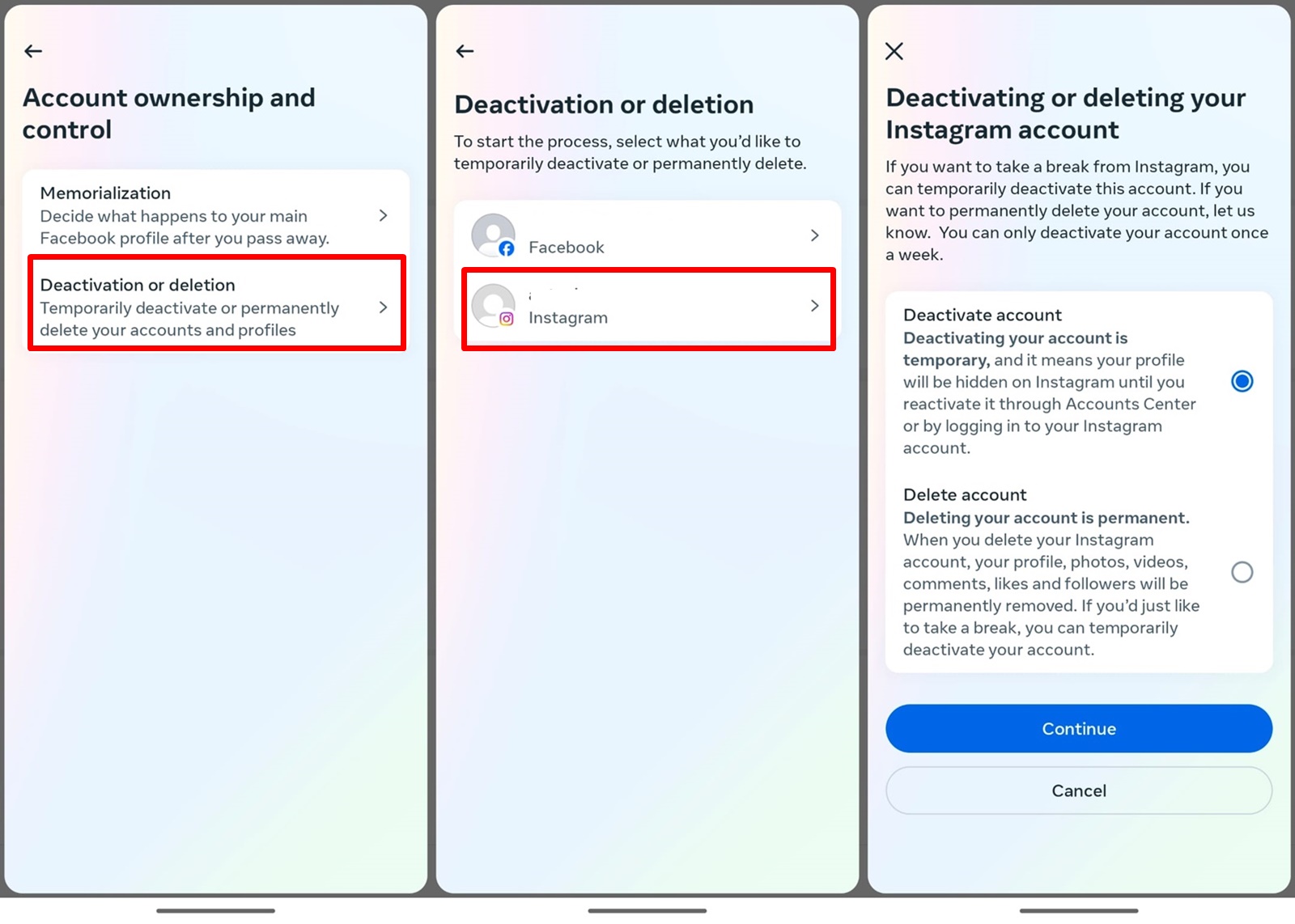
The process of deactivating a digital account typically involves navigating through the settings or account management section of the platform. While the exact steps differ from one service to another, there are common themes. Most platforms provide a clear option for deactivation, often presented as a “delete account,” “close account,” or “deactivate account” link. Upon initiating the deactivation, users are often presented with a confirmation step, sometimes requiring them to re-enter their password or answer security questions to prevent unauthorized actions.
It’s important to distinguish between temporary deactivation and permanent deletion. Some services offer a temporary deactivation option, which allows users to temporarily suspend their account without losing any data or settings. This is often a good choice for those who wish to take a break from a platform but may want to return later. In such cases, reactivating the account is usually a straightforward process, often involving simply logging back in.
Permanent deletion, on the other hand, is a more definitive action. Once an account is permanently deleted, all associated data, including personal information, posts, photos, and contacts, is irrevocably removed. The timeline for complete data erasure can vary, with some platforms stating that it may take a certain period (e.g., 30 to 90 days) for all data to be fully purged from their servers due to backup and archival policies.
Implications of Deactivation
The implications of deactivating a digital account extend beyond mere cessation of access. For social media accounts, deactivation often means your profile, posts, photos, and connections become invisible to others. Your username might be released back into the public domain after a grace period, allowing someone else to claim it. For email accounts, deactivation typically leads to the loss of access to stored emails, contacts, and any associated services linked to that email address. This can be a significant issue if the email is used for account recovery or as a primary contact for important services.
When it comes to cloud storage services, deactivation often triggers the deletion of all stored files. This emphasizes the critical importance of backing up essential data before proceeding with deactivation. Similarly, streaming service subscriptions that are deactivated will no longer provide access to content. The user’s viewing history, playlists, and personalized recommendations will likely be lost.
Furthermore, deactivation can impact linked accounts. Many online services allow users to sign up or log in using credentials from other platforms (e.g., “sign in with Google” or “sign in with Facebook”). Deactivating the primary account used for such linked logins can, in some cases, render the secondary accounts inaccessible or require them to be reconfigured with alternative login methods.
Data Retention and Privacy Concerns
A significant aspect of deactivation revolves around data retention and privacy. While users may deactivate an account, the platform’s data retention policies dictate how long and in what form user data is stored. Some services are transparent about their data handling practices, outlining that certain anonymized or aggregated data may be retained for analytical purposes or to comply with legal obligations. This raises privacy concerns for users who expect complete removal of their digital footprint.
It’s crucial for users to consult the terms of service and privacy policies of any platform before deactivating an account. These documents often contain detailed information about data deletion processes, retention periods, and any exceptions. Understanding these policies empowers users to make informed decisions and manage their digital privacy effectively.
Deactivation of Software and Applications
Beyond user accounts, the concept of deactivation also applies to software and applications, particularly in the context of licensing, installations, and operational states. This form of deactivation is often tied to the licensing agreements that govern the use of commercial software.
Software Licensing and Deactivation
Many software applications, especially those with paid licenses, employ activation and deactivation mechanisms. Activation is the process of verifying a software license with the vendor, typically through an internet connection, to ensure that the software is being used legitimately and within the terms of the license agreement. Deactivation, in this context, is the process of releasing that license from a specific device, allowing it to be installed and activated on another machine.
This is particularly common for software that is licensed per device or per user. For instance, if a user purchases a perpetual license for a creative suite or an operating system, they may be permitted to install it on a limited number of devices. If they upgrade their computer or need to reinstall the software on a new machine, they will need to deactivate the license on the old device to free it up.
The Technical Process of Software Deactivation
The technical process of software deactivation usually involves a specific function within the software itself. Users typically find an option like “Deactivate License,” “Manage Licenses,” or a similar entry within the software’s help, about, or preferences menus. Clicking this option often prompts a confirmation, and in some cases, requires an internet connection for the deactivation to be registered with the vendor’s license server. This server then updates the status of the license, marking it as available for reuse.
Failure to properly deactivate software before discarding or repurposing a device can lead to the license being permanently tied to the old hardware. This would prevent its activation on a new system, effectively wasting the purchased license. Therefore, understanding and executing the deactivation process is a vital step in software management for individuals and businesses alike.
Deactivation in Software Updates and End-of-Life
Software deactivation can also refer to the cessation of support and functionality for older versions of software or hardware. When a software vendor releases major updates or new versions, they may eventually stop supporting older iterations. This often involves “deactivating” the servers or services that were previously used by the older software to function. For example, an older version of an app might rely on specific backend servers for certain features; when these servers are shut down, the feature becomes deactivated.
Similarly, for hardware, “deactivation” can mean the discontinuation of manufacturer support, including security updates or access to proprietary software. This is often referred to as reaching “end-of-life” (EOL). For instance, a smartphone that is no longer receiving operating system updates or security patches can be considered deactivated in terms of its ongoing support lifecycle. This can pose security risks for users who continue to use such devices, as vulnerabilities may not be addressed.
Deactivation of Hardware and Devices
The term “deactivation” also extends to the physical realm of technology, encompassing the deactivation of electronic devices, particularly in the context of mobile phones and network services.
Mobile Device Deactivation and Network Services
When a mobile phone is reported lost or stolen, or if a user wishes to switch carriers, the device’s SIM card is typically deactivated. This deactivation severs the connection between the SIM card and the mobile network, preventing any unauthorized calls, texts, or data usage. The mobile carrier manages this process, and once a SIM card is deactivated, it can no longer be used to access the network. This is a crucial security measure to protect users from fraudulent activity.
In some cases, a device itself might be “deactivated” by a carrier or manufacturer. This can happen if a device is reported as lost or stolen and subsequently flagged in databases that prevent it from being activated on any network. This is a form of IMEI (International Mobile Equipment Identity) blocking, where the device’s unique identifier is blacklisted, rendering it inoperable on cellular networks, even with a new SIM card.
End-of-Life and Obsolete Hardware
Beyond mobile phones, the concept of deactivation also applies to the broader lifecycle of electronic hardware. As technology advances, older devices eventually become obsolete. This obsolescence can be seen as a form of deactivation in the sense that they are no longer supported by manufacturers, cannot run newer software, or are no longer efficient or compatible with modern systems.
For example, older gaming consoles, computers, or specialized hardware may be “deactivated” from active use as newer, more powerful, or more feature-rich alternatives become available. While the hardware might still function, its practical deactivation stems from its inability to keep pace with technological advancements and the discontinuation of software and support that would enable its full utility. This often leads to the recycling or disposal of such hardware, marking its final deactivation from the technological ecosystem.
Security and Deactivation
In the context of digital security, deactivation can be a proactive measure. For instance, when a security vulnerability is discovered in a piece of hardware or software, vendors may choose to remotely deactivate the affected feature or component until a patch can be deployed. This temporary deactivation acts as a critical defense mechanism to protect users from exploitation. Similarly, if a device is suspected of being compromised, a user might intentionally deactivate certain network connections or services to contain any potential damage.
Understanding deactivation in its various technological contexts is not just a matter of terminology; it’s fundamental to responsible digital citizenship. Whether it’s managing personal online accounts, ensuring proper software licensing, or keeping track of hardware lifecycles, a clear grasp of what deactivation entails empowers users to navigate the digital world with greater control, security, and efficiency.
aViewFromTheCave is a participant in the Amazon Services LLC Associates Program, an affiliate advertising program designed to provide a means for sites to earn advertising fees by advertising and linking to Amazon.com. Amazon, the Amazon logo, AmazonSupply, and the AmazonSupply logo are trademarks of Amazon.com, Inc. or its affiliates. As an Amazon Associate we earn affiliate commissions from qualifying purchases.