
YouTube’s “unlisted” video setting is a powerful, yet often misunderstood, feature. It offers a way to share content with specific individuals or groups without making it publicly discoverable. This nuanced control over visibility opens up a world of possibilities for creators, businesses, and even individuals looking for a more private way to distribute their video content. Understanding what “unlisted” truly signifies is the first step to effectively leveraging this versatile tool.
In essence, an unlisted video is not public, meaning it won’t appear in YouTube search results, on your channel’s video list, or in subscriber feeds. However, anyone with the direct link can view it. This distinction is crucial and separates it from both public and private videos. A private video, for example, can only be seen by the uploader and specific Google accounts they invite, while an unlisted video is accessible to anyone who possesses the URL, regardless of their Google account status. This makes it a flexible middle ground, offering more sharing potential than private settings without the broad exposure of public videos.

The implications of this setting are far-reaching, impacting how content is used for education, marketing, collaboration, and personal sharing. It allows for the controlled dissemination of information, beta testing of content, and the creation of exclusive viewing experiences. As we delve deeper into the functionalities and applications of YouTube unlisted videos, it becomes clear that this feature is more than just a privacy setting; it’s a strategic tool for content management and distribution within the digital landscape.
Understanding the Core Functionality of Unlisted Videos
At its heart, the “unlisted” status on YouTube is defined by its accessibility mechanism. Unlike public videos that are designed for mass consumption and discoverability, or private videos that are locked down to a select few, unlisted videos occupy a unique space. Their visibility is contingent solely on possessing the direct Uniform Resource Locator (URL). This means that even though the video isn’t searchable or featured on your channel, anyone who has received or found the link can access and watch it. This fundamental characteristic forms the basis of its utility.
The Technical Distinction: Public vs. Private vs. Unlisted
To truly grasp the meaning of “unlisted,” it’s essential to delineate it from YouTube’s other visibility settings.
- Public: This is the default setting for most uploads. Public videos are visible to everyone on YouTube. They can be found through search, appear on your channel page, and will be recommended by YouTube’s algorithm. They are the most accessible and are intended for broad reach.
- Private: Private videos are the most restrictive. Only you and the specific Google accounts you invite can see them. These are ideal for highly sensitive content or for works-in-progress that you want to keep entirely to yourself or share with a very small, pre-approved audience. The invitees don’t need a Google account to watch, but they must be invited by you using their Google account.
- Unlisted: As discussed, unlisted videos are not discoverable through search or on your channel page. They do not appear in subscriber feeds. However, anyone with the direct link can view the video. This means if the link is shared widely, the video can be seen by a large number of people, even if they are not explicitly invited or subscribed. Crucially, unlisted videos can still be embedded on websites or shared in emails, extending their reach beyond the YouTube platform itself.
This layered approach to privacy and discoverability allows creators to tailor how their content is consumed, a vital aspect in today’s diverse digital content ecosystem. The choice between these settings dictates the intended audience and the desired outcome of publishing a video.
The Mechanics of Access: Link Sharing is Key
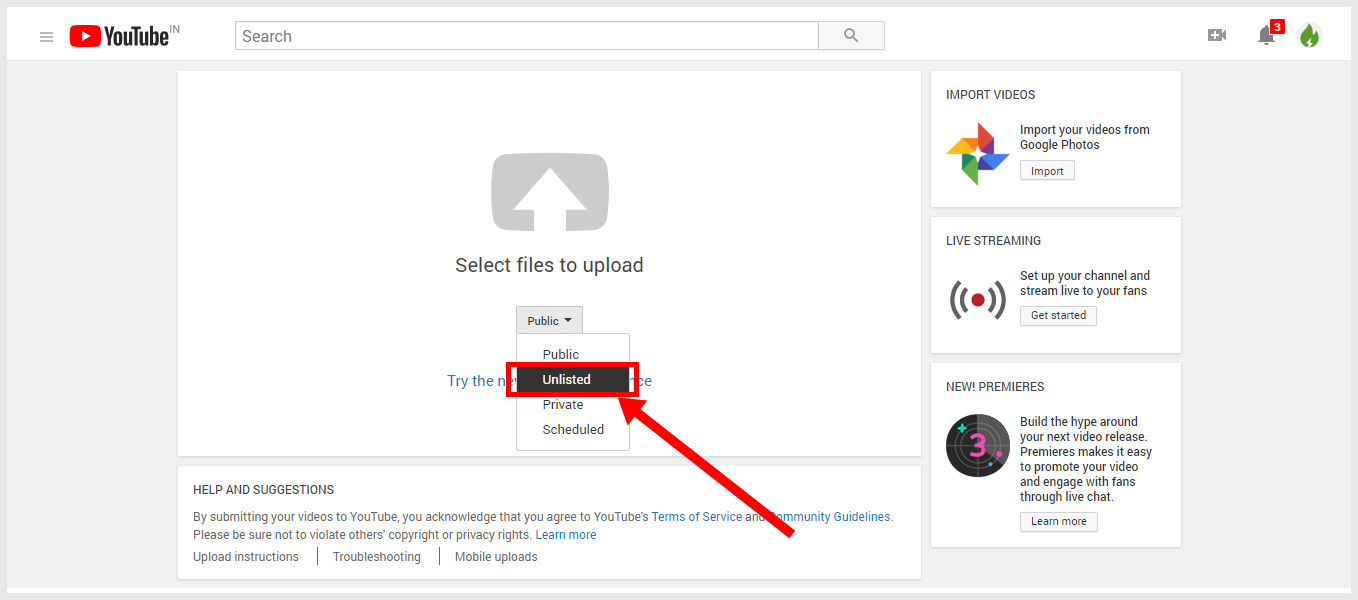
The entire premise of an unlisted video hinges on the distribution of its unique URL. When you upload a video and select the “unlisted” option, YouTube generates a specific web address for that video. This link is what grants access. It’s imperative to understand that the “unlisted” status does not inherently protect the link itself. If this link falls into the wrong hands or is shared carelessly, the video’s content can be exposed to an unintended audience.
Therefore, effective management of unlisted videos involves strategic link sharing. This can be done through:
- Direct Messaging: Sending the link via email, instant messaging apps, or social media direct messages to specific individuals.
- Private Groups: Sharing the link within private forums, Discord servers, or dedicated online communities.
- Website Embedding: Embedding the video on a password-protected page of a website or within a members-only section.
- Event Invitations: Including the link in invitations for webinars, online classes, or private virtual events.
The critical takeaway is that while the video is not indexed by YouTube, its accessibility is entirely dependent on the secure and controlled distribution of its URL. This characteristic makes it a powerful tool for selective audience engagement.
Strategic Applications of YouTube Unlisted Videos
The flexible nature of unlisted videos lends itself to a broad spectrum of strategic applications across various domains. From educational institutions and businesses to individual creators, the ability to share content with a curated audience without public exposure offers significant advantages. These applications often revolve around controlled distribution, feedback gathering, and exclusive content delivery.
Educational and Training Content Delivery
For educators, trainers, and corporate learning departments, unlisted videos provide an excellent method for distributing instructional materials. This is particularly useful for:
- Course Modules: Delivering lectures, tutorials, or demonstration videos to students enrolled in a specific course. Instead of making all course content public, educators can share links to individual modules, ensuring that only enrolled students can access them. This maintains the integrity of the course curriculum and prevents unauthorized access to proprietary educational content.
- Onboarding and Training: Companies can create unlisted videos for new employee onboarding or for specific training programs. This allows for the consistent delivery of information without cluttering public channels or requiring individual invitations for each employee. The links can be shared via internal communication platforms or email, ensuring that only employees within the organization have access.
- Internal Knowledge Sharing: Teams can use unlisted videos to share internal documentation, process explanations, or project updates with colleagues. This fosters a more collaborative environment without exposing sensitive internal information to the public.
The advantage here is the ability to create a private learning environment that is easily accessible to the intended learners while remaining hidden from the general public. This ensures that valuable training materials are utilized effectively by the target audience.
Beta Testing and Feedback Collection
For developers, content creators, and product managers, unlisted videos serve as an invaluable tool for beta testing and feedback collection. Before releasing a product, feature, or piece of content to the public, it’s often beneficial to get insights from a select group of users or testers.
- Software Demos and Tutorials: When showcasing a new software feature or a product update, developers can upload unlisted videos demonstrating its functionality. They can then share these links with a group of beta testers or early adopters to gather feedback on usability, bugs, or areas for improvement. This allows for iteration and refinement before a wider public release.
- Content Previews: For filmmakers, musicians, or artists, unlisted videos can be used to share preview cuts of films, trailers, or early versions of songs with a select audience. This could include industry professionals, investors, or a small group of fans who have been granted early access for their opinions. The feedback gathered can be instrumental in making final creative decisions.
- Website or App User Experience Testing: If a company is redesigning its website or launching a new app, they can record walkthroughs or tutorials of the user interface. These unlisted videos can then be sent to a user testing group to observe their interactions and identify any usability issues.
The unlisted status ensures that the pre-release content is not leaked prematurely and that feedback is solicited from a controlled and relevant group. This makes the development cycle more efficient and leads to a more polished final product.
Private Showcases and Archival Purposes
Beyond professional applications, unlisted videos offer practical solutions for personal and organizational archiving and showcases.
- Family Events and Personal Memories: Individuals can upload videos of family gatherings, weddings, birthdays, or other significant personal events and set them to unlisted. They can then share the link with family and friends, creating a private digital album of memories that can be easily accessed by loved ones without being broadcast to the entire world.
- Portfolio Pieces for Select Clients: Freelancers or agencies might have portfolio pieces that are not yet public or that they only wish to showcase to specific potential clients. Unlisted videos provide a discreet way to present these works, allowing the client to review them without the content appearing in the creator’s public portfolio.
- Archiving Sensitive Content: For organizations or individuals who need to store video content that is not for public consumption but may need to be accessed by authorized individuals at a later date, unlisted provides a good option. This could include internal meetings, historical records, or sensitive project documentation that needs to be preserved but not readily searchable.
In these scenarios, the unlisted setting strikes a balance between preserving content and making it accessible to a designated audience, ensuring both privacy and utility.
Limitations and Considerations for Unlisted Videos
While YouTube’s unlisted feature offers considerable flexibility, it is not without its limitations and requires careful consideration to be used effectively and securely. Understanding these constraints is crucial for avoiding unintended consequences and maximizing the benefits of this privacy setting. The core of these limitations lies in the inherent nature of link sharing and YouTube’s platform policies.
The Security of the Link: A Double-Edged Sword
The primary mechanism for accessing unlisted videos is the direct link. This presents a significant consideration regarding security. While the video is not publicly discoverable, its accessibility is entirely dependent on who possesses the URL.
- Uncontrolled Sharing: If the unlisted video link is shared widely, forwarded through multiple individuals, or posted on public forums, the video can become accessible to anyone. YouTube does not provide tools to track or revoke access to an unlisted video once the link has been shared. This means that if you share a link with ten people, and one of them shares it with a hundred more, your “unlisted” video could effectively become public.
- No Password Protection: Unlike some other platforms or hosting services, YouTube’s unlisted feature does not offer built-in password protection for individual videos. The only gatekeeper is the link itself.
- Potential for Discovery: While not indexed by YouTube search, unlisted videos can still be found if they are linked from other websites that are crawled by search engines. If an unlisted video is embedded on a publicly accessible webpage that is indexed, a search engine might discover and list the page, thereby revealing the video.
Therefore, creators must be diligent about how and with whom they share unlisted links. For highly sensitive content that absolutely must not be seen by anyone outside a very small, trusted group, alternative hosting solutions with more robust security features might be necessary.
Impact on Analytics and Discoverability
The unlisted setting has a direct impact on how a video’s performance is measured and how it can contribute to channel growth.
- Limited Analytics: While unlisted videos still generate analytics (views, watch time, etc.), these metrics do not contribute to public discoverability metrics like trending or recommendations. The views will be counted, but they won’t inherently boost the video’s visibility in YouTube’s public ranking systems.
- No Contribution to Channel Growth: Since unlisted videos do not appear on your channel page or in subscriber feeds, they do not directly drive new subscribers or encourage engagement from your existing audience in the same way that public videos do. Their reach is limited to those who are actively sent the link.
- Search Engine Optimization (SEO) Limitations: Unlisted videos are not discoverable through YouTube’s internal search engine, nor are they indexed by external search engines like Google. This means they cannot be optimized for search terms to attract organic traffic.
This limitation means that if the goal is to increase brand awareness, grow a subscriber base, or drive traffic through search, unlisted videos are not the primary tool for that purpose. They serve a different, more targeted function.
YouTube’s Terms of Service and Content Moderation
Even though a video is unlisted, it is still subject to YouTube’s Terms of Service and Community Guidelines.
- Content Violations: If an unlisted video contains content that violates YouTube’s policies (e.g., hate speech, nudity, copyright infringement), it can still be flagged, reviewed, and removed by YouTube. The unlisted status does not grant immunity from these rules.
- Demonetization and Account Strikes: Violations can lead to demonetization of the channel or even account strikes, regardless of whether the video was public or unlisted.
- Reporting Mechanism: While not publicly visible, unlisted videos can still be reported by users who have accessed them and believe they violate community guidelines. YouTube has mechanisms in place to investigate reported unlisted content.
It’s important to remember that “unlisted” refers to discoverability, not to a complete exemption from content moderation or platform rules. All uploaded content, regardless of its visibility setting, must adhere to YouTube’s established standards.
Transitioning Between Unlisted and Public Visibility
One of the practical advantages of YouTube’s unlisted feature is the ability to manage its visibility dynamically. This allows creators to move content between different states of discoverability, offering flexibility in content release strategies. Understanding how to transition an unlisted video to public, or vice-versa, is key to strategic content management on the platform.
Making an Unlisted Video Public
This is a straightforward process that can significantly expand a video’s reach.
- Navigate to YouTube Studio: Log in to your YouTube account and go to YouTube Studio.
- Access Content: In the left-hand menu, click on “Content.”
- Locate the Video: Find the unlisted video you wish to make public. It will be indicated by “Unlisted” under the “Visibility” column.
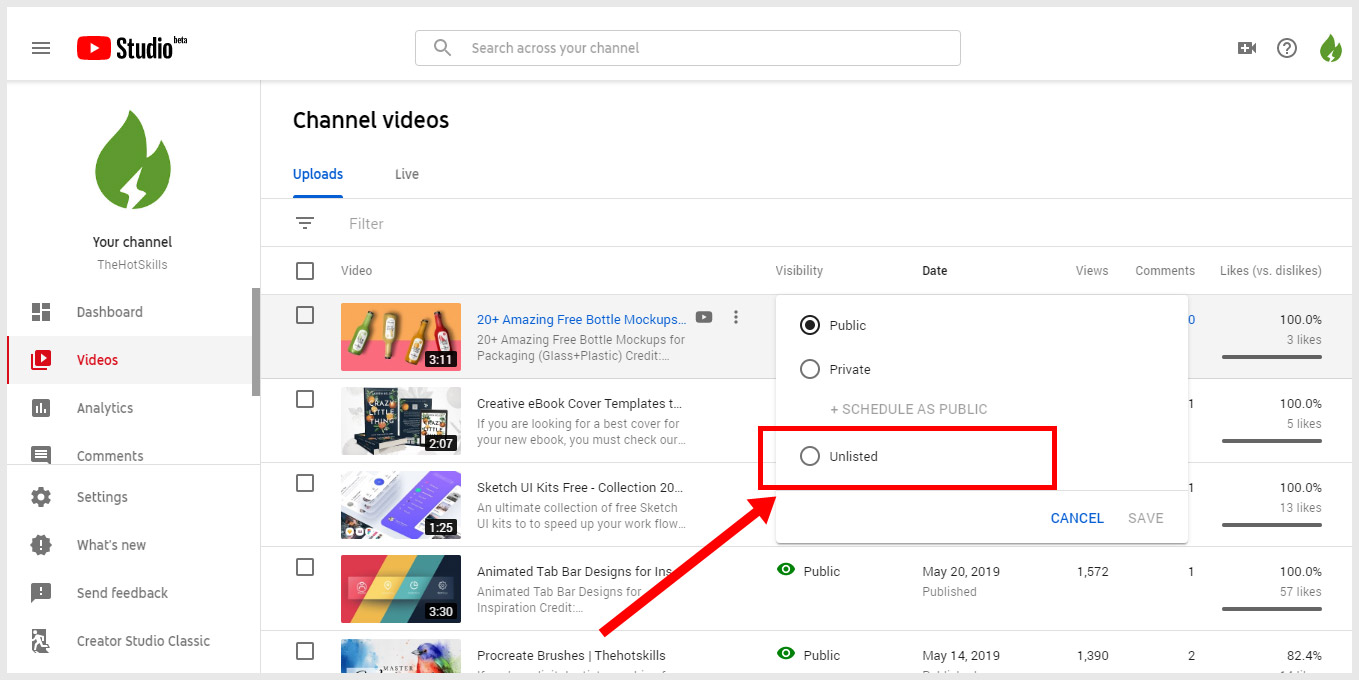
- Change Visibility: Click on the current visibility setting (“Unlisted”). A dropdown menu will appear with options: Public, Unlisted, Private, and Schedule. Select “Public.”
- Save Changes: Click the “Save” button at the top right of the screen.
Once saved, the video will immediately become public. It will appear on your channel, be discoverable through search, and potentially be recommended by YouTube. This is an excellent strategy for content that was initially used for private feedback or internal distribution and is now ready for a wider audience. For instance, a company might initially share an unlisted product demonstration with a small group of potential clients and then, after receiving positive feedback, switch it to public to attract broader interest.
Moving a Public Video to Unlisted
Conversely, there might be situations where a creator wishes to restrict access to a video that was previously public.
- Navigate to YouTube Studio and Content: Follow the same initial steps as above to reach your content list.
- Locate the Public Video: Find the public video you want to make unlisted. It will be indicated by “Public” under the “Visibility” column.
- Change Visibility: Click on the current visibility setting (“Public”). Select “Unlisted” from the dropdown menu.
- Save Changes: Click the “Save” button.
When you switch a public video to unlisted, it immediately disappears from public view. It will no longer be searchable on YouTube, nor will it appear on your channel’s public page. Any existing links to that video will still work, allowing those who already have the URL to access it. This is useful for:
- Removing Outdated Content: If a video contains information that is no longer relevant or has been superseded by newer content, making it unlisted removes it from public scrutiny while retaining the ability to access it if needed.
- Creating Exclusive Content: You might decide to make a previously public video part of an exclusive offering, accessible only through a specific link provided to a select group.
- Content Under Review: If a video is flagged or being reviewed, temporarily making it unlisted can remove it from public view while the situation is resolved.
The ability to easily toggle between these visibility settings provides a dynamic content management system, allowing creators to adapt their strategy based on evolving needs and objectives. This fluidity is a key benefit of understanding and utilizing YouTube’s unlisted feature effectively.
aViewFromTheCave is a participant in the Amazon Services LLC Associates Program, an affiliate advertising program designed to provide a means for sites to earn advertising fees by advertising and linking to Amazon.com. Amazon, the Amazon logo, AmazonSupply, and the AmazonSupply logo are trademarks of Amazon.com, Inc. or its affiliates. As an Amazon Associate we earn affiliate commissions from qualifying purchases.