
In the realm of home appliances, few signify convenience and efficiency quite like a modern washing machine. LG, a leading innovator in this space, consistently integrates advanced features and intuitive interfaces into its laundry solutions. However, even the most sophisticated technology can sometimes present users with cryptic indicators, leaving them scratching their heads. One such common query revolves around the meaning of “CL” displayed on an LG washer. Far from being a cause for alarm, this particular code is designed to inform and safeguard the user, playing a crucial role in the appliance’s operational integrity.

This article delves into the significance of the “CL” code on LG washing machines, exploring its purpose, the situations that trigger it, and the simple, effective solutions to address it. By understanding these fundamental aspects, LG washer owners can ensure their machines operate smoothly, prolong their lifespan, and ultimately, gain greater peace of mind. This is not just about deciphering a single code; it’s about unlocking a deeper understanding of how your appliance functions, empowering you to be a more informed and proactive user.
Understanding the “CL” Code: More Than Just an Indicator
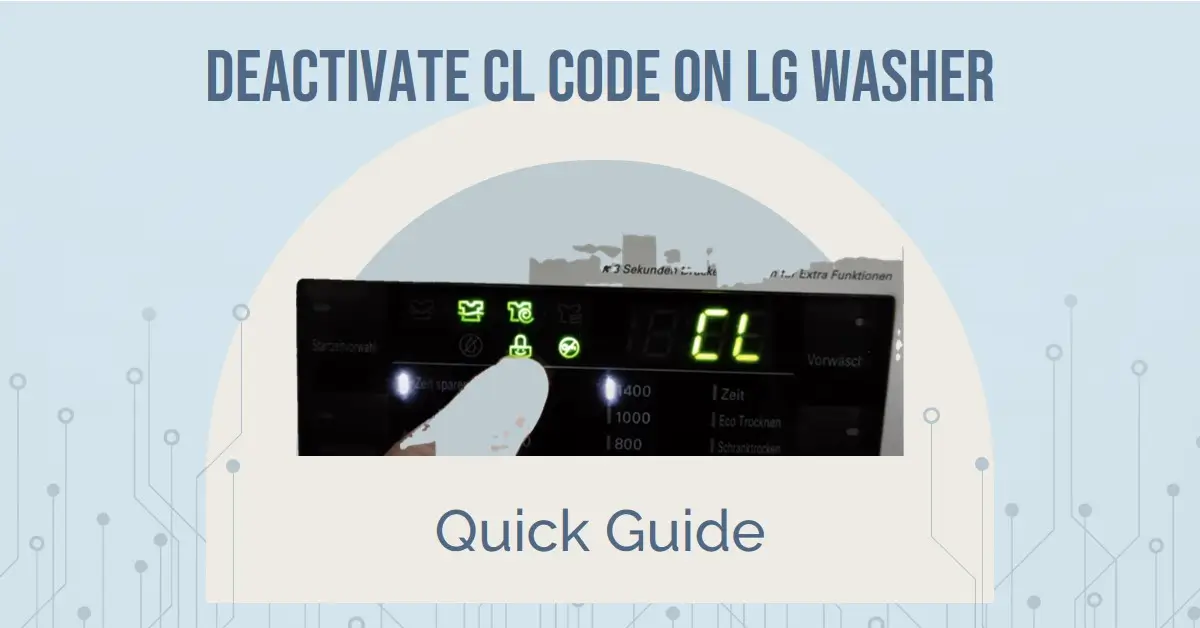
The “CL” display on an LG washing machine is not an error code in the traditional sense, signifying a malfunction. Instead, it represents a “Child Lock” or “Control Lock” feature. This is a safety mechanism designed to prevent accidental changes to the wash cycle or unintended operation of the machine, particularly by curious children or pets. LG, like many appliance manufacturers, recognizes the importance of safety in the home, and the Child Lock feature is a testament to this commitment.
The Purpose of Child Lock: Safety First
The primary objective of the Child Lock feature is to ensure user safety and prevent operational disruptions. Young children, driven by curiosity, might be tempted to press buttons on the control panel while the washing machine is in operation or even when it’s idle. Unsupervised interaction could lead to:
- Unintended Cycle Changes: A child pressing buttons could alter the selected wash program, temperature, or spin speed, potentially damaging clothes or wasting water and energy.
- Starting or Stopping the Machine: An accidental press could initiate a wash cycle unexpectedly or, conversely, halt a running cycle prematurely, leading to incomplete washes and potential mold growth inside the drum.
- Inadvertent Door Opening: In some models, certain button combinations might attempt to unlock the door, which is a critical safety feature during operation and should remain secured.
The Child Lock feature effectively renders the control panel unresponsive to accidental touches, overriding any other button presses until it is intentionally deactivated. This makes it an invaluable tool for households with young children, providing an extra layer of security and preventing frustrating interruptions.
How the Child Lock is Activated: Accidental and Intentional Triggers
The “CL” indicator typically appears when the Child Lock feature is activated. While intentional activation is straightforward, accidental activation can sometimes occur, especially with newer users or those unfamiliar with the specific model’s button layout.
-
Intentional Activation: Most LG washing machines require a specific button or a combination of buttons to be pressed and held for a few seconds to activate or deactivate the Child Lock. This is usually indicated in the user manual and often involves buttons related to cycle settings or specific function keys. For instance, holding down the “Spin Speed” and “Temperature” buttons simultaneously for three to five seconds is a common method. The “CL” symbol will then illuminate on the display.
-
Accidental Activation: Without knowing the correct combination, it’s possible to inadvertently press and hold the designated buttons while performing other tasks on the control panel. This can happen if a hand or arm brushes across the panel, or if someone is simply exploring the buttons without realizing their function. The sudden appearance of “CL” can be a surprise, but it’s important to remember it’s a protective measure, not a malfunction.
Troubleshooting the “CL” Code: Simple Steps to Reclaim Control
Encountering the “CL” display doesn’t require a service call or complex technical intervention. In most instances, resolving this situation is a matter of understanding how to deactivate the Child Lock. The process is designed to be simple and user-friendly, ensuring that you can regain full control of your washing machine with minimal effort.
Deactivating Child Lock: The Standard Procedure
The most common way to turn off the Child Lock is by reversing the activation process. As mentioned earlier, this typically involves pressing and holding a specific button or a combination of buttons for a set duration.
-
Identify the Activation Buttons: Consult your LG washing machine’s user manual. The manual will explicitly state which buttons need to be pressed and for how long to activate and deactivate the Child Lock. If the manual is unavailable, a quick online search using your LG washer’s model number and “Child Lock” should provide the necessary information.
-
Press and Hold: Locate the designated buttons on your control panel. Press and hold both buttons simultaneously. You’ll usually need to maintain this press for approximately three to five seconds.
-
Observe the Display: As you hold the buttons, watch the washing machine’s display. The “CL” indicator should disappear, signaling that the Child Lock has been successfully deactivated. You will then be able to operate the machine normally, selecting cycles and pressing other function buttons.
What If Deactivation Doesn’t Work? Advanced Troubleshooting
While the standard deactivation method resolves the “CL” issue in the vast majority of cases, there might be rare instances where it doesn’t immediately respond. This could be due to a temporary glitch in the control panel’s software or a power fluctuation. In such situations, a slightly more robust troubleshooting approach can be employed.
-
Power Cycle the Machine: This is a fundamental troubleshooting step for many electronic devices and can often resolve minor software glitches.
- Unplug the Washer: Carefully unplug the washing machine from the electrical outlet. Ensure the power cord is completely removed from the socket.
- Wait: Allow the machine to remain unplugged for at least one to two minutes. This gives the internal components time to fully discharge any residual power.
- Plug Back In: Reconnect the washing machine to the power outlet.
- Attempt Deactivation Again: Once the machine powers up, try the standard Child Lock deactivation procedure once more. The power cycle often resets the control panel and allows the deactivation command to be processed correctly.
-
Check for Physical Obstructions: While unlikely to cause the “CL” code itself, ensure there are no physical obstructions or debris around the control panel buttons that might be preventing them from being pressed correctly or consistently.
-
Consult the User Manual for Model-Specific Variations: Different LG washer models might have slight variations in their button combinations or procedures for Child Lock. Always refer to your specific model’s user manual for the most accurate instructions. If you’ve lost your manual, LG’s official website usually offers digital copies for download.
-
Contact LG Support: If, after attempting these troubleshooting steps, the “CL” indicator persists or you are unable to deactivate the Child Lock, it is advisable to contact LG customer support. They can provide model-specific guidance or, if necessary, arrange for a service technician to diagnose the issue. While “CL” typically signifies a feature, its persistent display without the ability to deactivate it could indicate a deeper control panel issue that requires professional attention.
Beyond “CL”: Understanding Other LG Washer Indicators
While the “CL” code is a common point of inquiry, LG washing machines utilize a range of indicators and codes to communicate operational status, alerts, and potential issues to the user. Familiarizing yourself with these can further enhance your understanding and proactive maintenance of your appliance.
Common LG Washer Display Indicators
Beyond the “CL” for Child Lock, your LG washer’s display might show other symbols or codes that are important to recognize:
- Cycle Progress Indicators: Many LG washers feature visual indicators for the different stages of a wash cycle (e.g., Wash, Rinse, Spin). These are informational and do not require action.
- Pause/Delay Start: An indicator showing that the cycle is paused or has a delay start set. This is usually activated intentionally.
- Water Temperature Indicators: Symbols or abbreviations indicating the selected water temperature (e.g., Hot, Warm, Cold).
- Spin Speed Indicators: Symbols or numerical values representing the chosen spin speed.
Interpreting LG Washer Error Codes
When your LG washer displays codes that do indicate a problem (unlike “CL”), these are typically alphanumeric and require a specific troubleshooting approach. These error codes are designed to pinpoint the source of the malfunction, enabling efficient diagnosis and repair. Some common examples include:
- IE (Inlet Error): This code suggests an issue with water filling the machine. It could be due to a closed water supply valve, a kinked inlet hose, or a problem with the water inlet valve itself.
- OE (Outlet Error): This code relates to draining issues. It might indicate a clogged drain pump filter, a kinked drain hose, or a malfunctioning drain pump.
- UE (Unbalanced Load Error): This code appears when the laundry inside the drum is unevenly distributed, preventing the machine from spinning safely and efficiently. Redistributing the load typically resolves this.
- dE (Door Error): This signifies an issue with the door latch or lock mechanism. The door might not be closing properly, or the sensor could be faulty.
Each of these error codes has a specific set of troubleshooting steps outlined in the user manual. It’s crucial to consult your manual for the precise meaning and recommended solutions for any error code that appears on your LG washer.
Maximizing Your LG Washer’s Lifespan Through Informed Usage
Understanding indicators like “CL” and common error codes is more than just a quick fix; it’s an integral part of responsible appliance ownership. By actively engaging with your LG washer’s interface and proactively addressing its signals, you can significantly contribute to its longevity and optimal performance.
Proactive Maintenance and Best Practices
- Regularly Clean the Drain Pump Filter: The OE error is a common indicator of a clogged drain pump filter. Most LG washers have an accessible filter that should be cleaned periodically (refer to your manual for location and frequency) to prevent drainage issues and potential damage to the pump.
- Avoid Overloading: Overloading the machine can lead to unbalanced loads (UE error), excessive wear and tear on the motor and drum bearings, and incomplete cleaning. Always adhere to the recommended capacity for your washer.
- Use the Right Detergent: Using too much detergent or the wrong type can lead to excessive suds, which can interfere with wash cycles and potentially damage components. Use high-efficiency (HE) detergents as recommended.
- Check Pockets and Zippers: Before loading laundry, always check pockets for loose change, keys, or other items that can damage the drum or drain pump. Ensure zippers are closed to prevent snagging.
- Level the Machine: An unlevel washing machine can vibrate excessively, leading to increased wear and tear and noise. Ensure your washer is stable on its feet.

Leveraging LG’s Smart Features
Many modern LG washers come equipped with smart technology, such as Wi-Fi connectivity and app integration. These features can offer additional layers of control and insight:
- Remote Monitoring: The LG ThinQ app allows you to monitor cycle progress, receive notifications when a cycle is complete, and even troubleshoot certain issues remotely.
- Smart Diagnosis: If an error code appears, the app can often provide guided troubleshooting steps or help diagnose the problem before you need to contact support.
- Software Updates: Some smart LG washers can receive software updates, which may include improvements to performance and bug fixes, potentially preventing future issues.
By understanding the simple yet important “CL” code and adopting a proactive approach to appliance care, LG washer owners can ensure their investment continues to deliver reliable and efficient laundry service for years to come. This knowledge transforms a potential point of confusion into an opportunity for enhanced understanding and control over your home’s essential appliances.
aViewFromTheCave is a participant in the Amazon Services LLC Associates Program, an affiliate advertising program designed to provide a means for sites to earn advertising fees by advertising and linking to Amazon.com. Amazon, the Amazon logo, AmazonSupply, and the AmazonSupply logo are trademarks of Amazon.com, Inc. or its affiliates. As an Amazon Associate we earn affiliate commissions from qualifying purchases.