
In an increasingly data-driven world, understanding and manipulating percentages is a fundamental skill. From calculating discounts during a shopping spree to analyzing growth rates in business reports, percentages are ubiquitous. While many individuals grasp the concept, the practical application – especially when relying on a calculator – can sometimes present a hurdle. This article delves into the precise methodologies, technological nuances, and best practices for mastering percentage calculations across various calculator types, transforming a seemingly simple task into an efficient and error-free operation.
The Ubiquitous Calculator: A Core Digital Tool
Before diving into the mechanics of percentage calculations, it’s crucial to appreciate the calculator itself as a technological marvel. Far from a mere number-crunching device, modern calculators – whether physical gadgets or software applications – are sophisticated tools designed to streamline complex mathematical operations. Understanding its architecture and features is the first step toward unlocking its full potential for percentage work.

The Anatomy of a Calculator: Key Buttons
Regardless of its form factor, most calculators share a common set of buttons essential for percentage operations. Beyond the numeric keypad (0-9) and basic arithmetic operators (+, -, *, /), the % key is paramount. Other critical buttons include C (Clear), AC (All Clear), CE (Clear Entry), +/- (Change Sign), and memory functions (M+, M-, MR, MC). Familiarity with these keys, and how your specific calculator implements them, is foundational. The % key, in particular, often behaves differently across models and brands, a nuance we will explore.
Different Types of Calculators: From Basic to Scientific
The world of calculators is diverse. Basic four-function calculators are ideal for straightforward tasks, offering limited complexity but high ease of use. Scientific calculators, on the other hand, boast an expanded set of functions, including trigonometric, logarithmic, and statistical operations, which can indirectly aid in more advanced percentage-related problem-solving (e.g., calculating percentage error in scientific experiments). Then there are graphing calculators, primarily for advanced mathematics, and financial calculators, specifically designed for compound interest, annuities, and other monetary calculations, where percentages play a central role. Each type, while different in scope, shares a common core for basic percentage tasks, but their advanced features can offer shortcuts or deeper analytical capabilities.
Why Understanding Your Calculator Matters
Simply put, not all calculators are created equal, and their internal logic can vary. Some calculators process the % key as a direct operator (e.g., 50 * 10% directly yields 5), while others require an intermediate step or convert the percentage into a decimal automatically. Understanding your specific calculator’s logic prevents errors and significantly speeds up calculations. Consulting your device’s manual or experimenting with known values is a smart strategy to grasp its particular behavior. This technological literacy ensures you are not just pressing buttons, but intelligently interacting with your tool.
Mastering Basic Percentage Calculations
The core of percentage calculations on a calculator revolves around a few fundamental operations. Once these are understood, more complex scenarios become easily manageable. The key is to break down the problem and identify the correct sequence of inputs.
Calculating a Percentage of a Number
This is perhaps the most common percentage operation. For example, to find 15% of 200:
- Input the base number:
200 - Press the multiplication key:
* - Input the percentage value:
15 - Press the percentage key:
% - Press the equals key (if necessary):
=
Result: 30
Some calculators will display the result immediately after pressing %, while others require pressing = to finalize the calculation. This is one of those instances where calculator-specific behavior comes into play. If your calculator doesn’t have a direct % key, you would convert the percentage to a decimal first: 200 * 0.15 = 30.
Finding a Number When a Percentage is Known
This scenario involves working backward. For instance, if 30 is 15% of a number, what is that number?
- Input the known part:
30 - Press the division key:
/ - Input the percentage value:
15 - Press the percentage key:
% - Press the equals key (if necessary):
=
Result: 200
Again, the % key’s interpretation is crucial here. Some calculators might require you to divide by the decimal equivalent of the percentage (e.g., 30 / 0.15 = 200). Understanding your device’s specific implementation of the % key is vital for accuracy.
Calculating Percentage Increase and Decrease
These are vital for tracking growth, depreciation, or price changes.
Percentage Increase (e.g., adding 10% to 50):
- Input the original number:
50 - Press the addition key:
+ - Input the percentage value:
10 - Press the percentage key:
% - Press the equals key (if necessary):
=
Result: 55 (Calculates 10% of 50, which is 5, then adds it to 50).
Percentage Decrease (e.g., subtracting 10% from 50):
- Input the original number:
50 - Press the subtraction key:
- - Input the percentage value:
10 - Press the percentage key:
% - Press the equals key (if necessary):
=
Result: 45 (Calculates 10% of 50, which is 5, then subtracts it from 50).
Working with Discounts and Sales Tax
These are direct applications of percentage increase/decrease.
Discount (e.g., 25% off an item costing $80):
80 - 25% = 60
Sales Tax (e.g., 8% tax on an item costing $75):
75 + 8% = 81
These real-world examples highlight the efficiency a calculator brings to everyday financial decisions.
Leveraging Advanced Calculator Functions for Percentages
Beyond the basic four operations, modern calculators offer features that can significantly enhance percentage calculations, particularly in multi-step problems or when dealing with complex data sets.
Using the Memory Functions for Multi-Step Calculations
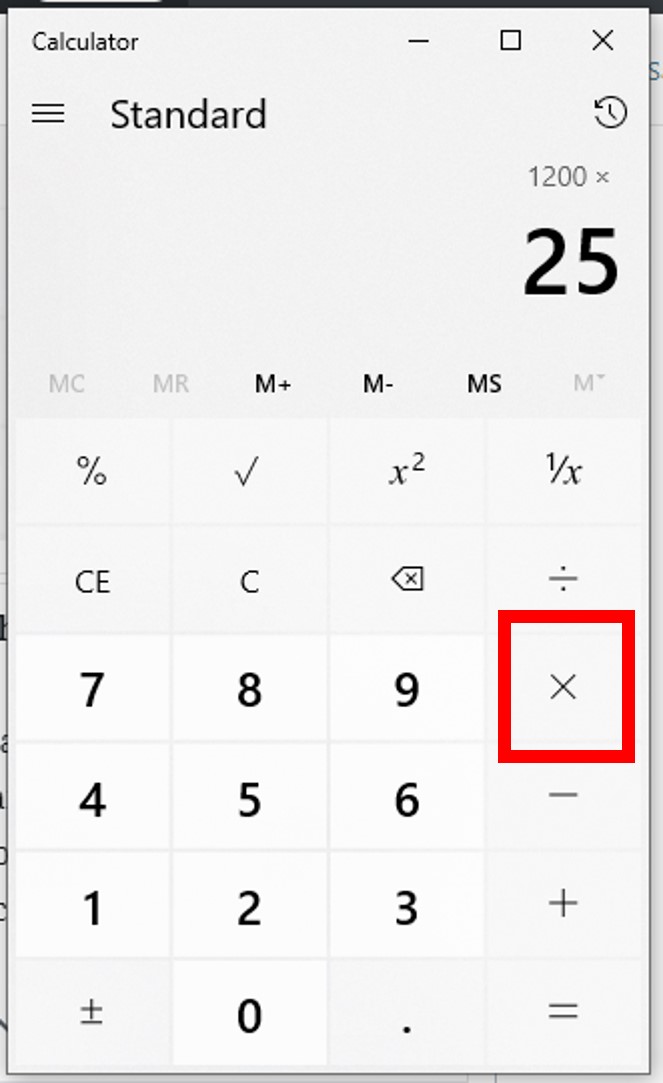
Memory functions (M+, M-, MR, MC) are invaluable for saving intermediate results. Imagine you need to calculate a percentage of one number, then add it to a percentage of another number.
Example: (10% of 200) + (5% of 300)
- Calculate 10% of 200:
200 * 10% = 20. Store this in memory:M+ - Clear the display:
CorAC - Calculate 5% of 300:
300 * 5% = 15. Add this to memory:M+ - Recall the total from memory:
MR
Result: 35
This prevents manual transcription errors and streamlines calculations that involve several components.
The Power of Parentheses: Order of Operations
Scientific and even some advanced basic calculators allow the use of parentheses, which are crucial for maintaining the correct order of operations (PEMDAS/BODMAS). When combining percentages with other arithmetic, parentheses ensure calculations are performed in the desired sequence.
Example: Calculate 10% of (200 + 50).
(200 + 50)* 10%=
Result: 25
Without parentheses, 200 + 50 * 10% might incorrectly calculate 200 + (50 * 10%) = 200 + 5 = 205.
Specialized Percentage Keys (if available on certain models)
Some advanced financial or business calculators might have specific keys for compound interest, loan payments, or other percentage-heavy functions. For instance, a financial calculator might have keys for PV (Present Value), FV (Future Value), PMT (Payment), N (Number of periods), and I/Y (Interest per year, often entered as a percentage). While these are typically found on specialized devices, they represent the pinnacle of calculator design for percentage-based computations, automating complex formulas into single key presses.
Scientific Calculators and Percentage Applications
While not overtly percentage-focused, scientific calculators facilitate tasks where percentages are derived from statistical data or complex formulas. Calculating standard deviations, means, or analyzing data sets to infer percentage distributions or probabilities often starts with raw numbers that are then converted into percentage insights. The ability to handle large numbers, exponents, and statistical functions makes them indirect, yet powerful, tools for percentage analysis in academic or research contexts.
The Digital Revolution: Percentage Calculators on Software and Apps
The evolution of computing has brought calculators far beyond physical devices. Software applications and web-based tools now offer incredibly robust and versatile platforms for percentage calculations, often with added features that physical calculators cannot match.
Built-in Calculators on Operating Systems (Windows, macOS, iOS, Android)
Every major operating system comes equipped with a default calculator app. These often offer standard, scientific, and sometimes even programmer or date calculation modes. Their convenience lies in being readily accessible on devices you already use daily. Many even offer a “history” feature, allowing you to review previous calculations, a significant advantage for complex multi-step percentage problems. Learning the keyboard shortcuts for these apps can dramatically speed up your workflow.
Dedicated Percentage Calculator Apps
The app stores are replete with specialized percentage calculator apps. These are designed specifically for scenarios like tips, sales tax, loan calculations, and split billing, often featuring intuitive interfaces that simplify the input process. For example, a tip calculator app might allow you to input the bill total, desired percentage, and number of people, then instantly display the tip amount, total with tip, and per-person cost. This user-centric design makes percentage calculations less abstract and more applicable to specific real-world contexts.
Spreadsheet Software (Excel, Google Sheets) for Complex Percentage Models
For power users, spreadsheet software like Microsoft Excel or Google Sheets stands as the ultimate percentage calculation tool. Beyond simple operations, spreadsheets allow for:
- Batch calculations: Apply a percentage calculation to thousands of numbers simultaneously.
- Formula chaining: Create complex models where percentages are derived from, or feed into, other calculations.
- Data visualization: Graphically represent percentage changes or distributions.
- “What-if” analysis: Easily change percentage rates to see their impact on financial outcomes or project metrics.
Using formulas like =A1*B1% or =(B1-A1)/A1 for percentage change, spreadsheets offer unparalleled flexibility and scalability for any percentage-related task, from budgeting to scientific research.
Online Calculators: Convenience and Specific Tools
The internet hosts an immense variety of online calculators, many of which are specialized for percentages. Websites offer calculators for mortgage payments, compound interest, body fat percentage, tax brackets, and more. Their advantage is immediate access, often with explanatory text or visual aids that clarify the calculation. While they require an internet connection, their specificity and user-friendliness can be a huge time-saver for particular percentage needs.
Maximizing Efficiency and Accuracy in Percentage Calculations
Calculating percentages isn’t just about knowing the steps; it’s also about executing them efficiently and accurately. Adopting best practices can prevent errors and save valuable time.
Double-Checking Your Inputs
The most common source of error in any calculator use is incorrect input. Always take a moment to verify that the numbers you’ve entered match the numbers you intended to calculate. This is especially crucial for percentages, where a misplaced decimal or a typo can drastically alter the outcome. Many digital calculators offer a visual display of your input sequence before pressing “equals,” which is an excellent opportunity for verification.
Understanding Rounding Rules
Percentages often result in decimal numbers. Knowing when and how to round is critical, particularly in financial or scientific contexts where precision matters. Calculators typically display many decimal places, but real-world applications often require rounding to two decimal places (for currency) or a specific number of significant figures. Understand if your calculator rounds automatically or if you need to manually perform the rounding step after obtaining the raw result. In formal reports, always specify the rounding convention used.
Practice Makes Perfect: Building Muscle Memory
Like any skill, proficiency with calculator percentage functions comes with practice. Regularly performing different types of percentage calculations will build muscle memory, making the process faster and more intuitive. This includes experimenting with how your specific calculator handles various percentage inputs and operations. The more you use your calculator for percentages, the more confident and efficient you will become.
When to Use a Calculator vs. Mental Math
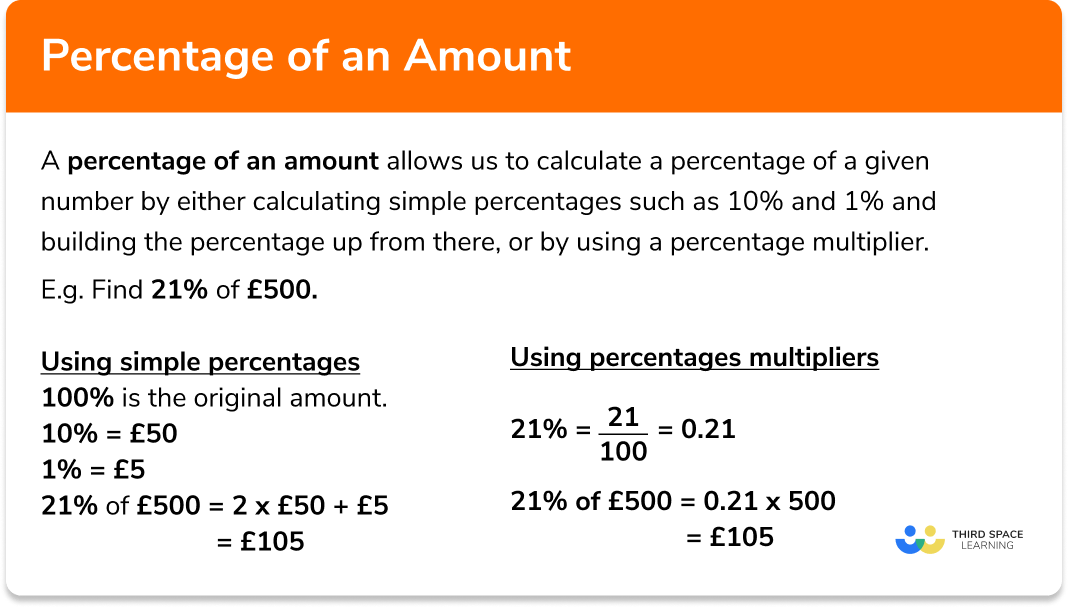
While calculators are powerful tools, not every percentage calculation requires one. Simple percentages like 10%, 25%, or 50% can often be calculated mentally faster than it takes to pull out a device. For example, 10% of 250 is easily 25. Knowing when to rely on mental math versus reaching for your calculator is a sign of true mastery, optimizing your workflow by applying the right tool for the job.
In conclusion, the calculator, in its various forms, is an indispensable tech tool for navigating the world of percentages. By understanding its mechanics, mastering basic and advanced operations, leveraging digital advancements, and adopting efficient practices, anyone can confidently tackle any percentage challenge that comes their way. It’s not just about getting the right answer; it’s about understanding the technology that empowers you to do so, consistently and accurately.
aViewFromTheCave is a participant in the Amazon Services LLC Associates Program, an affiliate advertising program designed to provide a means for sites to earn advertising fees by advertising and linking to Amazon.com. Amazon, the Amazon logo, AmazonSupply, and the AmazonSupply logo are trademarks of Amazon.com, Inc. or its affiliates. As an Amazon Associate we earn affiliate commissions from qualifying purchases.