
In today’s fast-paced digital world, managing personal finances has evolved significantly. Gone are the days when sending money to a friend meant fumbling for cash or writing a check. Peer-to-peer (P2P) payment platforms like Venmo have revolutionized how individuals handle everyday financial transactions, making it simpler, faster, and often more convenient. For anyone seeking to streamline their personal finance habits, understanding how to effectively use Venmo as a financial tool is indispensable. This guide will walk you through the process, emphasizing the financial implications and best practices for secure and efficient money management.

Venmo’s Place in the Personal Finance Ecosystem
Venmo has transcended its initial purpose as a simple money transfer app to become an integral part of many people’s personal finance strategies. Its popularity stems from its ease of use and ability to address common financial pain points.
The Evolution of Digital Payments
The rise of digital payment solutions has fundamentally reshaped our relationship with money. Traditional banking methods, while secure, often involve delays and inconvenience for small, casual transactions. Venmo stepped into this gap, offering an immediate solution for splitting dinner bills, sharing rent, sending gifts, or contributing to group purchases. It has fostered a culture where instant financial settlement among peers is not just expected but commonplace, making it easier to manage shared expenses without the awkwardness of IOUs. This shift reflects a broader trend towards digital-first financial tools that prioritize user experience and immediate gratification. For individuals, this means less time spent on manual tracking and reconciliation, freeing up mental energy for more strategic financial planning.
Convenience Meets Financial Utility
At its core, Venmo provides unparalleled convenience. Imagine you’ve just split a taxi fare with a friend, or perhaps you’re reimbursing a colleague for a coffee run. Instead of needing exact change or remembering to pay later, a few taps on your smartphone can settle the debt instantly. This immediacy is a significant financial utility, preventing small debts from accumulating and simplifying budgeting by ensuring transactions are accounted for in real-time. Furthermore, Venmo integrates seamlessly with most bank accounts and debit cards, creating a flexible financial conduit that bridges your traditional banking infrastructure with your daily spending habits. For managing personal finances, this means fewer outstanding balances, clearer financial boundaries in friendships, and an overall more organized approach to day-to-day money movement.
More Than Just Payments: A Social Financial Tool
While primarily a financial tool, Venmo also incorporates a social element, allowing users to add notes and emojis to transactions, and choose whether these are public, visible to friends, or private. This social layer, though optional, subtly integrates financial interactions into a broader social context. From a personal finance perspective, this can serve as a lighthearted digital ledger, providing context to various expenditures. While some may prefer complete privacy for their financial activities, the social feed highlights the ubiquitous nature of digital money transfers in modern social interactions, normalizing P2P payments as a standard way of managing shared financial responsibilities.
Preparing Your Venmo Account for Financial Transactions
Before you can confidently send money through Venmo, it’s crucial to ensure your account is properly set up and secured. This initial preparation is vital for protecting your funds and ensuring smooth, hassle-free transactions.
Setting Up Your Profile for Secure Sending
The foundation of secure financial transactions on Venmo is a well-verified profile. When you sign up, Venmo will prompt you to link a bank account or debit card. Completing this verification process is not just about convenience; it’s a critical step for unlocking higher transaction limits and ensuring that your money has a clear path to and from your personal bank account. Unverified accounts often face lower sending and receiving limits, which can hinder your ability to manage larger financial transfers. Additionally, linking and verifying your identity provides an extra layer of security, making it harder for unauthorized individuals to use your account for fraudulent activities. Always use a strong, unique password and consider enabling two-factor authentication (2FA) for an added security shield against unauthorized access to your funds.
Understanding Funding Sources and Their Financial Implications
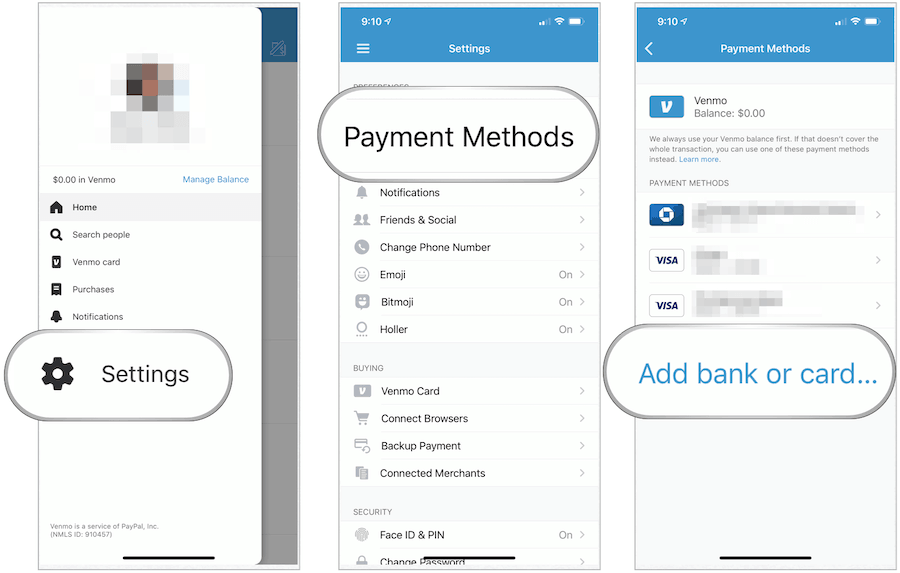
When sending money through Venmo, you typically have several funding source options: your Venmo balance, a linked bank account, a linked debit card, or a linked credit card. Each source comes with its own financial implications:
- Venmo Balance: If you have funds in your Venmo balance (from money you’ve received), sending money from here is usually instant and free.
- Linked Bank Account: Sending money directly from your bank account is also typically free. However, transfers can sometimes take a few business days to fully process, depending on your bank.
- Linked Debit Card: Using a debit card to send money is usually free and offers near-instant availability of funds, making it a popular choice for immediate financial needs.
- Linked Credit Card: This is where financial caution is advised. While you can use a credit card to send money to another person, Venmo typically charges a 3% fee for these transactions. This fee is a significant financial consideration, as it effectively makes sending money more expensive. Credit cards are best reserved for purchases where a fee isn’t applied, or when you explicitly want to earn rewards points on an eligible transaction and are willing to pay the fee. Understanding these funding options and their associated costs is key to making financially sound decisions when using Venmo.
Navigating Privacy Settings for Your Financial Activities
Venmo’s unique social feed means that by default, many transactions are public, allowing friends and even strangers to see who paid whom, and for what (though amounts are always private). For many, this level of transparency for personal financial activities is uncomfortable. Fortunately, Venmo provides robust privacy settings. You can choose to make each transaction visible to:
- Public: Anyone on Venmo can see the transaction.
- Friends: Only your Venmo friends can see the transaction.
- Private: Only you and the recipient can see the transaction.
For personal financial management, setting your default privacy to “Friends” or “Private” is often recommended, especially for sensitive or personal payments. You can adjust the privacy for individual payments at the time of sending, ensuring that your financial footprint on the platform aligns with your comfort level and privacy preferences. Regularly reviewing these settings ensures your financial interactions remain as discreet as you desire.
The Step-by-Step Guide to Sending Money Through Venmo
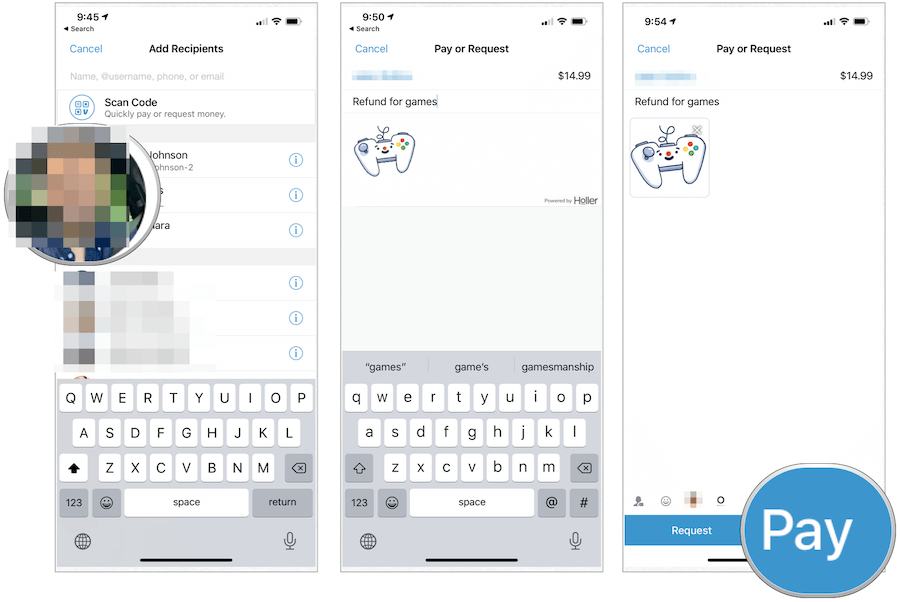
Once your account is set up and you understand the financial considerations of different funding sources, sending money through Venmo is a straightforward process. Following these steps carefully will ensure your financial transfers are accurate and secure.
Initiating a Payment
The first step is to open the Venmo app on your smartphone. At the bottom of the screen, you’ll typically find a “Pay or Request” button, often represented by a pencil and paper icon or a dollar sign. Tapping this will take you to a new screen where you can select the recipient. You can search for them by their Venmo username, phone number, or email address. It is absolutely crucial to double-check the recipient’s information. A single typo could send your money to the wrong person, and P2P payments can be notoriously difficult to reverse, leading to potential financial loss. Confirming the recipient’s identity, perhaps by asking for their exact Venmo username or a quick confirmation text, is a simple but vital financial safeguard.
Entering Transaction Details
After selecting your recipient, you’ll be prompted to enter the transaction details:
- Amount: Clearly type in the exact dollar amount you wish to send. Accuracy here is paramount to avoid overpaying or underpaying.
- Note: This is a crucial step for personal finance record-keeping. Always add a clear and concise note explaining the purpose of the payment (e.g., “Dinner last night,” “Rent for May,” “Birthday gift”). This note serves as your digital receipt and context for the financial transaction, useful for budgeting or if a dispute arises later.
- Payment Source: Below the amount and note, you’ll see your current payment source (e.g., “Venmo Balance,” “Bank of America Checking,” “Visa Debit”). Tap on this to change it if necessary, referring back to your understanding of fees associated with credit cards. Choose the most financially advantageous source for your transfer.
- Privacy: Select your desired privacy setting for this specific transaction (Public, Friends, or Private). For most personal financial transfers, “Private” or “Friends” is recommended.
Reviewing and Confirming Your Financial Transfer
Before you hit the final “Pay” button, Venmo will present you with a summary screen. This is your last opportunity to review all the details of your financial transfer. Carefully check:
- Recipient: Is it the correct person?
- Amount: Is the dollar amount precise?
- Note: Is the purpose clear?
- Payment Source: Are you comfortable with the selected source and any potential fees?
- Privacy: Is the privacy setting appropriate?
Once you are satisfied that all details are correct, tap the “Pay” button. Your money will then be transferred to the recipient’s Venmo account. For the sender, this transaction is generally irreversible once confirmed, underscoring the importance of meticulous review.
Optimizing Your Venmo Experience for Financial Security and Efficiency
Using Venmo effectively for personal finance extends beyond just knowing how to send money; it involves implementing best practices for security and efficiency to safeguard your funds and maximize the tool’s utility.
Best Practices for Secure Financial Transactions
Security is paramount when dealing with any financial tool. To protect your money and personal information on Venmo:
- Enable Two-Factor Authentication (2FA): This adds an extra layer of security, requiring a code from your phone in addition to your password to log in. It’s a critical defense against unauthorized access to your funds.
- Use Strong, Unique Passwords: Never reuse passwords, and ensure yours is complex, combining letters, numbers, and symbols.
- Be Wary of Scams: Venmo is a common target for phishing attempts and payment scams. Always verify payment requests directly with the sender through another communication channel before accepting, and never click suspicious links. Venmo transactions are meant for payments between people who know and trust each other.
- Protect Your Device: Keep your smartphone’s operating system updated, and use a strong passcode or biometric security (fingerprint/Face ID) to prevent unauthorized access if your phone is lost or stolen.
- Avoid Public Wi-Fi for Financial Transactions: Public Wi-Fi networks can be unsecure, making your financial data vulnerable. Conduct sensitive transactions on a trusted private network.
Managing Your Venmo Balance and Transfers to Bank
After receiving money on Venmo, you’ll have a balance. You can either leave this money in your Venmo account for future payments or transfer it to your linked bank account.
- Standard Transfer: This option is free and typically takes 1-3 business days for the funds to appear in your bank account. It’s the most financially sensible choice for non-urgent transfers.
- Instant Transfer: If you need immediate access to your funds, Venmo offers an instant transfer option. For a small fee (usually 1.75% of the transfer amount, with a minimum fee of $0.25 and maximum fee of $25), the money can be transferred to your eligible debit card-linked bank account, often within minutes. This is a useful feature for urgent financial needs but remember to factor in the fee when deciding.
Regularly transferring your Venmo balance to your bank account is a good personal finance practice, as it consolidates your funds and often allows you to earn interest or better manage your overall finances from one primary account.
Handling Disputes and Erroneous Payments
Despite all precautions, mistakes can happen. If you send money to the wrong person, or if you believe you’ve been scammed:
- Contact the Recipient Immediately: If you sent money to the wrong person by mistake, your first step should be to message the recipient directly through Venmo and politely request they send the money back. Many people are understanding and cooperative.
- Contact Venmo Support: If the recipient is unresponsive or unwilling to return the funds, contact Venmo Support immediately. While Venmo often has limited recourse for reversing P2P payments, especially if the recipient has already withdrawn the funds, they can sometimes mediate or provide guidance, particularly in cases of fraud.
- Understand P2P Limitations: It’s important to understand that P2P platforms like Venmo are primarily designed for payments between friends and trusted individuals. They typically do not offer the same level of buyer/seller protection as credit card companies or other payment processors. This is a critical financial distinction to keep in mind, especially for transactions with unknown parties.
By understanding how to send money through Venmo, you gain a powerful financial tool that can simplify your daily personal finance interactions. Adhering to security best practices and being mindful of the financial implications of different transaction types will ensure a smooth, secure, and efficient experience, allowing you to manage your money with confidence in the digital age.
aViewFromTheCave is a participant in the Amazon Services LLC Associates Program, an affiliate advertising program designed to provide a means for sites to earn advertising fees by advertising and linking to Amazon.com. Amazon, the Amazon logo, AmazonSupply, and the AmazonSupply logo are trademarks of Amazon.com, Inc. or its affiliates. As an Amazon Associate we earn affiliate commissions from qualifying purchases.