
In an increasingly digital world, peer-to-peer (P2P) payment applications have revolutionized how we transfer money, making cash and traditional banking transfers often feel archaic. Among the most prominent and widely adopted of these platforms is Venmo, an intuitive mobile app that simplifies sending and receiving money between friends, family, and even some businesses. Understanding how to effectively use this powerful digital tool is essential for anyone navigating modern personal finance. This comprehensive guide will walk you through the technical intricacies and user-friendly steps to pay someone on Venmo, ensuring you leverage its capabilities securely and efficiently.

Getting Started: Setting Up Your Venmo Digital Wallet
Before you can send your first payment, the journey begins with establishing your Venmo account and linking it to your financial instruments. This foundational setup ensures a seamless and secure experience.
Downloading and Installing the App
The Venmo application is designed for accessibility across major mobile operating systems. You can find and download it for free from the Apple App Store for iOS devices or the Google Play Store for Android devices. Ensure your smartphone meets the minimum system requirements for optimal performance and access to the latest security features. Once downloaded, the installation process is typically automated and straightforward, preparing your device for its new digital wallet.
Creating Your Venmo Account
Upon launching the app, you’ll be prompted to create an account. This involves providing some basic personal information, including your full legal name, a verified phone number or email address, and a secure password. Venmo prioritizes security from the outset, often requiring phone or email verification to confirm your identity and link your device to your new account. This step is crucial for preventing unauthorized access and ensuring your transactions are tied to a legitimate user.
Linking Payment Methods
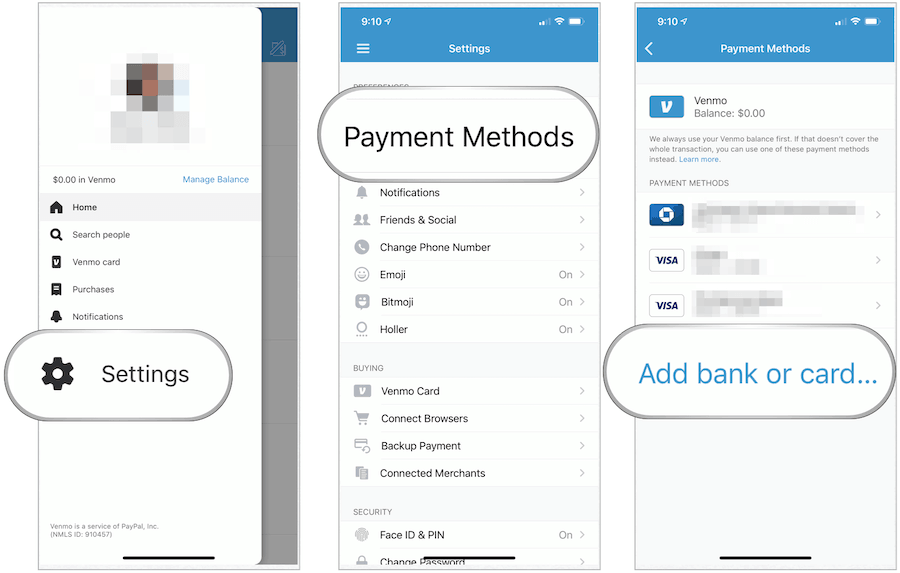
The heart of your Venmo digital wallet is its connection to your financial resources. To send money, you’ll need to link a bank account, a debit card, or a credit card.
- Bank Account: Linking your bank account allows you to transfer funds directly from your bank to Venmo, or vice versa. This often involves providing your bank’s routing number and your account number. Venmo typically verifies this link by initiating small micro-deposits (e.g., two deposits of less than $0.10) into your bank account, which you then confirm within the app. This secure process validates the account ownership.
- Debit Card: Linking a debit card provides immediate access to funds in your bank account, often with fewer steps than a direct bank link once the card is verified. It acts as a direct conduit for payments.
- Credit Card: While credit cards can be linked, it’s important to note that Venmo typically charges a 3% fee for payments funded directly by a credit card. This is a crucial technical detail to consider for cost-effective transactions, as payments funded by a Venmo balance, bank account, or debit card usually incur no fee for the sender.
Choosing and securely linking your preferred funding source is paramount. This initial setup establishes the technological backbone for all your future Venmo interactions.
Mastering the Payment Process: A Step-by-Step Tutorial
Once your account is active and funded, sending money on Venmo is remarkably intuitive. The app’s design prioritizes user experience, guiding you through each step.
Initiating a Payment
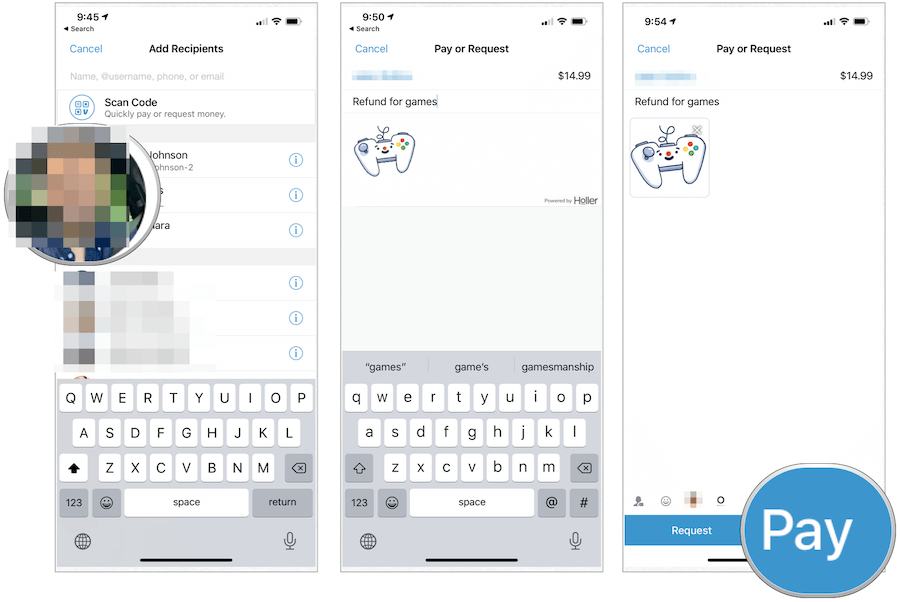
From the Venmo home screen, locate the prominent “Pay & Request” button, usually represented by a pencil and paper icon or a simple “Pay” button. Tapping this will open a new transaction screen, preparing you to enter the payment details. This single tap initiates the core function of the application.
Identifying the Recipient
Accuracy is paramount when sending money digitally. Venmo offers several ways to find your recipient:
- Username: The most common and recommended method. Each Venmo user has a unique username (e.g., @john-doe).
- Phone Number: If you have the recipient’s phone number saved in your contacts and they are a Venmo user, the app can often find them.
- Email Address: Similar to phone numbers, an email address can also identify a recipient.
Always double-check the recipient’s name and profile picture (if available) to ensure you are sending money to the correct person. A single typo could send your money to an unintended recipient, and recovering funds in such scenarios can be challenging.
Entering Payment Details
After selecting your recipient, you’ll enter the amount you wish to send. Below the amount field, there’s a crucial section for adding a “note.” This note describes the payment (e.g., “Dinner last night,” “Rent,” “Concert tickets”). Venmo’s unique social feed feature means these notes can be publicly visible by default. You have the option to change the privacy setting for each transaction to “Public,” “Friends,” or “Private.” This is a key technological feature offering users control over their data visibility.
Choosing Your Funding Source
Before confirming the payment, you’ll select which linked account or card will fund the transaction. Venmo typically defaults to your existing Venmo balance, followed by your linked bank account or debit card. If you choose a credit card, the app will explicitly display the 3% transaction fee, ensuring transparency about the technical cost implications. This step allows you to manage your finances directly within the app’s interface.
Reviewing and Confirming
The final step is to carefully review all the details: the recipient’s information, the amount, the note, and the funding source. Once you’re confident everything is correct, tap the “Pay” button. The funds are usually transferred instantly, and both you and the recipient will receive an in-app notification and an email confirming the transaction. This near-instantaneous transfer is a testament to the efficient backend technology powering Venmo.
Beyond Basic Payments: Exploring Advanced Venmo Features
Venmo is more than just a payment portal; it’s a versatile digital finance tool equipped with features that extend its utility beyond simple transfers.
Requesting Money and Splitting Bills
Just as easily as you can pay someone, you can also request money. This feature is invaluable for situations like group dinners, shared household expenses, or reimbursable costs. The process mirrors sending money, but you select “Request” instead of “Pay.” Venmo also offers a “Split” feature, allowing you to easily divide a bill among multiple contacts, automatically calculating individual shares and sending requests. This is a smart technological solution for common social financial dilemmas.
Understanding Venmo’s Social Feed and Privacy Settings
One of Venmo’s defining—and sometimes controversial—features is its social feed. By default, transactions are often public, with notes visible to anyone on the Venmo network. While some enjoy this transparency, others prefer more discretion. Venmo provides granular privacy controls: you can set individual transactions to “Friends” (visible only to your Venmo friends) or “Private” (visible only to you and the recipient). You can also adjust your default privacy settings for future transactions. Understanding and utilizing these settings is crucial for managing your digital footprint on the platform.
Venmo for Business Profiles
Venmo has expanded its utility to small businesses and sole proprietors. Users can create a business profile, allowing customers to pay them directly through the app. This feature comes with enhanced payment protection and reporting for businesses, often utilizing QR codes for easy, contactless payments in brick-and-mortar settings. This integration transforms Venmo from a purely P2P app into a viable point-of-sale solution for many.
The Venmo Debit Card and Credit Card
Extending its ecosystem, Venmo offers physical cards that link directly to your Venmo balance or bank account. The Venmo Debit Card allows you to spend your Venmo balance anywhere Mastercard is accepted, and earn cashback. The Venmo Credit Card, powered by Visa, offers rewards on eligible purchases. These cards seamlessly integrate your Venmo digital wallet with traditional payment networks, enabling a broader range of transactions beyond the app itself.
Ensuring Digital Security and Best Practices
While Venmo’s technology facilitates convenience, understanding and implementing robust security practices is essential to protect your funds and personal information.
Protecting Your Account: Passwords and Biometrics
Your Venmo password is the first line of defense. Use a strong, unique password that combines letters, numbers, and symbols, and avoid reusing passwords from other accounts. For enhanced security, enable biometric authentication (Touch ID or Face ID) and, crucially, two-factor authentication (2FA). 2FA adds an extra layer of protection by requiring a second verification method, like a code sent to your phone, before logging in or making certain transactions.
Recognizing and Avoiding Scams/Phishing
The digital landscape is rife with scams. Be vigilant against phishing attempts—fake emails or texts masquerading as Venmo, attempting to trick you into revealing your login credentials or personal information. Always access Venmo directly through the official app or website, never through suspicious links. Venmo will never ask for your password or sensitive information via email or text. Always verify the sender and the context of any communication related to your account.
Managing Your Privacy
Regularly review your transaction privacy settings. While a public feed can be fun for some, making sensitive payments private is a good habit. You have full control over who sees your transactions, and leveraging these settings is a fundamental aspect of digital self-protection on a social payment app.
Verifying Recipients
This cannot be stressed enough: always double-check the recipient’s details before sending money. Unlike traditional bank transfers, P2P payments are often instant and irreversible. If you send money to the wrong person, Venmo’s ability to recover those funds is limited, as it relies on the unintended recipient agreeing to return the money. Usernames, phone numbers, and email addresses should be confirmed meticulously.
Troubleshooting and Support: When Technology Goes Awry
Despite its robust design, technical issues can occasionally arise. Knowing how to navigate these situations is part of being a savvy Venmo user.
Common Payment Issues
- Failed Payments: Transactions can fail due to insufficient funds in your chosen funding source, an expired card, or a temporary technical glitch. Always check your bank balance or card validity first.
- Pending Transactions: Sometimes, payments might show as “pending.” This could be due to network delays, security reviews, or the recipient not having fully activated their account. Patience is often required, but if a payment remains pending for an extended period, contact support.
- Holds: Venmo may place a hold on funds for various reasons, including security concerns or large transactions. These are temporary and usually resolved once the internal review is complete.
Understanding Transaction Limits
Venmo enforces daily and weekly transaction limits, which vary depending on whether your identity is fully verified. Unverified accounts have lower limits, while fully verified accounts (often requiring your Social Security Number) have significantly higher limits. If you frequently send large amounts, be aware of these technical boundaries and ensure your account verification level matches your usage needs.
Dispute Resolution and Customer Support
If you encounter a persistent issue, suspect unauthorized activity, or have questions that aren’t answered in the app’s help center, Venmo’s customer support is available. You can typically reach them via email, in-app messaging, or sometimes phone. While Venmo mediates disputes for certain issues, especially unauthorized transactions, it’s crucial to understand that P2P platforms have limitations regarding “buyer protection” compared to credit card companies. Acting quickly is always best when addressing any potential fraud or error.
In conclusion, Venmo stands as a powerful testament to modern financial technology, simplifying the process of paying and requesting money. By understanding its setup, mastering its payment functionalities, exploring its advanced features, and adhering to digital security best practices, you can confidently and effectively integrate Venmo into your daily life. It’s a tool designed for convenience, and with a bit of knowledge, you can ensure your digital transactions are always smooth, secure, and hassle-free.
aViewFromTheCave is a participant in the Amazon Services LLC Associates Program, an affiliate advertising program designed to provide a means for sites to earn advertising fees by advertising and linking to Amazon.com. Amazon, the Amazon logo, AmazonSupply, and the AmazonSupply logo are trademarks of Amazon.com, Inc. or its affiliates. As an Amazon Associate we earn affiliate commissions from qualifying purchases.