
In an increasingly digital world, mobile payment applications like Cash App have become indispensable tools for managing personal finances, facilitating peer-to-peer transfers, and even engaging in investment opportunities. At the heart of Cash App’s utility is its ability to seamlessly integrate with your existing banking infrastructure, primarily through the linking of a debit card. This integration transforms your smartphone into a powerful financial hub, enabling instant transactions, secure payments, and quick access to your funds. Understanding the precise steps, security implications, and best practices for linking your debit card is paramount for maximizing the benefits of this innovative application. This tutorial will guide you through the process, ensuring a smooth, secure, and optimized Cash App experience.
Understanding Cash App’s Core Functionality and Its Digital Ecosystem
Before diving into the technical steps, it’s crucial to grasp what Cash App offers and how a linked debit card serves as its operational backbone. Cash App is more than just a payment service; it’s a comprehensive digital finance platform designed for speed, convenience, and accessibility.
What is Cash App and Why It Matters for Digital Payments
Cash App, developed by Block, Inc. (formerly Square, Inc.), emerged as a dominant force in the mobile payment landscape due to its user-friendly interface and robust feature set. It allows users to send and receive money instantly, deposit paychecks, purchase stocks and Bitcoin, and even file taxes. For individuals and small businesses alike, it offers a compelling alternative to traditional banking methods for everyday transactions. The simplicity of sending money to a friend with just a few taps, or quickly paying for goods and services using a linked Cash Card (which draws from your Cash App balance), underscores its relevance in today’s fast-paced digital economy. Its rise highlights a broader trend towards decentralized, mobile-first financial solutions that prioritize user experience and speed over conventional complexities.
The Role of Linked Cards in Facilitating Instant Transactions
At the core of Cash App’s operational model is the ability to link external financial instruments, predominantly debit cards. A linked debit card acts as a bridge between your traditional bank account and your Cash App balance. When you send money through Cash App, if your Cash App balance is insufficient, the app can automatically draw funds directly from your linked debit card. Conversely, when you want to “cash out” funds from your Cash App balance back to your bank account, your linked debit card provides the immediate conduit for that transfer. This direct link is what enables the “instant” aspect of many transactions, distinguishing it from processes that might involve lengthier ACH transfers. Without a linked card, many of Cash App’s features, particularly those involving adding or withdrawing funds beyond your Cash App balance, would be severely limited or unavailable. It’s the essential connection that transforms Cash App from a standalone digital wallet into an extension of your existing banking infrastructure.
Security Protocols and User Confidence in Mobile Payment Apps
Security is a paramount concern for any financial application, and Cash App employs a multi-layered approach to protect user data and transactions. When you link a debit card, your card information is encrypted and transmitted securely, adhering to industry standards like PCI DSS (Payment Card Industry Data Security Standard). Cash App utilizes advanced fraud detection technologies, PII (Personally Identifiable Information) safeguards, and secure server infrastructures. Features like PIN protection, biometric authentication (fingerprint or face ID), and two-factor authentication (2FA) provide additional layers of security for accessing your account and authorizing transactions. For users, understanding these protocols fosters confidence in the platform. The transparent communication of security measures, coupled with user education on best practices (like strong passwords and being wary of phishing), collectively contributes to a robust and trustworthy digital payment environment, which is crucial for widespread adoption and reliance on such apps.
The Step-by-Step Guide to Linking Your Debit Card
Linking your debit card to Cash App is a straightforward process designed for maximum user accessibility. Following these steps will ensure a successful integration.
Prerequisites: What You Need Before You Start
Before you begin the linking process, ensure you have the following ready:
- Your Smartphone: With the Cash App installed and an active internet connection.
- Your Cash App Account: You must have an active and verified Cash App account. If you’re a new user, you’ll need to complete the initial setup, which typically involves providing your phone number or email, and creating a username (Cashtag).
- Your Debit Card: The physical card itself, or at least access to its details: the 16-digit card number, the expiration date (MM/YY), and the 3-digit CVV (Card Verification Value) code from the back.
- Sufficient Funds (Optional but Recommended): While not strictly required for linking, having a small balance in your bank account connected to the debit card can help if Cash App needs to perform a micro-transaction verification.
Navigating the Cash App Interface: Initial Setup
- Open the Cash App: Launch the application on your smartphone.
- Access the Home Screen: You’ll typically land on the main Cash App interface, which shows your balance and recent activity.
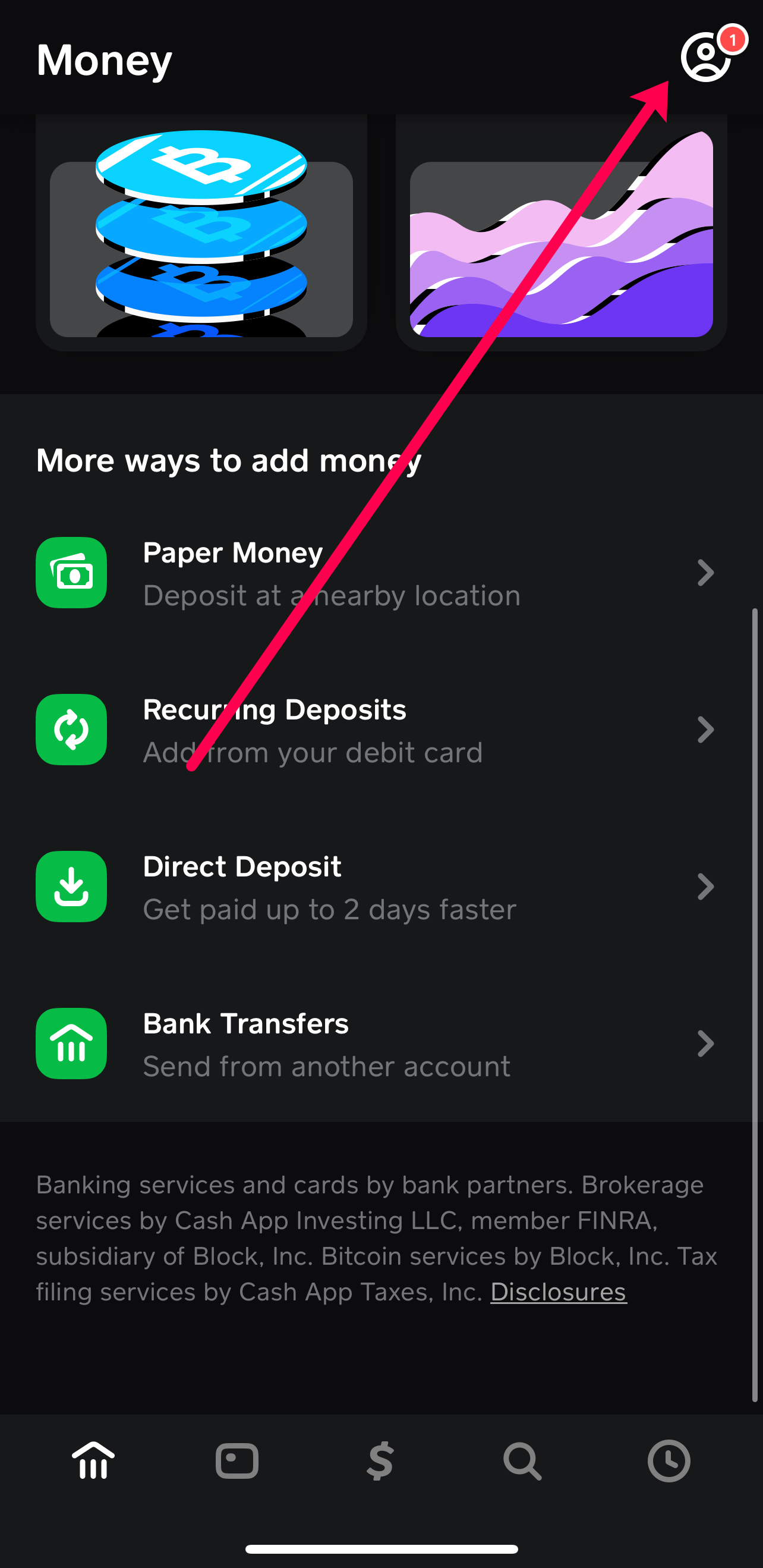
- Tap the Profile Icon: In the top right corner of the screen, you’ll see a profile icon (it might be a person icon or your profile picture if you’ve set one). Tap this to open your account settings and profile menu.
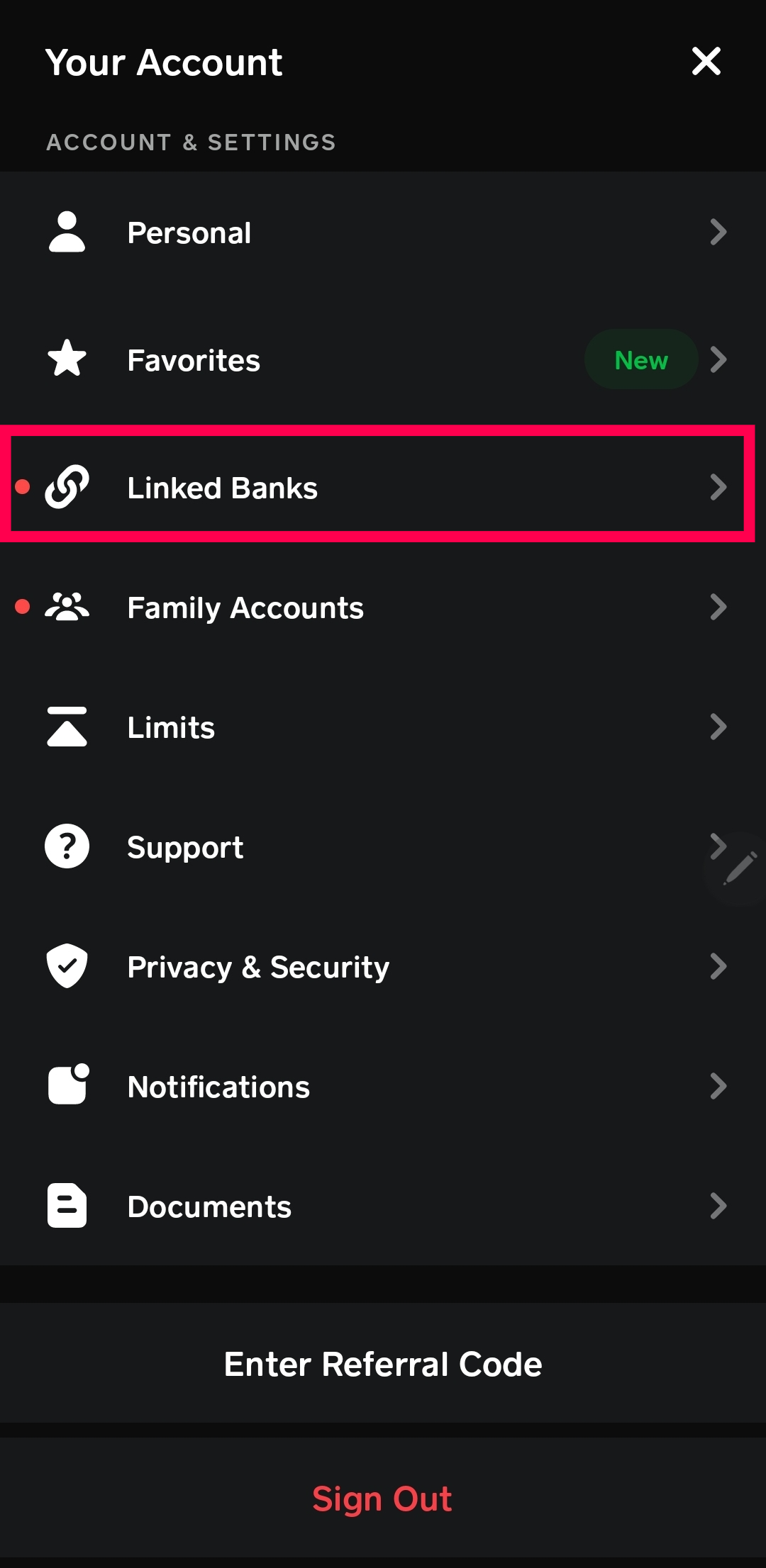
- Select “Linked Banks”: Scroll down the profile menu until you find the “Linked Banks” option. This section manages all your linked financial instruments, including debit cards and bank accounts.
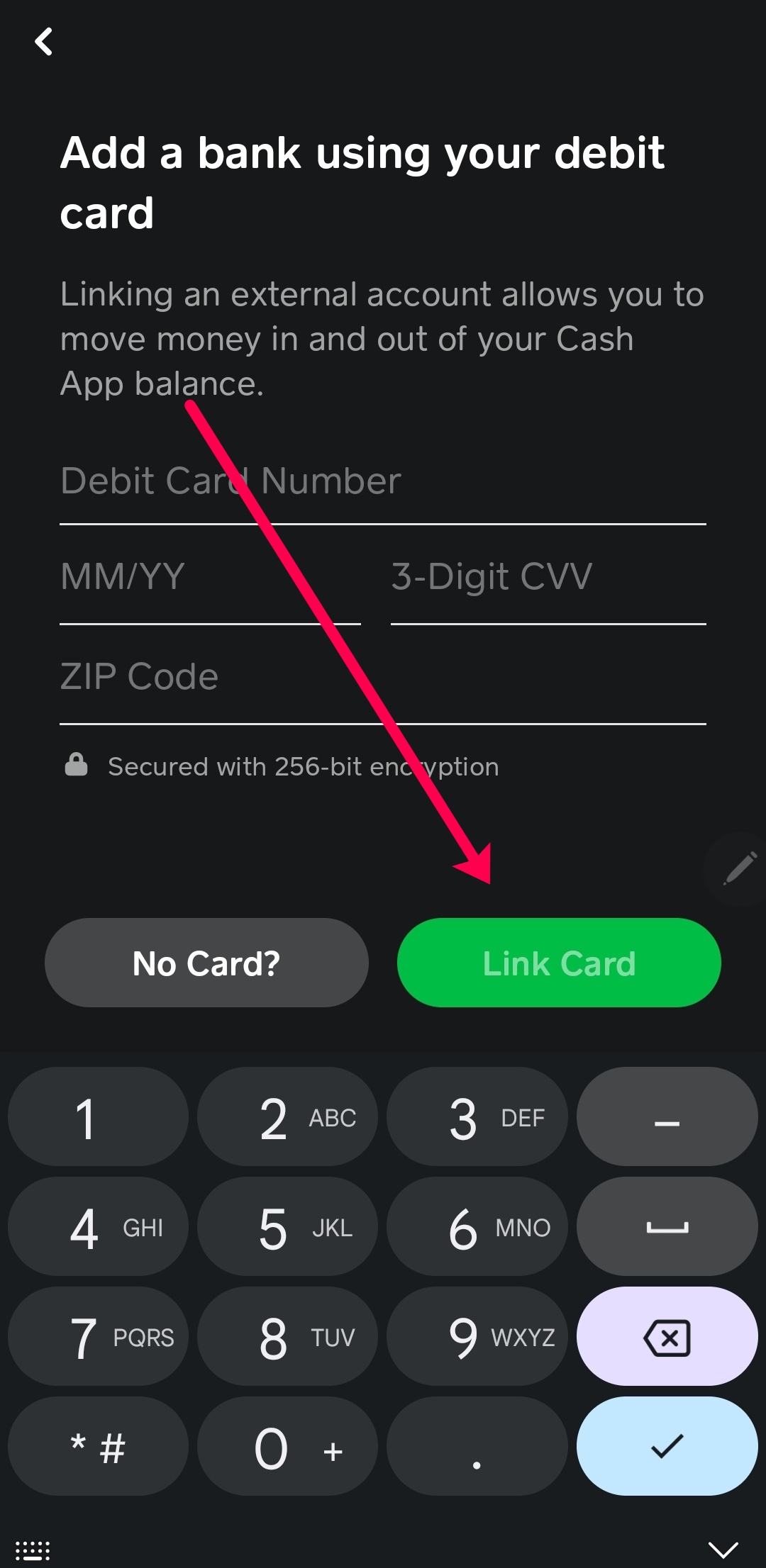
- Choose “Link Debit Card”: Within the “Linked Banks” section, you’ll see an option to “Link Debit Card.” Tap this to proceed.
Entering Your Debit Card Details Accurately
- Enter Debit Card Number: The app will prompt you to enter the 16-digit card number found on the front of your debit card. Double-check for accuracy.
- Enter Expiration Date: Input the month and year your card expires (e.g., 12/25 for December 2025).
- Enter CVV: Provide the 3-digit security code (CVV or CVC) located on the signature strip on the back of your debit card. For American Express cards, this is a 4-digit code on the front.
- Enter ZIP Code: You may be asked to enter the ZIP code associated with your billing address for the debit card. This is an additional security measure to verify your identity.
- Tap “Link Card”: Once all the details are accurately entered, tap the “Link Card” button to finalize the process.
Verification Processes and Troubleshooting Common Issues
After tapping “Link Card,” Cash App may perform a quick verification. This usually happens in the background, but sometimes:
- Micro-Deposit/Withdrawal: Cash App might make a very small, temporary charge (e.g., $0.01) to your card to verify its validity. This charge is typically reversed within minutes.
- Bank Verification: In some cases, your bank might send you a push notification or require you to confirm the link attempt via their banking app or a one-time passcode (OTP).
- Troubleshooting:
- “Card Not Supported”: Ensure your card is a debit card. Prepaid cards or credit cards may have limited functionality or not be linkable for certain actions. Some specific debit cards might also not be supported.
- Incorrect Details: Double-check all card details (number, expiration, CVV, ZIP code). A single typo will prevent linking.
- Internet Connection: Ensure you have a stable internet connection during the process.
- Bank Restrictions: Sometimes your bank might temporarily block the attempt as a fraud prevention measure. Contact your bank if you suspect this is the case.
- App Glitch: If all else fails, try restarting the Cash App or your phone, or reinstalling the app (ensure you have your login details).
Optimizing Your Cash App Experience with a Linked Debit Card
A successfully linked debit card unlocks the full potential of your Cash App, offering unparalleled flexibility and speed in managing your money.
Instant Deposits and Withdrawals: Leveraging Your Card for Quick Access
One of the primary advantages of a linked debit card is the ability to move funds in and out of your Cash App balance almost instantly.
- Instant Deposits: Need to send money but your Cash App balance is low? Funds can be instantly drawn from your linked debit card to cover the transaction. This eliminates delays and ensures you can make payments when needed.
- Instant Cash Outs: When you receive money on Cash App, you can choose to “Cash Out” to your linked debit card. For a small fee (typically 0.5% – 1.75%), the funds are transferred to your bank account almost immediately, providing quick access to your money. Standard cash outs (usually taking 1-3 business days) are free, but the instant option is invaluable for urgent needs. Your debit card acts as the gateway for this rapid transfer.
Enhancing Spending and Receiving Capabilities
With a debit card linked, your spending power within Cash App extends beyond your immediate Cash App balance.
- Seamless Payments: When sending money to friends or making payments, Cash App will prioritize your Cash App balance. If it’s insufficient, it will seamlessly draw the remaining amount from your linked debit card without requiring manual intervention, provided you have authorized this.
- Direct Deposits: You can set up direct deposits to your Cash App account. While this doesn’t directly use your linked debit card for the deposit itself, the card becomes critical for quickly moving those direct deposit funds out of Cash App and into your bank account if desired.
- Cash Card Integration: While the Cash Card (Cash App’s own debit card) draws from your Cash App balance, having a linked debit card ensures you can always top up your Cash App balance from your bank, making your Cash Card always ready for use.
Managing Multiple Cards and Prioritizing Payment Methods
Cash App allows users to link multiple debit cards. This feature is particularly useful for those who manage finances across different bank accounts or for family members sharing an account.
- Adding Multiple Cards: The process for adding additional debit cards is identical to linking your first one, found under the “Linked Banks” section.
- Setting a Primary Card: You can designate a primary debit card. This card will be the default option for instant cash outs and for funding transactions when your Cash App balance is insufficient. You can change your primary card at any time from the “Linked Banks” section.
- Removing Cards: If a card expires, is lost, or you simply no longer wish to use it with Cash App, you can easily remove it from the “Linked Banks” section. This enhances security and keeps your payment methods up-to-date. Efficient management of your linked cards ensures that your preferred financial channels are always accessible and secure within the app.
Security Best Practices and Digital Hygiene for Cash App Users
While Cash App employs robust security measures, user vigilance and adherence to best practices are crucial for maintaining the integrity of your account and linked debit card.
Protecting Your Account: PINs, Biometrics, and Two-Factor Authentication
Your first line of defense against unauthorized access is strong account security.
- Enable a PIN: Always set up a strong PIN (Personal Identification Number) within Cash App. This PIN will be required for sending payments or cashing out, adding an essential layer of security.
- Utilize Biometrics: If your smartphone supports it, enable fingerprint (Touch ID) or facial recognition (Face ID) for Cash App login and transaction authorization. Biometric security is often more convenient and secure than a traditional PIN.
- Activate Two-Factor Authentication (2FA): 2FA adds an extra layer of security by requiring a second form of verification (e.g., a code sent to your phone or email) in addition to your password or PIN. This significantly reduces the risk of unauthorized access, even if someone obtains your login credentials. Always enable 2FA for your Cash App account.
Recognizing and Avoiding Common Scams and Phishing Attempts
Scammers constantly evolve their tactics to trick users into divulging sensitive information or sending money.
- Phishing Emails/Texts: Be wary of unsolicited emails or text messages claiming to be from Cash App. Never click on suspicious links, open attachments, or provide your login details, debit card information, or PIN in response to these messages. Cash App will never ask for your PIN or full debit card number via email or text.
- “Payment Pending” Scams: Scammers might send fake “payment pending” notifications to trick you into sending them money to “release” a payment that doesn’t exist. Always verify payments within the official Cash App, not through external notifications.
- “Customer Support” Impersonators: Legitimate Cash App support will only contact you through the app or their official channels. Be suspicious of unsolicited calls or messages from individuals claiming to be support staff.
- “Free Money” Giveaways: If it sounds too good to be true, it almost certainly is. Legitimate giveaways will be announced through official Cash App channels, not random direct messages.
Always use common sense, verify sources, and if in doubt, contact Cash App support directly through the app.
Monitoring Transaction History and Staying Informed
Active monitoring of your account activity is a vital security practice.
- Regularly Review Transactions: Periodically check your Cash App transaction history (accessible from the main screen) for any unfamiliar or unauthorized activity.
- Set Up Notifications: Enable push notifications for all Cash App transactions. This allows you to receive instant alerts for every payment sent or received, helping you identify suspicious activity immediately.
- Stay Updated: Keep your Cash App application updated to the latest version. Updates often include critical security patches and new features designed to protect users. Staying informed about the latest app features and security advice from Cash App’s official channels will help you navigate the digital landscape safely.
Troubleshooting and Advanced Tips for Debit Card Integration
Even with the best preparation, issues can arise. Knowing how to troubleshoot and where to find help is essential for a smooth experience.
Common Errors During Linking and Their Solutions
- “Unable to link card”: This generic error often points to incorrect card details. Double-check the 16-digit number, expiration date, and CVV. Ensure the ZIP code matches your bank’s records.
- “This card is not supported”: As mentioned, some prepaid cards or certain types of credit cards might not work. Ensure it’s a standard debit card issued by a major bank. If it is, contact your bank to ensure there are no specific restrictions on its use with third-party apps.
- “Please contact your bank”: Your bank might have flagged the attempt as suspicious. Call your bank’s customer service number (usually on the back of your card) to verify the transaction attempt and authorize it.
- “Error processing request”: This could be a temporary server issue with Cash App. Wait a few minutes and try again. Ensure your internet connection is stable. If persistent, clear the Cash App cache (in your phone’s app settings) or reinstall the app.
- Account Limits: If you’re a new user or haven’t fully verified your identity, Cash App might have daily or weekly limits on how much you can add or send. This could prevent a transaction if it exceeds your current limit. Verify your identity within the app to increase limits.
When to Contact Cash App Support: Escalating Technical Issues
If you’ve exhausted all troubleshooting steps and are still unable to link your debit card or are experiencing other issues, it’s time to contact Cash App support.
- How to Contact: The best way to contact support is directly through the Cash App itself. Go to your Profile icon > Support > Start a Chat. This ensures you’re communicating through an authenticated channel.
- Provide Details: When contacting support, be prepared to provide as much detail as possible: the exact error message, steps you’ve already taken to troubleshoot, the type of debit card, and your Cash App username (Cashtag).
- Be Patient: While Cash App aims for quick responses, peak times might lead to longer wait times. Avoid sending multiple messages as this can reset your position in the queue.
- Never Share Sensitive Information Publicly: Cash App support will never ask for your full debit card number, PIN, or login password in an email or social media message. Only share necessary information within the secure in-app chat.
Future-Proofing Your Digital Wallet: Staying Updated with App Features
The digital payment landscape is constantly evolving, and Cash App regularly introduces new features, security enhancements, and policy updates.
- Enable Automatic Updates: Ensure your phone is set to automatically update Cash App. This guarantees you always have the latest version, which often includes critical security patches, bug fixes, and performance improvements.
- Read Official Announcements: Pay attention to in-app notifications or official communications from Cash App regarding new features or changes. Understanding these can help you better manage your linked cards and overall Cash App experience.
- Explore New Functionality: Regularly explore the Cash App interface for new tools or options. For instance, Cash App has expanded into stock and Bitcoin investing, and understanding how your linked debit card can facilitate funding these ventures can expand your digital financial capabilities. By staying proactive and informed, you can ensure your Cash App remains a cutting-edge and secure tool for your digital financial needs.
Linking your debit card to Cash App is a fundamental step in leveraging the full power of this versatile digital payment platform. By following these technical guidelines and adhering to best security practices, you can enjoy seamless, instant transactions and a secure financial experience within Cash App’s robust digital ecosystem.
aViewFromTheCave is a participant in the Amazon Services LLC Associates Program, an affiliate advertising program designed to provide a means for sites to earn advertising fees by advertising and linking to Amazon.com. Amazon, the Amazon logo, AmazonSupply, and the AmazonSupply logo are trademarks of Amazon.com, Inc. or its affiliates. As an Amazon Associate we earn affiliate commissions from qualifying purchases.