
In an increasingly data-driven world, understanding and manipulating percentages is a fundamental skill, essential for everything from personal budgeting to scientific analysis. While the underlying mathematical concepts remain constant, the tools we use to perform these calculations have evolved dramatically. From the rudimentary abacus to sophisticated smartphone apps, calculators stand as indispensable technological companions, simplifying complex computations and democratizing access to mathematical precision. This guide delves into the technical intricacies of leveraging various calculators – from basic handheld devices to advanced software applications – to accurately and efficiently compute percentages, transforming a potentially daunting task into a straightforward, systematic process.

The Calculator: A Cornerstone of Modern Computation
The journey of the calculator is a testament to humanity’s enduring quest for efficiency and accuracy in numbers. What began as mechanical marvels has transformed into sophisticated digital tools, deeply embedded in our daily technological landscape. Understanding the evolution and diverse forms of these devices is the first step toward mastering their capabilities, particularly when it comes to percentage calculations.
Evolution from Mechanical to Digital Intelligence
The concept of automated calculation dates back centuries, with devices like the abacus providing early assistance. The true genesis of the mechanical calculator, however, can be traced to the 17th century with inventions like Pascal’s calculator and Leibniz’s stepped reckoner. These intricate machines laid the groundwork for complex mechanical calculators that dominated the early 20th century. The advent of electronics heralded a new era, with desktop electronic calculators emerging in the 1960s, quickly followed by handheld versions that became ubiquitous in the 1970s.
Today, the calculator isn’t just a dedicated physical device. It has morphed into a feature integrated into operating systems (like Windows Calculator or macOS Calculator), a ubiquitous app on smartphones and tablets, and a powerful function within spreadsheet software. This evolution has made computational power more accessible and versatile than ever before, tailoring to various user needs and technical contexts.
Types of Calculators and Their Interfaces
Different calculators offer varying levels of functionality, often reflected in their user interfaces and button layouts. Recognizing these distinctions is crucial for efficient percentage calculation.
- Basic Calculators: These are the most common and user-friendly, typically featuring arithmetic operations (+, -, ×, ÷), a square root function, and, crucially, a percentage key (often denoted by “%”). Their simplicity makes them ideal for everyday calculations.
- Scientific Calculators: Designed for more complex mathematical, scientific, and engineering tasks, scientific calculators boast a wider array of functions, including trigonometry, logarithms, and advanced statistical operations. While they also feature a percentage key, their more crowded interface might require a slight learning curve for basic percentage tasks.
- Graphing Calculators: Primarily used in advanced mathematics and education, graphing calculators can display graphs, solve complex equations, and even run programs. While overkill for simple percentages, they certainly possess the capability.
- Smartphone Calculator Apps: These digital counterparts of basic and scientific calculators offer convenience and often intuitive interfaces. Many incorporate advanced features found in scientific calculators, accessible through mode switches or landscape orientation.
- Software Calculators (e.g., in Operating Systems): Built into computers, these applications often mimic handheld calculators, sometimes offering standard, scientific, and programmer modes. They provide a quick way to perform calculations without needing a physical device.
Understanding the specific features and input logic of your chosen calculator is paramount. While the fundamental mathematical principles remain constant, the precise sequence of button presses for percentage calculations can vary slightly between different models and apps.
Mastering the Percentage Function: Core Calculations
The core strength of a calculator lies in its ability to simplify repetitive or complex mathematical processes. For percentages, this means transforming multi-step mental arithmetic into a few quick button presses. Here, we’ll break down the most common percentage calculations, focusing on the practical application of calculator functions.
Finding a Percentage of a Number
This is perhaps the most frequent percentage operation: determining what a certain percentage is of a given value. For instance, calculating a 15% tip on a $50 bill.
Method 1: Using the “%” Key (if available and intuitive)
Many basic calculators are designed to handle this operation elegantly.
- Enter the base number:
50 - Press the multiplication key:
× - Enter the percentage value:
15 - Press the percentage key:
% - The result (
7.5) should appear automatically.
- Note: The behavior of the “%” key can vary between calculators. On some, pressing “%” after
15and×might immediately display0.15, requiring you to then press=after the50. Always test your calculator’s specific logic.
Method 2: Converting Percentage to Decimal (Universal Method)
This method works on any calculator, including those without an intuitive “%” key, and is mathematically more explicit.
- Convert the percentage to its decimal equivalent by dividing by 100. (e.g., 15% becomes 0.15).
- Enter the base number:
50 - Press the multiplication key:
× - Enter the decimal equivalent of the percentage:
0.15 - Press the equals key:
= - The result (
7.5) will be displayed.
This method is reliable and provides a clear understanding of the mathematical operation being performed.
Adding or Subtracting a Percentage (Markups and Discounts)
Calculating a new total after adding (markup, sales tax) or subtracting (discount, sale price) a percentage is another common use case. For example, finding the price of an item after a 20% discount on a $100 item.
Method 1: Using the “%” Key for Discounts (if applicable)
Some calculators streamline this process.
- Enter the original number:
100 - Press the minus key:
- - Enter the percentage value:
20 - Press the percentage key:
% - The result (
80) should appear.
For adding a percentage:
- Enter the original number:
100 - Press the plus key:
+ - Enter the percentage value:
20 - Press the percentage key:
% - The result (
120) should appear.
- Caution: This intuitive behavior is not universal. Some calculators will simply calculate
20% of 100(which is20) after100 - 20%and then you’d need to press=to perform the subtraction. Again, testing your specific calculator is key.
Method 2: Two-Step Calculation (Universal Method)
This method is reliable across all calculators.
For a 20% discount on $100:
- Calculate 20% of 100:
100 × 0.20 = 20 - Subtract this amount from the original:
100 - 20 = 80
For a 20% markup on $100:
- Calculate 20% of 100:
100 × 0.20 = 20 - Add this amount to the original:
100 + 20 = 120
Calculating Percentage Change
Determining the percentage change between two values is essential for tracking growth, decline, or relative differences. For example, if a stock price went from $80 to $100.
The formula for percentage change is: ((New Value - Old Value) / Old Value) × 100
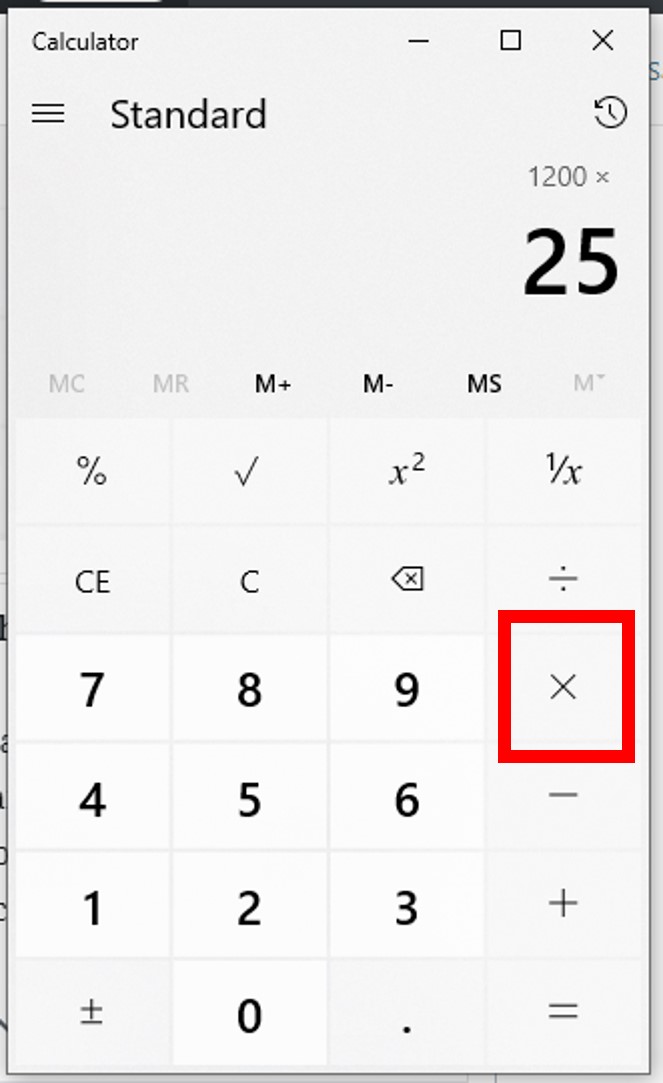
Let’s calculate the percentage change from $80 to $100:
- Calculate the difference:
100 - 80 = 20 - Divide by the old value:
20 ÷ 80 = 0.25 - Multiply by 100 to express as a percentage:
0.25 × 100 = 25%
On a calculator:
( 100 - 80 ) ÷ 80 × 100 =
20 ÷ 80 = 0.25
0.25 × 100 = 25
Most calculators will handle the order of operations correctly if parentheses are used, or you can perform it step-by-step.
Leveraging Advanced Features for Complex Percentage Tasks
Modern calculators, especially scientific, graphing, and software-based ones, offer features that can further streamline complex percentage calculations, reducing errors and saving time.
Using Parentheses for Multi-Step Operations
Parentheses ( ) are invaluable for ensuring the correct order of operations (PEMDAS/BODMAS). When performing calculations involving multiple steps or mixed operations, using parentheses guarantees that certain parts of your equation are evaluated first.
For example, to calculate a 15% sales tax after a $20 discount on a $200 item:
Without parentheses, 200 - 20 × 0.15 might incorrectly calculate 20 × 0.15 first.
The correct calculation is (200 - 20) × 1.15 (to add 15% tax directly).
On your calculator: ( 200 - 20 ) × 1.15 =
180 × 1.15 = 207
This ensures the discount is applied before the tax is calculated on the new subtotal.
Memory Functions for Sequential Calculations
Many calculators include memory functions (M+, M-, MR, MC) that allow you to store and recall intermediate results. This is particularly useful when performing a series of calculations where the result of one step feeds into the next, preventing re-entry errors.
Imagine you need to calculate 20% of X, then 10% of Y, and add these two results together.
- Calculate
X × 0.20. - Press
M+to add this result to memory. - Calculate
Y × 0.10. - Press
M+again to add this second result to the existing memory total. - Press
MR(Memory Recall) to retrieve the final sum. - Press
MC(Memory Clear) when finished to reset.
This feature is a powerful tool for maintaining accuracy in multi-component percentage problems.
Troubleshooting Common Calculator Percentage Errors
Even with sophisticated tools, user error remains a possibility. Understanding common pitfalls related to percentage calculations on a calculator can help you avoid mistakes and interpret results accurately.
Order of Operations Misconceptions
As highlighted with parentheses, the order in which a calculator processes operations is critical. Many calculators follow the standard PEMDAS/BODMAS rule. If you input 100 + 10 %, some calculators might interpret this as 100 + (10% of 100), while others might just calculate 10% of 100 and display 10 waiting for you to complete the addition. Always be mindful of the sequence and use parentheses explicitly for complex expressions, especially on basic calculators.
Inputting Decimals vs. Percentages
A frequent source of error is confusing how to input a percentage. Remember that “15%” mathematically means “15 out of 100,” or “0.15” as a decimal.
- If your calculator has an effective “%” button, you might type
15 %and the calculator internally converts it. - If your calculator’s “%” button doesn’t behave intuitively for direct percentage operations (like adding/subtracting), or if you’re using a scientific calculator where it often functions as a decimal converter, you should manually convert percentages to decimals. For example, instead of
200 × 15 %, type200 × 0.15. - Never enter
15.00if you mean15%. This would be interpreted as 15 whole units, not 15 hundredths.
Always double-check your input and, if unsure, opt for the decimal conversion method, which is universally unambiguous.
Beyond the Handheld: Percentage Tools in Software and Apps
The digital age has expanded the definition of a “calculator” to include powerful software applications and dedicated apps that offer sophisticated percentage calculation capabilities, often with enhanced user interfaces and additional features.
Spreadsheet Software Functions
Spreadsheet programs like Microsoft Excel, Google Sheets, or Apple Numbers are arguably the most powerful and versatile percentage calculators available. They combine the functionality of a calculator with the ability to manage and analyze large datasets.
- Direct Percentage Input: You can directly type percentages (e.g.,
15%) into cells, and the software will interpret them as their decimal equivalents (0.15). - Formulas: Using formulas, you can automate complex percentage calculations across entire columns or rows.
=A1*B1(where A1 is the base number and B1 is the percentage in decimal form orX%)=A1*(1+B1)(for adding a percentage/markup)=A1*(1-B1)(for subtracting a percentage/discount)=(B1-A1)/A1(for percentage change)
- Referencing Cells: The true power lies in referencing cells, allowing you to change input values and instantly see how percentages update across your entire spreadsheet.
- Conditional Formatting: You can even use percentages for data visualization, highlighting cells based on percentage thresholds.
For business analysis, financial modeling, or academic research, spreadsheets offer unparalleled control and scalability for percentage calculations.
Dedicated Percentage Calculator Apps
Numerous apps are designed specifically for percentage calculations, often going beyond basic arithmetic to include niche functions. These apps can be particularly helpful for:
- Tip Calculators: Automatically calculate tips and split bills based on percentages.
- Discount Calculators: Quickly determine final prices after multiple discounts or sales tax.
- Loan/Mortgage Calculators: Incorporate interest rate percentages into amortization schedules.
- Growth/Decline Calculators: Analyze trends over time using percentage change.
These apps often feature intuitive graphical interfaces, making complex tasks accessible. They abstract away the technical button presses of a physical calculator, focusing on user-friendly input fields for common percentage scenarios.

Conclusion: The Power of Precision at Your Fingertips
Calculating percentages, though a seemingly simple mathematical task, benefits immensely from the precision and efficiency offered by calculators. From the humble handheld device to sophisticated spreadsheet software, each technological iteration empowers users to perform these crucial calculations with greater ease and accuracy. By understanding the specific features of your calculator, mastering the direct and universal methods for core operations, and recognizing potential pitfalls, you transform what might be a source of frustration into a powerful tool for informed decision-making. In an era where data literacy is paramount, the ability to confidently wield your calculator for percentage computations is not just a technical skill, but a gateway to deeper understanding and greater control over the numbers that shape our world.
aViewFromTheCave is a participant in the Amazon Services LLC Associates Program, an affiliate advertising program designed to provide a means for sites to earn advertising fees by advertising and linking to Amazon.com. Amazon, the Amazon logo, AmazonSupply, and the AmazonSupply logo are trademarks of Amazon.com, Inc. or its affiliates. As an Amazon Associate we earn affiliate commissions from qualifying purchases.