
In an increasingly digital world, the venerable physical wallet is gradually giving way to its sleek, efficient, and often more secure counterpart: the digital wallet. Far more than just a place to store credit cards, digital wallets have evolved into comprehensive platforms that streamline payments, organize loyalty programs, store tickets, and even manage cryptocurrencies. They represent a fundamental shift in how we interact with our money and personal identification, offering unparalleled convenience and advanced security features.
For many, the concept of a digital wallet might seem futuristic, or perhaps an unnecessary complication. However, understanding its mechanics and embracing its capabilities can unlock a new level of efficiency in daily transactions. This comprehensive guide aims to demystify digital wallets, providing a step-by-step roadmap from initial setup to advanced usage, all while emphasizing the underlying technology and security protocols that make them a cornerstone of modern digital living.
Understanding the Digital Wallet Landscape
Before diving into the specifics of usage, it’s crucial to grasp what a digital wallet is, the various forms it takes, and the compelling advantages it offers over traditional payment methods. This foundational understanding sets the stage for a seamless transition into the world of digital payments.
What is a Digital Wallet?
At its core, a digital wallet is a software-based system that securely stores payment information and passwords for numerous payment methods and websites. Instead of carrying a physical wallet filled with cards, cash, and identification, a digital wallet allows users to store this information on their smartphone, smartwatch, or even a computer. When making a purchase, the digital wallet transmits the required payment data to the merchant, often through contactless technology like Near Field Communication (NFC) or QR codes, eliminating the need to physically present a card or cash. Its primary function is to facilitate secure and convenient electronic transactions.
Types of Digital Wallets
The digital wallet ecosystem is diverse, catering to a range of devices and specific user needs. Understanding these distinctions helps in choosing the right platform.
- Mobile Wallets: These are the most common type, typically integrated into smartphones. Examples include Apple Pay, Google Pay (formerly Android Pay), and Samsung Pay. They leverage the phone’s hardware, like NFC chips and biometric scanners, to enable tap-to-pay functionality and secure authentication.
- Web-Based Wallets: Platforms like PayPal, Venmo, or individual bank apps offer web-based wallets that can be accessed through browsers on various devices. While they might not offer the same in-store contactless features as mobile wallets, they excel in online transactions and person-to-person (P2P) payments.
- Cryptocurrency Wallets: Specialized digital wallets designed specifically to store, send, and receive cryptocurrencies (e.g., Bitcoin, Ethereum). These come in various forms, including “hot wallets” (online, connected to the internet) and “cold wallets” (offline, hardware-based for enhanced security).
- Wearable Tech Wallets: Smartwatches and fitness trackers are increasingly incorporating digital wallet capabilities, allowing users to make payments directly from their wrist, often through NFC technology.
Key Benefits of Adopting Digital Wallets
The shift towards digital wallets is driven by several compelling advantages that enhance user experience and security.
- Unparalleled Convenience: With a digital wallet, your payment methods are always with you, as long as you have your smartphone or wearable. This eliminates the need to carry multiple physical cards and reduces clutter.
- Increased Security: Digital wallets employ advanced security features like tokenization, encryption, and biometric authentication (fingerprint, facial recognition). Unlike physical cards where your actual card number is transmitted, digital wallets use a unique, single-use token for each transaction, significantly reducing the risk of fraud.
- Speed and Efficiency: Contactless payments via NFC are remarkably fast. A simple tap is often quicker than swiping a card or fumbling for cash, streamlining checkout processes in stores and online.
- Better Organization: Beyond payments, digital wallets can store loyalty cards, gift cards, event tickets, boarding passes, and even digital IDs, consolidating numerous items into one accessible location.
- Reduced Contact: In a world increasingly conscious of hygiene, contactless payments offered by digital wallets minimize physical interaction with terminals and cash, promoting a safer transaction environment.
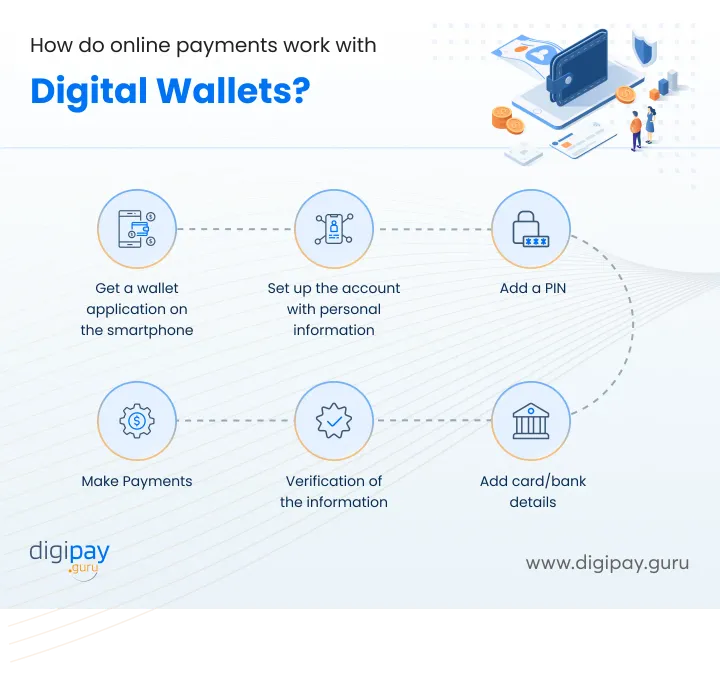
Setting Up Your Digital Wallet: A Step-by-Step Guide
The process of setting up a digital wallet is designed to be user-friendly, guiding you through the necessary steps to secure your payment information and prepare for transactions. While specific steps might vary slightly between platforms, the core principles remain consistent.
Choosing the Right Platform
Your choice of digital wallet will largely depend on your device and preferred ecosystem.
- Apple Pay: For iPhone, Apple Watch, iPad, and Mac users. Seamlessly integrated into Apple devices, it leverages Face ID or Touch ID for authentication.
- Google Pay: Available for Android smartphones, smartwatches, and web browsers. Offers broad compatibility across various Android devices and online platforms.
- Samsung Pay: Exclusive to Samsung Galaxy devices. It stands out by supporting both NFC and Magnetic Secure Transmission (MST) technology, allowing it to work with older card readers that don’t have NFC capabilities.
- PayPal/Venmo/Cash App: Primarily focused on online payments and P2P transfers, though some offer debit cards that link to the digital balance. These are platform-agnostic, accessible via web or app on any smartphone.
- Bank-Specific Apps: Many banks now integrate digital wallet features directly into their mobile banking applications, allowing for quick payments and card management within a trusted environment.
Consider which platform aligns best with your existing devices and how you plan to use the wallet (e.g., primarily in-store, online, or P2P).
Installation and Initial Setup
Most digital wallets come pre-installed or are readily available through your device’s app store.
- Locate the App: For mobile wallets, find the “Wallet” app on iOS devices or the “Google Pay” / “Samsung Pay” app on Android devices. If it’s a third-party app like PayPal, download it from the App Store or Google Play Store.
- Open and Create/Log In: Upon opening, you’ll typically be prompted to create a new account or log in with existing credentials (e.g., your Apple ID, Google account, or Samsung account).
- Agree to Terms: Review and accept the terms and conditions to proceed.
Adding Payment Methods
This is the crucial step where you link your financial accounts to your digital wallet.
- Select “Add Card” or “Add Payment Method”: The option is usually prominent on the wallet’s main screen.
- Choose Card Type: Indicate whether you’re adding a credit card, debit card, or potentially a loyalty/gift card.
- Enter Card Details:
- Scan: Many wallets allow you to simply scan your physical card using your device’s camera. This often auto-fills the card number, expiration date, and sometimes your name.
- Manual Entry: Alternatively, you can manually type in the card number, expiration date, and CVV (the 3 or 4-digit security code on the back/front of your card).
- Billing Address: You’ll also need to confirm or enter your billing address associated with the card.
- Verification Process: For security, your bank or card issuer will need to verify your identity. This typically involves:
- SMS Code: A code sent to your phone number linked to the bank account.
- Email Code: A code sent to your email address.
- Bank App Confirmation: A push notification to your bank’s mobile app for approval.
- Phone Call: A brief automated call to verify your identity.
- Once verified, your card will be added and ready for use. Repeat this process for any additional cards you wish to store.
Configuring Security Features
Robust security is a hallmark of digital wallets. It’s essential to set these up correctly.
- Biometrics (Fingerprint/Face ID): Ensure your device’s biometric authentication is active (e.g., Touch ID/Face ID on iOS, fingerprint/face unlock on Android). Digital wallets heavily rely on these for transaction authorization.
- PIN/Passcode: Always have a strong PIN or passcode set for your device. This acts as a fallback if biometrics fail or as an additional layer of security.
- Two-Factor Authentication (2FA): If your wallet platform offers it for account login (e.g., PayPal), enable 2FA for an extra layer of protection against unauthorized access to your wallet account itself.
Making Transactions with Your Digital Wallet
Once set up, using your digital wallet is remarkably straightforward, offering various methods for different transaction scenarios.
In-Store Purchases
This is where contactless payment technology shines.
- Look for the Symbol: Identify payment terminals displaying the contactless payment symbol (four curved lines) or the logos of Apple Pay, Google Pay, or Samsung Pay.
- Activate Your Wallet:
- iPhone: Double-click the side button (or home button on older models) to bring up your default card.
- Android (Google Pay/Samsung Pay): Simply unlock your phone and hold it near the terminal. Some phones allow you to open the wallet app explicitly.
- Apple Watch/Wearables: Double-click the side button.
- Authenticate: Your device will prompt you for authentication, typically using your fingerprint, face scan, or device passcode.
- Tap to Pay: Hold your device near the contactless reader on the payment terminal. A chime or visual confirmation on your device and the terminal will indicate a successful transaction.
Online Shopping and App Purchases
Digital wallets also streamline online checkouts, eliminating the need to manually enter card details for every purchase.
- Select Digital Wallet at Checkout: On e-commerce websites or within apps, look for payment options like “Pay with Apple Pay,” “Google Pay,” or “PayPal.”
- Authorize Purchase: Upon selecting, your device or browser will prompt you to authenticate the transaction using your biometric data or password.
- Auto-Fill: The digital wallet securely provides your payment and shipping information to the merchant, completing the purchase in just a few clicks.

Person-to-Person (P2P) Payments
Many digital wallets (especially apps like Venmo, PayPal, Cash App, and increasingly Google Pay) facilitate sending and receiving money between individuals.
- Select “Send” or “Pay”: In the app, choose the option to send money.
- Enter Recipient Details: Input the recipient’s phone number, email, or username.
- Enter Amount and Optional Note: Specify how much you want to send and add a memo for context.
- Confirm and Send: Review the details and confirm the transfer. Funds are typically transferred instantly or within minutes, though withdrawal to a bank account may take longer.
Managing Loyalty Programs and Tickets
Beyond payments, digital wallets are excellent organizers for your non-payment essentials.
- Adding Loyalty Cards: Most wallets have an option to add loyalty programs. You can often scan the barcode of your physical loyalty card or manually enter its number.
- Adding Event Tickets/Boarding Passes: When you purchase tickets or check in for a flight online, look for an “Add to Apple Wallet” or “Save to Google Pay” button. This automatically imports your ticket/pass, complete with QR codes and relevant information like gate numbers or seat assignments, and often provides timely notifications.
Advanced Features and Optimizing Your Digital Wallet Experience
Digital wallets are continually evolving, integrating more sophisticated features designed to enhance convenience and provide greater financial insights. Leveraging these advanced capabilities can further streamline your digital life.
Integrating with Smart Devices
The utility of digital wallets extends beyond your smartphone to a growing ecosystem of connected devices.
- Smartwatches: Many smartwatches from Apple, Samsung, Google (Wear OS), and Fitbit come equipped with NFC and allow you to link your digital wallet. This means you can make payments directly from your wrist, a particularly convenient feature when your phone isn’t easily accessible (e.g., during a run or workout).
- Other Wearables: Beyond smartwatches, some fitness trackers, rings, and even key fobs are incorporating payment capabilities, offering diverse ways to pay without reaching for a phone or wallet.
- Smart Home Devices: While less common for direct payments, some smart home platforms integrate with payment services for features like voice-activated shopping or subscription management, securely using your linked wallet details.
Budgeting and Spending Insights
While not all digital wallets offer comprehensive budgeting tools, many provide valuable insights into your spending habits.
- Transaction History: Most digital wallets maintain a detailed log of your purchases, showing merchant names, dates, and amounts. This can be a useful tool for tracking expenditures and reconciling statements.
- Categorization (Limited): Some wallets or linked bank apps can automatically categorize transactions (e.g., groceries, dining, transport), offering a high-level overview of where your money is going.
- Integration with Financial Apps: Many digital wallets can link to third-party personal finance management (PFM) apps. These PFM tools can pull transaction data from your wallet (via your bank account or card issuer) to provide more in-depth budgeting, spending analysis, and financial planning features.
Multi-Currency and International Payments
For frequent travelers or those making international online purchases, digital wallets offer burgeoning solutions.
- Currency Conversion: Some platforms (e.g., PayPal) handle currency conversion for international transactions, though it’s wise to check exchange rates and fees.
- International Card Support: Digital wallets typically support major credit and debit cards from various countries, meaning your usual payment methods can be used abroad wherever the wallet is accepted.
- Travel-Specific Cards: Certain digital wallets might integrate with travel-specific debit cards or multi-currency accounts, allowing you to hold and spend in different currencies without incurring foreign transaction fees. While the digital wallet itself primarily acts as a secure conduit, these integrations enhance its utility for global transactions.
Troubleshooting Common Issues
Even with robust technology, occasional hiccups can occur. Knowing how to troubleshoot can save time and frustration.
- Payment Failures:
- Terminal Issues: Ensure the payment terminal is working and compatible with contactless payments.
- NFC Position: Make sure your device is held correctly and close enough to the NFC reader.
- Card Limits: Check if you’ve hit a daily transaction limit for your card or a contactless payment limit (though many countries have increased or removed these).
- Insufficient Funds: Confirm there are enough funds in your linked account.
- Bank Decline: Contact your bank if transactions are consistently declined; there might be a hold on your card.
- Lost Device: Immediately use your device’s “Find My” feature (e.g., Find My iPhone, Find My Device for Android) to remotely lock or wipe your device. You can also suspend or remove cards from your digital wallet via your associated account (e.g., iCloud for Apple Pay, Google Account for Google Pay).
- App Glitches: Try force-closing and restarting the wallet app. If issues persist, clear the app’s cache (Android) or reinstall the app. Ensure your operating system and the wallet app are updated to the latest versions.
Digital Wallet Security: Protecting Your Assets
The very concept of storing sensitive financial information on a device might raise concerns. However, digital wallets are engineered with multiple layers of cutting-edge security technology, often making them safer than carrying physical cards. Understanding these mechanisms and adopting best practices is paramount to ensuring your financial safety.
Built-in Security Measures
Digital wallets leverage sophisticated technological safeguards to protect your data.
- Tokenization: This is the cornerstone of digital wallet security. When you add a card, your actual 16-digit card number is not stored on your device or transmitted during a transaction. Instead, a unique, encrypted “token” or “device account number” is created. This token is a substitute for your card number. When you pay, only this token, not your actual card number, is sent to the merchant. If a data breach occurs at a merchant, the token is useless to fraudsters as it cannot be reverse-engineered to reveal your original card number.
- Encryption: All data stored within the digital wallet, as well as data transmitted during a transaction, is heavily encrypted. This scrambling of information makes it unreadable to unauthorized parties, even if intercepted.
- Device-Level Security: Digital wallets are tightly integrated with your device’s inherent security features. This includes:
- Biometric Authentication: Transactions are authorized only after successful fingerprint or facial recognition, ensuring only you can make payments.
- Passcodes/PINs: A strong device passcode acts as a fallback or primary authentication method.
- Secure Elements: Many smartphones have a dedicated “Secure Element” (SE) chip, a tamper-resistant hardware component designed to store sensitive data like payment tokens in an isolated environment, separate from the main operating system.
- Dynamic CVV: Unlike physical cards with a static CVV, some digital wallets generate a dynamic CVV for online transactions, adding another layer of security.
Best Practices for Users
While the technology is robust, user vigilance is crucial for maintaining security.
- Always Use Biometrics and Strong Passcodes: Never disable fingerprint or face ID, and always have a complex, unique passcode on your device. These are your primary lines of defense.
- Keep Software Updated: Ensure your phone’s operating system and all wallet apps are always updated. Updates often include critical security patches that protect against newly discovered vulnerabilities.
- Be Wary of Public Wi-Fi for Sensitive Transactions: While tokenization offers strong protection, performing financial transactions over unsecured public Wi-Fi networks can expose you to other risks. It’s generally safer to use your mobile data or a trusted private network.
- Review Transaction History Regularly: Periodically check your digital wallet’s transaction history and cross-reference it with your bank statements to quickly identify any unauthorized activity.
- Avoid Jailbreaking/Rooting Devices: Modifying your device’s operating system can compromise its security features, including those protecting your digital wallet.
What to Do If Your Device is Lost or Stolen
Immediate action is vital if your device falls into the wrong hands.
- Activate Remote Wipe/Lock: Use your device’s built-in remote management features (e.g., Apple’s “Find My” or Google’s “Find My Device”) to locate, lock, or erase all data on the device. This is the fastest way to prevent unauthorized access to your digital wallet and other personal information.
- Suspend/Remove Cards Remotely: Most digital wallet platforms allow you to remotely suspend or remove the cards linked to the lost device through your associated account (e.g., iCloud for Apple Pay, your Google Account for Google Pay). This ensures no payments can be made from the wallet even if the device isn’t immediately wiped.
- Contact Your Bank: Inform your bank or card issuer about the lost device and the potential compromise of your digital wallet. They can take additional measures, such as monitoring for suspicious activity or issuing new tokens.
Recognizing and Avoiding Scams
Cybercriminals constantly devise new ways to exploit users. Stay informed to protect yourself.
- Phishing Attempts: Be suspicious of emails or messages asking for your wallet login credentials, card details, or personal information. Digital wallet providers or banks will never ask for this via unsolicited communication.
- Fake Apps: Only download digital wallet apps from official app stores (Apple App Store, Google Play Store). Be wary of third-party app stores or direct downloads, as these might contain malicious fake apps designed to steal your data.
- Unusual Requests: If a merchant or individual asks you to pay in an unusual way or demands immediate payment to avoid consequences, exercise extreme caution.

Conclusion
The digital wallet is no longer a niche technology for early adopters; it is rapidly becoming an indispensable tool for managing finances in the modern era. From the secure architecture of tokenization and encryption to the sheer convenience of contactless payments and consolidated digital cards, its advantages are clear. By understanding how to set up, use, and most importantly, secure your digital wallet, you empower yourself with a powerful and efficient means of managing transactions and organizing your digital life.
Embracing digital wallets is a step towards a more streamlined, secure, and future-proof approach to personal finance. The technology will only continue to evolve, integrating deeper into our smart devices and expanding its capabilities. By familiarizing yourself with these tools today, you’re not just adopting a new payment method; you’re stepping into the vanguard of digital convenience and security.
aViewFromTheCave is a participant in the Amazon Services LLC Associates Program, an affiliate advertising program designed to provide a means for sites to earn advertising fees by advertising and linking to Amazon.com. Amazon, the Amazon logo, AmazonSupply, and the AmazonSupply logo are trademarks of Amazon.com, Inc. or its affiliates. As an Amazon Associate we earn affiliate commissions from qualifying purchases.