
The digital landscape has profoundly reshaped how we conduct financial transactions, making traditional banking methods often seem cumbersome in comparison. At the forefront of this evolution stands PayPal, a pioneering force in online payments that has seamlessly integrated into daily life for millions worldwide. More than just a service, PayPal represents a sophisticated piece of financial technology that facilitates secure, swift, and convenient money transfers, online purchases, and business operations. For newcomers navigating the digital economy, the initial step into this ecosystem—registering for an account—might seem daunting. However, understanding the process not only demystifies it but also unlocks a powerful tool for managing your digital finances. This comprehensive guide will walk you through every aspect of registering for PayPal, framed within the context of digital technology, ensuring a smooth onboarding experience into this essential platform. We’ll explore the technical prerequisites, the step-by-step registration process, crucial security measures, and how to optimize your account, all while maintaining a sharp focus on the underlying technological mechanisms that make PayPal an indispensable part of our connected world.
Understanding PayPal: More Than Just a Payment Platform
In an era defined by instantaneous digital communication and global connectivity, the methods by which we manage and transfer money have undergone a monumental transformation. PayPal, instrumental in pioneering this shift, evolved from a nascent online payment processor into a comprehensive digital financial ecosystem. To fully appreciate the registration process, it’s crucial to understand PayPal not merely as an app or a website, but as a sophisticated technological framework designed to facilitate secure and efficient monetary exchange across various digital frontiers.
The Evolution of Digital Transactions
PayPal marked a significant turning point in online transactions, demonstrating the immense potential of leveraging the internet for financial services. It pioneered user-friendly peer-to-peer (P2P) payments, allowing individuals to send money with just an email address, effectively bypassing traditional banking intermediaries for smaller transactions. Technically, PayPal’s infrastructure relies on advanced network protocols and robust encryption standards, ensuring every byte of financial data is protected. Its cloud-based architecture allows for immense scalability and reliability, processing millions of transactions daily. This continuous evolution, including seamless mobile integration, solidifies its position at the forefront of digital finance.
Key Features and Benefits for Users: A Technical Perspective
PayPal’s allure lies in its blend of simplicity and advanced functionality. Its intuitive user interface (UI) and user experience (UX) design allow easy navigation. Underneath, a powerhouse of technical features ensures security and convenience:
- Advanced Encryption and Fraud Detection: State-of-the-art encryption (TLS) protects sensitive data, complemented by sophisticated, AI-driven fraud detection algorithms that proactively monitor for suspicious activity.
- Global Reach and Currency Conversion: PayPal’s technical infrastructure seamlessly handles multi-currency transactions, simplifying international commerce through automated conversion mechanisms.
- Seamless E-commerce Integration: Robust Application Programming Interfaces (APIs) and SDKs enable effortless integration into e-commerce platforms, offering streamlined “one-click” checkout experiences.
- Mobile Accessibility: Dedicated, feature-rich mobile applications for iOS and Android offer the full spectrum of PayPal services, demonstrating a strong focus on mobile-first technology.
PayPal’s Ecosystem: Connecting Buyers and Sellers Globally
PayPal has cultivated a vast digital ecosystem bridging buyers and sellers globally. It acts as a trusted digital intermediary, abstracting international banking complexities. For businesses, especially SMEs and freelancers, PayPal offers a suite of technological tools—such as invoicing systems and recurring payment options—empowering them to conduct global business without needing their own sophisticated payment gateway infrastructure. This network effect, driven by adaptable technology, cements PayPal’s role in the modern digital economy.
Pre-Registration Essentials: What You Need to Get Started
Before embarking on the actual registration, gathering the necessary digital and personal prerequisites is crucial. Just as a software installation requires specific system resources, establishing a PayPal account necessitates certain information and a suitable technical environment to ensure a smooth and secure setup, preventing technical hitches or delays.
Essential Information and Documentation
The foundation of your PayPal account is built upon accurate personal and financial data. This information is crucial for identity verification, security protocols, and linking your digital wallet to real-world financial instruments. From a technical standpoint, this is the data input required by PayPal’s system to create and authenticate your unique digital identity.
- A Valid Email Address: Your primary identifier for login, notifications, and communications.
- A Reliable Mobile Phone Number: Used for crucial security functions like two-factor authentication (2FA) and verifying suspicious activity.
- Your Full Legal Name and Current Residential Address, Date of Birth: Fundamental for Know Your Customer (KYC) compliance and identity verification.
- Government-Issued Identification (Recommended for Full Verification): A driver’s license, passport, or national ID may be required for higher verification tiers, unlocking full account functionality and increased transaction limits. PayPal’s system utilizes digital identity verification technologies.
- Bank Account or Credit/Debit Card Details: To fund and withdraw, you’ll need to link at least one financial instrument. This involves providing details for secure, encrypted data transfer to integrate these external financial systems with your PayPal account.
Device Compatibility and Internet Requirements
A stable and secure technical environment is paramount. This ensures data integrity and protects your sensitive information during transmission.
- Stable Internet Connection: Crucial for uninterrupted data submission.
- Compatible Device: Register via a web browser on a computer (ensure updated browser like Chrome, Firefox, Edge, Safari) or through the official PayPal mobile app (ensure OS meets minimum requirements).
- Basic Security Software: Up-to-date antivirus and firewall add client-side protection against malware or phishing.
Choosing the Right Account Type: Personal vs. Business
PayPal offers two primary account types, each tailored to different user needs and equipped with distinct technical functionalities.
- Personal Account: For individuals for everyday transactions: sending/receiving money from friends/family, online shopping. Streamlined for simplicity in individual payment processing.
- Business Account: For merchants, freelancers, and businesses. Offers a comprehensive suite of technological tools: multi-user access, advanced invoicing/reporting, custom checkout solutions (via APIs), and specialized support. Provides a more robust and scalable platform for managing commercial transactions.
The Step-by-Step Technical Registration Process
With your essential information ready and your device prepared, the actual process of creating your PayPal account is a straightforward sequence of digital interactions designed for security and user-friendliness. Follow these technical steps to establish your digital wallet.
Initiating Your Account Creation
- Access the Platform: Navigate to the official PayPal website (paypal.com) using your preferred web browser, or launch the PayPal app on your mobile device.
- Select “Sign Up”: Locate and click the “Sign Up” button, typically found in the top right corner of the website or as a prominent option in the app.
Data Input and Security Configuration
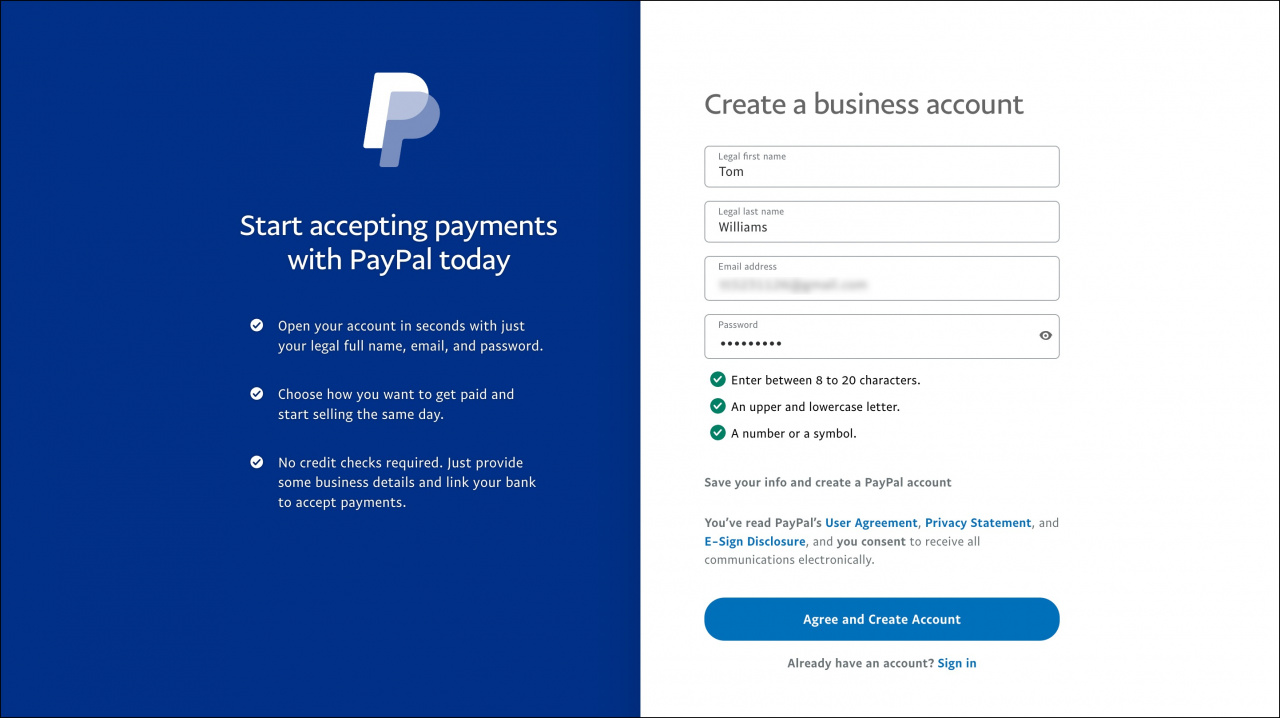
- Choose Account Type: Select either “Personal Account” or “Business Account” based on your needs, then click “Next.”
- Provide Contact Information: Enter your active email address and a secure mobile phone number. PayPal will use these for communication and verification.
- Create Strong Credentials: Formulate a robust password (combining uppercase, lowercase, numbers, and symbols). This password is the primary gatekeeper to your digital funds, so its strength is paramount for digital security.
- Verify Your Phone: A verification code will be sent via SMS to your registered phone number. Enter this code into the PayPal interface to confirm ownership of the number.
Linking Financial Instruments and Verification
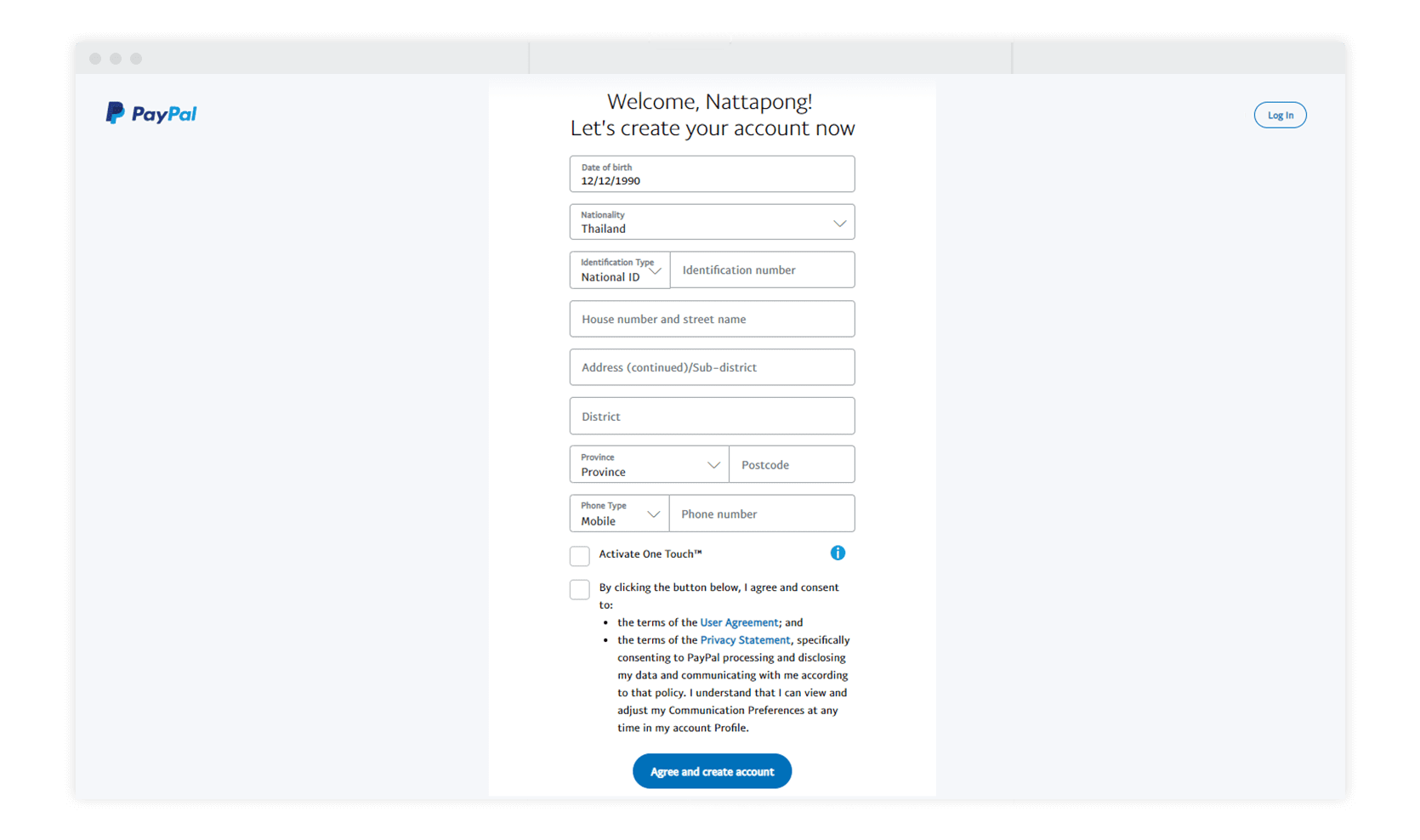
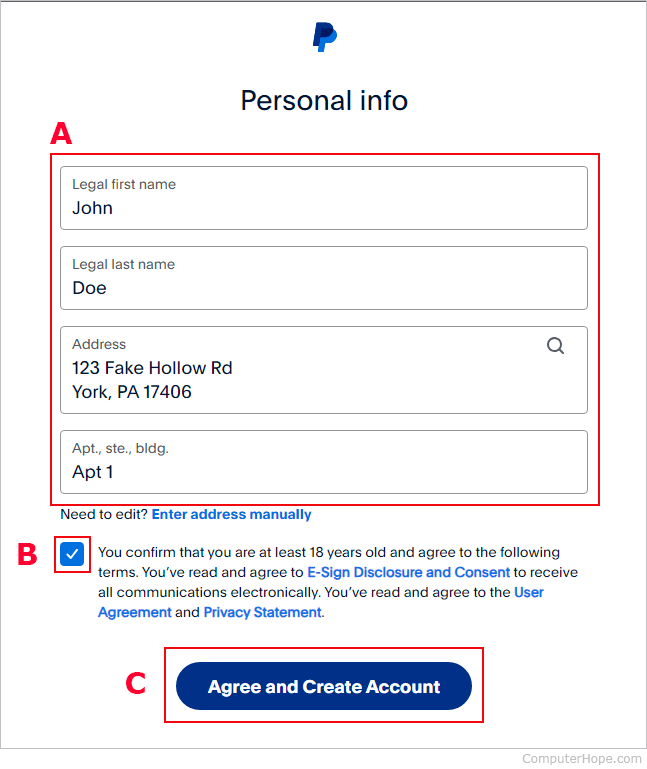
- Input Personal Details: Provide your full legal name, date of birth, and residential address as prompted. These data points are essential for KYC compliance.
- Link Financial Instrument: Connect your bank account or a credit/debit card. For bank accounts, this typically involves entering your bank name, account number, and routing number. For cards, input the card number, expiration date, and security code (CVV). PayPal employs secure, encrypted channels for this sensitive data transfer. Verification usually involves small micro-deposits to your bank account or a temporary authorization hold on your card, which you then confirm.
- Confirm Identity (If Required): Depending on your region or if you’re registering a Business account, you may be prompted to upload scans or photos of a government-issued ID. This digital verification step reinforces account security and compliance.
Completing the Setup
- Review and Agree: Carefully read PayPal’s User Agreement and Privacy Policy. These documents outline the terms of service and how your data is handled. Click “Agree and Create Account” or a similar button to finalize.
- Explore Your Dashboard: Once registered, you’ll be directed to your PayPal dashboard, which serves as the central interface for managing your transactions, linked accounts, and security settings.
- Enhance Security: Consider immediately activating Two-Factor Authentication (2FA) for an added layer of digital protection, if not already prompted during registration.
Conclusion
Registering for PayPal is more than just signing up for a service; it’s an initiation into a robust digital ecosystem built on advanced technology designed for secure and efficient financial transactions. By understanding the technological underpinnings, preparing the necessary digital information, and carefully following the step-by-step process, you can confidently establish your PayPal account. This powerful digital wallet will then serve as a versatile tool for navigating the complexities of online commerce, peer-to-peer payments, and global financial interactions, all underpinned by sophisticated digital security protocols. Embrace the convenience and security that PayPal’s technology offers, empowering your financial activities in the digital age.
aViewFromTheCave is a participant in the Amazon Services LLC Associates Program, an affiliate advertising program designed to provide a means for sites to earn advertising fees by advertising and linking to Amazon.com. Amazon, the Amazon logo, AmazonSupply, and the AmazonSupply logo are trademarks of Amazon.com, Inc. or its affiliates. As an Amazon Associate we earn affiliate commissions from qualifying purchases.