
In an increasingly digital world, the archaic ritual of printing tax forms, writing checks, and mailing them off has largely been relegated to the past. Today, paying your taxes online has become the standard, offering unparalleled convenience, security, and efficiency for millions of taxpayers. This shift is not merely a technological upgrade but a fundamental transformation in how individuals and businesses manage their financial obligations, aligning perfectly with the broader trends of digital finance and streamlined economic processes. For anyone still navigating the complexities of tax season with physical paperwork, understanding the nuances of online tax payments is not just a convenience—it’s an essential step towards modern financial management.

This comprehensive guide will delve into the various methods available for online tax payments, walk you through the process, and highlight critical considerations to ensure your financial compliance is both seamless and secure. From leveraging official government portals to utilizing commercial software, we will explore the landscape of digital tax payments, empowering you to fulfill your civic duty with confidence and ease.
The Evolution of Tax Payments: From Paper to Pixels
The journey from manual ledger entries and paper checks to instant digital transactions reflects a profound evolution in financial administration. For decades, tax payments were a labor-intensive process, fraught with potential delays and human error. The advent of the internet and the subsequent development of secure online financial infrastructures have revolutionized this landscape, offering taxpayers a more accessible and less daunting experience.
The Shift Towards Digital Convenience
The impetus for this shift was multifaceted. Governments, seeking to improve efficiency and reduce administrative costs, began investing heavily in digital infrastructure for tax collection. Simultaneously, taxpayers demanded more user-friendly and time-saving methods for managing their finances. The result was a gradual but decisive move towards online portals and integrated software solutions. This digital transformation has not only expedited the payment process but has also significantly reduced instances of lost mail, processing delays, and manual reconciliation errors that were common with traditional methods. It has made tax compliance a year-round, on-demand activity rather than a singular, dreaded annual event.
Understanding the Benefits of Online Tax Payments
Beyond mere convenience, online tax payments offer a host of tangible benefits that directly impact your personal and business finance management:
- Time Savings: Eliminate trips to the post office, searching for stamps, and the time spent physically preparing envelopes. Payments can be made in minutes from the comfort of your home or office.
- Enhanced Accuracy: Digital systems often have built-in validation checks, reducing the likelihood of errors in payment amounts or taxpayer identification numbers. This minimizes the risk of penalties due to incorrect submissions.
- Instant Confirmation: Most online payment systems provide immediate confirmation of your payment, offering peace of mind and an undeniable audit trail. This contrasts sharply with waiting for a canceled check or a mailed receipt.
- Improved Security: While no online system is entirely foolproof, official government and reputable commercial platforms employ robust encryption and security protocols designed to protect your sensitive financial data from fraud and unauthorized access.
- Flexibility: Online payments can be scheduled in advance, ensuring you meet deadlines even if you’re busy or away. They also allow for last-minute payments right up until the deadline.
- Reduced Paperwork: By moving to digital records and confirmations, you contribute to a paperless environment and simplify your own record-keeping, making it easier to retrieve payment history when needed.
These benefits underscore why online tax payments are not just an option but the preferred method for modern financial stewardship, empowering taxpayers to manage their fiscal responsibilities with greater control and less stress.
Navigating the Digital Landscape of Tax Payments
The digital realm offers several avenues for paying your taxes online, each with its own set of features and suitability depending on your specific needs. Understanding these options is key to choosing the most efficient and appropriate method for your financial situation.
Official Tax Authority Websites (IRS, State Tax Agencies)
The most direct and often recommended way to pay your federal taxes online is through the Internal Revenue Service (IRS) website, specifically their “Pay Your Tax Bill” section. Similarly, most state tax agencies provide their own secure online portals for state income tax payments.
- IRS Direct Pay: This free service allows you to pay your tax bill or make estimated tax payments directly from your checking or savings account. It’s simple, secure, and requires no registration. You’ll need your bank account information and taxpayer identification number.
- Payment Card Options (IRS): While the IRS does not directly process credit or debit card payments, it works with third-party payment processors that do. These processors charge a small fee, but it offers the flexibility of using a card, which might be beneficial for those who prefer to earn rewards or need to manage cash flow.
- Electronic Federal Tax Payment System (EFTPS): This free service is primarily for businesses and individuals who make estimated tax payments or federal tax deposits. It offers greater flexibility in scheduling payments up to 365 days in advance. Registration is required and takes a few weeks to complete.
- State Tax Portals: Each state has its own digital platform, which typically mirrors the functionality of the IRS portal, allowing for direct bank transfers or credit/debit card payments through approved third parties. It’s crucial to locate your specific state’s revenue department website and follow their instructions.
Using official government channels provides the highest degree of confidence in security and ensures that your payment is directly routed to the correct authority without intermediaries.
Utilizing Commercial Tax Software
Many taxpayers use commercial tax preparation software like TurboTax, H&R Block, or TaxAct to prepare and file their tax returns. A significant advantage of these platforms is their integrated payment functionality.
- Seamless Integration: Once you’ve prepared your return and determined your tax liability, these software programs typically guide you through the payment process directly within their interface. You can often choose to pay via direct debit from your bank account or through a linked credit/debit card (which again, usually involves a third-party processor and associated fees).
- User-Friendly Experience: Commercial software is designed for ease of use, making the entire tax process, including payment, straightforward. They often store your financial information securely, simplifying future payments.
- Comprehensive Record-Keeping: These platforms maintain digital records of your filed returns and payments, providing a consolidated history for future reference and audit preparedness.
While these tools often come with a fee for their preparation services, the integrated payment option adds a layer of convenience for those already using them.
Exploring Third-Party Payment Processors
Beyond direct government portals and integrated software, several authorized third-party payment processors exist that allow you to pay your federal and state taxes online. These are typically the same processors used when you opt for credit/debit card payments on government websites.
- Flexibility in Payment Methods: These processors offer a wider range of payment options, including various credit cards, debit cards, and sometimes even digital wallets.
- Transaction Fees: It’s important to note that these services almost always charge a convenience fee, which can vary depending on the processor and the type of payment method used. These fees are usually a percentage of the payment amount or a flat fee.
- Security and Authorization: Ensure that any third-party processor you use is officially authorized by the IRS or your state tax agency. A list of authorized processors is typically available on the respective government websites.
While offering more payment flexibility, always weigh the convenience fees against your financial strategy. For large payments, these fees can accumulate, potentially outweighing the benefits unless earning credit card rewards is a significant factor.
A Step-by-Step Guide to Online Tax Payments
Making an online tax payment is a straightforward process, but meticulous attention to detail is crucial to avoid errors and ensure your payment is successfully recorded. Following these steps will help you navigate the process confidently.
Gathering Your Financial Documents
Before you begin, ensure you have all necessary information at hand. This typically includes:
- Your Taxpayer Identification Number (TIN): For individuals, this is your Social Security Number (SSN). For businesses, it’s your Employer Identification Number (EIN).
- The Tax Year and Form Number: Clearly identify which tax year you are paying for and the specific tax form (e.g., Form 1040 for individual income tax, Form 1120 for corporate income tax).
- The Exact Payment Amount: Double-check your calculations or the amount generated by your tax software to ensure accuracy.
- Your Bank Account Information (if paying via direct debit): This includes your bank’s routing number and your checking or savings account number.
- Your Credit/Debit Card Information (if paying via card): Card number, expiration date, security code, and billing address.
Having these details ready will streamline the payment process and prevent delays.
Choosing Your Preferred Payment Method
Based on the options discussed earlier, select the method that best suits your needs:
- Direct Pay/EFTPS (for federal taxes) or State Portal Direct Debit: This is generally the most cost-effective option as it typically incurs no fees.
- Commercial Tax Software Integration: If you’ve prepared your taxes using software, this might be the most convenient integrated option.
- Third-Party Processor (Credit/Debit Card): Choose this if you prioritize earning credit card rewards, need to manage cash flow, or prefer not to use direct bank transfers, accepting the associated fees.
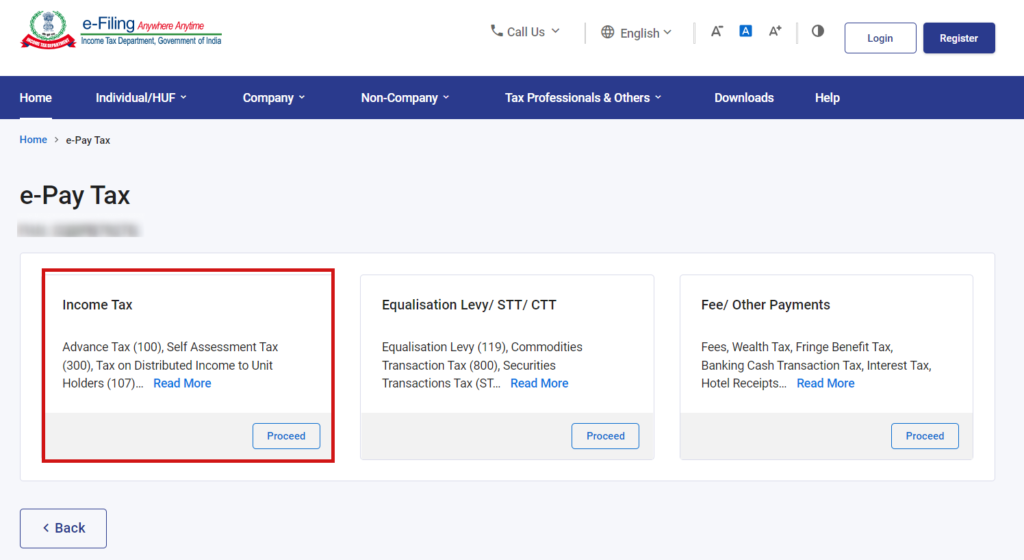
Make an informed decision based on cost, convenience, and your financial strategy.
Initiating and Confirming Your Payment
Once you’ve chosen your method, proceed with the payment:
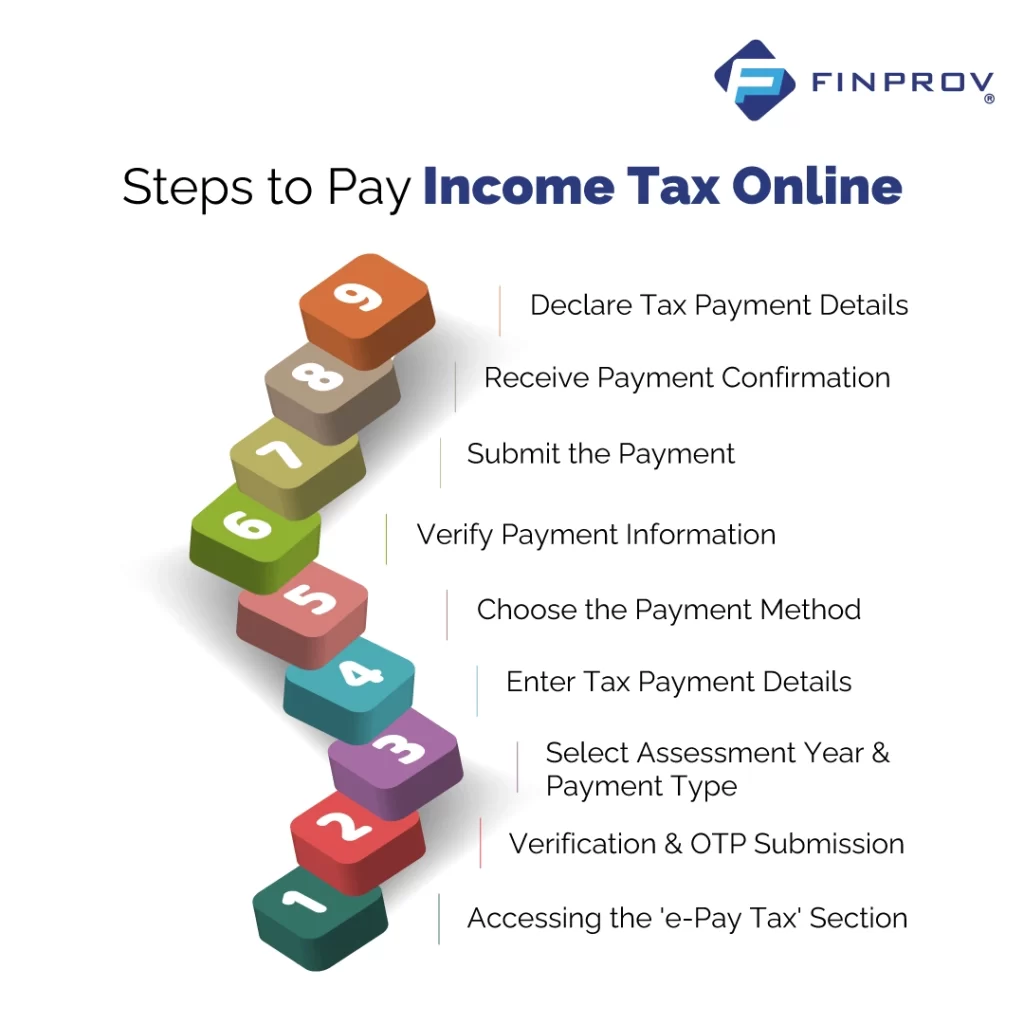
- Access the Platform: Navigate to the chosen website (IRS, state tax agency, commercial software, or authorized third-party processor).
- Select Payment Type: Indicate whether it’s a balance due, estimated tax payment, or an extension payment.
- Enter Taxpayer Information: Provide your SSN/EIN, name, and address as requested.
- Input Payment Details: Enter the tax year, the exact amount, and your chosen payment method’s details (bank account or credit/debit card info).
- Review and Confirm: This is a critical step. Carefully review all entered information—especially the payment amount, tax year, and account numbers—before finalizing the transaction. A single incorrect digit can lead to significant issues.
- Submit Payment: Click the submit or confirm button.
Upon successful submission, you should receive an immediate confirmation number or email. Save this confirmation number and/or print the confirmation page. This is your proof of payment.
Record-Keeping and Verification
Proper record-keeping is paramount for financial transparency and audit preparedness:
- Save Confirmation: Keep the confirmation number, email, or printed page in your tax records.
- Check Bank/Card Statements: Within a few business days, verify that the payment has been debited from your bank account or posted to your credit card statement. This serves as an additional layer of verification.
- Maintain Digital/Physical Records: Store digital copies of your payment confirmations alongside your filed tax returns. For physical records, a dedicated tax folder is invaluable.
Diligent record-keeping ensures you can quickly verify payments and respond to any inquiries from tax authorities.
Ensuring Security and Accuracy in Your Online Tax Transactions
While online tax payments offer significant advantages, they also necessitate a heightened awareness of security and accuracy. Your financial well-being depends on protecting your sensitive data and ensuring your submissions are flawless.
Protecting Your Personal and Financial Information
Cybersecurity threats are a constant concern, particularly when dealing with financial transactions. Take the following precautions:
- Use Official Websites Only: Always ensure you are on the legitimate IRS.gov website or your state’s official tax portal. Be wary of phishing emails or suspicious links that claim to be from tax authorities. Look for “https://” in the URL and a padlock icon.
- Strong, Unique Passwords: If you create an account on a tax payment system (like EFTPS or commercial software), use a strong, unique password and enable two-factor authentication (2FA) if available.
- Secure Internet Connection: Avoid making tax payments over unsecured public Wi-Fi networks. Use a trusted, private network at home or work.
- Monitor Accounts: Regularly review your bank and credit card statements for any unauthorized transactions.
- Update Software: Keep your operating system, web browser, and antivirus software up to date to protect against known vulnerabilities.
Vigilance is your best defense against identity theft and financial fraud.
Double-Checking for Accuracy Before Submission
Errors in tax payments can lead to penalties, interest charges, or even delays in processing your return. Precision is non-negotiable:
- Verify Amounts: Ensure the payment amount exactly matches your tax liability.
- Confirm Tax Year: Submitting a payment for the wrong tax year is a common mistake. Double-check that you’ve selected the correct year.
- Accurate Identifiers: Your SSN or EIN must be entered correctly. Mismatched or incorrect identifiers can cause payments to not be properly attributed.
- Bank/Card Details: Re-enter or meticulously check your bank account or credit card numbers. A transposed digit can mean a failed payment.
A few extra moments spent verifying details can save hours of frustration and potential financial repercussions later.
What to Do if You Encounter Issues
Despite best efforts, issues can arise. Knowing how to react is crucial:
- Failed Payment Notification: If your payment is rejected or fails, contact your bank or credit card company first to understand why (e.g., insufficient funds, incorrect details). Then, rectify the issue and attempt the payment again.
- Incorrect Payment Amount: If you realize you paid the wrong amount, do not try to “fix” it by making another payment of a different amount without first consulting IRS or state guidance. For federal taxes, the IRS offers options for making additional payments or requesting refunds for overpayments. For underpayments, simply make another payment for the difference, clearly indicating the tax year.
- Payment Not Showing Up: If your bank account was debited or credit card charged, but you haven’t received confirmation, or if your payment doesn’t appear on your tax account, contact the relevant tax authority directly with your confirmation number and proof of payment (bank statement).
- Technical Difficulties: If the website is down or you face technical glitches, try again later or contact the technical support line provided by the tax authority or software vendor.
Proactive communication and careful documentation are key to resolving any payment discrepancies or issues effectively.
Beyond Basic Payments: Quarterly Estimates and Extensions
The convenience of online payment extends beyond just your annual tax bill, offering valuable flexibility for more complex financial situations such as estimated taxes and extension filings.
Managing Estimated Tax Payments Online
Many individuals, particularly self-employed professionals, freelancers, and those with significant income not subject to withholding, are required to pay estimated taxes quarterly. Missing these payments or underpaying can lead to penalties. Online platforms make managing these regular payments significantly easier:
- IRS Direct Pay/EFTPS: These platforms are ideal for scheduling and making your quarterly estimated tax payments (Form 1040-ES). You can schedule payments in advance for all four quarters, ensuring you meet the deadlines without having to remember each one manually.
- State Estimated Tax Portals: Similar options are available through your state’s tax website for state estimated taxes.
- Benefits: Online management reduces the risk of forgetting a payment, provides instant confirmation, and simplifies year-end reconciliation of your tax obligations. It also helps with cash flow management by spreading out your tax burden throughout the year.
This proactive approach to tax management is a cornerstone of sound personal and business finance, made significantly more manageable through online tools.
Filing for a Tax Extension Electronically
Sometimes, taxpayers need more time to prepare their returns. Filing for an extension does not extend the time to pay your taxes, but it does extend the deadline to file your return. Online methods make this process simple:
- IRS Free File or Form 4868: You can file for a federal extension electronically through the IRS Free File program (if eligible), by using commercial tax software, or directly via IRS Direct Pay (by indicating you are making an “Extension Payment”). Even if you don’t expect to owe taxes or plan to pay later, filing Form 4868 ensures your filing deadline is extended.
- State Extensions: Most states also offer online portals or integrate with commercial software for filing state tax extensions.
- Crucial Note: If you anticipate owing taxes, you should still estimate your tax liability and pay that amount by the original deadline to avoid interest and penalties, even if you file an extension for the return itself. Online payment methods are invaluable for making this estimated payment alongside your extension request.
The ability to electronically manage extensions and estimated payments provides crucial flexibility, helping taxpayers stay compliant even when facing complex financial circumstances or time constraints.
In conclusion, paying your taxes online is no longer a niche option but a fundamental aspect of modern financial management. By embracing the digital avenues provided by government agencies and commercial software, taxpayers can ensure their financial obligations are met with accuracy, security, and unparalleled convenience, transforming a once daunting annual task into a streamlined and efficient process.
aViewFromTheCave is a participant in the Amazon Services LLC Associates Program, an affiliate advertising program designed to provide a means for sites to earn advertising fees by advertising and linking to Amazon.com. Amazon, the Amazon logo, AmazonSupply, and the AmazonSupply logo are trademarks of Amazon.com, Inc. or its affiliates. As an Amazon Associate we earn affiliate commissions from qualifying purchases.