
In the dynamic world of online shopping, gift cards serve as a popular and convenient method for spending. Among them, American Express (Amex) gift cards stand out, offering the flexibility of a credit card without the associated debt. However, the process of using these specific gift cards, particularly on a massive platform like Amazon, can sometimes present unique challenges and questions. This guide aims to demystify the process, providing a professional, insightful, and engaging roadmap for seamlessly leveraging your Amex gift card for your Amazon purchases, ensuring you maximize its value and avoid common pitfalls.
Understanding how to effectively utilize various financial tools is a cornerstone of sound personal finance. An Amex gift card, though seemingly straightforward, has nuances that, once understood, can enhance your online shopping experience and financial management. From understanding its fundamental nature as a prepaid debit card to navigating Amazon’s payment system, we’ll cover every essential step, empowering you to shop confidently and efficiently.
Understanding Amex Gift Cards and Their Appeal
American Express gift cards are a popular choice for gifts, rewards, and personal budgeting due to their widespread acceptance and the perceived security of the Amex brand. However, unlike traditional Amex credit cards, these are prepaid instruments, meaning you can only spend the amount loaded onto them. This distinction is crucial for managing your finances and understanding their limitations, especially when shopping online.
The Versatility of Amex Gift Cards
Amex gift cards are generally accepted anywhere American Express cards are, making them incredibly versatile. They function much like a debit card, drawing directly from the pre-loaded balance. This makes them an excellent tool for controlled spending, allowing individuals to budget for specific purchases without dipping into their primary bank accounts or running up credit card debt. For many, they represent a hassle-free way to give or receive money for shopping, dining, or services. Their appeal also lies in their robustness against overdrafts; once the funds are depleted, the card simply stops working, preventing unexpected charges.
Key Features and Limitations to Be Aware Of
While highly versatile, Amex gift cards come with specific features and limitations that users should understand:
- Prepaid Nature: As mentioned, they are prepaid, meaning the funds are finite. It’s essential to keep track of your balance to avoid payment declines.
- No PIN Required (Typically): For online purchases, a PIN is usually not required. Instead, you’ll use the card number, expiration date, and security code (CVV) just like a credit card.
- Expiration Dates and Fees: Amex gift cards generally have an expiration date (often five years from activation), and sometimes inactivity fees may apply after a certain period if not used. Always check the cardholder agreement for specific terms.
- Not Reloadable: Unlike some prepaid debit cards, Amex gift cards are typically not reloadable. Once the funds are exhausted, the card becomes inactive.
- No Credit Building: They do not impact your credit score, as they are not lines of credit.
- Cannot Be Linked to Bank Accounts: They operate independently and cannot be linked directly to a bank account for transfers or withdrawals.
Understanding these points ensures a smoother experience and helps you integrate the gift card effectively into your personal finance strategy.
Preparing Your Amex Gift Card for Amazon Purchases
Before you can add your Amex gift card to your Amazon account and start shopping, there are a few preparatory steps that can significantly enhance your experience and prevent potential issues. These steps are crucial for secure and efficient use of any financial tool online.
Registering Your Gift Card Online
While not always mandatory for every online purchase, registering your Amex gift card is a highly recommended best practice, especially when using it on major platforms like Amazon. Registration typically involves visiting the Amex gift card website (usually provided on the card or packaging) and inputting your card details, along with your billing address.
Why Register?
- Security: It links your card to you, providing a layer of protection in case of loss or theft.
- Tracking: You can easily check your balance and transaction history online.
- Address Verification: Many online merchants, including Amazon, use Address Verification Service (AVS) as a fraud prevention measure. If the billing address you enter on Amazon doesn’t match the address registered with your gift card, the transaction might be declined. Registering ensures a match, drastically reducing the chances of a declined payment due to address mismatches.
Checking Your Balance: A Crucial First Step
Before attempting any purchase, always check your Amex gift card balance. This might seem obvious, but it’s a critical step that often gets overlooked. You can typically check your balance on the Amex gift card website or by calling the customer service number provided on the back of the card. Knowing the exact balance helps you:
- Avoid Declines: Prevents the embarrassment and frustration of a payment decline due to insufficient funds.
- Plan Purchases: Allows you to select items that fit within your budget or plan for split payments if your desired purchase exceeds the card’s value.
- Manage Expectations: Helps you understand precisely how much purchasing power you have available.
Understanding Amex Gift Card as a Debit/Credit Card
When you use an Amex gift card online, particularly on Amazon, you will treat it as a credit or debit card. There’s no separate “gift card” payment option specifically for Amex gift cards (unlike Amazon’s own gift cards).
- Payment Method Category: When prompted to add a new payment method on Amazon, select “Add a credit or debit card.”
- Inputting Details: You’ll enter the 15-digit card number (it starts with 37 or 34), the expiration date, and the 4-digit security code (CID) located on the front of the card, usually above the card number on the right.
- Billing Address: This is where the registration step becomes vital. Ensure the billing address you enter on Amazon exactly matches the address you registered with your Amex gift card.
By taking these preparatory steps, you establish a solid foundation for a seamless and successful shopping experience on Amazon.
Step-by-Step Guide to Adding and Using Your Card on Amazon
Once your Amex gift card is registered and you know its balance, using it on Amazon is a straightforward process, similar to using any other credit or debit card. However, handling potential balance discrepancies requires a bit of foresight.
Adding the Gift Card as a Payment Method
- Log In to Amazon: Access your Amazon account.
- Navigate to Payment Options: Go to “Your Account” (hover over your name at the top right) and select “Payment Options” under “Ordering and Shopping Preferences.”
- Add a New Card: Click on “Add a credit or debit card.”
- Enter Card Details: Carefully input the Amex gift card number, the expiration date, and the security code (CID) found on the front of the card.
- Enter Billing Address: This is crucial. Use the exact billing address you registered with your Amex gift card. If you haven’t registered one, you might use your own address, but registering it is always safer for AVS matching.
- Add Your Card: Click “Add your card” to save it to your Amazon account.
Making a Purchase with Your Amex Gift Card
- Shop on Amazon: Browse and add items to your cart as usual.
- Proceed to Checkout: When you’re ready, go to your cart and click “Proceed to checkout.”
- Select Payment Method: On the payment selection page, you should see your newly added Amex gift card listed among your payment options. Select it.
- Review Order: Review your order details, including the shipping address and total cost.
- Place Your Order: If everything looks correct and the gift card covers the full amount, click “Place your order.”
Handling Partial Balances and Multiple Payment Methods
This is where Amex gift cards often differ from regular credit cards. What if your purchase exceeds the gift card’s balance, or you have a small remaining balance on the card? Amazon’s system is designed to handle this, but it requires a specific approach:
- Determine Gift Card Balance: Before checkout, know the exact remaining balance on your Amex gift card.
- Enter Gift Card Amount: When selecting your payment method during checkout, choose your Amex gift card. Amazon typically attempts to charge the full order amount to the selected card.
- System Response: If the gift card doesn’t cover the full amount, Amazon will often decline the transaction if you only select the gift card.
- Split Payment Strategy: The trick is to select another payment method (e.g., a personal credit card or Amazon gift card balance) in addition to your Amex gift card. Amazon will then deduct the maximum possible amount from your Amex gift card first, and the remaining balance will be charged to your secondary payment method.
- Crucial Note: This “split payment” functionality for debit/credit cards (which Amex gift cards are treated as) can sometimes be finicky. A more reliable method if you’re experiencing issues is to purchase an Amazon gift card with your Amex gift card for the exact amount available on the Amex card. Then, apply that Amazon gift card balance to your account, and use the combined Amazon balance for your purchase, topping up with another payment method if needed. This essentially converts your Amex gift card balance into Amazon credit, which is inherently designed for split payments.
- Using Small Balances: For very small remaining balances on an Amex gift card, purchasing a low-value Amazon gift card (if available in the exact amount) is often the most efficient way to deplete the Amex card entirely and consolidate your funds within Amazon’s ecosystem.
By following these steps, you can effectively use your Amex gift card, even when dealing with partial balances, thereby optimizing your personal finance strategies for online shopping.
Common Issues and Troubleshooting When Using Amex Gift Cards on Amazon
Despite careful preparation, users can sometimes encounter issues when trying to use their Amex gift cards on Amazon. Understanding these common problems and knowing how to troubleshoot them can save you time and frustration, maintaining your financial peace of mind.
“Insufficient Funds” and Managing Split Payments
The most frequent issue is a payment decline due to “insufficient funds.” This happens when the total cost of your order, including tax and shipping, exceeds the balance on your Amex gift card.
Troubleshooting:
- Know Your Balance: Always double-check your gift card balance before starting checkout.
- Split Payment (Direct Method): As mentioned, select the Amex gift card and a secondary payment method (like your personal credit card) during Amazon checkout. Amazon is usually smart enough to deduct from the gift card first and then the other card for the remainder. However, if this fails…
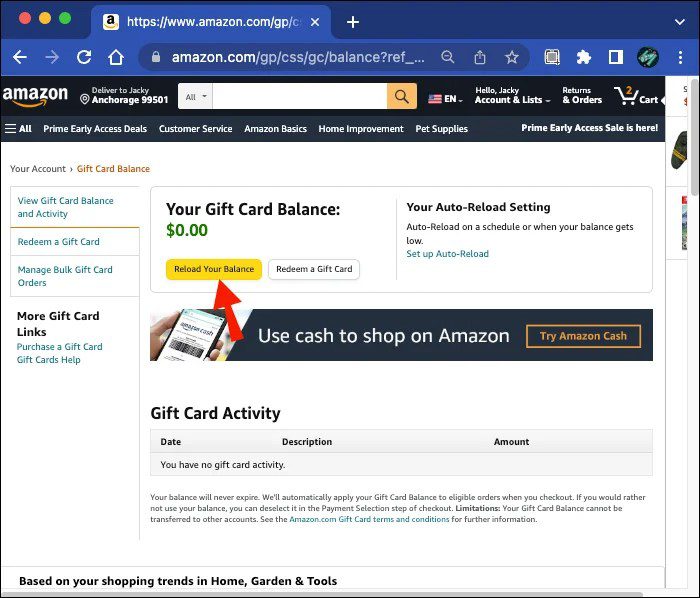
- Convert to Amazon Gift Card: This is the most reliable workaround for partial balances. Purchase an Amazon gift card equal to or slightly less than your Amex gift card’s remaining balance using your Amex gift card. Once purchased, the Amazon gift card balance will be applied to your account. Then, you can use your accumulated Amazon balance for your purchase, easily topping it off with another payment method if needed. This effectively consolidates your funds into Amazon credit, which is inherently more flexible for split payments.
Addressing Card Declines and Verification Issues
Beyond insufficient funds, other reasons for a declined transaction include:
- Billing Address Mismatch (AVS Failure): This is very common if you haven’t registered your Amex gift card with your home address.
- Solution: Register your Amex gift card online with your current billing address before attempting the purchase. Ensure the address entered on Amazon for the gift card matches exactly.
- Incorrect Card Details: A simple typo in the card number, expiration date, or security code (CID) can cause a decline.
- Solution: Double-check all entered information carefully.
- Temporary Holds: Sometimes, a small authorization hold might be placed on the card, temporarily reducing the available balance, especially for first-time use. This usually resolves itself quickly.
- Solution: Wait a few minutes and try again, or check your balance to see if a hold is present.
What to Do if Your Balance Doesn’t Reflect Correctly
If you believe your gift card balance is incorrect or a transaction shows up that you didn’t make:
- Review Transaction History: Log in to the Amex gift card website to view its detailed transaction history.
- Contact Amex Gift Card Customer Service: If there’s a discrepancy, immediately contact the customer service number on the back of your Amex gift card. They can investigate unauthorized transactions or clarify balance issues. Have your card number and transaction details ready.
- Keep Records: Always keep the physical gift card until you’re certain its balance is zero and all transactions are settled.
Proactive monitoring and quick action are key to resolving any financial discrepancies and protecting your funds.
Maximizing Your Amex Gift Card Value and Financial Best Practices
Using an Amex gift card effectively goes beyond simply making a purchase. It’s also about strategic spending and integrating this financial tool into your broader personal finance habits to ensure you get the most out of every dollar.
Strategic Spending: Avoiding Fees and Expiration
- Use It Promptly: The best way to avoid inactivity fees (if applicable) and expiration dates is to use the card sooner rather than later. Don’t let valuable funds sit idle.
- Consolidate Small Balances: If you have multiple Amex gift cards with small balances, consider consolidating them. While you can’t typically combine them directly onto one Amex card, you can use each one to purchase Amazon gift cards, thereby moving all the value into your Amazon account where it’s easier to manage and combine for larger purchases. This is a savvy financial move to prevent ‘stranded’ funds.
- Target Purchases: Use your gift card for specific, planned purchases rather than letting it linger. This aligns with good budgeting practices.
Combining Gift Cards for Larger Purchases
While Amazon allows you to use multiple Amazon gift cards seamlessly, combining multiple Amex gift cards directly for a single purchase is not usually an option within Amazon’s standard payment flow for credit/debit cards.
The Solution: Convert to Amazon Credit
The most effective strategy, as highlighted earlier, is to use each Amex gift card individually to purchase Amazon gift cards. For example, if you have two Amex gift cards with $50 each, buy a $50 Amazon gift card with the first Amex card, and another $50 Amazon gift card with the second. These will both be applied to your Amazon account balance, effectively giving you $100 in Amazon credit, which you can then use in a single transaction for a larger item. This ensures no value is lost and simplifies the checkout process significantly.
Security Tips for Online Gift Card Use
Treat your Amex gift card like cash or a debit card – securely.
- Keep Card Details Safe: Do not share your gift card number, expiration date, or security code with anyone you don’t trust.
- Beware of Phishing: Be wary of emails or messages asking for your gift card details. Amex and Amazon will never ask for this information unsolicited.
- Use Secure Websites: Always ensure you are on the legitimate Amazon website (look for “https://” and the padlock icon in your browser’s address bar) when making purchases.
- Monitor Balance: Regularly check your gift card balance and transaction history, especially after online purchases, to detect any unauthorized activity quickly.
- Keep Physical Card: Retain the physical gift card until its balance is fully depleted and you’ve confirmed all transactions. This is crucial for any potential disputes or customer service inquiries.
By adopting these financial best practices, you not only ensure the smooth use of your Amex gift card on Amazon but also reinforce broader principles of financial responsibility and security in your digital transactions. Leveraging these tools wisely contributes to a more organized and stress-free personal finance journey.
aViewFromTheCave is a participant in the Amazon Services LLC Associates Program, an affiliate advertising program designed to provide a means for sites to earn advertising fees by advertising and linking to Amazon.com. Amazon, the Amazon logo, AmazonSupply, and the AmazonSupply logo are trademarks of Amazon.com, Inc. or its affiliates. As an Amazon Associate we earn affiliate commissions from qualifying purchases.