
In an increasingly digital financial landscape, managing one’s money effectively often involves navigating various applications and platforms. Among these, Cash App stands out as a popular mobile payment service that facilitates peer-to-peer transfers, direct deposits, and even investments. A common and essential task for many users is transferring funds from their Cash App balance to a linked debit or credit card, enabling them to access their money for everyday spending, bill payments, or further financial allocation. This process, while seemingly straightforward, involves understanding specific financial mechanics, potential fees, and strategic considerations that can significantly impact personal finance management.

This comprehensive guide delves into the practical steps and financial insights required to seamlessly move your Cash App money onto your card. We will explore the underlying principles of these transactions, illuminate the financial implications of different transfer options, and offer best practices to integrate Cash App effectively into your broader personal finance strategy. Whether you’re a casual user looking for quick access to funds or a meticulous budgeter aiming to optimize your digital money management, mastering this core function is paramount for financial agility and control.
Understanding the Fundamentals of Cash App Transfers
Before initiating any transfer, a clear understanding of how Cash App operates within the broader financial ecosystem is crucial. Cash App functions as a digital wallet, holding your funds separate from your traditional bank account until you decide to move them. The ‘card’ in question typically refers to a linked debit card, which acts as the bridge between your Cash App balance and your bank account.
What is Cash App and Its Role as a Financial Tool?
Cash App, developed by Block, Inc. (formerly Square, Inc.), is primarily known for its user-friendly interface that simplifies sending and receiving money. Beyond peer-to-peer payments, it offers a suite of features including the Cash Card (a customizable, free debit card linked to your Cash App balance), direct deposit capabilities, and the ability to buy and sell Bitcoin and stocks. For many, it serves as an ancillary bank account or a convenient hub for quick transactions. Its utility as a financial tool lies in its accessibility and speed, particularly for immediate money transfers and managing a secondary spending balance. However, like any financial instrument, understanding its operational nuances is key to leveraging its benefits without encountering unexpected financial hurdles.
Differentiating Between Debit and Credit Card Links for Transfers
When it comes to transferring money out of Cash App, the distinction between a debit card and a credit card link is critical.
- Debit Cards: These are the primary and most efficient way to transfer money from Cash App to your traditional bank account. When you link a debit card, you are essentially linking your bank account through the card’s network. Transfers to a debit card typically result in the funds appearing in your associated bank account. Most Cash App users rely on debit cards for standard and instant transfers.
- Credit Cards: While Cash App allows you to link a credit card for sending money to others (often incurring a fee for the sender), it generally does not support transferring money from your Cash App balance to a credit card. Credit cards are designed for borrowing, not for receiving direct deposits from third-party apps. Attempting to transfer to a credit card directly is usually not an option within the app, as it goes against the fundamental nature of credit lines. Therefore, for the purpose of getting your Cash App money onto a card you can spend, a debit card (and its linked bank account) is the only viable option. This distinction is fundamental for sound financial management and avoiding unnecessary confusion or failed transactions.
Why Transfer Money from Cash App to a Card?
The motivations behind transferring funds from your Cash App balance to a physical card are diverse and often rooted in practical personal finance needs.
- Access for General Spending: Your bank-issued debit card provides universal access to your funds, allowing you to withdraw cash from ATMs, make purchases in stores that don’t accept Cash App directly, or pay bills online where a traditional card number is required.
- Budgeting and Categorization: Some users might keep a certain amount of “spending money” in Cash App, then transfer a budgeted amount to their main bank account at specific intervals. This can help separate discretionary spending from essential expenses.
- Consolidation of Funds: If you receive multiple payments through Cash App (e.g., from side hustles, reimbursements from friends), consolidating these funds into your primary bank account via your linked debit card makes it easier to track and manage your overall financial picture.
- Security and Peace of Mind: While Cash App has security measures, some individuals prefer to keep larger sums in their traditional bank accounts, which may offer different levels of consumer protection or simply feel more secure for long-term savings.
- Avoiding Cash App Fees for Direct Use: Although the Cash Card offers direct spending from your Cash App balance, transferring funds to your main bank account allows you to use your preferred bank’s debit card without potentially incurring any incidental Cash App fees for certain transactions, or simply sticking to a single payment method.
The Mechanics of Initiating a Transfer
Once you understand the ‘why,’ the ‘how’ becomes the next critical step. The process of transferring money from your Cash App balance to your linked debit card (and thus your bank account) is designed to be user-friendly, but understanding each stage is vital for smooth and successful transactions.
Linking Your Bank Account and Debit Card: The Prerequisite
Before you can move money out of Cash App, you must have a bank account and a corresponding debit card linked. This step establishes the necessary financial bridge.
- Open Cash App: Launch the application on your smartphone.
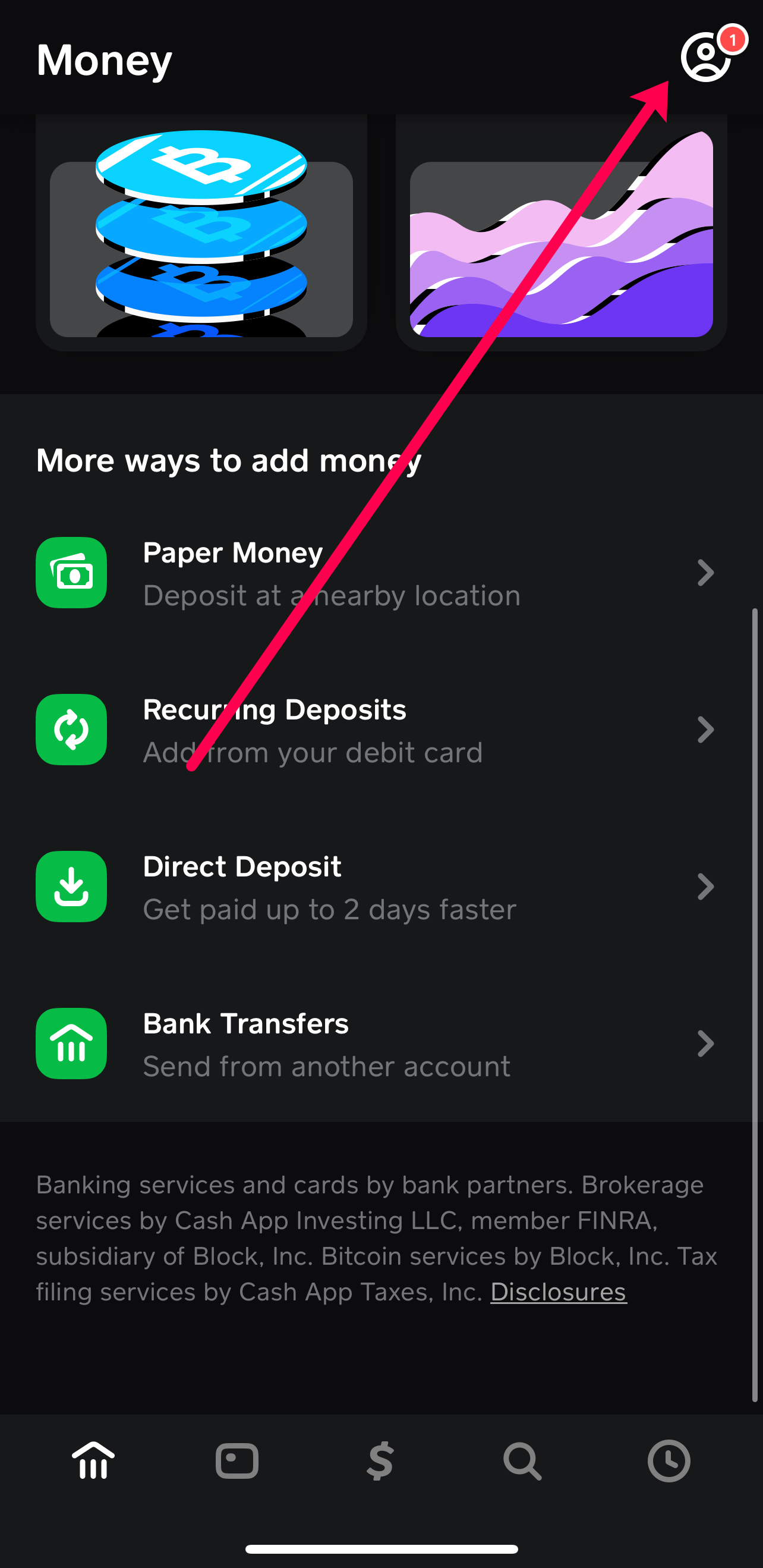
- Navigate to the Banking Tab: This is typically represented by a house icon or bank building icon at the bottom of the screen.
- Link Bank: Tap on the “Link Bank” option. If you haven’t linked one yet, it will prompt you to do so.
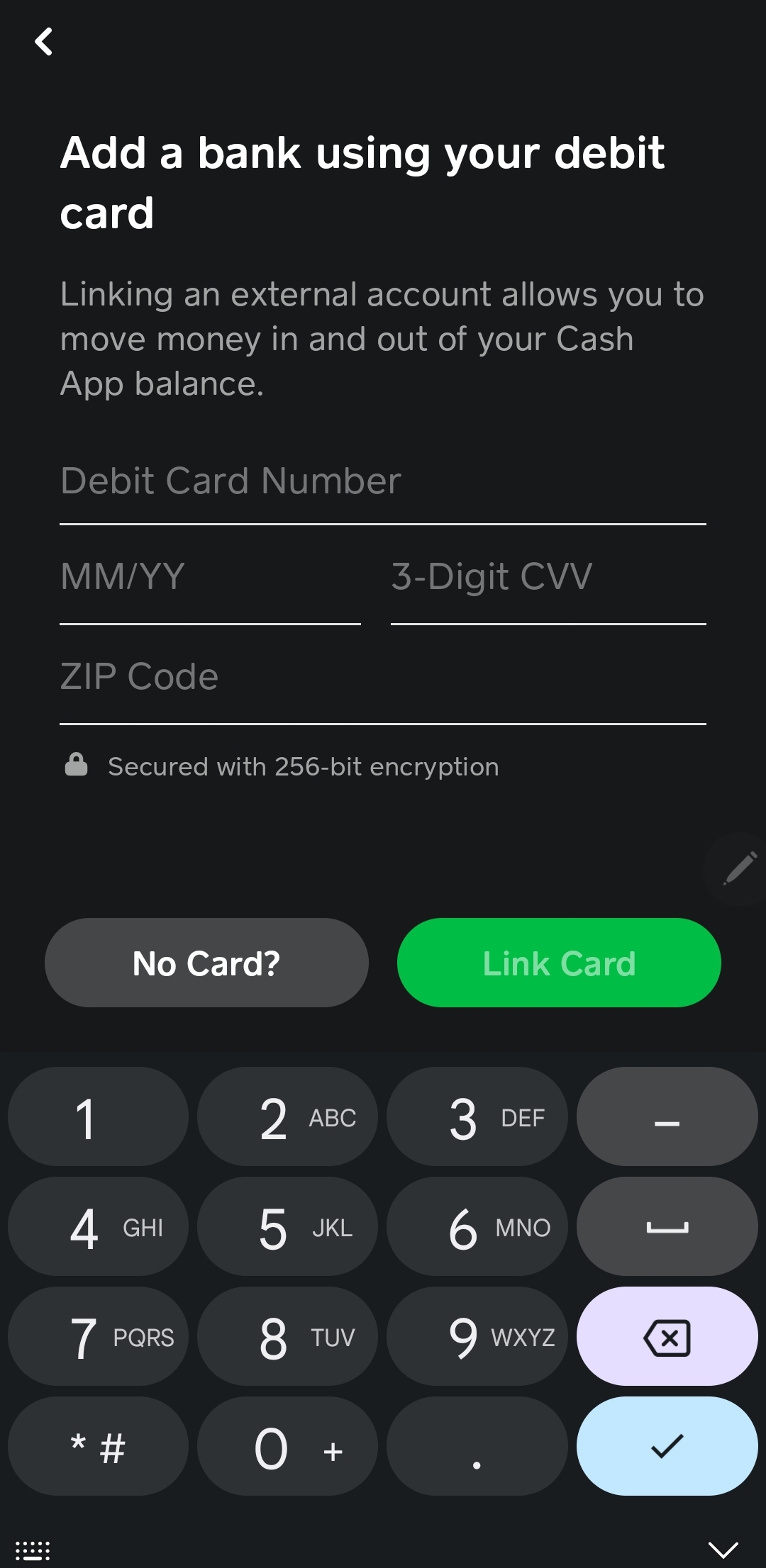
- Enter Debit Card Details: You’ll be asked to input your debit card number, expiration date, CVV, and zip code. This information is used to verify the card and link it to your Cash App profile. Cash App uses secure encryption to protect your financial data.
- Verify Bank Account (if prompted): In some cases, Cash App might require further verification, such as logging into your online banking portal through a secure third-party service like Plaid, which safely connects your bank to Cash App without sharing your bank login details directly with Cash App. This step ensures that the debit card is legitimately associated with your bank account.
It is crucial to ensure that the debit card you link is indeed tied to the bank account you wish to transfer funds to. Using an expired card or one with incorrect details will lead to failed transfers.
Step-by-Step Guide to Initiating a Transfer
Once your debit card is linked, transferring funds is a straightforward process:
- Access Your Cash App Balance: From the main Cash App screen, tap on the “Banking” tab (house icon). This will display your current Cash App balance.
- Select “Cash Out”: Below your balance, you’ll see a “Cash Out” button. Tap this to initiate the transfer.
- Enter the Amount: Input the specific amount of money you wish to transfer from your Cash App balance to your linked debit card. You can choose to transfer your entire balance or a partial amount.
- Choose Transfer Speed: This is where you make a crucial financial decision:
- Standard Deposit: This option is free but takes 1-3 business days to arrive in your bank account. It’s suitable for non-urgent transfers.
- Instant Deposit: This option typically incurs a fee (usually 0.5% to 1.75% of the transferred amount, with a minimum fee of $0.25). The funds are usually available in your bank account within minutes. This is ideal for urgent financial needs.
- Confirm Transfer: Review the amount, chosen transfer speed, and any associated fees. If everything looks correct, tap “Confirm” or “Cash Out” to finalize the transaction.
After confirmation, you’ll receive a notification within the app, and often an email, confirming the transfer request. For instant deposits, the funds should appear in your bank account almost immediately. For standard deposits, you’ll need to monitor your bank statement over the next few business days.
Understanding Fees, Limits, and Timelines
A critical aspect of financial management with Cash App is understanding the associated costs and constraints.
- Fees: As mentioned, standard deposits are free. Instant deposits incur a fee, which is displayed clearly before you confirm the transfer. This fee is deducted from the transfer amount. For example, if you transfer $100 with a 1.5% fee, you’ll receive $98.50 in your bank account. Being aware of these fees helps you avoid unexpected costs and make informed decisions about transfer urgency.
- Limits: Cash App imposes certain limits on how much you can send, receive, and cash out within specific timeframes (e.g., weekly, monthly). These limits can vary based on whether your account is verified. Verified accounts (which usually involve providing your full name, date of birth, and the last four digits of your Social Security Number) generally have higher limits. It’s important to check your current limits within the app, especially if you plan to transfer large sums, to ensure your transaction will go through without issue.
- Timelines: Standard deposits generally take 1 to 3 business days. “Business days” typically exclude weekends and public holidays. Therefore, a transfer initiated on a Friday evening might not arrive until the following Tuesday or Wednesday. Instant deposits, as the name suggests, are usually processed within minutes, though occasional bank processing delays can occur. Planning your transfers around these timelines is crucial for effective money management, particularly when dealing with bill payments or time-sensitive expenses.
Best Practices for Managing Cash App Funds
Effective management of your Cash App funds extends beyond merely knowing how to transfer money. It encompasses adopting secure habits, meticulously tracking your financial movements, and knowing how to troubleshoot potential issues. These best practices contribute significantly to your overall financial well-being and peace of mind.
Implementing Robust Security Measures
Protecting your financial information and funds is paramount when using any digital financial tool, including Cash App.
- Enable Security Locks: Always activate a PIN, Touch ID, or Face ID for accessing your Cash App. This prevents unauthorized access if your phone is lost or stolen.
- Two-Factor Authentication (2FA): Turn on 2FA for your Cash App account. This adds an extra layer of security, requiring a code from your phone or email in addition to your password for logging in or making significant changes.
- Be Wary of Scams: Cash App is a frequent target for scammers. Never share your PIN, sign-in code, or other sensitive information with anyone. Be skeptical of unsolicited requests for money or offers that seem too good to be true. Cash App support will never ask for your PIN or full debit card number.
- Regularly Monitor Transactions: Periodically check your Cash App transaction history and your linked bank account statements for any suspicious activity. Report unauthorized transactions immediately.
- Use Strong, Unique Passwords: Ensure your Cash App password is complex and not used for any other online accounts.
By adhering to these security protocols, you significantly reduce the risk of financial fraud and unauthorized access to your funds, safeguarding your money in the digital realm.
Tracking Transactions for Budgeting and Financial Oversight
Integrating Cash App transactions into your personal budgeting and financial tracking routine is essential for comprehensive financial oversight.
- Utilize In-App History: Cash App provides a detailed transaction history. Regularly review this to reconcile your spending and incoming funds.
- Categorize Transfers: Mentally (or physically, if you use a budgeting app) categorize why money is moving in or out of Cash App. Is it for a specific expense, savings, or income? This clarity aids in understanding your cash flow.
- Reconcile with Bank Statements: When you transfer money from Cash App to your debit card/bank account, ensure the amounts match what appears on your bank statement. Discrepancies should be investigated promptly.
- Factor in Fees: Remember to account for instant transfer fees in your budget. While small, they can add up over time and affect your net available funds.
- Periodic Review: Make it a habit to review your Cash App activity weekly or monthly as part of your overall financial review. This helps you stay on top of your spending and ensures your Cash App usage aligns with your financial goals.
Diligent tracking transforms Cash App from a mere transaction tool into an active component of your broader financial management strategy, providing valuable insights into your spending habits and financial health.
Troubleshooting Common Transfer Issues
Despite the generally smooth process, you might occasionally encounter issues when trying to transfer money from Cash App to your card. Knowing how to troubleshoot these problems can save you time and frustration.
- Insufficient Balance: The most common reason for a failed transfer is an insufficient Cash App balance. Double-check that you have enough funds to cover the transfer amount plus any applicable instant deposit fees.
- Incorrect Card Information: Ensure your linked debit card details (number, expiration, CVV, zip code) are correct and up-to-date. An expired or incorrectly entered card will lead to a failed transaction.
- Bank Restrictions: Your bank might have internal limits or restrictions on incoming transfers from third-party apps. If transfers consistently fail, contact your bank to inquire about any such limitations.
- Cash App Account Limits: As mentioned earlier, your Cash App account may have daily or weekly transfer limits, especially if it’s unverified. Attempting to transfer an amount exceeding these limits will result in a failure.
- Network or App Glitches: Occasionally, temporary issues with Cash App’s servers or your internet connection can disrupt transfers. Try again after a short while, or ensure you have a stable connection.
- Outdated App Version: Ensure your Cash App is updated to the latest version. Outdated apps can sometimes have bugs that affect functionality.
- Contact Cash App Support: If you’ve checked all the above and are still facing issues, reach out to Cash App support directly through the app. They can investigate specific transaction failures and provide guidance. Provide them with details of the attempted transfer, including amount, date, and any error messages received.
Proactive troubleshooting and swift action are key to resolving transfer issues efficiently, ensuring your money remains accessible when you need it.
Strategic Use of Cash App for Personal Finance
Beyond the basic mechanics, Cash App can be a powerful tool when integrated strategically into your overall personal finance framework. Leveraging its features thoughtfully can enhance your budgeting, saving, and financial responsiveness.
Integrating Cash App into Your Budgeting Strategy
For many, Cash App can serve as a designated wallet for specific budget categories, enhancing control over discretionary spending.
- Dedicated Spending Wallet: Use your Cash App balance specifically for certain variable expenses like dining out, entertainment, or minor shopping. This allows you to “fund” this digital wallet with a set amount each week or month and visually track spending against that budget without touching your main bank account.
- Receiving Side Hustle Income: If you engage in gig work or side hustles, direct those payments to Cash App. You can then easily transfer a portion to savings, another to cover immediate expenses, and the remainder to your main bank account, providing a clear separation of income streams.
- Budgeting for Shared Expenses: For roommates or partners who split expenses, Cash App facilitates easy peer-to-peer payments. By keeping a communal pot or quickly sending/receiving money, you can simplify expense reconciliation and ensure everyone contributes fairly.
- Savings Goals: While not a primary savings account, you can use Cash App to hold small, short-term savings goals. For example, saving up for a specific purchase from friends or quickly moving a portion of your income into Cash App as a preliminary step before transferring it to a dedicated savings account.
By intentionally assigning roles to your Cash App balance within your budget, you transform it from a casual payment app into a purposeful financial instrument that supports your fiscal discipline.
Leveraging Instant Transfers for Urgent Financial Needs
The instant deposit feature, despite its fee, offers a critical financial lifeline in emergency situations.
- Immediate Expense Coverage: If an unexpected bill arises or you need to cover an urgent expense (e.g., car repair, medical co-pay) and your primary bank account balance is low, instant transferring funds from Cash App (if you have funds there) can bridge the gap immediately.
- Avoiding Overdrafts: In situations where your main bank account is close to an overdraft, a quick instant transfer from Cash App can deposit funds in time to prevent costly overdraft fees, making the instant transfer fee a worthwhile trade-off.
- Time-Sensitive Payments: For payments with strict deadlines, where a standard 1-3 business day transfer might be too slow, instant transfers ensure your funds arrive in time, preventing late fees or service interruptions.
- Accessing Funds While Traveling: If you’re traveling and need quick access to money, but your primary bank card is compromised or inaccessible, having funds in Cash App that can be instantly transferred to another card (if you have one linked) or used via the Cash Card can be a lifesaver.
While the fee for instant transfers should always be considered, understanding its strategic value for financial emergencies empowers you to make informed decisions that can prevent larger financial setbacks.
The Cash Card as an Alternative to Transfers
It’s also worth noting the Cash Card itself, which is a debit card directly linked to your Cash App balance. For many users, this negates the need for frequent transfers to their personal bank account.
- Direct Spending: The Cash Card allows you to spend your Cash App balance directly at any merchant that accepts Visa. This means you don’t need to “cash out” to your personal bank account to use the money.
- ATM Withdrawals: You can use your Cash Card to withdraw cash from ATMs (fees may apply for out-of-network ATMs, and Cash App may charge a fee if you don’t meet direct deposit requirements).
- No Transfer Fees: By using the Cash Card, you completely bypass instant transfer fees, making it a cost-effective way to access and spend your Cash App funds.
- Customization and Boosts: The Cash Card offers customizable designs and “Boosts,” which provide instant discounts at various retailers. This can lead to small savings on everyday purchases.
For those who frequently receive funds into Cash App and wish to spend them immediately without extra steps or fees, leveraging the Cash Card is often the most efficient strategy. It streamlines the financial flow, keeping your money readily accessible within the Cash App ecosystem. The decision between using the Cash Card directly or transferring funds to your linked bank card ultimately depends on your spending habits, budgeting preferences, and immediate financial needs.
Mastering the art of putting Cash App money on your card, or utilizing the Cash Card effectively, is a fundamental skill for anyone engaging with this popular financial tool. It allows for greater flexibility, control, and strategic management of your digital funds, ensuring they serve your personal finance goals efficiently.
aViewFromTheCave is a participant in the Amazon Services LLC Associates Program, an affiliate advertising program designed to provide a means for sites to earn advertising fees by advertising and linking to Amazon.com. Amazon, the Amazon logo, AmazonSupply, and the AmazonSupply logo are trademarks of Amazon.com, Inc. or its affiliates. As an Amazon Associate we earn affiliate commissions from qualifying purchases.