
In an increasingly digital world, mobile applications have become indispensable tools for managing various aspects of our lives, from communication to finance. Cash App, developed by Square (now Block, Inc.), stands out as a popular peer-to-peer payment application, enabling users to send and receive money, invest, and even file taxes with ease. However, with the convenience and interconnectedness of such platforms comes the inherent need for robust digital security and user control. Just as in the physical world, there are instances where users may need to sever digital ties with others, whether for personal privacy, to avoid unsolicited requests, or to protect themselves from potential scams. This comprehensive guide delves into the technical intricacies of blocking a user on Cash App, exploring not just the “how-to” but also the underlying reasons from a digital security and app management perspective.
Understanding the “Block” Feature in Mobile Applications
The concept of “blocking” a user is a fundamental security and privacy feature prevalent across virtually all interactive digital platforms, from social media to financial apps. It empowers users to control their digital interactions, acting as a crucial line of defense against unwanted contact and potential threats. On a platform like Cash App, where financial transactions are at its core, understanding this feature is paramount for maintaining a secure and comfortable user experience.
Why Blocking Matters: A Digital Security Perspective
From a technical and security standpoint, blocking isn’t merely a social convenience; it’s a critical tool for digital hygiene and safety. Consider these scenarios where blocking becomes essential:
- Protection Against Scams and Fraud: The digital landscape is rife with opportunistic scammers. If you encounter a user attempting to solicit money under false pretenses, initiating suspicious transactions, or engaging in phishing attempts, blocking them immediately prevents further interaction and potential financial loss. It cuts off their access to send you requests or messages, significantly reducing their window of opportunity.
- Preventing Unsolicited Requests and Harassment: Like any communication platform, Cash App can be used for unsolicited requests, repeated pings, or even harassment. Blocking ensures that individuals cannot send you payment requests, messages, or locate your profile, restoring your peace of mind and digital boundaries.
- Privacy Management: Sometimes, you may simply not wish to have a particular individual view your transaction history or send you requests, even without malicious intent. Blocking offers a straightforward way to manage your digital privacy, ensuring only trusted contacts can interact with your account.
- Rectifying Past Relationships: Personal relationships can change. If you’ve had a falling out or simply no longer wish to be connected with someone on a financial platform, blocking provides a clean, technical separation without necessarily deleting your own account or history.
The “block” feature, therefore, functions as a user-activated firewall, segmenting your digital space and allowing you to curate who can and cannot interact with your financial profile.
The Anatomy of a Block: What Happens Behind the Scenes
When you block someone on Cash App, a series of technical actions are initiated by the application’s backend systems to enforce this restriction:
- Communication Halt: The most immediate effect is the cessation of direct communication. The blocked user can no longer send you messages through the app.
- Transaction Prevention: Critically, the blocked user will be unable to send you money or request money from you. Any attempts to initiate a transaction will fail, often with an error message indicating that the user is unavailable or blocked.
- Profile Visibility: While the exact level of visibility might vary slightly with app updates, typically, blocking prevents the user from easily finding your profile or viewing your public transaction activities. This reduces their ability to track or engage with your account.
- No Notification to Blocked User (Typically): Most platforms, including Cash App, design their blocking mechanism to be discreet. The blocked individual is generally not explicitly notified that they have been blocked. Instead, they might notice they can no longer send messages or transactions to you, inferring the action. This design choice aims to prevent potential escalation or confrontation.
- Reversible Action: Blocking is almost always a reversible action. The system maintains a record of blocked users, allowing you to unblock them should circumstances change.
This multi-faceted approach ensures that blocking provides a comprehensive barrier, safeguarding your financial interactions and personal digital space within the Cash App ecosystem.
Step-by-Step Guide: Blocking a User on Cash App
The process of blocking someone on Cash App is designed to be intuitive, ensuring users can quickly and effectively manage their interactions. There are typically two primary pathways to initiate a block, depending on whether you have a recent transaction with the individual or can easily locate their profile.
Method 1: Blocking from a User’s Profile
This is the most common and direct method when you know who you want to block and can find their profile.
- Open the Cash App: Launch the Cash App on your mobile device (iOS or Android).
- Navigate to the Search/Profile Icon: On the Cash App home screen, locate either the “Activity” tab (clock icon) to find a recent transaction with the user, or the profile icon (circle with a person) usually found in the top right or bottom right, which leads to your personal profile where you can then search for other users. An easier method for finding someone not in your recent activity is to tap the dollar sign icon at the bottom, then type their Cashtag or name into the “To” field as if you were going to send them money.
- Access the User’s Profile: Once you have found the user’s name or Cashtag in your activity list or through a search, tap on their name to view their profile.
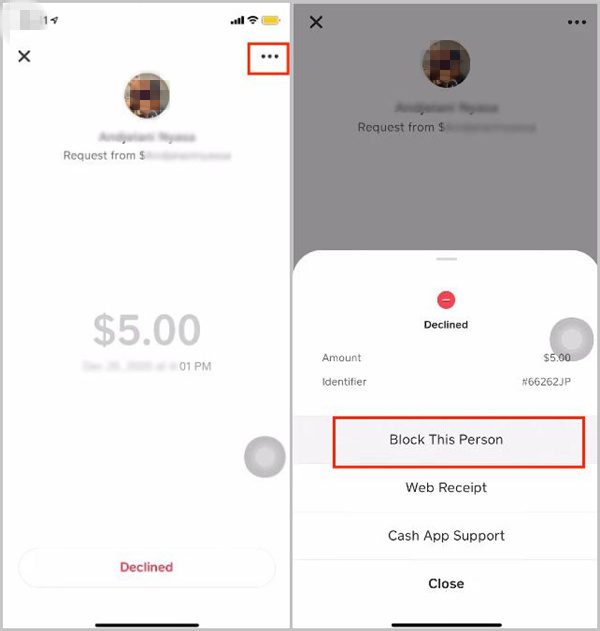
- Locate the Three Dots Menu: On the user’s profile screen, look for a small icon usually represented by three dots (ellipsis) or sometimes a gear/settings icon. This is typically in the top right corner of the profile. Tap this icon.
- Select “Block”: A menu will appear with several options. You should see “Block” or “Block this person.” Tap on this option.
- Confirm the Block: Cash App will usually ask for confirmation to ensure you intend to block the user. Review the prompt and confirm your decision.
Once confirmed, the user is immediately blocked.
Method 2: Blocking from a Transaction History
If the user you wish to block has recently sent you money or you have sent money to them, you can often block them directly from the transaction details.
- Open the Cash App: Launch the application.
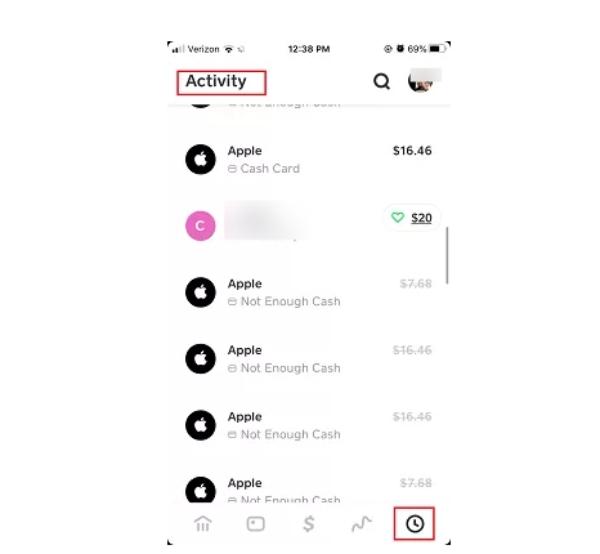
- Go to the Activity Tab: Tap the clock icon in the bottom right corner of the main screen. This will display your transaction history.
- Find the Relevant Transaction: Scroll through your activity feed to locate a transaction involving the user you want to block. Tap on the specific transaction to view its details.
- Access User Details or Options: Within the transaction details, you will usually see the name or Cashtag of the other party involved. Tap on their name/Cashtag. This will either take you directly to their profile (where you can follow Method 1 from step 4) or display a small pop-up with options.
- Locate and Select “Block”: If a pop-up appears, look for the “Block” option. If it takes you to their profile, proceed as in Method 1 (steps 4-6).
- Confirm the Block: Confirm your action when prompted by the app.
Confirming the Block and Troubleshooting Common Issues
- Confirmation: After blocking, there isn’t a direct “blocked list” readily visible within the standard Cash App interface (unlike some social media apps). The primary confirmation is the absence of further interaction. If you attempt to search for them or send them money, the app will typically indicate they are unavailable or prevent the action.
- Troubleshooting:
- User Not Found: If you can’t find the user’s profile, ensure you have their correct Cashtag or full name. If they’ve changed their Cashtag or deleted their account, you won’t be able to block them.
- App Glitch: If the “block” option isn’t appearing, try restarting the Cash App or updating it to the latest version from your device’s app store.
- Accidental Block: If you accidentally block someone, you’ll need to go to their profile again (if you can find it) or access your settings (if a global blocked list feature is ever introduced) to unblock them.
Beyond Blocking: Advanced App Management and Security Settings
While blocking is a powerful individual action, it’s part of a broader suite of tools and practices that enhance your digital security on Cash App. A holistic approach involves leveraging all available features and maintaining general cybersecurity vigilance.
Reporting Malicious Activity to Cash App Support
Blocking prevents future interaction, but it doesn’t always address past harm or larger systemic issues. If a user has engaged in fraudulent activity, harassment, or violated Cash App’s terms of service, it’s crucial to report them to Cash App support.
- Distinction: Blocking is a personal control feature; reporting is a platform enforcement action.
- How to Report: Similar to blocking, you can usually find a “Report” option within a user’s profile or a specific transaction detail, often alongside the “Block” option. Provide as much detail as possible to Cash App’s support team.
- Why it Matters: Reporting helps Cash App identify and remove malicious actors, making the platform safer for everyone. This contributes to the overall integrity and security of the financial technology ecosystem.
Enhancing Your Cash App Security: Proactive Measures
Beyond reactive measures like blocking, proactive security practices are essential for any financial application.
- Enable Two-Factor Authentication (2FA): This is perhaps the most critical security feature. 2FA requires a second form of verification (like a code sent to your phone) in addition to your password, making it significantly harder for unauthorized individuals to access your account.
- Strong, Unique Passwords: Use a complex password unique to your Cash App account. Avoid using easily guessable information or reusing passwords from other sites.
- Review Privacy Settings: Regularly check your app’s privacy settings to control what information is visible to others.
- Recognize Phishing Attempts: Be wary of suspicious emails, text messages, or in-app messages that claim to be from Cash App, especially those asking for personal information or urging you to click unusual links. Cash App will never ask for your PIN or full sign-in code.
- Monitor Activity: Regularly review your transaction history for any unauthorized or suspicious activity. Promptly report anything unusual to Cash App support.
Unblocking a User: Reversing the Digital Barrier
Should circumstances change, and you wish to restore contact with a blocked user, Cash App allows you to unblock them.
- Locate the User’s Profile: You’ll need to find their profile again, either through a previous transaction or by searching for their Cashtag.
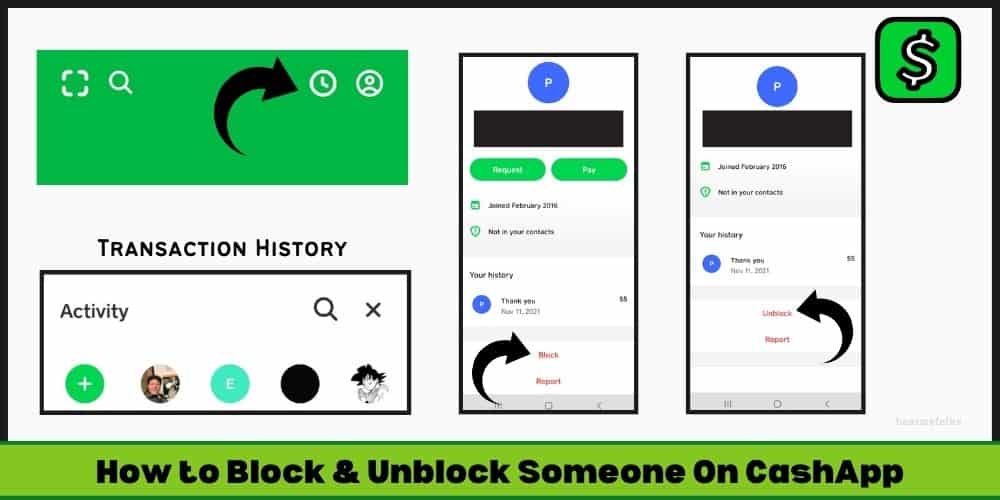
- Access the Three Dots Menu: On their profile, tap the three dots (ellipsis) icon.
- Select “Unblock”: A menu will appear with the option to “Unblock” or “Unblock this person.” Tap this option.
- Confirm: Confirm your decision when prompted.
Once unblocked, the user will be able to send you messages and initiate transactions again, effectively reversing the restrictions.
The Evolving Landscape of App Security and User Empowerment
The digital realm is in constant flux, with new threats and technological advancements emerging regularly. Financial applications like Cash App are at the forefront of this evolution, continually refining their security protocols and user control features.
The Role of App Developers in User Safety
App developers bear a significant responsibility in creating and maintaining secure platforms. For Cash App, this involves:
- Continuous Feature Development: Regularly updating features like blocking, reporting, and privacy settings to be more robust and user-friendly.
- Advanced Encryption and Fraud Detection: Implementing sophisticated backend technologies to encrypt data and proactively detect and prevent fraudulent transactions.
- Educating Users: Providing resources and guidelines to help users understand best practices for digital security.
Best Practices for Maintaining Digital Boundaries
As users, our active participation in maintaining digital boundaries is crucial. On Cash App, this translates to:
- Scrutiny of Contacts: Only transact with people you know and trust.
- Mindful Information Sharing: Be cautious about what personal information you share on the platform.
- Proactive Engagement: Don’t hesitate to use blocking and reporting features when necessary. They are there to protect you.
- Staying Informed: Keep up-to-date with Cash App’s security announcements and general cybersecurity news.
In conclusion, knowing how to block someone on Cash App is more than just a functional tip; it’s a fundamental aspect of managing your digital security and personal space within a financial application. By understanding not only the steps to block but also the underlying technical implications and the broader context of app security, users can navigate the digital world with greater confidence and control, ensuring their financial interactions remain safe and private. Embracing these features empowers you to be an active participant in your own digital defense, reinforcing the secure environment that modern fintech applications strive to provide.
aViewFromTheCave is a participant in the Amazon Services LLC Associates Program, an affiliate advertising program designed to provide a means for sites to earn advertising fees by advertising and linking to Amazon.com. Amazon, the Amazon logo, AmazonSupply, and the AmazonSupply logo are trademarks of Amazon.com, Inc. or its affiliates. As an Amazon Associate we earn affiliate commissions from qualifying purchases.