
In a world increasingly dominated by artificial intelligence, quantum computing, and augmented reality, the humble calculator often gets overlooked. Yet, this ubiquitous device, whether in its physical form or as a software application, remains a fundamental tool, silently underpinning countless operations in science, engineering, finance, and daily life. But have you ever paused to consider the intricate dance of electrons and logic that allows it to perform complex computations with blinding speed and unerring accuracy? Understanding how a calculator works is not just a lesson in historical technology; it’s an essential journey into the very bedrock of digital computation, revealing the ingenious principles that drive nearly all modern electronic devices. From simple addition to complex trigonometric functions, the calculator embodies elegant solutions to mathematical challenges, translating human input into binary operations and back again, all within the blink of an eye.
The Fundamental Building Blocks: From Switches to Silicon
The journey of the calculator is a fascinating evolution from mechanical marvels to sophisticated microchips. Its operational principles are rooted in fundamental concepts of logic and electrical engineering, transforming human-readable numbers into machine-processable signals.
Early Mechanical Calculators: A Glimpse into Pre-Electronic Logic
Before the advent of electronics, calculators were intricate mechanical contraptions. Pioneers like Wilhelm Schickard, Blaise Pascal, and Gottfried Leibniz designed machines in the 17th century that used gears, levers, and rotating wheels to perform addition, subtraction, multiplication, and division. Pascal’s “Pascaline” (1642), for instance, was an adding machine that worked by rotating number wheels, with carries automatically propagating from one digit to the next. Leibniz’s Stepped Reckoner further improved upon this, allowing for direct multiplication and division. These early devices, while revolutionary for their time, were bulky, slow, prone to mechanical failure, and limited in their computational scope. They laid the conceptual groundwork, demonstrating that arithmetic could be automated through a series of deterministic physical actions, but the true revolution awaited the power of electricity.
The Dawn of Electronics: Transistors and Logic Gates
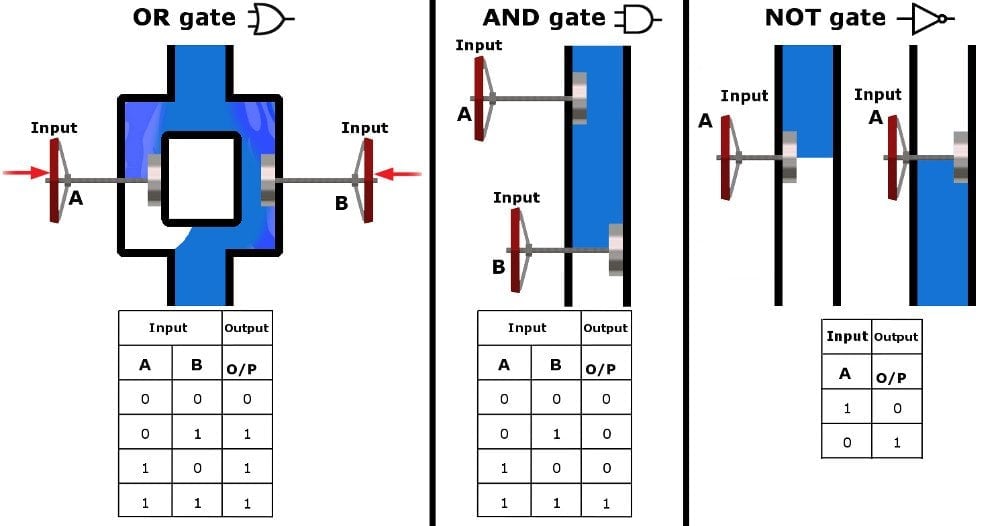
The mid-20th century heralded the electronic revolution, with the invention of the transistor in 1947 proving to be a pivotal moment. Transistors, essentially tiny electronic switches, could turn electrical signals on or off, representing the binary states of 1s and 0s. This breakthrough allowed for the creation of logic gates – basic electronic circuits that implement Boolean logic functions (AND, OR, NOT, XOR). An AND gate, for example, produces an output of “1” only if all its inputs are “1.” These gates are the atomic units of digital computation. By combining thousands, even millions, of these simple logic gates in sophisticated arrangements, engineers could build circuits capable of performing complex operations. The transition from unreliable vacuum tubes to robust, miniature transistors dramatically reduced the size, power consumption, and cost of electronic devices, making the dream of a personal electronic calculator a tangible reality.
Integrated Circuits: Miniaturization and Power
The true leap forward for electronic calculators came with the invention of the integrated circuit (IC) in the late 1950s. An IC is a microscopic chip containing a vast number of transistors and other electronic components fabricated on a single piece of semiconductor material, typically silicon. This innovation allowed for unprecedented miniaturization, reliability, and speed. Instead of assembling individual transistors, resistors, and capacitors on a circuit board, entire functional units – like adders, registers, and memory cells – could be etched onto a single chip. This density made possible the development of the microprocessor, a single IC that performs the functions of a central processing unit. The first commercially available portable electronic calculator, the Busicom 141-PF, released in 1971, famously used a single microprocessor chip, the Intel 4004. This heralded the era of the personal electronic calculator, transforming it from a lab curiosity into an affordable, everyday tool. The continuous advancement in IC technology, adhering to Moore’s Law, has allowed calculators to become ever smaller, more powerful, and feature-rich, culminating in the complex scientific and graphing calculators we use today.
The Brain of the Calculator: Microprocessors and Algorithms
At the heart of every modern electronic calculator lies a sophisticated arrangement of hardware and software working in concert. This “brain” translates human input into digital signals, processes them according to programmed instructions, and displays the result.
Input and Output: Keypads, Displays, and User Interface
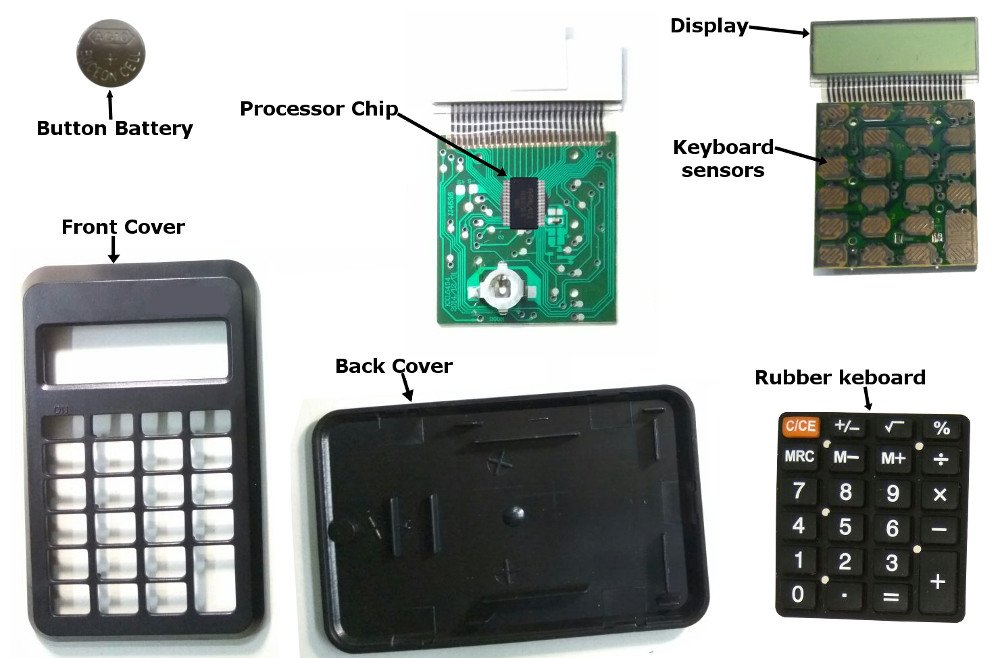
The interaction with a calculator begins and ends with its user interface. The keypad is the primary input device, featuring numeric keys (0-9), arithmetic operators (+, -, *, /), and function keys (%, sqrt, sin, cos, etc.). When a key is pressed, it completes a circuit, sending a unique electrical signal to the calculator’s processor. This signal represents a specific number or operation. The processor interprets this signal and typically stores it in a temporary memory register. The display, historically LED (Light-Emitting Diode) or VFD (Vacuum Fluorescent Display) and now predominantly LCD (Liquid Crystal Display), provides immediate visual feedback. As numbers are entered and operations selected, they appear on the display, allowing the user to verify their input. Once a calculation is performed, the result is then rendered on the display, converting the internal binary output back into human-readable decimal digits. Advanced calculators may feature multi-line displays or dot-matrix screens capable of showing graphs or complex equations, enhancing the user experience and facilitating more intricate tasks.
Processing Unit: Executing Arithmetic Operations
The core of the calculator’s intelligence resides in its Central Processing Unit (CPU), or more specifically, a microcontroller or microprocessor designed for arithmetic operations. When input is received from the keypad, the CPU fetches relevant instructions from its embedded memory (firmware). These instructions are algorithms detailing how to perform each operation. For example, when you press ‘5’, then ‘+’, then ‘3’, then ‘=’, the CPU orchestrates a sequence: it reads ‘5’, stores it in a register, reads ‘+’, prepares for an addition operation, reads ‘3’, stores it in another register, and finally, upon receiving ‘=’, it executes the addition algorithm on the stored numbers. The CPU contains an Arithmetic Logic Unit (ALU), which is the specialized circuit responsible for carrying out these arithmetic (addition, subtraction, multiplication, division) and logical (AND, OR, NOT) operations. The speed and efficiency of this ALU are crucial to the calculator’s overall performance.
Memory: Storing Numbers and Intermediate Results
To perform calculations, a calculator needs memory. This memory comes in several forms:
- ROM (Read-Only Memory): This is where the calculator’s firmware is stored. Firmware is the permanent, non-erasable set of instructions (programs or algorithms) that tell the calculator how to operate, how to interpret key presses, how to perform mathematical functions, and how to display results. It’s the calculator’s operating system.
- RAM (Random Access Memory): This is volatile memory used for temporary storage. When you enter numbers or perform intermediate steps in a calculation, these values are held in RAM. For example, if you’re calculating
(2 + 3) * 4, the result of2 + 3(which is 5) would be temporarily stored in RAM before being multiplied by 4. RAM is also used to store variables, memory functions (M+, M-, MR), and calculation history in more advanced models. When the calculator is turned off (or after a period of inactivity for some models), the contents of RAM are usually lost. The efficient management of these memory components ensures that calculations are performed accurately and intermediate results are preserved until needed.
The Role of Firmware: Hardcoded Instructions
Firmware is arguably the most critical component that gives a calculator its “smarts.” It’s a type of software permanently embedded into the calculator’s hardware, typically in a ROM chip. Unlike software on a computer that can be easily updated or changed, firmware is designed to be stable and enduring, providing the foundational logic for the device. For a calculator, the firmware contains:
- Keypad Scan Routines: Instructions on how to detect and interpret which key has been pressed.
- Display Drivers: Code that translates numerical data into the specific patterns of pixels or segments required by the LCD or LED display.
- Mathematical Algorithms: The core routines for performing all supported arithmetic and transcendental functions. These algorithms are highly optimized for speed and accuracy, often employing techniques like the CORDIC algorithm for trigonometric functions or iterative methods for square roots.
- Error Handling: Instructions on how to detect and respond to invalid inputs or computational errors (e.g., division by zero, overflow).
- Power Management: Routines to conserve battery life and manage power states.
The quality and efficiency of a calculator’s firmware directly impact its accuracy, speed, and overall functionality. It’s a testament to clever engineering that such complex mathematical processes can be distilled into compact, efficient code running on relatively simple hardware.
Demystifying Arithmetic: How Calculations Happen
At its core, a calculator processes numbers not as humans do, but in a language intrinsic to electronic circuits. Understanding this language is key to grasping how arithmetic operations are executed.
Binary Representation: The Language of Computers
The fundamental secret to how a calculator works lies in its ability to convert our familiar decimal (base-10) numbers into binary (base-2). Electronic circuits operate using two states: on or off, high voltage or low voltage. These states are perfectly represented by the binary digits 1 and 0, respectively, known as bits. When you input a number like ‘7’ into a calculator, its internal circuitry translates this into its binary equivalent, which is ‘111’. Similarly, ’10’ becomes ‘1010’. All internal operations, from addition to complex functions, are performed on these binary numbers. This conversion is handled by encoder circuits upon input and decoder circuits for output, seamlessly translating between human-readable decimal and machine-understandable binary.
Addition and Subtraction: Simple Logic
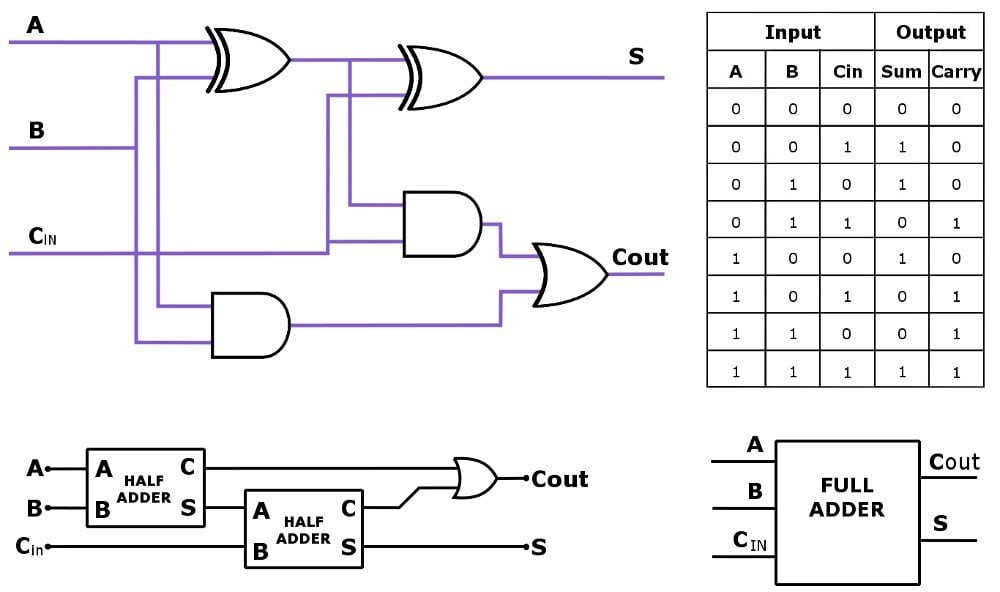
Once numbers are in binary form, addition is surprisingly straightforward, relying on the same principles of carrying digits that we use in decimal arithmetic, but with only two possible digits (0 and 1). For example, 1 + 1 in binary is 0 with a carry of 1, just like 5 + 5 in decimal is 0 with a carry of 1 (making 10). Electronic circuits called adders are specifically designed to perform this. A half-adder can add two bits, producing a sum and a carry bit. A full-adder takes three bits (two input bits and an incoming carry bit) and produces a sum and an outgoing carry bit. By chaining multiple full-adders together, the calculator can add multi-bit binary numbers. Subtraction is often implemented as a form of addition using a technique called two’s complement. To subtract a number, the calculator takes its two’s complement (essentially negating it in binary) and then adds it to the first number. For instance, A – B becomes A + (-B). This elegant trick allows the same adder circuits to handle both addition and subtraction.
Multiplication and Division: Iterative Processes
Multiplication and division are generally more complex than addition and subtraction for a calculator, often implemented as iterative processes of the simpler operations.
- Multiplication can be thought of as repeated addition. For example, 3 * 4 can be calculated as 3 + 3 + 3 + 3. In binary, this involves a series of shifts and additions. The shift-and-add algorithm is commonly used: one number is repeatedly shifted left (equivalent to multiplying by 2 in binary) and added to a running total, depending on the bits of the other number. Modern calculators use optimized hardware multipliers that perform these operations much faster.
- Division is analogous to repeated subtraction. To calculate 12 / 3, the calculator repeatedly subtracts 3 from 12 until the remainder is less than 3, counting how many times the subtraction occurred. In binary, this involves a shift-and-subtract algorithm (also known as non-restoring or restoring division algorithms), where the divisor is repeatedly shifted and subtracted from the dividend. Just like multiplication, dedicated hardware dividers in contemporary calculators speed up this process significantly.
Handling Complex Functions: Square Roots, Trigonometry, and Beyond
Beyond the four basic arithmetic operations, scientific calculators can perform a myriad of functions: square roots, logarithms, trigonometric functions (sin, cos, tan), exponentials, and more. These are not typically handled by direct hardware circuits in the same way as simple addition. Instead, they rely on sophisticated algorithms stored in the calculator’s firmware (ROM).
- Square Roots: Often computed using iterative methods like the Newton-Raphson method or the method of successive approximations. These algorithms start with an initial guess and repeatedly refine it until a desired level of precision is reached.
- Trigonometric and Logarithmic Functions: A popular and highly efficient algorithm for these is the CORDIC (COordinate Rotation DIgital Computer) algorithm. CORDIC can compute trigonometric, hyperbolic, logarithmic, and exponential functions using only simple additions, subtractions, and bit shifts. This makes it ideal for calculators, as it avoids complex multiplication and division for every step, relying instead on simpler, faster operations.
- Floating-Point Arithmetic: To handle very large or very small numbers, and numbers with fractional parts, calculators use floating-point representation. This system represents numbers as a significand (mantissa) and an exponent, similar to scientific notation. The CPU has dedicated hardware and firmware routines to perform arithmetic on these floating-point numbers, managing precision and potential rounding errors.
The magic of these advanced functions lies in their reduction to a series of fundamental binary operations, demonstrating the elegance and power of computational algorithms.
Beyond Basic Arithmetic: Advanced Features and Types
The evolution of the calculator hasn’t stopped at simple arithmetic. Over the decades, it has branched out into specialized forms, each catering to increasingly complex computational needs and user demands, pushing the boundaries of portable computing.
Scientific Calculators: Expanding Functionality
The introduction of the scientific calculator marked a significant leap beyond basic arithmetic, becoming an indispensable tool for students, engineers, and scientists. These calculators incorporate a vast array of pre-programmed functions essential for higher mathematics and scientific disciplines. Beyond the standard operations, they feature keys for trigonometric functions (sine, cosine, tangent, and their inverses), logarithms (natural and base-10), exponential functions, square roots, factorials, and often statistical functions like mean and standard deviation. They also typically handle scientific notation, allowing users to input and display very large or very small numbers, and often include constants for common physical values. The internal firmware of a scientific calculator contains complex algorithms, such as the CORDIC algorithm or polynomial approximations, to compute these functions quickly and accurately, transforming what would be tedious manual calculations into instant results. Their robust functionality makes them a staple in academic and professional environments where intricate computations are routine.
Graphing Calculators: Visualizing Data
Graphing calculators represent a further evolution, bridging the gap between a simple calculator and a basic computer. Their defining feature is a large, dot-matrix display capable of rendering graphs of mathematical functions. Users can input equations, and the calculator will plot them, allowing for visual analysis of curves, intersections, roots, and other properties. Beyond graphing, these devices often include advanced features such as symbolic manipulation (algebraic operations on variables), matrices, vectors, calculus functions (derivatives, integrals), and even basic programming capabilities. The firmware in graphing calculators is substantially more complex, often resembling a minimalist operating system, supporting data storage, file management, and even connectivity to computers or other calculators. They are particularly vital in higher education, allowing students to explore mathematical concepts visually and perform complex computations that might otherwise require specialized software. The visual feedback transforms abstract numbers into comprehensible patterns, enhancing understanding and problem-solving skills.
Programmable Calculators: Custom Logic
The concept of programmability transformed the calculator from a static tool into a dynamic, adaptable device. Programmable calculators allow users to create and store sequences of operations, essentially writing small programs. This feature is invaluable for tasks that involve repetitive calculations or complex formulas that are not built into the calculator’s standard functions. Users can input a series of keystrokes or a simplified code, which the calculator then executes on demand with different input values. Early programmable calculators might have stored only a few dozen steps, while modern graphing calculators can handle hundreds of lines of code, often supporting rudimentary BASIC-like languages. This programmability empowers users to customize their tools to specific needs, automate workflows, and even develop simple applications. For engineers, scientists, and financial professionals, programmable calculators can significantly streamline work by encapsulating complex proprietary formulas or iterative processes, making them highly efficient personal computing aids.
The Rise of Software Calculators: Apps and Online Tools
In the digital age, the physical calculator has found a powerful parallel in its software manifestations. Calculator apps are standard features on smartphones, tablets, and personal computers, offering functionalities ranging from basic arithmetic to advanced scientific and graphing capabilities. Online calculator tools cater to specific niches, such as mortgage calculators, currency converters, unit converters, or complex scientific simulators. These software calculators leverage the processing power and display capabilities of the underlying devices, often offering richer user interfaces, easier data input (via touchscreens or keyboards), and seamless integration with other applications. While they lack the tactile satisfaction of physical buttons and the dedicated focus of a standalone device, their accessibility, versatility, and cost-effectiveness (often free) have made them incredibly popular. This trend underscores the calculator’s enduring utility, demonstrating its adaptability across different technological paradigms, from dedicated hardware to integrated software solutions.
The Enduring Relevance of the Calculator in a Digital Age
Despite the omnipresence of powerful computers and artificial intelligence, the calculator, in its various forms, maintains an undeniable relevance. Its enduring presence in classrooms, offices, and pockets around the globe speaks to its fundamental utility and its role as a gateway to understanding digital computation.
Educational Tool: Foundation for Understanding Computation
For many, the calculator serves as an initial introduction to automated computation. In classrooms, from elementary arithmetic to advanced calculus, it empowers students to focus on problem-solving strategies rather than getting bogged down by tedious calculations. It helps visualize mathematical concepts, test hypotheses, and explore “what if” scenarios. Furthermore, dissecting how a calculator works, even conceptually, provides a foundational understanding of binary logic, algorithms, and digital processing—concepts that are directly applicable to programming, computer science, and virtually all digital technologies. It teaches precision, the importance of order of operations, and the power of abstraction in solving complex problems. The calculator is not merely a crutch but a scaffold, enabling deeper mathematical exploration and fostering computational thinking from an early age.
Professional Utility: Engineering, Finance, and Science
In professional domains, the calculator remains an indispensable tool. Engineers rely on scientific and graphing calculators for on-the-spot calculations during design, analysis, and fieldwork, quickly verifying measurements or solving equations without needing to boot up a computer. Financial analysts use them for rapid compound interest calculations, loan amortizations, and investment projections. Scientists leverage them for data analysis, statistical computations, and complex formula evaluations in laboratories or during field research. While more powerful software and computational platforms exist for exhaustive analysis, the calculator offers immediate, portable, and dedicated functionality for routine and critical calculations. Its simplicity and reliability make it the go-to device for quick confirmations and calculations where precision and speed are paramount, and where distractions from a multi-purpose device are undesirable.
Everyday Convenience: Quick Calculations On-the-Go
Beyond specialized professional and educational use, the calculator is a marvel of everyday convenience. Whether it’s splitting a restaurant bill, converting currency during travel, calculating a tip, or estimating expenses while shopping, the calculator app on a smartphone or a small handheld device offers instant computational power. Its ubiquity means that complex mathematical challenges, once daunting and time-consuming, can now be resolved in seconds, simplifying daily tasks and decision-making. This accessibility democratizes mathematical problem-solving, making it available to anyone, anywhere, without needing specialized knowledge or equipment. It’s a testament to good design: a tool that performs a specific function efficiently and unobtrusively, enhancing productivity and reducing cognitive load in countless mundane scenarios.
Future Innovations: AI and Augmented Reality Integration
As technology continues to advance, the calculator too will evolve. We are already seeing glimpses of future innovations that could integrate AI and augmented reality (AR) into computational tools. Imagine a calculator app that not only solves equations but also intelligently suggests the best approach, identifies potential errors in user input, or even explains the underlying mathematical principles using AI-driven tutoring. AR could revolutionize how we interact with calculations; for instance, pointing a smartphone camera at a handwritten equation could instantly solve it and display the steps in an overlay, or even visualize the solution in 3D. While the core binary logic will remain the same, the user interface and the intelligence behind the interaction could become profoundly more intuitive and powerful. These advancements promise to further enhance the calculator’s role, making it an even more intelligent, integrated, and indispensable partner in navigating the complexities of our numerical world. The calculator, far from being obsolete, is a testament to timeless engineering principles, constantly adapting to serve new generations with ever-increasing capability.
aViewFromTheCave is a participant in the Amazon Services LLC Associates Program, an affiliate advertising program designed to provide a means for sites to earn advertising fees by advertising and linking to Amazon.com. Amazon, the Amazon logo, AmazonSupply, and the AmazonSupply logo are trademarks of Amazon.com, Inc. or its affiliates. As an Amazon Associate we earn affiliate commissions from qualifying purchases.