
The calculator, in its various forms, is an indispensable tool in our daily lives, from balancing a checkbook to solving complex engineering equations. Often taken for granted, this compact device harbors a sophisticated ecosystem of electronics and logic that transforms simple button presses into accurate numerical results. Far from being a mere number cruncher, a calculator is a marvel of miniaturized computing, a direct descendant of ancient reckoning tools, distilled into a pocket-sized powerhouse. Understanding how it operates offers a fascinating glimpse into the foundational principles of digital technology, demystifying the intricate dance between electrical signals and mathematical operations.
The Fundamental Building Blocks: From Input to Output
At its core, a calculator functions as a specialized computer, designed to perform arithmetic and logical operations. Its journey begins with user input and culminates in a displayed result, traversing a series of interconnected components that each play a crucial role in this transformation.
User Interface: The Gateway to Calculation
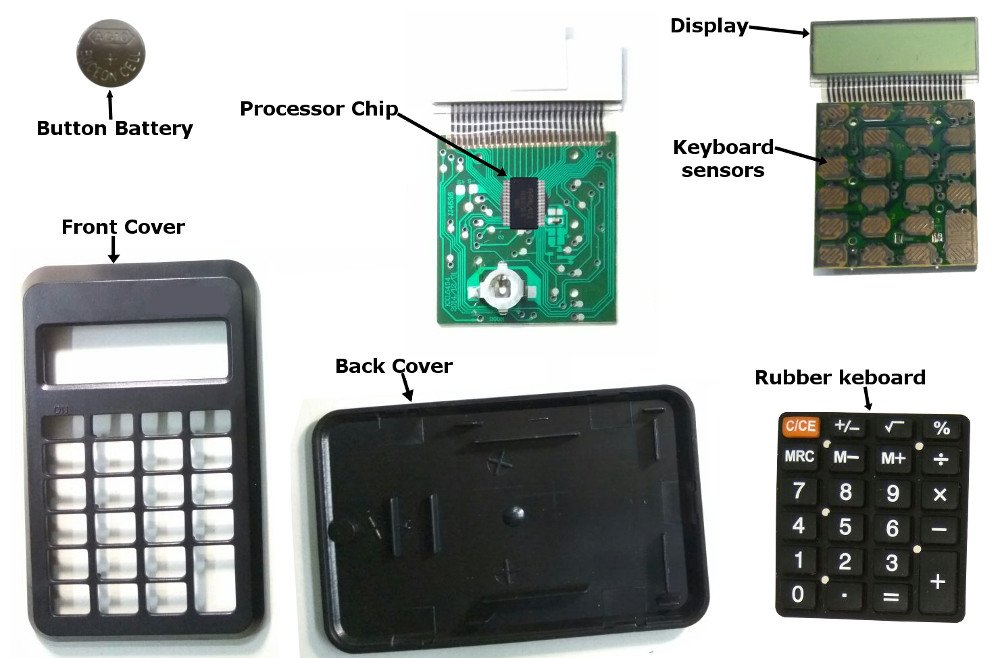
The most immediate aspect of any calculator is its user interface, comprising the keypad and the display. The keypad is more than just a collection of buttons; it’s an array of switches. When a key is pressed, it completes an electrical circuit, sending a unique signal to the calculator’s central processing unit (CPU). Each number, operator (+, -, x, /), or function (sin, cos, log) has a specific code associated with it. This converts the physical action of pressing a button into a digital input that the calculator can understand. Modern keypads often use a membrane switch design, providing tactile feedback while being durable and spill-resistant.
The display, typically a Liquid Crystal Display (LCD) or sometimes an LED display for older models, is where the input numbers and the calculated results are shown. LCDs work by manipulating polarized light with liquid crystals, requiring very little power, which is why they are prevalent in battery-operated devices. Each segment or pixel on the display is individually controlled to form numbers and symbols, making the abstract digital data visually comprehensible to the user. The speed and clarity of this display are crucial for an efficient user experience, ensuring that calculations can be followed in real-time.
The Processor’s Role: Decoding Your Commands
The true “brain” of a calculator resides within its microchip, specifically the Central Processing Unit (CPU) and its specialized component, the Arithmetic Logic Unit (ALU). When a signal from the keypad arrives, the CPU interprets it. It doesn’t just recognize “5” as the number five, but as a specific binary code representing five. The CPU then manages the flow of data and instructions, orchestrating all internal operations.
The Arithmetic Logic Unit (ALU) is where all the mathematical heavy lifting happens. It’s a digital circuit capable of performing arithmetic operations (addition, subtraction, multiplication, division) and logical operations (AND, OR, NOT comparisons). When you press “2 + 3 =”, the CPU directs the numbers 2 and 3 to the ALU, along with the instruction to add them. The ALU executes this instruction with incredible speed, producing a binary result that is then sent back to the CPU for display. The efficiency and design of the ALU are paramount to a calculator’s speed and accuracy.
Memory: Storing Numbers and Instructions
A calculator requires memory for two primary purposes: to store the numbers and operations entered by the user during an ongoing calculation, and to store its own operating instructions (firmware). Random Access Memory (RAM) is used for temporary storage of input numbers, intermediate results, and the current state of the calculation. When you input “2 + 3”, the ‘2’ is stored in RAM, then the ‘+’ operation, then the ‘3’. When you press ‘=’, the calculator retrieves these values from RAM to perform the calculation. This memory is volatile, meaning its contents are lost when the power is turned off.
For permanent storage of the calculator’s essential programming, Read-Only Memory (ROM) is utilized. This non-volatile memory holds the instructions the calculator needs to boot up, recognize button presses, perform calculations, and manage the display. This firmware is factory-programmed and generally cannot be altered by the user. Advanced calculators might also include a small amount of non-volatile memory (like EEPROM or Flash memory) to store user-defined programs or settings, ensuring they persist even when the calculator is off.
The Language of Logic: Binary and Boolean Algebra
At the heart of every digital device, including a calculator, lies the elegant simplicity of binary code and the foundational principles of Boolean algebra. These concepts are the bedrock upon which all complex digital operations are built.
Bits and Bytes: The Digital Alphabet
Calculators, like all digital computers, don’t understand numbers or letters in the way humans do. Instead, they operate on binary digits, or bits, which are the smallest units of information. Each bit can exist in one of two states: 0 or 1, representing “off” or “on” in an electrical circuit. These states are physically represented by voltage levels—a high voltage might be a 1, a low voltage a 0. All numbers, characters, and instructions within a calculator are translated into sequences of these 0s and 1s. For instance, the decimal number 5 is represented in binary as 101, and the number 10 as 1010.
A collection of eight bits forms a byte, which is the basic unit of data storage and processing in many computing systems. Calculators, particularly those designed for higher precision, use multiple bytes to represent numbers, allowing them to handle larger values and decimal fractions with greater accuracy. The more bits allocated to represent a number, the larger the range of numbers and the finer the precision that can be achieved.
Logic Gates: The Decision Makers
The physical manifestation of Boolean algebra within a calculator (and any digital circuit) comes in the form of logic gates. These are tiny electronic circuits that take one or more binary inputs and produce a single binary output based on a specific logical rule. The most fundamental logic gates include:
- AND gate: Output is 1 only if all inputs are 1.
- OR gate: Output is 1 if any input is 1.
- NOT gate (Inverter): Output is the inverse of the input (0 becomes 1, 1 becomes 0).
- XOR gate (Exclusive OR): Output is 1 if inputs are different.
These basic gates are the atomic components from which all complex digital operations are constructed. They are typically implemented using transistors, which act as high-speed electronic switches. By combining thousands, or even millions, of these simple gates in intricate configurations, the calculator’s ALU can perform sophisticated calculations.
Building Complex Operations from Simple Logic
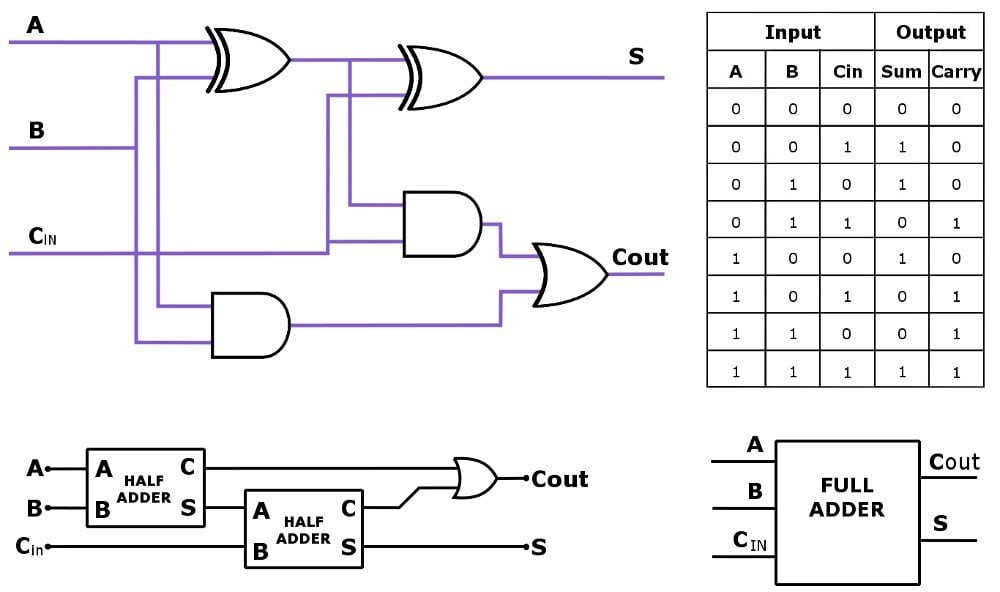
The magic of logic gates lies in their ability to perform arithmetic. For example, addition is not a single operation for the ALU; it’s broken down into a series of logical steps. A fundamental circuit called a half-adder can add two single bits, producing a sum and a carry bit. A full-adder can add three bits (two input bits plus a carry-in from a previous stage), producing a sum and a carry-out. By chaining multiple full-adders together, a calculator can add binary numbers of any length.
For instance, to add two 4-bit numbers (like 1010 + 0101), the calculator would use four full-adder circuits, one for each bit position, propagating the carry bit from one adder to the next. Subtraction is often performed using a clever technique called two’s complement, which allows subtraction to be treated as an addition problem, further simplifying the hardware required. This hierarchical approach, building complex functions from elementary logical operations, is a cornerstone of digital design.
Performing Operations: From Basic Arithmetic to Advanced Functions
The capabilities of a calculator range from simple sums to complex scientific computations. Each operation, regardless of its apparent complexity, is executed through a precisely defined sequence of internal steps.
Addition and Subtraction: The Core Algorithms
As mentioned, addition in a calculator is carried out by specialized adder circuits within the ALU, which process binary numbers bit by bit, generating a sum and propagating carry-overs. For example, adding two decimal numbers like 5 (101 binary) and 3 (011 binary) would involve bit-wise addition:
101 (5)
+ 011 (3)
1000 (8)
This process, though conceptually simple, requires careful management of carry bits by the logic gates.
Subtraction is often implemented using the two’s complement method. To subtract ‘B’ from ‘A’ (A – B), the calculator effectively calculates A + (-B). The negative of ‘B’ is found by first inverting all the bits of ‘B’ (one’s complement) and then adding 1. This clever trick means that the same adder circuits used for addition can also be utilized for subtraction, reducing the complexity of the hardware. For instance, to calculate 5 – 3:
- Binary for 3 is 011.
- One’s complement of 011 is 100.
- Two’s complement of 3 is 100 + 1 = 101 (representing -3).
- Now, add 5 and -3: 101 (5) + 101 (-3) = 1010. After accounting for overflow (which indicates the sign), the result is 2 (010).
Multiplication and Division: Iterative Processes
Multiplication is typically implemented as repeated addition and bit shifts. To multiply A by B, the calculator can repeatedly add A to itself B times. However, for efficiency, it often employs a method similar to long multiplication taught in schools, but adapted for binary. This involves a series of additions and bit-shifting operations. For example, multiplying 5 (101) by 3 (011):
- Check the least significant bit of the multiplier (011). If it’s 1, add the multiplicand (101) to a running total.
- Shift the multiplicand left by one bit (1010).
- Shift the multiplier right by one bit (01). If the bit is 1, add the shifted multiplicand to the total.
- Repeat until all bits of the multiplier are processed. This leads to a sum of partial products, resulting in 15.
Division is generally the most complex basic operation and is often implemented as repeated subtraction or through more sophisticated algorithms like restoring or non-restoring division, which also involve shifts and subtractions. These algorithms iteratively determine the quotient bits by comparing the divisor with portions of the dividend.
Beyond Basic Math: Scientific Functions
Scientific calculators handle a much broader range of functions, including trigonometry (sin, cos, tan), logarithms, exponentials, powers, and roots. These functions are not implemented as direct hardware circuits in the same way addition is. Instead, they rely on sophisticated numerical algorithms programmed into the calculator’s ROM.
For example, trigonometric functions are often computed using Taylor series expansions or the CORDIC (COordinate Rotation DIgital Computer) algorithm. The CORDIC algorithm is particularly efficient in hardware as it primarily uses shifts and additions, making it ideal for calculating trigonometric, hyperbolic, and other functions without needing complex multiplication or division circuits for each step. Similarly, logarithms and exponentials are approximated using polynomial expansions or iterative methods that converge on the correct value with a predetermined level of precision. Floating-point arithmetic is crucial for these functions, allowing calculators to handle very large or very small numbers and numbers with decimal points accurately, by representing them with a mantissa and an exponent.
Evolution of Calculation: From Abacus to Advanced Devices
The journey of calculation tools spans millennia, evolving from manual manipulation to complex digital computation, with each step marking a significant leap in human ingenuity and technological advancement.
Historical Precursors: Mechanical Marvels
Long before the advent of electronics, humanity devised clever mechanical aids for computation. The abacus, dating back thousands of years, is perhaps the earliest and most enduring example, allowing users to perform arithmetic by sliding beads on rods. It demonstrates the fundamental principle of positional notation that underpins modern number systems.
The 17th century saw the dawn of mechanical calculators with inventions like the Pascaline by Blaise Pascal and the Stepped Reckoner by Gottfried Wilhelm Leibniz. These devices used a system of gears and dials to perform addition, subtraction, multiplication, and division, showcasing the potential for automating arithmetic. Though rudimentary by today’s standards, they laid the conceptual groundwork for mechanical computation, demonstrating how physical mechanisms could embody mathematical rules. Charles Babbage’s 19th-century designs for the Difference Engine and the Analytical Engine, though largely unbuilt in his time, envisioned programmable mechanical computers that were centuries ahead of their time, introducing concepts like memory and conditional branching.
The Digital Revolution: Microprocessors and Miniaturization
The true revolution came in the 20th century with the invention of the transistor and, subsequently, the integrated circuit. Early electronic calculators of the 1960s were bulky and expensive, using discrete transistors. However, the development of the microprocessor in the early 1970s was a game-changer. The first single-chip microprocessors, like the Intel 4004, were capable of performing the arithmetic and logical operations required for a calculator, dramatically reducing their size, cost, and power consumption.
This innovation led to the proliferation of the pocket calculator. Devices like the Busicom LE-120A “Handy” and the Hewlett-Packard HP-35 transformed calculations from a specialized task to an everyday convenience. These early electronic calculators replaced noisy mechanical parts with silent, efficient silicon chips, making them faster, more reliable, and portable. The shift from bulky desktop machines to devices that could fit in a shirt pocket was nothing short of revolutionary, democratizing access to computational power.
Modern Calculators: Integration and Specialization
Today’s calculators are incredibly diverse and specialized. Scientific calculators are standard tools for students and professionals in STEM fields, offering functions for trigonometry, logarithms, complex numbers, and statistical analysis. Graphing calculators, like those from Texas Instruments and Casio, take this a step further, featuring large displays capable of plotting functions, solving equations graphically, and even running small programs, essentially acting as dedicated miniature computers.
Beyond standalone devices, calculator functionality has been integrated into virtually every digital device. Smartphones and computers come with built-in calculator apps, leveraging their powerful general-purpose processors to perform calculations with immense speed and precision. Specialized calculators also exist for specific industries, such as financial calculators for accountants and investors, or construction calculators for builders. The progression reflects a continuous drive towards greater computational power, smaller form factors, and more tailored functionality, making calculation an increasingly seamless part of our digital existence.
The Unsung Heroes: Power and Display Technologies
While the internal logic and processing units are the “brains” of a calculator, its operational longevity and user-friendliness are heavily dependent on its power source and how it presents information. These often-overlooked components are crucial for the calculator’s practical utility.
Powering the Device: Batteries and Solar Cells
Calculators are designed for portability and sustained use, which necessitates efficient power management. The vast majority of portable calculators are powered by small, long-lasting batteries, typically button cells (like CR2032) or AAA batteries. The choice of LCDs, with their minimal power consumption, is directly linked to the desire for extended battery life. Modern calculator chips are also engineered for low-power operation, utilizing power-saving modes when idle and efficient circuit designs to minimize energy draw during calculations.
Many calculators also incorporate solar cells as a primary or supplementary power source. These photovoltaic cells convert ambient light into electrical energy, often eliminating the need for battery replacements in well-lit conditions. Solar power is particularly effective for calculators because their power demands are relatively low and intermittent, making them ideal candidates for harvesting small amounts of environmental energy. This dual power capability (solar and battery backup) ensures reliability and convenience, allowing calculators to function in various environments without constant concern for power.
Visualizing Results: LCD and LED Displays
The display is the user’s window into the calculator’s operations. Most modern calculators use Liquid Crystal Displays (LCDs) due to their low power consumption and ability to present clear, high-contrast characters. Early LCDs for calculators typically employed seven-segment displays, where combinations of seven illuminated segments form individual digits. This approach is simple, robust, and highly legible for numerical output.
As calculators evolved, so did their displays. Dot matrix LCDs became prevalent in scientific and graphing calculators. These displays are composed of a grid of tiny pixels, allowing for the display of more complex characters (like letters for unit conversions), symbols, graphs, and even small menus. The ability to display multiple lines of text, matrices, and intricate mathematical expressions significantly enhances the functionality and user experience of advanced calculators. While some older or specialized calculators might use Light Emitting Diode (LED) displays (particularly common in older desktop models), LCDs have largely dominated the portable calculator market due to their superior energy efficiency and suitability for compact, battery-powered devices.
The continuous innovation in display technology, from basic segments to high-resolution dot matrices, has directly contributed to the calculator’s versatility, enabling users to interact with increasingly complex mathematical concepts and data in a visually intuitive manner.

Conclusion: The Enduring Legacy of the Humble Calculator
From the abacus to the pocket-sized supercomputers we carry today, the journey of the calculator is a testament to humanity’s relentless pursuit of automating and simplifying computation. What appears to be a simple device on the surface is, in fact, an intricate network of specialized circuits, governed by the elegant rules of binary logic and Boolean algebra. Every button press triggers a cascade of electrical signals, interpreted by microprocessors, processed by ALUs, and displayed through advanced screens, all powered by efficient energy solutions.
The calculator serves as a perfect microcosm of digital technology itself. Its evolution mirrors the broader advancements in microelectronics, miniaturization, and software algorithms that have transformed our world. While smartphone apps and powerful desktop software now offer calculator functionality, the dedicated calculator retains its unique value—a focused tool, optimized for its specific purpose, reliable, and often indispensable in environments where general-purpose computing devices might be inappropriate or cumbersome. Understanding “how a calculator works” is not merely about appreciating a gadget; it’s about grasping the fundamental principles that underpin the entire digital age, revealing the profound ingenuity packed into a device we often take for granted. Its enduring legacy is a powerful reminder of how foundational innovations can continue to shape our ability to understand and interact with the quantitative world around us.
aViewFromTheCave is a participant in the Amazon Services LLC Associates Program, an affiliate advertising program designed to provide a means for sites to earn advertising fees by advertising and linking to Amazon.com. Amazon, the Amazon logo, AmazonSupply, and the AmazonSupply logo are trademarks of Amazon.com, Inc. or its affiliates. As an Amazon Associate we earn affiliate commissions from qualifying purchases.