
In the modern digital landscape, our streaming accounts are more than just portals to music and podcasts; they are repositories of personal data, curated preferences, and sensitive payment information. Spotify, as the world’s leading audio streaming platform, holds a significant amount of user data, making the security of your account a top priority. Whether you are performing a routine security update, responding to a potential data breach, or simply trying to regain access to a forgotten account, knowing how to navigate the technical process of changing your Spotify password is an essential skill for any tech-savvy user.
This guide provides a deep dive into the technical steps required to update your credentials, the underlying security implications of account management, and best practices for maintaining a robust digital footprint in an era of increasing cyber threats.
The Importance of Proactive Password Management in the Streaming Era
Before diving into the “how-to,” it is vital to understand the “why.” In the realm of digital security, streaming services are often overlooked compared to banking or email accounts. However, “credential stuffing”—a cyberattack where stolen credentials from one service are used to gain access to others—remains a prevalent threat.
Protecting Your Personal Data and Privacy
Your Spotify account contains your email address, date of birth, postal code, and often your credit card details or PayPal links. If a malicious actor gains access to your account, they can harvest this data for phishing attempts or identity theft. Furthermore, your listening habits constitute a unique digital fingerprint. Protecting your password ensures that your private data remains just that—private.
Preventing Premium Account Hijacking
Spotify Premium accounts are high-value targets on the dark web. Hackers often steal accounts to resell them or to use them in “bot farms” to artificially inflate streaming numbers for specific artists. If you notice unfamiliar playlists, “Recently Played” tracks you don’t recognize, or if your music keeps pausing because “your account is being used on another device,” your security has likely been compromised.
The Role of Password Complexity
The technical standard for a secure password has evolved. Modern security experts recommend “passphrases”—long strings of random words—or complex alphanumeric combinations. Updating your Spotify password allows you to move away from legacy, weak passwords toward modern, encrypted standards that are resistant to brute-force attacks.
Step-by-Step Guide: Changing Your Spotify Password via Web and Mobile
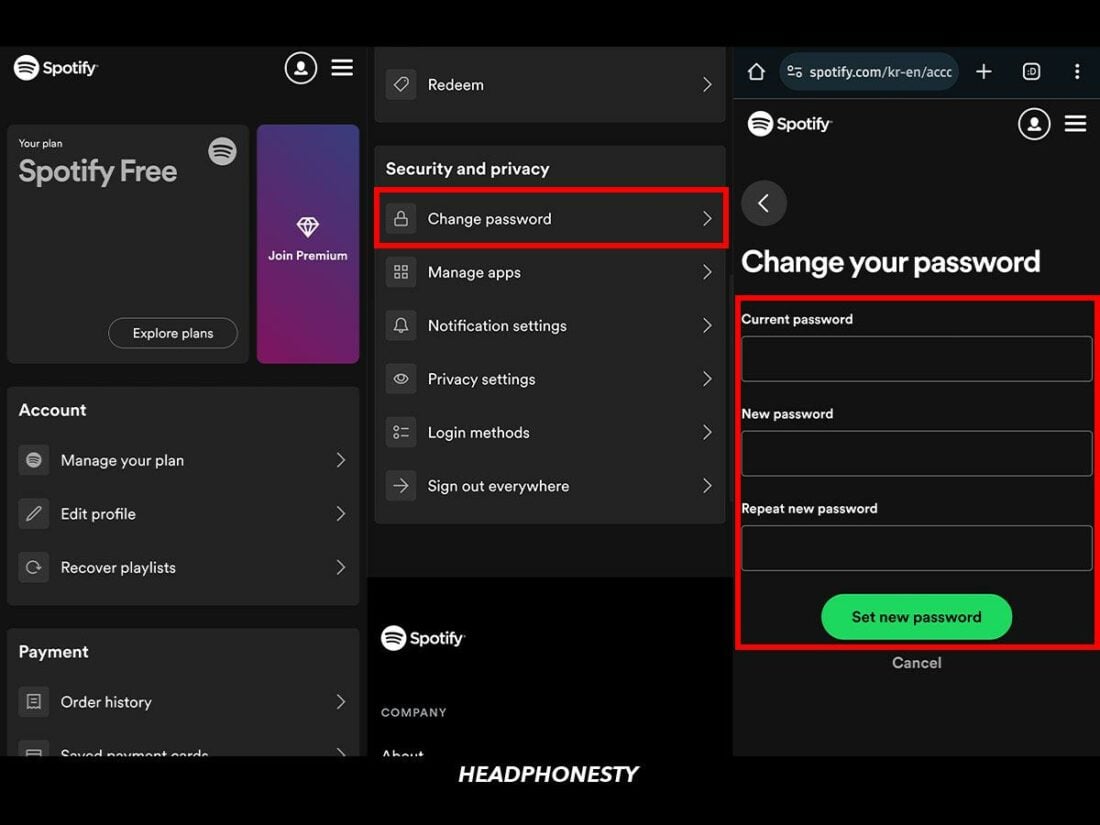
One of the most common technical hurdles users face is searching for a “Change Password” button within the Spotify mobile app. Interestingly, for security and platform architecture reasons, Spotify does not allow password changes directly inside the iOS or Android applications. This must be done through a web browser.
Changing Your Password via the Web Portal
If you currently know your password and simply wish to update it, follow these steps:
- Access the Account Overview: Open your preferred web browser (Chrome, Safari, or Firefox) and navigate to the Spotify website. Log in with your current credentials.
- Navigate to the Profile Icon: Click on your profile picture or username in the top right corner and select “Account” from the dropdown menu. This will redirect you to the account management page (account.spotify.com).
- Locate the Change Password Tab: In the sidebar menu on the left, click on “Change password.”
- Input Credentials: You will be prompted to enter your current password followed by your new, secure password twice to ensure accuracy.
- Save Changes: Click “Set new password.” You should receive a confirmation message, and a notification email will be sent to your registered address.
Resetting a Forgotten Password
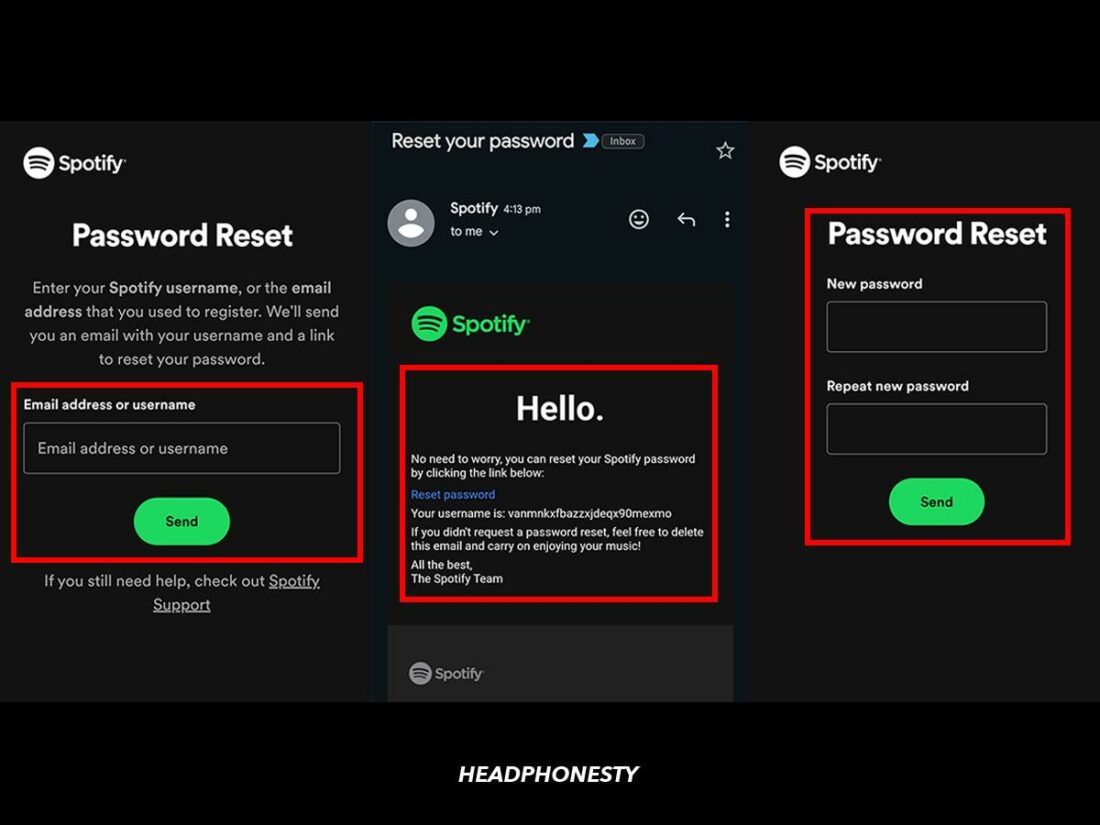
If you are locked out of your account, the technical workflow shifts to the “Password Reset” protocol, which relies on email verification.
- Visit the Password Reset Page: Go to the Spotify login page and click on “Forgot your password?”
- Email Verification: Enter your username or the email address associated with the account.
- Link Authentication: Spotify will send an automated system email containing a localized, time-sensitive link.
- Creating the New Credential: Click the link, which will bypass the “current password” requirement and allow you to set a new one. Note: These links typically expire within four hours for security reasons.
Handling Social Logins (Facebook, Google, Apple)
Many users sign up for Spotify using “Single Sign-On” (SSO) through Facebook, Google, or Apple. In this technical configuration, Spotify does not actually “know” your password; it receives an authentication token from the third-party provider.
- To change your password in this case: You must change the password of the parent account (e.g., your Facebook password).
- To disconnect SSO: If you wish to create a standalone Spotify password, you must use the “Forgot Password” flow using the email address associated with your social account to “break” the link and establish independent credentials.
Troubleshooting Technical Friction Points
Even with a straightforward UI, technical glitches can occur during the password update process. Understanding the backend logic can help you resolve these issues quickly.
The “Invalid Link” Error
If you receive a “Link is invalid or has already been used” error during a reset, it is usually due to one of three things:
- Expiration: You waited too long to click the link.
- Multiple Requests: You requested several reset emails and are clicking an older one. Always use the most recent email in your inbox.
- Browser Caching: Your browser might be storing an old version of the page. Try opening the link in an “Incognito” or “Private” window.
Email Not Arriving
If the reset email doesn’t appear, check your “Spam” or “Promotions” folders. Technically, some ISP filters may flag automated “no-reply” emails as bulk mail. If it still doesn’t arrive, ensure you haven’t accidentally set up a “burner” email or a hidden Apple ID relay when you first created the account.
The “Log Out Everywhere” Technical Safeguard
After changing your password, especially if you suspect your account was compromised, it is a technical best practice to use the “Sign out everywhere” feature. This is located at the bottom of the “Account Overview” page. This action invalidates all current session tokens, forcing every device (TVs, smart speakers, tablets) to disconnect. It can take up to an hour to propagate across all global servers, but it is the only way to ensure an intruder is fully evicted.
Advanced Digital Security: Beyond the Password
Updating a password is just one layer of a robust tech security strategy. To truly secure your Spotify account and your broader digital life, you should consider implementing more advanced tools.
Leveraging Password Managers
Human memory is the weakest link in digital security. Using a dedicated password manager (like Bitwarden, 1Password, or LastPass) allows you to generate high-entropy passwords (e.g., *&^jK92!mLP0$q) that are virtually impossible to crack via dictionary attacks. These tools store your credentials in an encrypted vault, meaning you only need to remember one “master” password.
Two-Factor Authentication (2FA) Limitations
As of the current technical roadmap, Spotify does not offer native Two-Factor Authentication (2FA) for all standard accounts in the same way Google or Microsoft does. This makes your password even more critical. However, if you use a Google or Facebook login to access Spotify, you can enable 2FA on those accounts. This adds a hardware or biometric layer of security that hackers cannot bypass with a password alone.
Managing Third-Party App Permissions
Over time, many users grant “Access” to their Spotify data to third-party apps (e.g., receipt generators, dating apps, or stats trackers). These integrations use API tokens. Periodically review these in the “Apps” section of your Spotify account dashboard and revoke access to any service you no longer use. This minimizes the “attack surface” of your account.

Conclusion: Maintaining Long-Term Account Integrity
In the ecosystem of modern software, security is not a one-time event but a continuous process. Changing your Spotify password is a fundamental aspect of digital hygiene that protects your data, your financial information, and your personalized user experience.
By understanding the technical nuances of the web-based update process, the complexities of social logins, and the importance of post-update actions like “logging out everywhere,” you place yourself in a position of control. As software continues to evolve, staying informed about these basic yet powerful security protocols ensures that your journey through the world of digital audio remains uninterrupted and secure. Remember: a secure account starts with a strong password, but it is maintained through vigilance and the smart use of modern technology tools.
aViewFromTheCave is a participant in the Amazon Services LLC Associates Program, an affiliate advertising program designed to provide a means for sites to earn advertising fees by advertising and linking to Amazon.com. Amazon, the Amazon logo, AmazonSupply, and the AmazonSupply logo are trademarks of Amazon.com, Inc. or its affiliates. As an Amazon Associate we earn affiliate commissions from qualifying purchases.