
In the vast and interconnected ecosystem of modern e-commerce, few platforms wield as much influence as Amazon. For millions globally, it’s the default destination for everything from daily essentials to cutting-edge gadgets. Within this intricate digital landscape, a seemingly mundane task like changing a shipping address holds surprising significance, intertwining critical aspects of user experience (UX), digital security, and platform functionality. It’s not merely about updating a field in a database; it’s about ensuring the seamless flow of goods, safeguarding personal information, and appreciating the underlying technological architecture that makes such operations possible.
This guide delves into the technical nuances and practical steps involved in updating your Amazon shipping address, framed within the broader context of e-commerce technology. We’ll explore the intuitive design choices Amazon has made, the security protocols that protect your data, and the implications of efficient address management in a world increasingly reliant on digital delivery. Understanding this process from a tech perspective illuminates the sophistication behind what appears to be a simple user interaction.
Navigating Amazon’s Digital Interface: A Step-by-Step Tech Tutorial
Amazon’s interface, whether on its sprawling website or its highly optimized mobile application, is engineered for user accessibility. The process of modifying your shipping address is a prime example of its user-centric design principles, aiming for clarity and efficiency. This section breaks down the technical journey across different platforms, highlighting the UX considerations at play.
On the Amazon Website: Desktop and Mobile Browser
The desktop website, with its broader screen real estate, often presents a more comprehensive view of user settings. Changing an address here involves a structured navigation path, typical of robust web applications.
- Accessing Your Account: The initial step involves logging into your Amazon account. This is a critical security gateway, often protected by passwords and, increasingly, multi-factor authentication (MFA) – a foundational security measure we’ll discuss later.
- Locating “Your Account”: Once logged in, users typically navigate to the “Accounts & Lists” dropdown menu, usually positioned prominently in the top right corner. This menu serves as a central hub for managing various account-related settings, demonstrating a hierarchical information architecture.
- Entering “Your Addresses”: Within the “Your Account” page, Amazon categorizes settings for easy access. The “Your Addresses” section is usually found under the “Ordering and shopping preferences” or “Account settings” block. This dedicated module underscores the importance of address data as a distinct, manageable entity within the platform’s schema.
- Adding, Editing, or Deleting:
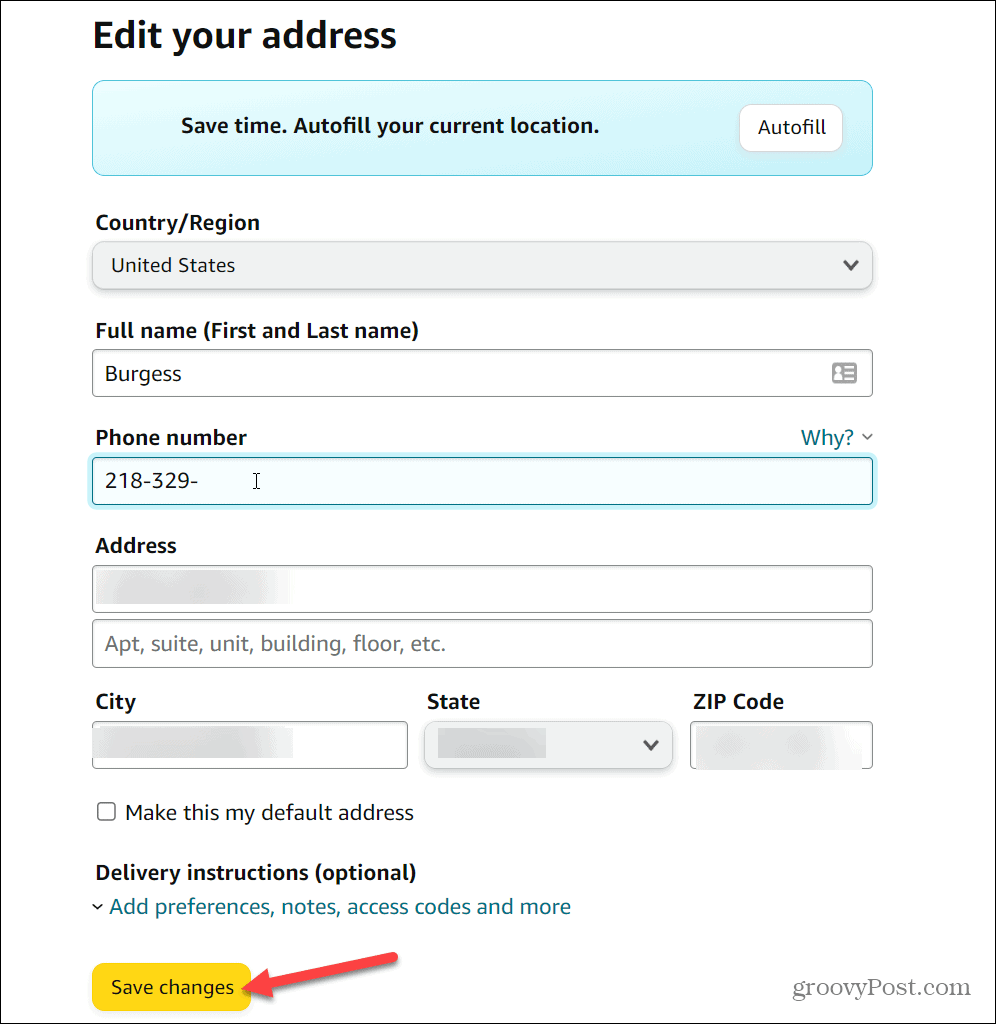
- Adding a New Address: Users click the “Add Address” button. This triggers a data entry form, meticulously designed to capture all necessary delivery information: full name, street address (with separate fields for apartment/suite numbers), city, state/province, postal code, and phone number. The form often includes real-time validation, using backend algorithms to check for common errors in postal codes or address formats, enhancing data integrity.
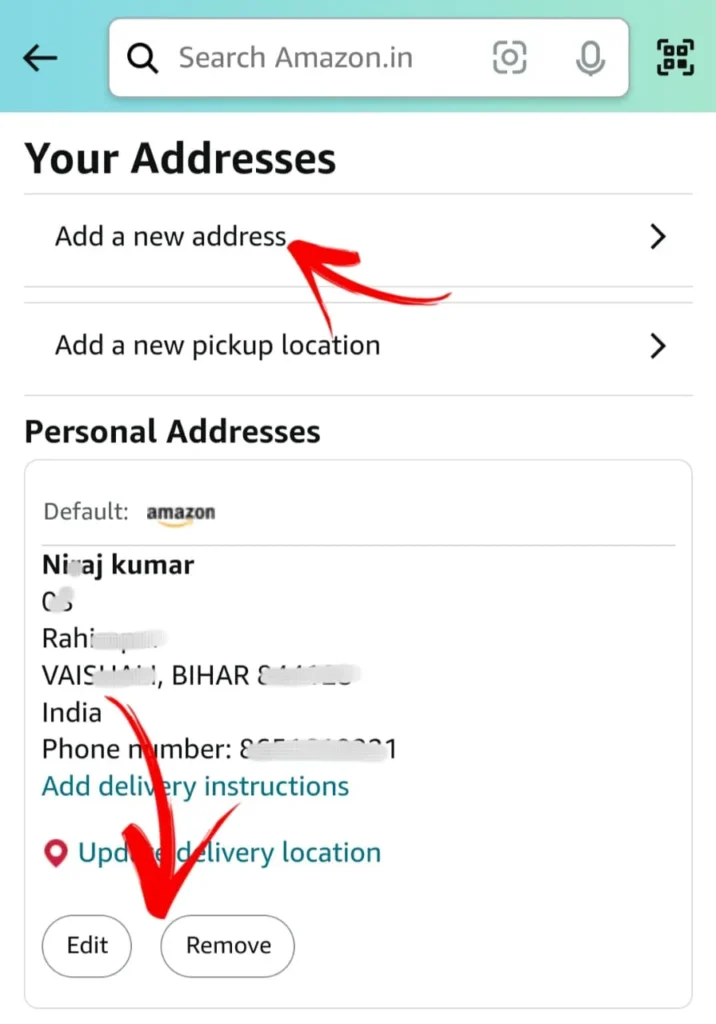
- Editing an Existing Address: Next to each stored address, there’s usually an “Edit” option. Clicking this re-populates the data entry form with the existing details, allowing users to modify specific fields. This edit functionality ensures that changes are applied to the correct record in the database, preventing accidental overwrites or the creation of duplicate, incorrect entries.
- Deleting an Address: A “Remove” or “Delete” option is also available. When selected, the system typically prompts a confirmation dialog, a crucial UX pattern to prevent accidental data loss. Upon confirmation, the address record is purged from the user’s active address book.
This process highlights Amazon’s commitment to structured data input and management, crucial for the reliable operation of its vast logistics network. The clarity of the UI minimizes user error, a key objective in front-end development.
Via the Amazon Mobile App: Streamlined for On-the-Go Management
The Amazon mobile app offers a more streamlined, touch-optimized experience, reflecting best practices in mobile UI/UX design. While the underlying logic is identical, the navigation paths are tailored for smaller screens and finger-based interaction.
- App Access and Authentication: Similar to the website, secure login is paramount. Biometric authentication (fingerprint, facial recognition) often supplements passwords on mobile, offering an enhanced layer of convenience and security, leveraging device-specific hardware features.
- Hamburger Menu Navigation: Most mobile apps utilize a “hamburger menu” (three horizontal lines) for accessing main functionalities. Tapping this reveals a sidebar or overlay menu.
- Locating “Your Account” or “Account Settings”: Within the mobile menu, users will typically find “Your Account” or a similarly named section. This consolidates user-specific settings.
- Finding “Your Addresses”: Under “Account Settings,” the “Your Addresses” option will be present. The mobile interface often presents these options as a clean list, prioritizing touch targets.
- Address Management: The interface for adding, editing, or deleting addresses on the app closely mirrors the website’s functionality but is often presented with larger buttons and input fields to accommodate touch-based input, reducing the likelihood of selection errors. Auto-fill features, leveraging device capabilities, can further expedite the data entry process.
The mobile app’s design prioritizes speed and accessibility, a testament to responsive design principles that ensure consistent functionality across diverse device types.
Managing Multiple Addresses: The Power of Your Digital Address Book
Amazon’s “Your Addresses” section acts as a personal digital address book, a core data management feature. Users can store numerous addresses for different purposes – home, work, gift recipients, vacation homes. This capability streamlines checkout processes, as users can simply select a pre-existing address rather than re-entering data. This efficiency not only saves time but also reduces data entry errors, which could lead to logistical nightmares. The system intelligently allows users to designate a “default” address, which is automatically selected for new orders, further enhancing UX by minimizing clicks and decisions. This “default” setting is a simple yet powerful configuration management feature.
The Unseen Layers: Digital Security and Privacy Considerations
Beyond the visible interface, changing an address on Amazon triggers a series of backend operations governed by robust digital security and privacy protocols. This isn’t just a convenience; it’s a security-sensitive transaction that safeguards both the user and the integrity of Amazon’s logistics.
Safeguarding Your Deliveries: Why Address Accuracy Matters
An incorrect shipping address isn’t just an inconvenience; it’s a potential security vulnerability. Misdirected packages can lead to:
- Financial Loss: If a package is delivered to the wrong address and cannot be recovered, the customer may suffer financial loss, or Amazon may incur costs for replacement.
- Identity Theft Risk: If personal items or documents are delivered to an unauthorized location, they could fall into the wrong hands, exposing the recipient to identity theft or fraud.
- Product Diversion: In cases of high-value items, a compromised address could be exploited by fraudsters to reroute deliveries.
Amazon’s system, therefore, uses various technical checks to ensure address validity, including integration with postal service databases and often, geolocation services (with user permission, especially on mobile) to verify addresses against physical locations. This technological verification minimizes the risk of human error and deliberate manipulation.
Protecting Your Account: Two-Factor Authentication and Address Changes
Account security is paramount, especially when sensitive information like shipping addresses is being modified. Amazon, like most major tech platforms, strongly encourages and often mandates Two-Factor Authentication (2FA) or Multi-Factor Authentication (MFA).
When a user attempts to change an address, particularly if it’s a significant modification or the first time a new address is added, the system might trigger additional security checks. This could include:
- Re-entering the password: Even if already logged in.
- Sending a One-Time Password (OTP): To the registered email or phone number.
- Biometric verification: If available and enabled on the device.
These measures ensure that even if a password is compromised, an unauthorized individual cannot easily alter shipping details and hijack deliveries. This layered security approach is a cornerstone of modern digital security architecture.
Amazon’s Data Handling: Trust and Transparency
Amazon’s immense scale means it manages an enormous volume of personal data, including shipping addresses. Its privacy policy outlines how this data is collected, stored, and used. From a technical standpoint, this involves:
- Encryption at Rest and In Transit: Address data, like all sensitive customer information, is encrypted both when stored on Amazon’s servers (at rest) and when transmitted across networks (in transit) using robust cryptographic protocols (e.g., TLS/SSL).
- Access Controls: Strict access controls and permission hierarchies ensure that only authorized personnel and automated systems can access address data, and only for legitimate purposes (e.g., order fulfillment, customer service).
- Data Minimization: While addresses are crucial, Amazon adheres to principles of data minimization, only collecting information necessary for delivery and account management.
These practices build trust, a critical component of user adoption and sustained engagement in the digital economy.
Optimizing Your E-commerce Experience: Beyond the Basics
Understanding the “how” is just the beginning. The “why” and “what else” reveal deeper insights into e-commerce functionality and user interaction design. Optimizing your address management goes beyond mere updates; it’s about leveraging the system’s capabilities for a smoother, more secure experience.
Default Addresses: Streamlining Future Purchases
The ability to set a default shipping address is a deceptively simple yet powerful UX optimization. Technically, this involves flagging a specific address record in the user’s database with a ‘default’ attribute. When a new order is initiated, the system’s backend query automatically retrieves this flagged address, pre-filling the shipping information. This intelligent pre-selection:
- Reduces Cognitive Load: Users don’t have to choose an address every time.
- Accelerates Checkout: Fewer clicks mean faster transactions.
- Minimizes Errors: Reduces the chance of selecting the wrong address under pressure.
This feature is a prime example of how intelligent system defaults enhance user satisfaction and transaction efficiency within a tech platform.
Troubleshooting Common Technical Glitches
While Amazon’s system is robust, users can occasionally encounter technical hiccups when trying to change an address. From a tech support perspective, common issues include:
- Invalid Address Format Errors: The system might flag an address as invalid if it doesn’t conform to postal service standards. This often requires users to double-check their input against official postal lookup tools. The backend validation rules are key here.
- Browser/App Cache Issues: Stale cache or cookies can sometimes interfere with form submissions or account updates. Clearing browser data or reinstalling the app can resolve these client-side technical conflicts.
- Network Connectivity Problems: A poor internet connection can lead to incomplete data submission, resulting in errors.
- Temporary System Glitches: On rare occasions, Amazon’s servers might experience temporary outages or maintenance, affecting functionality.
Understanding these potential points of failure empowers users to self-diagnose and troubleshoot minor technical issues, reducing reliance on customer service.
The Future of Address Management: AI and Geolocation Integration
The evolution of address management in e-commerce is far from over. Future innovations will likely leverage advancements in AI and geolocation technologies:
- AI-Powered Address Prediction and Correction: AI algorithms could learn from user input and postal data to proactively suggest correct addresses, flag potential typos, or even infer missing details more accurately.
- Dynamic Geolocation Verification: As drone deliveries and hyper-local logistics expand, precise GPS coordinates and real-time geolocation data, potentially integrated directly from smart devices, could augment traditional street addresses, ensuring ultra-precise delivery points.
- Blockchain for Address Verification: Distributed ledger technologies could offer immutable, secure, and transparent methods for address verification, enhancing trust and reducing fraud across multiple platforms.
These futuristic integrations promise even greater accuracy, security, and efficiency in the delivery ecosystem.
The Broader Tech Landscape: UX Principles in E-commerce
The simple act of changing an Amazon shipping address offers a microcosm of larger tech principles that govern successful e-commerce platforms. It reflects a deep understanding of user behavior and the application of sophisticated engineering to meet those needs.
Intuitive Design: Amazon’s Approach to User-Centricity
Amazon’s success is deeply rooted in its commitment to intuitive design. The process of managing addresses is a prime example:
- Clear Labeling: Options like “Your Addresses,” “Add Address,” “Edit,” and “Remove” are unambiguously labeled, reducing cognitive effort.
- Logical Flow: The step-by-step process, from login to confirmation, follows a predictable and logical sequence, minimizing confusion.
- Visual Hierarchy: Key actions and information are visually emphasized, guiding the user’s eye and focus.
These design choices are not arbitrary; they are the result of extensive A/B testing, user research, and continuous iteration, all guided by data analytics to optimize the user journey.
The Importance of Seamless Updates in a Dynamic World
In an era where people frequently move, travel, or send gifts to diverse locations, the ability to update shipping information quickly and reliably is not just a feature – it’s a necessity. E-commerce platforms that fail to provide a seamless, secure, and efficient way to manage addresses risk customer frustration, lost sales, and eroded trust. This highlights the critical role of agile development and robust backend systems capable of real-time data updates.

Comparing Platforms: Lessons from Amazon’s Address Management System
While each e-commerce platform has its unique interface, the core technical requirements for address management are universal. Amazon’s system often serves as a benchmark due to its scale and maturity. Other platforms can learn from Amazon’s emphasis on:
- Dedicated Address Management Modules: Separating address information from other profile settings simplifies navigation.
- Clear Default Settings: Offering the option to set a default address greatly enhances recurring user experience.
- Integrated Security Measures: Prompting for additional verification during sensitive changes is crucial for user trust.
- Robust Validation: Employing backend checks for address format and postal code accuracy minimizes delivery errors.
By observing and learning from established systems like Amazon’s, newer platforms can accelerate their development of user-friendly and secure address management features.
In conclusion, changing your Amazon shipping address is far more than a simple data entry task. It’s an interaction deeply embedded within a complex technological framework, showcasing Amazon’s prowess in user experience design, digital security implementation, and sophisticated data management. By understanding the underlying tech, users can appreciate the engineering effort that goes into ensuring their packages arrive safely and efficiently, while also becoming more adept at navigating the ever-evolving digital landscape of e-commerce.
aViewFromTheCave is a participant in the Amazon Services LLC Associates Program, an affiliate advertising program designed to provide a means for sites to earn advertising fees by advertising and linking to Amazon.com. Amazon, the Amazon logo, AmazonSupply, and the AmazonSupply logo are trademarks of Amazon.com, Inc. or its affiliates. As an Amazon Associate we earn affiliate commissions from qualifying purchases.