
In the current era of the “Streaming Wars,” digital consumers find themselves navigating a complex landscape of Subscription Video on Demand (SVOD) services. Paramount+, a major player in the global media ecosystem, offers a vast library of content, yet the technical requirements for managing these digital accounts can often become cumbersome. Whether you are streamlining your software suite, rotating platforms to access specific software integrations, or simply practicing better digital hygiene, understanding the technical nuances of terminating a subscription is essential.
Canceling a Paramount+ subscription is not a one-size-fits-all process. Because the service is integrated into various hardware ecosystems—ranging from mobile operating systems like iOS and Android to smart TV interfaces like Roku and Amazon Fire OS—the deactivation path depends entirely on the initial point of purchase. This guide provides an in-depth technical analysis of the deactivation process across all major digital environments.
Understanding the Paramount+ Digital Ecosystem
Before initiating a cancellation, it is critical to understand the architecture of your subscription. Paramount+ utilizes a multi-channel distribution model. If you signed up directly via the Paramount+ website, your billing is handled by their internal servers. However, if you registered through a third-party app store or a streaming device, the billing logic is outsourced to that specific platform’s API.
Third-Party Billing vs. Direct Subscriptions
In the tech world, this is known as “In-App Purchase” (IAP) management. When you subscribe via Apple’s App Store or Google Play, Paramount+ does not actually have the authority to cancel your billing; they merely receive a token from the third-party provider confirming your access. Therefore, attempting to cancel a third-party subscription through the Paramount+ website will often result in a redirect or an error message.
Identifying Your Billing Source
The first technical step is to verify where your money is going. You can typically find this in the “Account” section of the Paramount+ interface. Look for a field labeled “Billing Information” or “Plan Details.” If it lists a company like Amazon, Apple, or Roku, you must navigate to those specific digital storefronts to manage your lifecycle. If it displays credit card details or a PayPal link directly, you are dealing with a direct-to-consumer (DTC) subscription.
Platform-Specific Deactivation Procedures
Navigating the UI (User Interface) of different platforms requires a specific sequence of commands. Below are the technical walkthroughs for the most common digital environments.
Canceling via Web Browser (Direct)
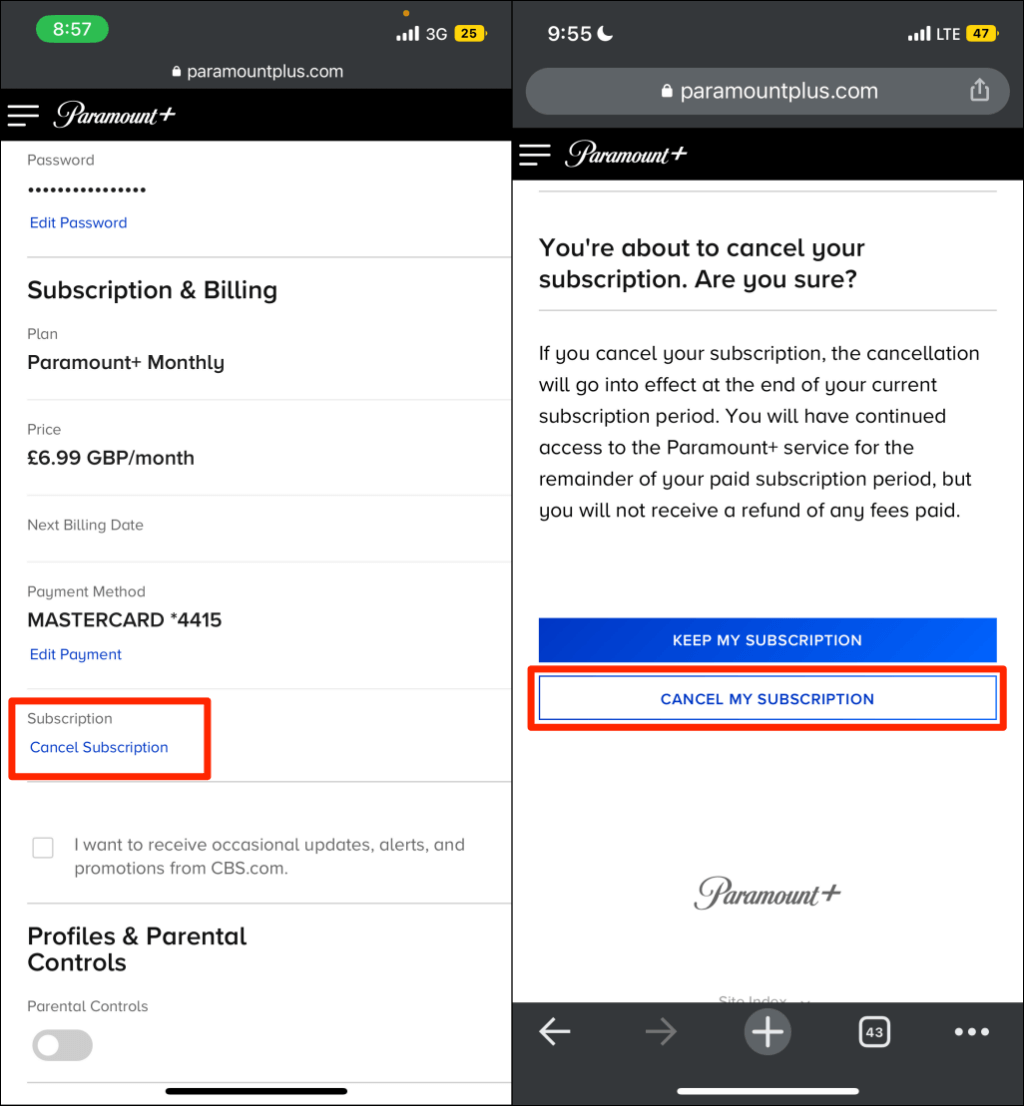
For users who subscribed directly through the Paramount+ website, the process is handled through a standard web-based dashboard.
- Authentication: Navigate to the official Paramount+ website and log in with your administrative credentials.
- Profile Navigation: Click on the user profile icon in the top-right corner and select “Account.”
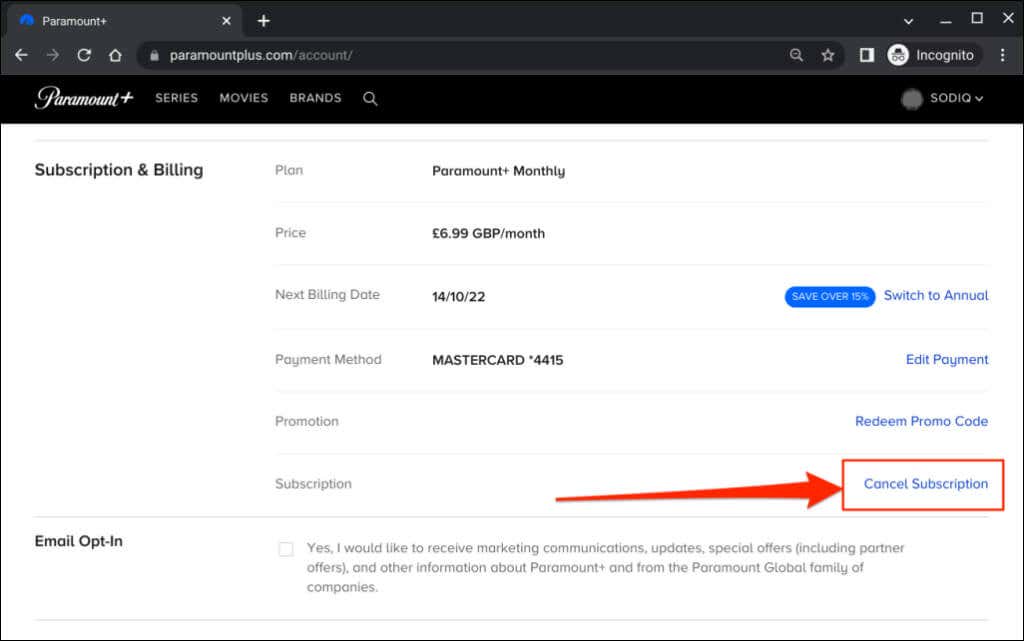
- Subscription Logic: Under the “Subscription & Billing” header, locate your specific plan. You will see a “Cancel Subscription” hyperlink.
- Verification Loop: The system will typically trigger a retention modal—a common UX design intended to offer discounts or “pausing” options. To proceed with full termination, bypass these prompts and confirm the cancellation.
- Data Confirmation: Ensure you receive an automated confirmation email. From a digital security standpoint, archiving this email is vital for preventing “zombie” charges—recurring fees that persist due to database synchronization errors.
Managing Subscriptions on iOS and Android Devices
Mobile operating systems centralize subscription management to enhance security and user control.
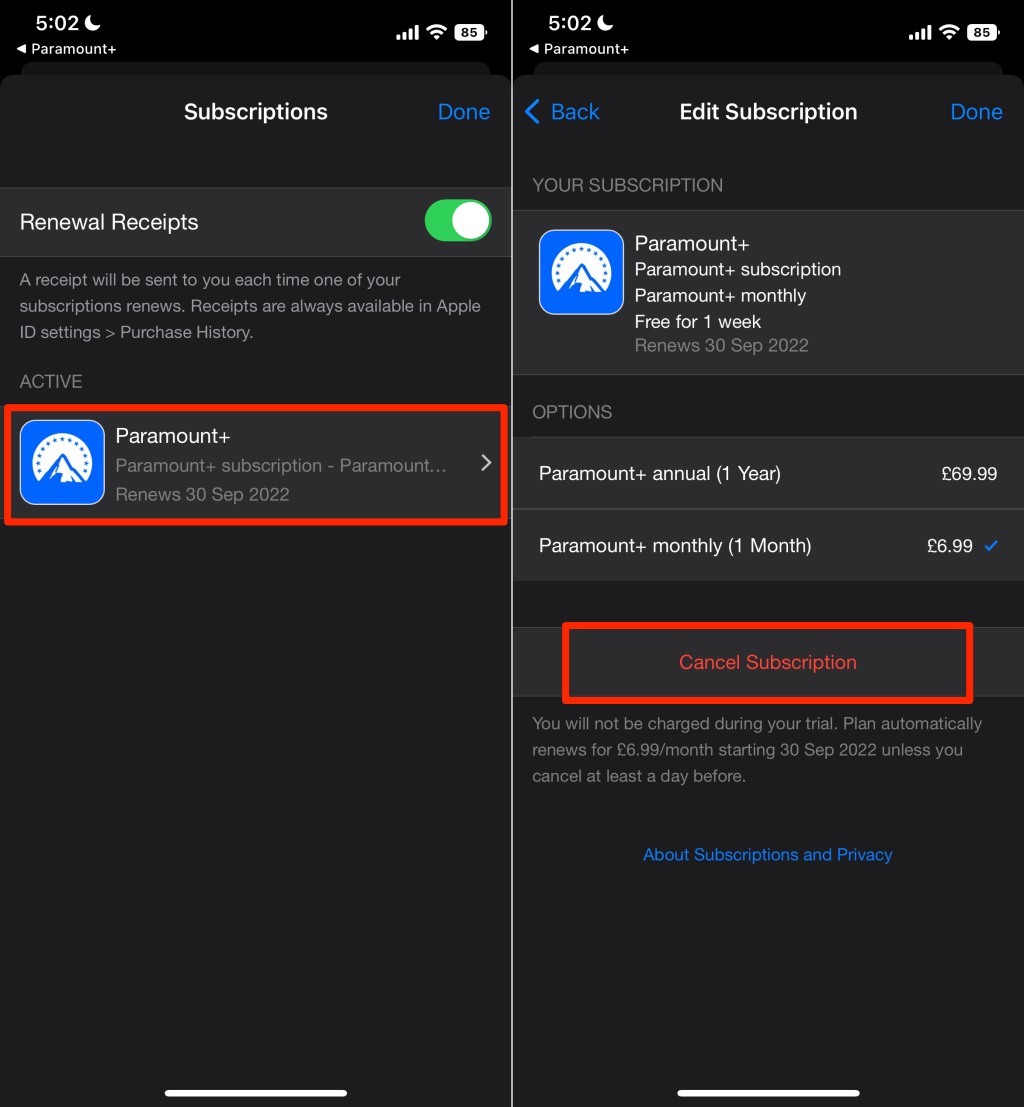
- iOS (Apple Ecosystem): On an iPhone or iPad, your subscription is tied to your Apple ID. Open the Settings app, tap your name at the apex of the menu, and select Subscriptions. Locate Paramount+ in the active list and select “Cancel Subscription.” This action revokes the billing token associated with your iCloud account.
- Android (Google Play Ecosystem): Open the Google Play Store app. Tap the profile icon and navigate to Payments & Subscriptions > Subscriptions. Select the Paramount+ app and choose “Cancel subscription.” Google’s backend will handle the communication with Paramount’s servers to ensure your access is revoked at the end of the current billing cycle.
Navigating Connected TV Interfaces (Roku, Amazon Fire TV)
Smart TV platforms operate as gated ecosystems with their own proprietary billing layers.
- Roku: Highlight the Paramount+ channel on your home screen and press the Star (*) button on your remote. This opens the options menu. Select Manage Subscription and then Cancel Subscription.
- Amazon Fire TV: Unlike other platforms, Amazon often requires users to manage “Channels” via a web browser. Log into your Amazon account, navigate to Account & Lists > Memberships & Subscriptions, and select Prime Video Channels. From here, you can toggle the “Auto-Renew” setting for Paramount+ to “Off.”
Troubleshooting and Technical Challenges in Digital Cancellations
Even with a clear roadmap, users may encounter technical friction during the deactivation process. These issues often stem from browser cache conflicts or synchronization delays between different server clusters.
Dealing with Persistent Login Issues
If you find yourself unable to log in to cancel—perhaps due to a forgotten password or a deactivated email—the technical remedy involves a password reset via the SMTP (Simple Mail Transfer Protocol) link sent to your recovery address. If the system fails to recognize your credentials despite correct input, it may be a “session persistence” error. Clearing your browser’s cookies and cache or attempting the process in “Incognito Mode” will force a fresh handshake with the Paramount+ servers, often resolving the UI glitch.
Confirming Account Termination and Data Privacy
A critical component of digital security is understanding what happens to your data after a subscription ends. Terminating a subscription cancels the billing cycle, but it does not necessarily delete your account data. Under modern data protection regulations like GDPR or CCPA, users have the “right to be forgotten.”
Once the subscription is canceled, your profile, watch history, and PII (Personally Identifiable Information) may remain on Paramount’s servers for marketing purposes or to facilitate an easy “re-subscribe” flow. If you wish to purge this data entirely, you must submit a formal data deletion request through their privacy portal, ensuring your digital footprint is minimized.
Strategic Subscription Management in the Modern Tech Landscape
The necessity of knowing how to cancel a service like Paramount+ points to a broader trend in technology: the rise of “Subscription Fatigue.” As the digital economy shifts toward recurring revenue models, the burden of management falls on the user.
Utilizing Digital Tracking Tools
To manage multiple software licenses and media subscriptions effectively, many tech-savvy users are turning to centralized management tools. Apps that utilize API integrations can scan your financial statements or app store history to provide a unified dashboard of all active “burn rates.” Using these tools allows you to see exactly when a Paramount+ trial will expire or when a billing cycle will reset, allowing for “Just-in-Time” cancellations.
The Future of “Auto-Renewal” Regulation
From a technical and legal standpoint, the “dark patterns” often used to hide cancellation buttons are coming under scrutiny. Tech regulators are increasingly demanding “Click-to-Cancel” functionality, which requires companies to make the deactivation process as simple as the sign-up process. For a platform like Paramount+, this means continuous updates to their UI/UX to ensure compliance with shifting digital standards. Staying informed about these interface changes ensures that you, the user, remain in control of your digital environment.
Conclusion
Managing a Paramount+ subscription is a fundamental task in modern digital life, requiring a basic understanding of platform ecosystems and software interfaces. Whether you are navigating the direct web portal, an iOS “Subscription” menu, or a Roku interface, the key is identifying the primary billing authority. By following the platform-specific protocols outlined above and practicing proactive digital hygiene—such as archiving confirmation emails and monitoring for “zombie” charges—you can ensure your tech stack remains lean and efficient. As the software landscape continues to evolve, the ability to quickly and effectively manage digital commitments will remain a vital skill for every tech-literate consumer.
aViewFromTheCave is a participant in the Amazon Services LLC Associates Program, an affiliate advertising program designed to provide a means for sites to earn advertising fees by advertising and linking to Amazon.com. Amazon, the Amazon logo, AmazonSupply, and the AmazonSupply logo are trademarks of Amazon.com, Inc. or its affiliates. As an Amazon Associate we earn affiliate commissions from qualifying purchases.