
In the contemporary digital landscape, an Amazon account is far more than a simple login for an e-commerce platform. It serves as a centralized identity provider for a vast ecosystem of cloud services, streaming media, smart home integration, and digital content management. Understanding the technical nuances of setting up and optimizing this account is essential for any user looking to navigate the modern web securely and efficiently. This guide provides a comprehensive, deep dive into the technical process of account creation, the implementation of robust security protocols, and the management of integrated digital services.

The Architecture of Account Creation: Navigating the Interface
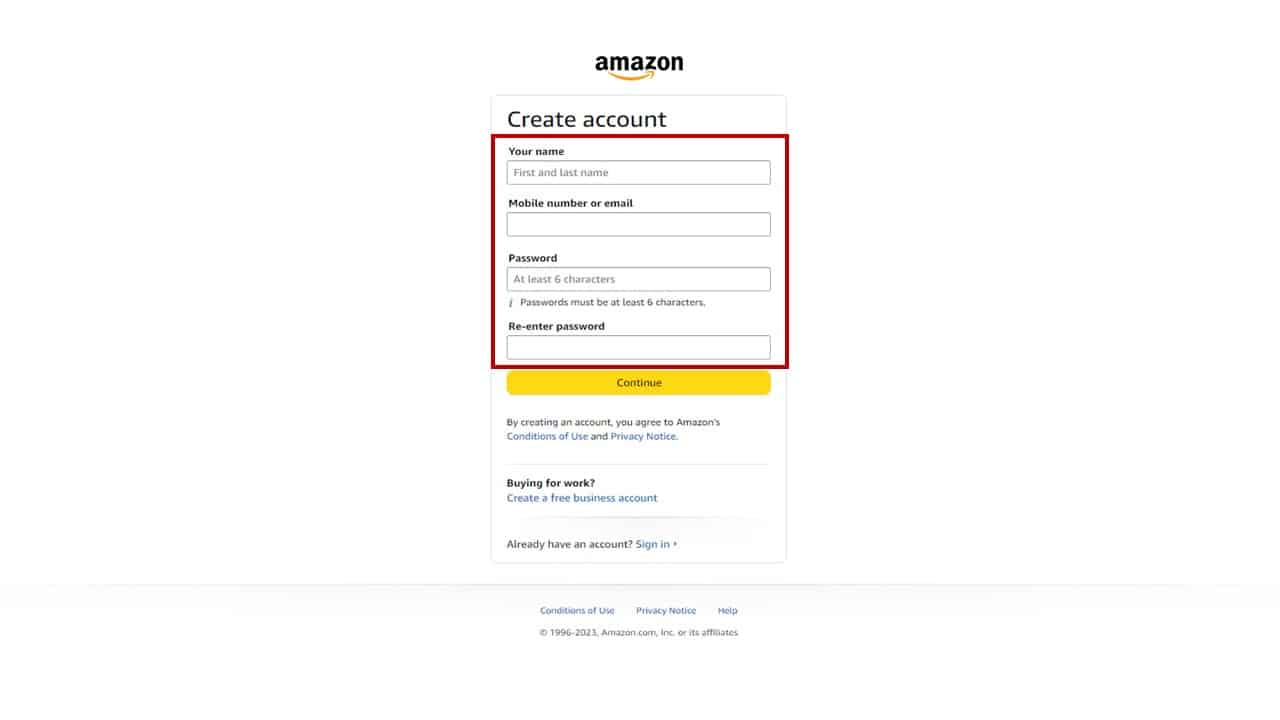
The process of creating an Amazon account is a study in streamlined User Experience (UX) design, yet it involves several critical backend handshakes that ensure data integrity and user authentication. Whether you are utilizing the desktop web interface or the mobile application framework, the initial setup is the foundation of your digital interaction with the Amazon ecosystem.
Desktop vs. Mobile App Infrastructure
While the end goal is the same, the technical path differs slightly between the desktop browser and the mobile application. On a desktop, the process relies on secure browser-side cookies and encrypted HTTPS protocols to transmit your data to Amazon’s authentication servers. In contrast, the mobile app utilizes an API-driven approach, often integrating with the device’s native keychain or biometric authentication systems (such as FaceID or Android Biometrics) to provide a more seamless, hardware-integrated experience.
When initiating the “Create Account” sequence, you are required to provide a unique identifier—typically an email address or a mobile phone number. From a technical standpoint, this identifier becomes the primary key in Amazon’s relational database for your user profile. It is linked to your unique User ID (UUID), which tracks your preferences, history, and digital rights across all Amazon-owned sub-platforms.
The Verification Loop and Data Validation
Upon submitting your initial details, Amazon triggers an automated verification loop. This is usually managed via a Simple Email Service (SES) or an SMS gateway. You will receive a One-Time Password (OTP) or a verification link. This step is critical for preventing automated “bot” accounts and ensuring that the communication channel between the server and the user is valid. During this phase, the system also runs validation scripts to ensure the password meets specific entropy requirements, protecting the account from common brute-force vulnerabilities right from the start.
Strengthening the Digital Fortress: Advanced Security Protocols
In an era of increasing cyber threats, a simple password is no longer sufficient. Amazon offers several advanced security features that leverage modern cryptographic standards to protect user data. After the initial account creation, the first priority for any tech-savvy user should be the hardening of account security.
Implementing Multi-Factor Authentication (MFA)
Multi-Factor Authentication (MFA), specifically Two-Step Verification (2SV), is the gold standard for account security. Amazon supports several methods for this, ranging from the less secure SMS-based codes to the highly secure Time-based One-Time Password (TOTP) algorithms.
To implement the most secure version, users should opt for an authenticator app (like Google Authenticator or Authy). This method uses a shared secret key between the server and your device to generate a code that changes every 30 seconds. Because this code is generated locally on your device and is not sent over the cellular network, it is immune to “SIM swapping” attacks. For the highest level of security, Amazon also supports physical security keys (U2F/FIDO2 standards), such as YubiKeys, which require a physical touch to authorize a login, virtually eliminating the risk of remote hijacking.
Managing Device Authorizations and Session Tokens
Every time you log in to your Amazon account on a new gadget—be it a smart TV, a tablet, or a Kindle—a new session token is generated. Within the “Login & Security” settings, users can access a granular list of “Registered Devices.” This interface allows you to view the metadata of every device currently holding an active session.
Technically, it is best practice to periodically audit these devices and “De-register” any that are no longer in use. De-registering a device invalidates the OAuth tokens associated with that specific hardware, ensuring that if a device is lost or stolen, the account remains inaccessible from that entry point.
The Integrated Ecosystem: Syncing Services and Smart Home Hardware
An Amazon account is the “Single Sign-On” (SSO) key to a massive array of technological services. Once the account is live, it acts as the central node for managing everything from cloud storage to Internet of Things (IoT) devices.
Alexa and the IoT Framework
For users of Alexa-enabled devices, the Amazon account serves as the administrative hub for the smart home. When you sign in to an Echo device, you are essentially provisioning that hardware to interact with Amazon’s cloud-based Voice Service (AVS). The account management dashboard allows you to configure “Skills,” which are essentially third-party APIs that extend the functionality of the voice assistant.
From a technical perspective, your account manages the permissions for these APIs, dictating which third-party services can access your data. Managing these permissions carefully is vital for maintaining a secure smart home environment.
Digital Content and Rights Management (DRM)
The Amazon account also functions as a digital locker for Kindle books, Prime Video content, and Amazon Music. This is governed by Digital Rights Management (DRM) protocols. When you purchase or lease digital content, the license is cryptographically tied to your Amazon account UUID.
The “Manage Your Content and Devices” section is a powerful tool where you can push content to specific devices, update firmware on Kindle e-readers, and manage the “Family Vault” (if applicable), which allows for the controlled sharing of digital assets across multiple accounts using the “Amazon Household” technical bridge.
Navigating Data Privacy and Tracking Settings
In the world of big tech, account management also involves controlling the flow of data. Amazon provides various toggles that allow users to manage their digital footprint and how their browsing data is utilized by the platform’s machine learning algorithms.
Managing Advertising Identifiers and Personalization
Every Amazon account is associated with an internal advertising ID. This ID tracks your interactions within the app and on the site to build a profile for “Interest-Based Ads.” Tech-conscious users can navigate to the “Advertising Preferences” section to opt-out of this tracking. While this doesn’t reduce the number of ads, it stops the system from using your specific behavioral data to populate them, thereby increasing your digital privacy.
Clearing Browsing History and Cache
Amazon’s recommendation engine is built on a complex neural network that analyzes your browsing and purchase history. Occasionally, this can lead to “filter bubbles” or irrelevant suggestions. Within your account settings, you can manually view and delete items from your browsing history. This action sends a command to Amazon’s data processing layer to exclude those specific data points from the next iteration of the recommendation algorithm, effectively “resetting” your discovery feed.
Troubleshooting and Account Recovery Mechanisms
Even the most secure accounts can face access issues. Amazon has built-in technical redundancies to help users recover access without compromising the security of the underlying data.
The Role of Recovery Emails and Secure Backup Codes
During the setup of Two-Step Verification, Amazon provides a set of “Backup Codes.” These are static, one-time-use alphanumeric strings that bypass the MFA requirement. From a technical standpoint, these should be stored in a secure, encrypted password manager or a physical safe.
If you lose access to your MFA device, these codes are the only way to regain access without undergoing a manual identity verification process with Amazon’s security team. The recovery process often involves “Account Reinstatement,” where the system may ask for historical data points—such as the date the account was created or the last four digits of a stored payment method—to verify the user’s identity against the stored encrypted records.

Technical Support and Secure Communication
In the event of a suspected breach, Amazon’s “Security Center” provides tools to instantly sign out of all active sessions and reset the account’s master password. This initiates a system-wide “flush” of session cookies across all global servers, ensuring that any unauthorized actor is immediately disconnected.
Creating an Amazon account is more than just filling out a form; it is the act of establishing a secure, personalized presence within one of the world’s most sophisticated digital infrastructures. By focusing on high-level security practices, understanding the integration of IoT and DRM, and actively managing data privacy, users can leverage the full power of the Amazon tech ecosystem while maintaining a robust defensive posture.
aViewFromTheCave is a participant in the Amazon Services LLC Associates Program, an affiliate advertising program designed to provide a means for sites to earn advertising fees by advertising and linking to Amazon.com. Amazon, the Amazon logo, AmazonSupply, and the AmazonSupply logo are trademarks of Amazon.com, Inc. or its affiliates. As an Amazon Associate we earn affiliate commissions from qualifying purchases.