
In the dynamic landscape of personal finance, gift cards often serve as a convenient and thoughtful way to manage spending, offer presents, or simply enjoy a pre-allocated budget for desired purchases. Among the myriad options, American Express (Amex) gift cards stand out due to the brand’s reputation for security and widespread acceptance. However, navigating their use on a platform as vast and popular as Amazon can sometimes present unique challenges and nuances that aren’t immediately obvious. This guide aims to demystify the process, providing a professional, insightful, and engaging walkthrough for effectively utilizing your Amex gift card on Amazon, transforming potential hurdles into seamless transactions and savvy financial decisions.
At its core, using an Amex gift card on Amazon is a straightforward process once you understand the underlying mechanisms and common pitfalls. It’s about recognizing the Amex gift card as a prepaid card, similar to a debit card, rather than a traditional credit card, which dictates how it interacts with Amazon’s payment system. For anyone looking to maximize their purchasing power, manage their budget, or simply redeem a thoughtful gift, mastering this interaction is a valuable personal finance skill.
Understanding Amex Gift Cards and Amazon’s Payment System
Before diving into the mechanics of a transaction, it’s crucial to grasp the fundamental nature of Amex gift cards and how Amazon’s payment infrastructure processes different types of payments. This foundational knowledge will empower you to anticipate potential issues and make informed decisions.
The Nature of Amex Gift Cards: Prepaid vs. Credit
An American Express gift card, despite bearing the prestigious Amex logo, functions primarily as a prepaid debit card. Unlike a credit card, which extends a line of credit that you repay, a gift card holds a finite, pre-loaded balance. Once this balance is depleted, the card typically becomes inactive (unless it’s a reloadable type, which is less common for standard gift cards). This distinction is critical because it affects how transaction authorizations work. When you use a credit card, the merchant typically verifies the card’s validity and the availability of credit. With a prepaid card, the transaction must check the exact available balance against the purchase amount, often requiring a small buffer for authorizations. Amex gift cards are not linked to your personal credit history or bank account, offering a layer of anonymity but also requiring a slightly different approach to online transactions compared to registered debit or credit cards.
Amazon’s Accepted Payment Methods Overview
Amazon, being a global e-commerce giant, accepts a wide array of payment methods to cater to its diverse customer base. This includes major credit cards (Visa, MasterCard, American Express, Discover, JCB, Diner’s Club), debit cards, Amazon gift cards, and even methods like checking accounts (for certain services) or installment plans. For a prepaid Amex gift card, Amazon treats it much like any other debit or credit card for processing purposes. The key difference lies in the verification process, especially concerning the billing address and the available balance. Amazon’s system expects a payment method to have a clear billing address associated with it for security and fraud prevention. This often becomes the primary point of confusion for users of prepaid gift cards.
Why Amex Gift Cards Can Be Tricky: Billing Address and Balance Issues
The two most common stumbling blocks when using an Amex gift card on Amazon are the billing address requirement and issues related to the card’s balance.
- Billing Address: Unlike a personal credit card tied to your home address, an Amex gift card often doesn’t have a specific billing address registered by default. When Amazon attempts to verify the payment method, it might look for a billing address that matches the one on file with the card issuer. If this information is absent or incorrect, the transaction may be declined. Fortunately, Amex provides a way to register an address, which is a critical preparatory step.
- Balance Issues: If your purchase exceeds the exact balance on your Amex gift card, Amazon’s system might decline the entire transaction, even if you intend to pay the remainder with another method. Some systems are designed to allow split payments, but the initial authorization for the gift card needs to succeed for its portion. Moreover, some transactions (especially for digital goods or services) might initiate a small pre-authorization hold, which can temporarily reduce the available balance, leading to declines if the balance is exactly equal to the purchase price.
Step-by-Step Guide to Redeeming Your Amex Gift Card on Amazon
With a clear understanding of the nuances, let’s walk through the exact steps to ensure a smooth transaction when using your Amex gift card on Amazon.
Checking Your Gift Card Balance
Before even thinking about Amazon, always verify the exact balance on your Amex gift card. This is paramount. You can usually do this by visiting the Amex gift card website (often listed on the back of the card) and entering the card number and security code. Knowing the precise amount helps you plan your purchase and avoid declines due to insufficient funds.
Registering Your Amex Gift Card with a Billing Address
This is arguably the most crucial step for online purchases. Visit the American Express gift card registration portal (you can usually find a link on the Amex gift card website or by searching “Amex gift card register address”). You will need to enter your card details (card number, expiration date, security code). For the billing address, use your own current billing address – the same one associated with your Amazon account and other payment methods. This links a verifiable address to the card, which Amazon’s system can then validate during a transaction. It might take a few minutes or hours for the registration to fully process, so it’s wise to do this in advance.
Adding Your Amex Gift Card as a New Payment Method on Amazon
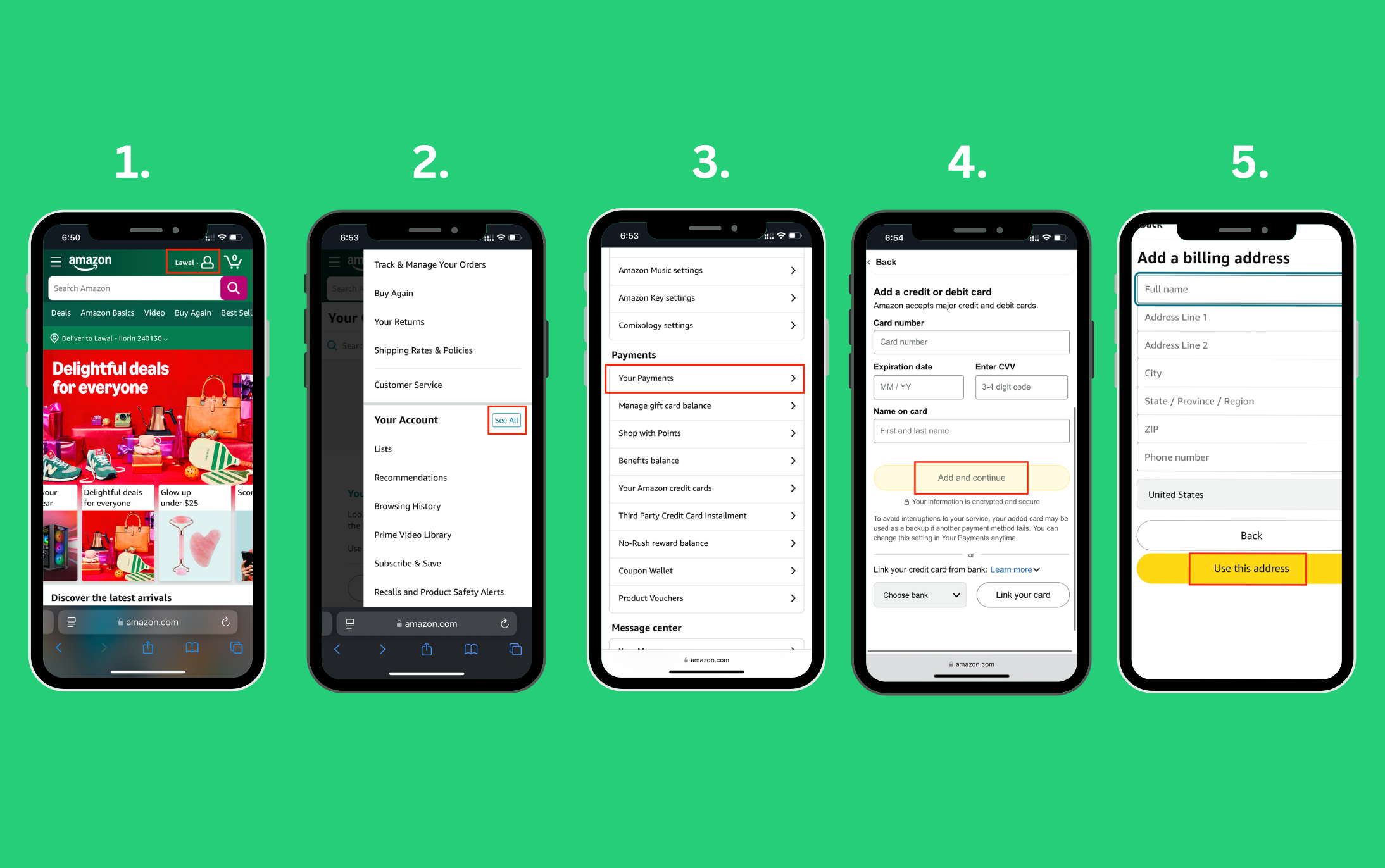
- Log in to Amazon: Go to your Amazon account.
- Navigate to “Your Payments”: In the “Account & Lists” dropdown, select “Account,” then “Your Payments.”
- Add a New Payment Method: Click on “Add a payment method.”
- Enter Card Details: Choose “Add a credit or debit card.” Input the 15-digit card number from your Amex gift card, the expiration date, and the cardholder’s name (you can use your own name here, as the card isn’t tied to a specific individual in the traditional sense, but the registered billing address is key).
- Confirm Billing Address: Amazon will prompt you to enter or select a billing address. Crucially, use the exact billing address you registered with your Amex gift card. This is where the earlier registration step pays off.
Applying the Gift Card at Checkout
Once your Amex gift card is successfully added to your Amazon account, using it during checkout is straightforward:
- Add Items to Cart: Browse Amazon and add the desired items to your shopping cart.
- Proceed to Checkout: Go to your cart and click “Proceed to checkout.”
- Select Payment Method: On the “Payment method” page, you should see your newly added Amex gift card listed among your payment options. Select it.
- Review Order: Ensure all details, including the shipping address and selected payment method, are correct.
- Place Your Order: Click “Place your order.”
Handling Partial Payments and Remaining Balances
What if your purchase exceeds the gift card’s balance? Amazon’s system is generally capable of handling split payments, but it requires a specific approach:
- Scenario 1: Purchase > Gift Card Balance: If your total order is, for example, $75 and your Amex gift card has $50, select the Amex gift card as your primary payment method. Amazon will automatically apply the $50 from the gift card and then prompt you to select another payment method (e.g., a credit card or debit card) to cover the remaining $25. Ensure you have a backup payment method available.
- Scenario 2: Purchase < Gift Card Balance: If your purchase is less than the gift card’s balance, the entire amount will be deducted from the card, and the remaining balance will stay on the card for future use. Remember to keep track of this remaining balance by checking the Amex gift card website.
Troubleshooting Common Issues and Maximizing Your Experience
Despite careful preparation, issues can sometimes arise. Knowing how to troubleshoot and employ smart strategies can save time and frustration.
“Payment Method Declined” – Common Causes and Solutions
This is the most frequent message encountered. Here’s a breakdown of common causes and their remedies:
- Incorrect Billing Address: Double-check that the billing address you entered on Amazon exactly matches the one you registered with Amex for the gift card. Even minor discrepancies (e.g., “Street” vs. “St.”) can cause declines.
- Insufficient Funds: Verify the current balance on your Amex gift card. If the purchase amount, including any potential pre-authorization holds, exceeds the balance, it will be declined.
- Pre-authorization Holds: For certain purchases or new payment methods, Amazon might attempt a small pre-authorization ($1-$2) to verify the card. If your card has only the exact amount for the purchase, this pre-authorization might temporarily drop the balance below the required threshold, causing a decline. Wait a few minutes and try again, or consider using the card for a slightly smaller amount initially.
- Card Not Activated: Ensure the Amex gift card was activated according to its instructions (usually a simple phone call or website visit).
- Security Features: If you’re making a very large purchase or multiple quick purchases, Amex’s fraud detection systems might flag the transaction. It’s rare for gift cards, but possible.
Balance Discrepancies and How to Verify
If you suspect a balance discrepancy, always refer to the official Amex gift card website for the definitive balance. Amazon’s display might not always reflect the absolute latest information, especially if transactions are pending. Keep your physical card or a record of its number handy.
Dealing with Multiple Gift Cards
Amazon typically allows you to apply only one debit/credit card type payment per order initially. If you have multiple Amex gift cards, you cannot directly stack them in the payment method section to cover a single purchase.
Solution: The best strategy is to convert your Amex gift card balances into Amazon Gift Card balance. This method is highly recommended:
- Go to Amazon’s “Reload Your Balance” page.
- Purchase an Amazon eGift card or reload your own Amazon account balance using your Amex gift card as the payment method.
- Repeat this for each Amex gift card you have.
- The entire amount will be consolidated into your Amazon.com Gift Card balance, which can then be easily applied to any future purchases without hassle. This sidesteps all billing address and split payment issues.
Returns and Refunds When Using a Gift Card
If you return an item purchased with an Amex gift card, the refund process can vary:
- Original Card Reload: Amazon typically attempts to refund the money back to the original Amex gift card. If the card is still active, the funds should reappear on it.
- Amazon Gift Card Balance: If the original Amex gift card is no longer active, or if there are issues with reloading it, Amazon often issues the refund as an Amazon Gift Card balance to your account. This is usually the default for items bought with an Amazon Gift Card balance created from an Amex gift card.
- Keep Your Card: It’s a good practice to retain your Amex gift card (even if empty) until you’re certain you won’t need to return any purchases made with it.
Advanced Strategies for Amex Gift Card Utilization on Amazon
Beyond basic redemption, there are strategic ways to leverage Amex gift cards within your personal finance framework.
Consolidating Balances with Amazon Gift Card Reloads
As mentioned above, this is arguably the most efficient and trouble-free way to use Amex gift cards on Amazon, especially if you have multiple cards or odd remaining balances. By converting the Amex gift card balance directly into Amazon account balance, you create a pool of funds that behave just like regular Amazon gift cards. This eliminates billing address concerns, allows for seamless partial payments, and simplifies tracking. It’s a smart move for anyone who frequently shops on Amazon.
Leveraging for Budgeting and Impulse Control
Amex gift cards can be excellent budgeting tools. If you’ve allocated a specific amount for discretionary spending on Amazon (e.g., for hobbies, entertainment, or gifts), transferring that budget onto an Amex gift card can provide a tangible limit. Once the card is empty, your spending stops, preventing overspending or impulse purchases beyond your set budget. This offers a psychological boundary that a regular credit card might not.
Gifting and Receiving: Best Practices
When giving an Amex gift card for use on Amazon, advise the recipient to register the card’s billing address and consider converting it to an Amazon Gift Card balance. When receiving one, follow these steps immediately to ensure you get full value. Always activate the card and check its balance promptly upon receipt.
Beyond the Purchase: Financial Prudence with Gift Cards
While gift cards offer convenience, understanding their broader financial implications and security best practices is crucial for responsible personal finance management.
Understanding Gift Card Fees and Expiration Dates (Amex Specifics)
Most consumer-facing Amex gift cards sold today (especially those purchased at retail) do not have expiration dates on the funds themselves, thanks to federal regulations. However, the card plastic may have an expiration date, meaning you might need a replacement card if it expires before you use all the funds. Always check the terms and conditions that come with your specific Amex gift card. Additionally, purchase fees might apply when buying the card, but Amex gift cards generally do not charge inactivity fees or monthly maintenance fees after purchase. Always read the fine print to avoid surprises.
Security Tips for Managing Prepaid Cards Online
- Treat like Cash: Amex gift cards are like cash. If lost or stolen, recovery can be difficult, especially if not registered.
- Keep Records: Take a photo of the front and back of your gift card (including the card number, expiration date, and CVV/security code) and note down its balance. This information is vital if you need to report a lost or stolen card or dispute a transaction.
- Use Secure Websites: Only use your card on reputable, secure websites (like Amazon, indicated by “https://”).
- Monitor Balance: Regularly check your card’s balance on the official Amex gift card website, especially after online purchases, to track spending and detect any unauthorized activity.
- Phishing Awareness: Be wary of emails or messages asking for your gift card details; these are often phishing attempts.
Integrating Gift Cards into a Broader Financial Strategy
For those committed to robust personal finance, gift cards can fit into a larger strategy. They can be used to:
- Allocate specific discretionary spending budgets.
- Introduce younger family members to online spending within controlled limits.
- Mitigate risk by avoiding tying a primary bank account to certain online purchases.
- Act as an emergency backup payment method for small online purchases.
By understanding the mechanics, leveraging best practices like converting to Amazon balance, and exercising financial prudence, your Amex gift card becomes more than just a piece of plastic – it transforms into a versatile and secure tool within your personal finance arsenal for seamless shopping on Amazon.
aViewFromTheCave is a participant in the Amazon Services LLC Associates Program, an affiliate advertising program designed to provide a means for sites to earn advertising fees by advertising and linking to Amazon.com. Amazon, the Amazon logo, AmazonSupply, and the AmazonSupply logo are trademarks of Amazon.com, Inc. or its affiliates. As an Amazon Associate we earn affiliate commissions from qualifying purchases.