
In an increasingly digital world, the way we manage and transfer money has evolved dramatically. Gone are the days when cash or checks were the primary methods for everyday transactions between individuals. Today, peer-to-peer (P2P) payment apps have revolutionized this landscape, offering instant, convenient, and often social ways to move funds. Among these, Venmo stands out as a pioneering force, transforming mundane financial interactions into simple, engaging experiences. This guide will walk you through everything you need to know about sending money via Venmo, from initial setup to advanced features and crucial security considerations, ensuring you harness the full power of this ubiquitous digital tool.

Understanding Venmo: More Than Just a Payment App
At its core, Venmo is a mobile payment service owned by PayPal, designed to facilitate quick and easy money transfers between friends, family, and even businesses. Launched in 2009, it quickly distinguished itself with a unique social feed component, allowing users to share and comment on transactions (with privacy settings allowing for discretion). This blend of financial functionality and social networking has made Venmo a staple for splitting bills, paying back friends, and handling a myriad of small, everyday financial exchanges.
What is Venmo?
Venmo is an application installed on your smartphone (available for iOS and Android) that links to your bank account, debit card, or credit card. It allows you to send money to and request money from other Venmo users instantly. Unlike traditional bank transfers that might take days, Venmo transactions between users are typically immediate. The money sent sits in your Venmo balance, from where you can use it for further payments, make purchases with the Venmo Debit Card, or transfer it to your linked bank account. Its interface is designed for simplicity, making complex financial transactions feel as easy as sending a text message.
Why Choose Venmo for Digital Payments?
The appeal of Venmo lies in its unparalleled convenience and speed. Imagine splitting a dinner bill among several friends; instead of fumbling with cash or waiting for bank transfers, a few taps on Venmo can settle everyone’s share in moments. Its integration with a social feed adds a layer of transparency and engagement that traditional banking lacks, making payments feel more personal and less transactional (though privacy settings allow users to keep details discreet). For many, it’s become the default method for shared expenses due to its widespread adoption and user-friendly interface. Furthermore, Venmo continually evolves, adding features like business profiles, in-app purchases, and even a physical debit card, expanding its utility beyond simple P2P transfers.
Getting Started: Account Setup Essentials
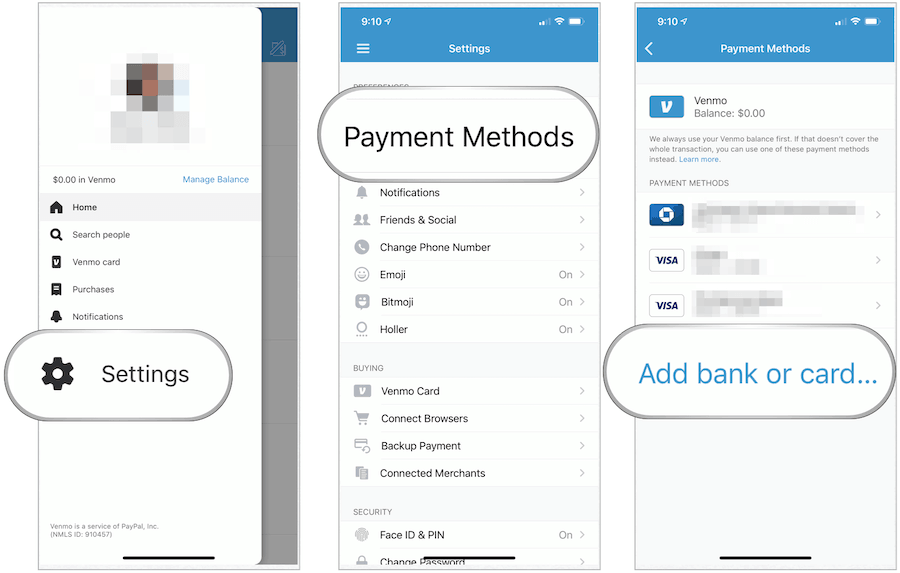
Before you can send or receive money, you’ll need to set up your Venmo account. The process is straightforward and designed to get you started quickly. First, download the Venmo app from your device’s app store. Once installed, you’ll be prompted to sign up, usually by connecting with Facebook or providing an email address and creating a secure password. You’ll need to verify your phone number and email. The critical next step is linking a funding source. You can link your bank account (via instant verification with your online banking login or manual verification with micro-deposits), a debit card, or a credit card. While linking a bank account or debit card typically incurs no fees for standard transfers, using a credit card for payments to other individuals usually comes with a 3% fee, a standard practice across many payment platforms to cover processing costs.
Step-by-Step Guide: Sending Money with Ease
Sending money on Venmo is designed to be intuitive. Once your account is set up and funded, you can initiate a payment in just a few taps. Understanding each step ensures your money goes to the right person, securely and efficiently.
Initiating a Payment
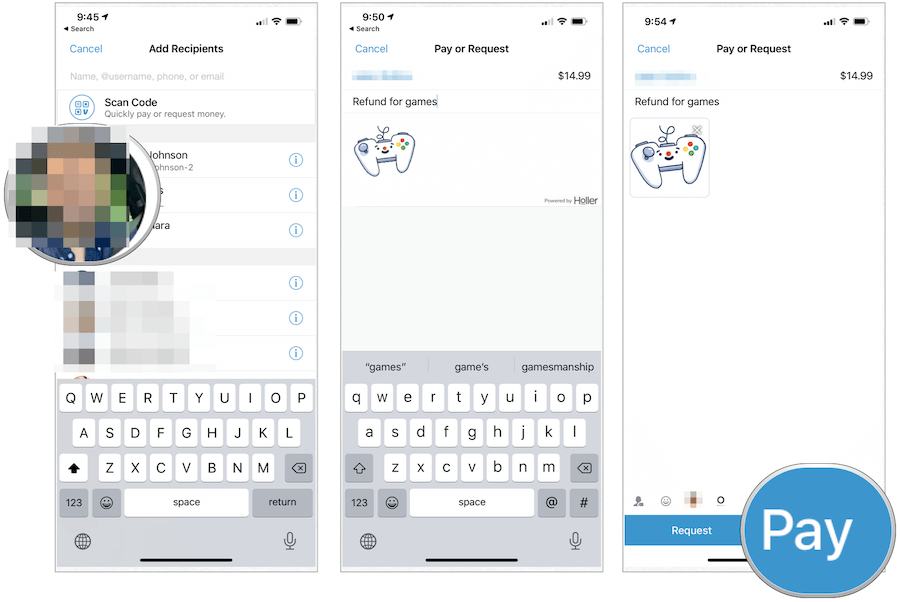
To begin, open the Venmo app. On the main screen, you’ll typically find a prominent “Pay & Request” button, often represented by a pen-and-paper icon or a dollar sign. Tapping this button will open a new screen where you can specify who you want to pay and how much. This is the gateway to all your outgoing transactions, designed for quick access and minimal navigation.
Selecting Your Recipient
Venmo offers multiple ways to find the person you want to pay. You can search for them by their Venmo username, phone number, or email address. If they’re in your phone’s contacts and also on Venmo, they’ll likely appear automatically. For in-person payments, Venmo supports scanning a recipient’s unique QR code, eliminating the need to type out usernames. This feature is particularly useful in social settings or when dealing with merchants using Venmo. Always double-check the recipient’s username or profile picture to ensure you’re sending money to the correct person, as Venmo payments are often irreversible.
Entering Payment Details
Once you’ve selected your recipient, the app will prompt you to enter the amount you wish to send. Below the amount, there’s a crucial field for a note or description. This is where the social aspect of Venmo often comes into play. You can write a brief message, use emojis, or even link relevant information. This note is public by default unless you adjust your privacy settings for that specific transaction. Finally, you’ll select your preferred funding source (Venmo balance, linked bank account, debit card, or credit card). Remember the 3% fee for credit card payments to individuals.
Reviewing and Confirming Your Transaction
Before the money is dispatched, Venmo provides a review screen. This is your last chance to verify all the details: the recipient’s name, the amount, the note, and the funding source. This step is critical because, once confirmed, payments are instant and can be difficult, if not impossible, to reverse. Take a moment to ensure everything is correct, then tap the “Pay” button to complete the transaction. The recipient will typically receive a notification immediately, and the funds will appear in their Venmo balance.
Beyond Basic Payments: Advanced Venmo Features
While sending and receiving money is Venmo’s primary function, the platform has expanded its capabilities significantly, offering a suite of features that enhance its utility for both personal and commercial use. These advanced functionalities make Venmo a versatile digital wallet rather than just a simple P2P app.
Splitting Bills and Group Payments
One of Venmo’s most lauded features is its seamless bill-splitting functionality. For situations like group dinners, shared vacations, or household expenses, Venmo allows you to easily request specific amounts from multiple friends after you’ve paid the initial bill. You can select multiple recipients, enter the total amount, and Venmo can even divide it equally for you or allow you to specify individual amounts. This eliminates awkward conversations and ensures everyone pays their fair share with minimal effort.
Venmo Debit Card and Credit Card
Venmo has ventured into physical payment methods with its own Mastercard Debit Card and a Venmo Credit Card. The Venmo Debit Card directly accesses your Venmo balance, allowing you to spend funds held within the app anywhere Mastercard is accepted. It comes with features like cash back on eligible purchases and the ability to track spending. The Venmo Credit Card, issued by Synchrony Bank, offers customizable rewards and direct integration with your Venmo app, providing a modern approach to managing credit and spending. These cards extend Venmo’s reach beyond app-based transfers into everyday retail transactions.
Business Profiles and Merchant Payments
Initially designed for friends, Venmo has increasingly become a tool for businesses. Users can create “Business Profiles” to accept payments for goods and services. This is particularly popular among small businesses, freelancers, and service providers who benefit from Venmo’s ease of use and widespread adoption. Additionally, many larger merchants now accept Venmo as a payment option at checkout, both online and in-store, further cementing its role in the broader digital economy. These features transform Venmo from a purely social payment app into a viable commercial tool.
Requesting Money
The flip side of sending money is requesting it. If someone owes you money, Venmo makes it incredibly easy to send them a request. Similar to sending, you initiate a “Pay & Request” action, select the person, enter the amount, and add a note explaining the request. The recipient then receives a notification and can approve the payment directly from their Venmo balance or linked funding source. This streamlines the process of getting paid back without needing to remind people manually.
Ensuring Security and Privacy on Venmo
Given that Venmo deals with financial transactions, understanding and utilizing its security and privacy features is paramount. While the platform employs robust measures, user vigilance is also crucial to protect your funds and personal information.
Understanding Venmo’s Security Measures
Venmo uses encryption and other advanced security technologies to protect your transactions and personal data. All data is encrypted, and the platform employs fraud detection systems to monitor for suspicious activity. Account holders can also enable multi-factor authentication, requiring a code from a trusted device in addition to a password, adding an extra layer of protection against unauthorized access. Funds held in your Venmo balance are also often covered by FDIC insurance, provided certain conditions are met, similar to traditional bank accounts.
Managing Your Privacy Settings
One of Venmo’s distinguishing features, the public social feed, can also be a point of concern for some users. By default, transactions are often public, visible to anyone on the Venmo network. However, Venmo provides granular control over your privacy settings. For each transaction, you can choose between “Public,” “Friends Only,” or “Private.” It’s highly recommended to review your default privacy settings in the app’s preferences and adjust them to your comfort level. You can set a default for all future payments, ensuring your financial activities remain as discreet as you prefer.
Best Practices for Secure Transactions
Even with Venmo’s built-in security, user awareness is your best defense. Always use a strong, unique password and enable multi-factor authentication. Be extremely cautious when sending money to unknown individuals or for transactions outside your immediate network. Verify the recipient’s identity (username, phone number, email) before confirming a payment, especially if you’ve received a request that seems out of character. Be wary of phishing attempts or scams that try to trick you into sharing your login credentials or sending money to fraudulent accounts. Venmo transactions are typically final, so confirming the legitimacy of every payment is vital.
What to Do If Something Goes Wrong
In the event of an unauthorized transaction, a payment sent to the wrong person, or a dispute, time is of the essence. Immediately contact Venmo’s customer support through the app or their website. They have processes in place to investigate and potentially resolve issues, although success isn’t always guaranteed, especially if you willingly sent money to a scammer. For unauthorized transactions, report them promptly, as Venmo’s fraud protection policies are designed to cover such incidents, provided they are reported within specified timeframes.
Optimizing Your Venmo Experience
To truly master Venmo, it’s worth exploring how to customize its functionalities to fit your needs, troubleshoot common issues, and understand its place in the evolving landscape of digital payments.
Notification Settings and Alerts
Venmo can be configured to send you various notifications: when you receive money, when a payment is processed, or even when friends make transactions (if your privacy settings allow). Customizing these alerts allows you to stay informed without being overwhelmed. You can manage notification preferences within the app’s settings, choosing between push notifications, email alerts, or SMS. This ensures you’re always aware of your account activity, enhancing both convenience and security.
Troubleshooting Common Issues
While Venmo is generally reliable, users might occasionally encounter issues. Common problems include failed payments, delayed transfers to a bank account, or issues linking a funding source. For failed payments, often checking your funding source (e.g., sufficient balance, card not expired) or trying again can resolve it. Delayed bank transfers (which typically take 1-3 business days for standard transfers) should be monitored, and if excessively delayed, Venmo support should be contacted. For any technical glitches or error messages, restarting the app or your device can sometimes help, but direct contact with Venmo’s support team is always the best course of action for persistent problems.
Future of Digital Payments and Venmo’s Role
The digital payment space is constantly innovating, and Venmo is a key player in shaping its future. With continued advancements in mobile technology, security protocols, and integration with other financial services, Venmo is poised to remain at the forefront of casual and even commercial transactions. Its focus on user experience, social integration, and expanding utility through features like crypto buying and selling within the app demonstrates its commitment to evolving with consumer needs and technological trends. As digital wallets become increasingly central to our financial lives, understanding and effectively utilizing platforms like Venmo will be essential for navigating the modern economy.
By mastering how to send money via Venmo and leveraging its array of features, you can streamline your financial interactions, manage shared expenses effortlessly, and participate confidently in the digital payment revolution. It’s more than just an app; it’s a gateway to a more connected and efficient financial future.
aViewFromTheCave is a participant in the Amazon Services LLC Associates Program, an affiliate advertising program designed to provide a means for sites to earn advertising fees by advertising and linking to Amazon.com. Amazon, the Amazon logo, AmazonSupply, and the AmazonSupply logo are trademarks of Amazon.com, Inc. or its affiliates. As an Amazon Associate we earn affiliate commissions from qualifying purchases.