
Taking control of your personal finances is a powerful step towards financial independence, and a significant part of that journey involves understanding and managing your taxes. While the prospect of doing your own taxes can seem daunting, akin to navigating a labyrinth of complex forms and ever-changing regulations, the reality is that with the right approach and available tools, it’s a perfectly achievable and often beneficial endeavor. Millions of individuals successfully file their own taxes each year, saving on preparation fees, gaining a deeper insight into their financial landscape, and ensuring accuracy firsthand. This comprehensive guide will demystify the process, empowering you with the knowledge and confidence to handle your tax obligations like a seasoned professional.
Understanding the Fundamentals of Tax Filing
Before diving into software and forms, it’s crucial to grasp the foundational concepts of tax filing. A solid understanding of these basics will serve as your compass through the entire process, ensuring you meet your obligations and optimize your financial outcomes.
Who Needs to File?
The requirement to file a federal income tax return primarily depends on your gross income, filing status, and age. The IRS sets specific thresholds each year; if your gross income exceeds these amounts, you are generally required to file. For instance, a single individual under 65 might have a different filing threshold than a married couple filing jointly over 65. It’s also important to note that even if your income is below the filing threshold, you might still want to file to receive a refund for withheld taxes or eligible tax credits, such as the Earned Income Tax Credit. Special circumstances, like having net earnings from self-employment of $400 or more, also trigger a filing requirement regardless of overall income. Always consult the IRS guidelines for the current tax year to confirm your specific situation.
Key Documents You’ll Need
Organization is paramount when preparing to do your own taxes. Gathering all necessary documents before you start will streamline the process and prevent last-minute scrambling. The most common documents include:
- W-2 Forms: Received from your employer(s), reporting your wages, tips, and other compensation, along with federal, state, and local taxes withheld.
- 1099 Forms: Various types exist. 1099-NEC (Nonemployee Compensation) for independent contractors, 1099-INT for interest income, 1099-DIV for dividend income, 1099-B for proceeds from broker and barter exchange transactions, and 1099-R for distributions from pensions, annuities, retirement or profit-sharing plans, IRAs, etc.
- 1098 Forms: Such as 1098-E for student loan interest paid, and 1098 for mortgage interest paid.
- Other Income Statements: Including statements for Social Security benefits (SSA-1099), unemployment compensation, gambling winnings, or income from rental properties.
- Proof of Deductions and Credits: This includes receipts for charitable contributions, medical expenses, business expenses (for the self-employed), childcare expenses (Form W-10), records of educational expenses (Form 1098-T), and any property tax statements.
- Previous Year’s Tax Return: Often helpful for reference, especially if you had carryovers of losses or credits, or for comparing year-over-year income and deductions.
Basic Tax Terminology Explained
Navigating tax forms and software becomes much simpler when you understand the jargon. Here are a few essential terms:
- Gross Income: All taxable income you receive from all sources, before any deductions.
- Adjusted Gross Income (AGI): Your gross income minus certain “above-the-line” deductions, such as contributions to traditional IRAs, student loan interest, and educator expenses. AGI is a critical figure, as many deductions and credits are limited or phased out based on your AGI.
- Deductions: Amounts that reduce your taxable income. They come in two main forms: the standard deduction (a fixed amount based on your filing status) and itemized deductions (specific expenses like mortgage interest, state and local taxes, and charitable contributions). You typically choose the larger of the two.
- Credits: Amounts that directly reduce the amount of tax you owe, dollar for dollar. Credits are generally more valuable than deductions. Some credits are refundable, meaning you can receive money back even if your tax liability is zero (e.g., Earned Income Tax Credit), while others are non-refundable, meaning they can only reduce your tax liability to zero (e.g., Child Tax Credit for many taxpayers).
- Taxable Income: The amount of income left after subtracting all eligible deductions from your AGI. This is the figure on which your tax liability is calculated using tax brackets.
- Tax Brackets: The range of income taxed at a specific rate. The U.S. has a progressive tax system, meaning higher income levels are taxed at higher marginal rates.
Choosing the Right Method for DIY Tax Filing
The era of sifting through paper forms by hand is largely behind us, thanks to a plethora of user-friendly options. Selecting the right method depends on the complexity of your financial situation and your comfort level with technology.
Free Online Tax Software Options
For many taxpayers with straightforward returns, free online tax software is an excellent and cost-effective solution.
- IRS Free File Program: This partnership between the IRS and leading tax software companies offers free federal (and sometimes state) tax preparation and e-filing for taxpayers whose AGI falls below a certain threshold (which changes annually). Eligibility varies by provider, but it’s a robust option for those who qualify. It typically covers common forms and scenarios.
- Commercial Software Free Tiers: Companies like TurboTax, H&R Block, and TaxAct offer free versions of their software for simple returns, often defined as those only requiring Form 1040 without additional schedules. These are ideal for individuals with W-2 income, the standard deduction, and basic credits. Be mindful of potential upsells for more complex situations or state filing, which might not be included in the free tier.
Paid Online Tax Software Solutions
If your tax situation is more complex—involving self-employment income, investments, rental properties, itemized deductions, or numerous credits—paid software is usually the best route.
- TurboTax: Known for its user-friendly interface and comprehensive guidance, TurboTax offers various tiers (Deluxe, Premier, Self-Employed) tailored to different needs. It’s often praised for its step-by-step interviews and robust error checking.
- H&R Block: A strong competitor, H&R Block also provides excellent guidance and various product levels, including options for in-person support or review by a tax professional if needed. Their software is intuitive and highly reliable.
- TaxAct: Often a more budget-friendly option, TaxAct provides solid functionality for various complexities. While perhaps not as flashy as its competitors, it offers good value and covers most tax situations effectively.
- TaxSlayer: Another cost-effective choice, TaxSlayer is often preferred by those comfortable navigating tax forms, as it offers a slightly more direct input method without as much hand-holding as some other platforms, making it efficient for experienced filers.
These platforms generally allow you to import W-2s and 1099s directly from employers and financial institutions, greatly reducing manual data entry and potential errors. They also walk you through deductions and credits pertinent to your situation.
Manual Filing with IRS Forms
While less common, some individuals prefer to file manually using paper forms. This might be appropriate for very simple returns where the taxpayer is highly comfortable with tax instructions, or in situations where e-filing is not feasible. The IRS website provides all necessary forms and instructions. However, be aware that manual filing often means slower processing of refunds and a higher chance of errors if not meticulously completed. Most online software will print out your forms if you prefer to mail them rather than e-file, offering a hybrid approach.
Navigating Deductions, Credits, and Withholdings
This is where the real money-saving magic happens. Maximizing deductions and credits and managing your withholdings correctly can significantly impact your refund or the amount you owe.
Maximizing Your Deductions
Deductions reduce your taxable income. The choice between taking the standard deduction or itemizing is one of the most significant decisions.
- Standard Deduction: A fixed dollar amount based on your filing status, adjusted annually for inflation. For many taxpayers, especially those without significant mortgage interest, medical expenses, or charitable contributions, the standard deduction is higher and simpler to take.
- Itemized Deductions: If your eligible itemized expenses exceed your standard deduction, you’ll want to itemize. Common itemized deductions include:
- State and Local Taxes (SALT): Capped at $10,000 per household.
- Mortgage Interest: Paid on your primary residence.
- Medical and Dental Expenses: Exceeding a certain percentage of your AGI (e.g., 7.5% for most years).
- Charitable Contributions: Both cash and non-cash, up to certain limits.
- Other common “above-the-line” deductions (that reduce AGI regardless of standard vs. itemized): Student loan interest, HSA contributions, contributions to traditional IRAs, self-employment tax (one-half), and educator expenses.
It’s crucial to keep detailed records for any itemized deductions you claim, as the IRS may request proof.
Leveraging Tax Credits for Greater Savings
Tax credits are direct dollar-for-dollar reductions of your tax liability and are often the most impactful way to reduce your tax bill.

- Child Tax Credit (CTC): A significant credit for eligible children, with a portion often being refundable.
- Earned Income Tax Credit (EITC): A refundable credit for low to moderate-income working individuals and families. This can result in a refund even if you paid no tax.
- Education Credits:
- American Opportunity Tax Credit (AOTC): Partially refundable credit for the first four years of post-secondary education.
- Lifetime Learning Credit (LLC): Non-refundable credit for courses taken for job skills or degree programs.
- Child and Dependent Care Credit: For expenses paid for the care of a qualifying individual to allow you to work or look for work.
- Saver’s Credit (Retirement Savings Contributions Credit): A credit for low to moderate-income individuals who contribute to retirement accounts.
- Residential Energy Credits: For making energy-efficient improvements to your home.
Each credit has specific eligibility requirements, income limitations, and documentation needs. Tax software is excellent at guiding you through these to ensure you claim all you’re entitled to.
Adjusting Your Withholdings for the Future
Your tax obligations aren’t just about filing; they’re also about proactive planning throughout the year. Your W-4 form, submitted to your employer, dictates how much federal income tax is withheld from your paycheck.
- Avoiding Underpayment or Overpayment:
- Underpayment: If too little tax is withheld, you might owe a substantial amount at tax time and could even face penalties.
- Overpayment: If too much is withheld, you’re essentially giving the government an interest-free loan throughout the year. While a large refund feels good, that money could have been earning interest or used to pay down debt.
- Reviewing Your W-4: It’s wise to review and update your W-4 annually, or whenever you experience a significant life event (marriage, divorce, birth of a child, new job, second job). The IRS Tax Withholding Estimator tool is a great resource to help you determine the optimal withholding.
- Estimated Taxes for Self-Employed: If you are self-employed or have significant income not subject to withholding (e.g., rental income, investment income), you are generally required to pay estimated taxes quarterly. Failing to do so can result in underpayment penalties.
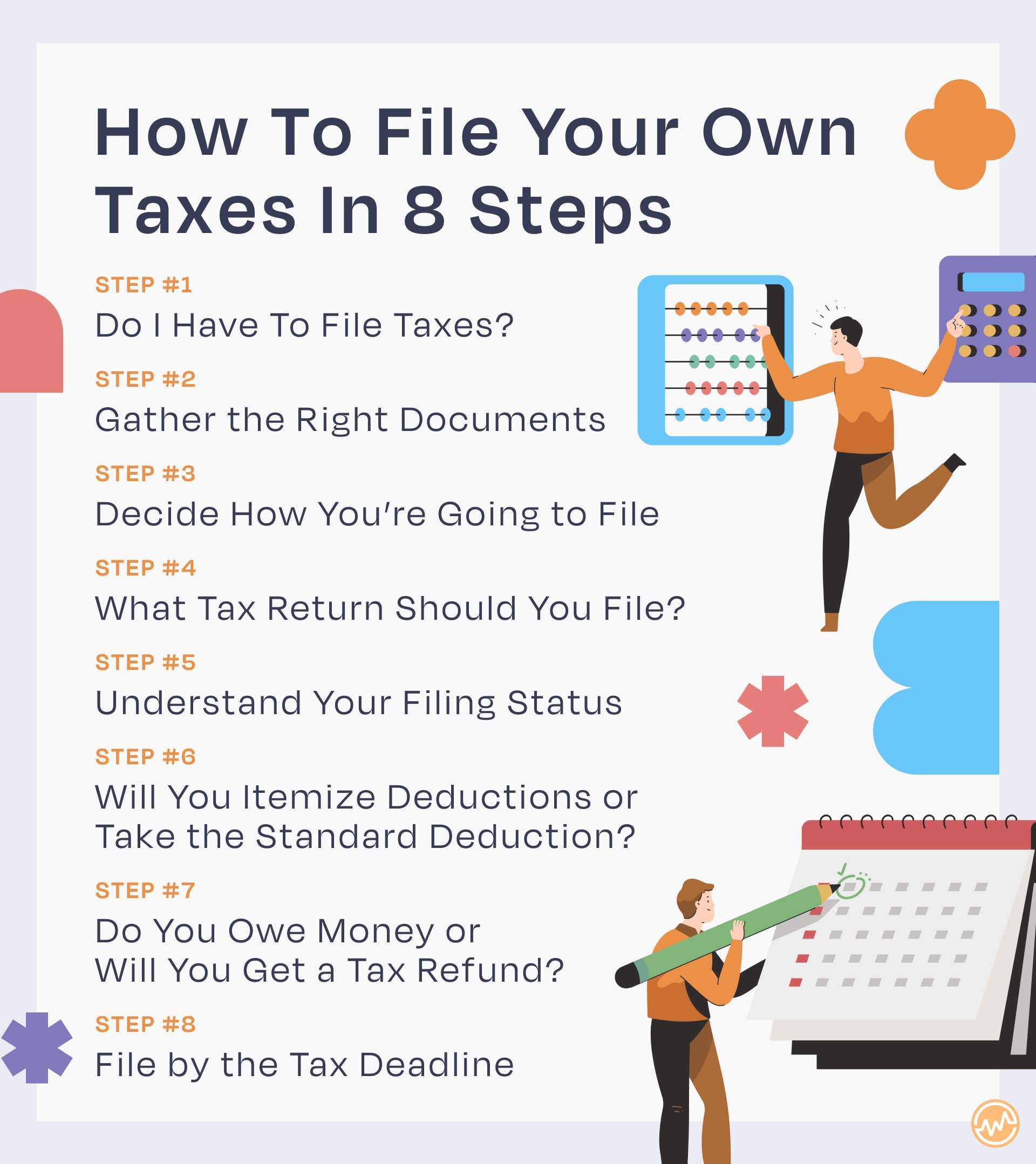
Step-by-Step Guide to Filing Your Own Taxes
Once you have your documents and understand the basics, the actual filing process becomes a manageable series of steps.
Gathering and Organizing Your Information
This initial step is critical. Create a dedicated folder (physical or digital) for all your tax documents as they arrive throughout the year. Use a checklist to ensure you haven’t missed anything. Having everything neatly organized before you begin entering data will save significant time and reduce stress. Labeling digital files clearly (e.g., “W2EmployerName2023.pdf”) makes them easy to find.
Entering Data Accurately
Whether using online software or paper forms, accuracy is paramount.
- Follow Software Prompts: Tax software is designed to walk you through each section. Read questions carefully and enter information precisely as it appears on your official documents (W-2s, 1099s, etc.).
- Double-Check Entries: A single transposed digit can lead to errors. Many platforms allow you to directly import forms, which significantly reduces manual entry errors. If manually inputting, cross-reference your entries with the original documents.
- Understand Each Field: Don’t just blindly type. Take a moment to understand what information each field is asking for. If unsure, hover over tooltips or consult the software’s help section or IRS instructions.
Reviewing Your Return Thoroughly
This is arguably the most critical step before submitting.
- Utilize Software Error Checks: All reputable tax software includes built-in error checks that flag potential issues, missing information, or inconsistencies. Pay close attention to these warnings and resolve them.
- Review Summaries: Most software provides a summary of your return before filing. Look at your income, deductions, credits, and the final tax liability or refund amount. Does it make sense based on your understanding of your financial year?
- Print and Review (Optional but Recommended): Printing a draft of your return allows you to review it away from the screen, which can sometimes help spot errors that digital review misses. Have a fresh pair of eyes look at it if you’re comfortable sharing.
- Consider Professional Review (Hybrid Approach): If you’re still uncertain, some online platforms offer an option to have a tax professional review your return before filing, for an additional fee. This can provide peace of mind without the full cost of professional preparation.
E-Filing vs. Mailing Your Return
- E-Filing (Electronic Filing): This is the recommended and most popular method.
- Benefits: Faster processing of refunds (especially with direct deposit), immediate confirmation of receipt by the IRS, fewer errors compared to paper returns, and generally more secure.
- Process: Your chosen software will guide you through the e-filing submission. You’ll typically need to verify your identity using your prior year’s AGI or a self-selected PIN.
- Mailing Your Return: If you prefer to mail a paper return:
- Process: Print out your completed forms, sign where indicated, and attach any required schedules or forms (like W-2s).
- Important: Mail your return via certified mail with a return receipt to have proof of submission. Be aware that paper returns take significantly longer to process.
Beyond Filing: Post-Tax Season Considerations
Filing your taxes isn’t the absolute end of your tax journey. There are important follow-up actions and ongoing planning considerations.
What to Do If You Owe Taxes
If your return indicates you owe money to the IRS, don’t panic. You typically have until the tax deadline (usually April 15th) to pay.
- Payment Options:
- Direct Debit: Most e-filing software allows you to authorize a direct debit from your bank account.
- IRS Direct Pay: Pay directly from your checking or savings account on the IRS website.
- Credit/Debit Card: Pay through an approved third-party processor (fees apply).
- Check/Money Order: Mail a check or money order with Form 1040-V.
- Payment Plans: If you can’t pay the full amount by the deadline, the IRS offers various payment options, including short-term payment plans (up to 180 days) or an Offer in Compromise (OIC) for those experiencing significant financial hardship. It’s crucial to contact the IRS to set up an arrangement to avoid further penalties.
What to Do If You’re Receiving a Refund
Congratulations! While a refund feels great, remember it means you overpaid your taxes throughout the year.
- Direct Deposit: Opt for direct deposit for the fastest and most secure refund delivery.
- Manage Expectations: Refunds typically arrive within 21 days for e-filed returns with direct deposit, but can take longer. You can track your refund status on the IRS “Where’s My Refund?” tool.
- Use Your Refund Wisely: Consider using your refund to pay down high-interest debt, boost your emergency fund, or invest for your future rather than splurging.
Keeping Meticulous Records for Future Reference
Once your taxes are filed, your organizational efforts should continue.
- How Long to Keep Records: Generally, you should keep tax records for at least three years from the date you filed your original return or two years from the date you paid the tax, whichever is later. For certain situations (e.g., claiming a loss from worthless securities), you might need to keep them for seven years. Records related to property should be kept as long as you own the property plus three years.
- What to Keep: Keep copies of your filed returns (federal and state), all supporting documents (W-2s, 1099s, receipts for deductions, charitable donation acknowledgments, bank statements proving payments, etc.).
- Storage: Store them securely, either physically in a fireproof safe or digitally encrypted and backed up in multiple locations (e.g., cloud storage, external hard drive).

Preparing for Next Year: Proactive Tax Planning
Tax planning isn’t just an annual event; it’s an ongoing process.
- Mid-Year Check-Ups: Review your income and expenses mid-year. Are you on track with your withholdings? Do you anticipate any major life changes?
- Life Changes Affecting Taxes: Marriage, divorce, birth or adoption of a child, buying a home, starting a business, or retiring can all significantly impact your tax situation. Adjust your W-4 or estimated payments accordingly.
- Retirement Contributions: Maximize contributions to tax-advantaged accounts like 401(k)s and IRAs to reduce your taxable income.
- Capitalizing on Tax-Loss Harvesting: If you have investments, consider selling losing investments to offset capital gains and potentially a portion of ordinary income.
Doing your own taxes is a learnable skill that offers significant financial benefits and a deeper understanding of your personal economy. By approaching it systematically, utilizing available tools, and staying organized, you can confidently navigate the tax landscape and ensure you’re making the most of your financial situation, year after year. The empowerment that comes from managing your own taxes is invaluable, transforming a once-dreaded annual task into an opportunity for financial growth and insight.
aViewFromTheCave is a participant in the Amazon Services LLC Associates Program, an affiliate advertising program designed to provide a means for sites to earn advertising fees by advertising and linking to Amazon.com. Amazon, the Amazon logo, AmazonSupply, and the AmazonSupply logo are trademarks of Amazon.com, Inc. or its affiliates. As an Amazon Associate we earn affiliate commissions from qualifying purchases.