
In an increasingly digital world, the way we manage and transfer money has undergone a profound transformation. Gone are the days when physical cash and checks were the undisputed kings of peer-to-peer transactions. Today, mobile payment applications have emerged as indispensable tools, simplifying everything from splitting a dinner bill to sending urgent funds to a family member. Among these innovative platforms, Venmo stands out as a pervasive force, having redefined the landscape of personal finance with its user-friendly interface and unique social integration. If you’ve ever found yourself asking, “How do you Venmo?” you’re not alone. This comprehensive guide will demystify the platform, walking you through its core functionalities, advanced features, and essential security practices, ensuring you can navigate this digital payment powerhouse with confidence and ease.

Understanding the Venmo Ecosystem
At its heart, Venmo is more than just a money transfer app; it’s a social financial tool designed to make sending and receiving money as seamless and intuitive as sending a text message. Its popularity stems from a blend of convenience, speed, and a surprisingly engaging social layer that sets it apart from traditional banking applications.
What is Venmo?
Launched in 2009 and acquired by PayPal in 2013, Venmo is a mobile payment service that allows users to send and receive money from each other directly from their phones. Primarily focused on peer-to-peer (P2P) transactions, it acts as a digital wallet, holding a balance that users can then transfer to their linked bank accounts or debit cards. While it handles financial transactions, Venmo’s core appeal lies in its simplicity and the ability to easily split costs and pay back friends without the hassle of cash or bank transfers that take days to clear.
Why Venmo Gained Popularity
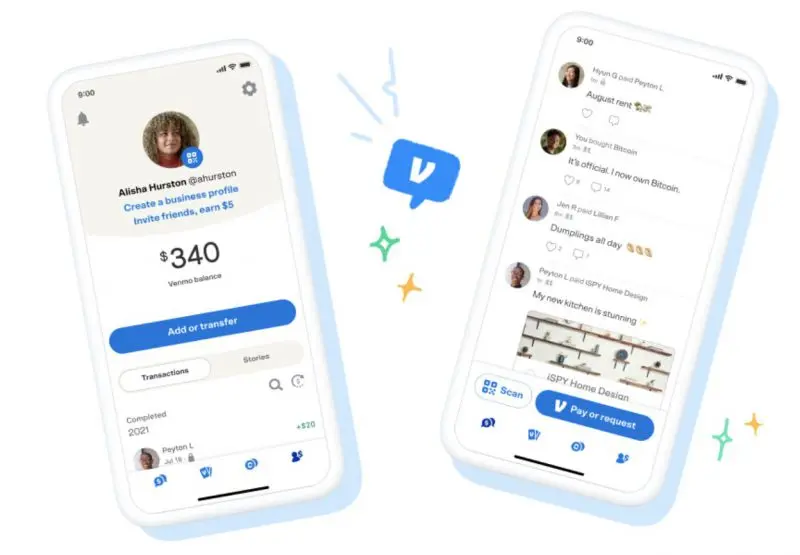
Venmo’s rapid ascent to prominence can be attributed to several key factors. First and foremost is its unparalleled convenience. Instead of fumbling for exact change or coordinating bank details, users can complete transactions in a few taps. Secondly, its speed is a major draw; money transfers between Venmo users are typically instantaneous. Perhaps most distinctively, Venmo introduced a social element to financial transactions. Users can add notes, emojis, and even photos to their payments, and these transactions can be shared publicly, with friends, or kept private, much like a social media feed. This social aspect, while sometimes controversial regarding privacy, helped gamify and normalize digital payments, especially among younger demographics.
Venmo’s Core Functionality
The fundamental operations of Venmo revolve around three simple actions:
- Sending Money: Paying a friend for your share of rent, a concert ticket, or lunch.
- Requesting Money: Asking someone to pay you back for something they owe, like their portion of a shared utility bill.
- Receiving Money: Funds sent to you by another Venmo user appear in your Venmo balance, ready to be used or transferred out.
These core functions are underpinned by an intuitive interface designed for rapid execution, making financial interactions almost an afterthought rather than a chore.
Getting Started: Setting Up Your Venmo Account
Before you can dive into the world of seamless digital payments, a few initial setup steps are necessary. The process is straightforward, designed to get you up and running quickly while ensuring basic security and regulatory compliance.
Downloading the App and Creating a Profile
The first step is to download the Venmo app, available for free on both iOS (Apple App Store) and Android (Google Play Store) devices. Once installed, you’ll be prompted to create an account. This typically involves providing your phone number, email address, and creating a strong password. You’ll also choose a unique username, which serves as your primary identifier on the platform, making it easy for friends to find and pay you. Basic personal information like your legal name and date of birth will also be required to comply with financial regulations.
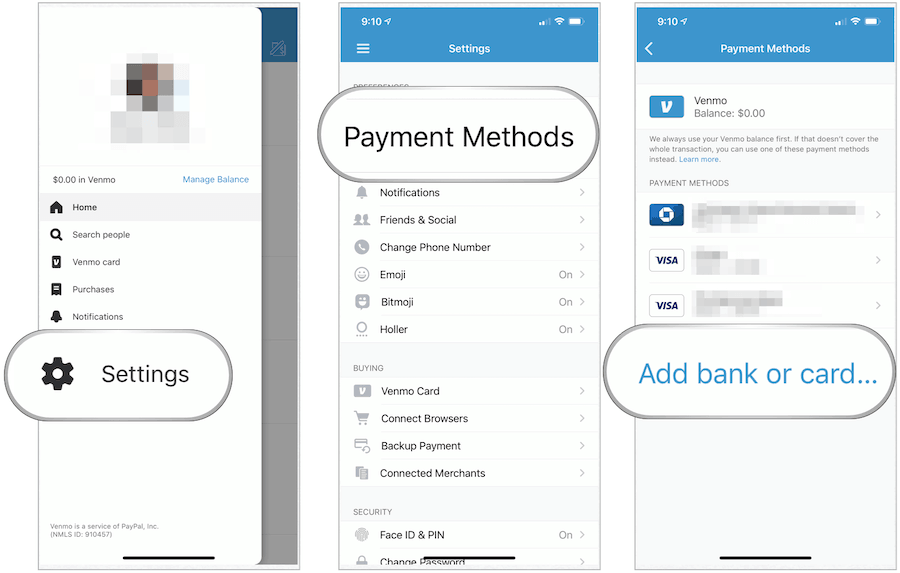
Linking Your Bank Account or Debit Card
To make Venmo truly functional, you need to connect a funding source. The most common and recommended method is linking your bank account or a debit card. This allows you to send money even if your Venmo balance is zero, drawing funds directly from your linked account. It also enables you to cash out your Venmo balance by transferring it to your bank. Linking a bank account usually involves securely logging into your online banking portal through Venmo’s partner service (like Plaid) or manually entering your bank’s routing and account numbers, which Venmo then verifies with small deposits. While credit cards can also be linked, they typically incur a 3% fee for sending money, so debit cards or bank accounts are generally preferred for peer-to-peer payments.
Verifying Your Identity for Full Features
To unlock Venmo’s full potential and comply with Know Your Customer (KYC) regulations, you’ll eventually need to verify your identity. This usually involves providing your Social Security Number (SSN) and potentially other identifying documents. Identity verification is crucial for increasing transaction limits, transferring larger sums of money to your bank, and using certain advanced features like the Venmo Debit Card or Credit Card. While you can often send and receive small amounts without immediate verification, it’s a necessary step for sustained and comprehensive use of the platform.
Mastering Venmo Transactions
Once your account is set up, sending and receiving money becomes incredibly simple. Venmo’s interface is designed for quick, intuitive interactions, making financial transactions almost as casual as a chat message.
Sending Money: A Step-by-Step Guide
- Tap the Pay/Request Button: This is usually a prominent button, often indicated by a pencil and paper icon or a dollar sign.
- Select Recipients: You can search for friends by their username, phone number, or email. If they’re in your phone’s contacts and have a Venmo account, they’ll often appear automatically.
- Enter the Amount: Type in the exact amount you wish to send.
- Add a Note (and Emoji!): This is Venmo’s signature social feature. Write a brief description of the payment (e.g., “Dinner last night,” “Rent,” “Concert tickets”). You can also add relevant emojis to make it more expressive. This note is often visible to others depending on your privacy settings.
- Choose Your Funding Source: If your Venmo balance doesn’t cover the transaction, you’ll need to select a linked bank account or debit card. Remember, using a credit card for P2P payments incurs a 3% fee.
- Set Privacy: Decide if you want the transaction visible to Public, Friends, or Private. For most personal transactions, “Friends” or “Private” is recommended.
- Confirm and Send: Review all details and tap “Pay.” The money is typically transferred instantly to the recipient’s Venmo balance.
Requesting Money: Effortless Reminders
Requesting money is just as straightforward:
- Tap the Pay/Request Button.
- Select the Person You’re Requesting From: Find them by username, phone, or email.
- Enter the Amount: Specify how much they owe.
- Add a Note: Explain what the request is for (e.g., “Your share of the groceries,” “Coffee from yesterday”).
- Confirm and Request: The recipient will receive a notification and can then choose to pay you.
Receiving Money and Cashing Out
When someone sends you money on Venmo, it instantly appears in your Venmo balance. You have a few options for what to do with these funds:
- Keep it in Your Venmo Balance: You can use your Venmo balance to send money to others or make purchases with your Venmo Debit Card.
- Transfer to Your Bank (Standard): This is free but typically takes 1-3 business days to appear in your linked bank account.
- Instant Transfer to Your Bank: For a small fee (usually 1.75% of the transfer amount, with a minimum fee of $0.25 and a maximum of $25), you can transfer money to your linked debit card or eligible bank account in minutes.
Understanding Transaction Fees
While Venmo prides itself on free peer-to-peer transfers, it’s essential to be aware of certain fees:
- Sending Money with a Credit Card: A 3% fee is applied when you use a linked credit card to send money to another Venmo user. There’s no fee for using a linked bank account or debit card.
- Instant Transfers: As mentioned, transferring funds from your Venmo balance to your bank account instantly incurs a 1.75% fee. Standard transfers are free.
- Cryptocurrency Purchases: Venmo charges a small fee for buying and selling cryptocurrency through its platform.
- Business Profile Payments: Businesses using Venmo to accept payments for goods and services may incur a small transaction fee (e.g., 1.9% + $0.10).
Exploring Beyond Basic Payments: Advanced Venmo Features
Venmo has evolved beyond a simple P2P app, integrating more sophisticated financial tools to enhance user experience and utility. These features cater to a broader range of financial needs, from everyday spending to managing group expenses.
Venmo Debit Card and Credit Card
To expand its utility as a spending tool, Venmo offers both a Venmo Debit Card and a Venmo Credit Card.
- Venmo Debit Card: This Mastercard debit card is directly linked to your Venmo balance. It allows you to spend your Venmo funds wherever Mastercard is accepted, essentially turning your Venmo balance into a fully functional bank account for everyday purchases. If your Venmo balance runs low, it can automatically draw funds from your linked bank account.
- Venmo Credit Card: Issued by Synchrony Bank, this Visa credit card offers rewards tailored to your top spending categories. It also integrates seamlessly with the Venmo app, allowing you to manage your card, track purchases, and split payments with friends directly from the app.
Business Profiles and Payments
Venmo isn’t just for friends anymore. It also facilitates payments to and from eligible businesses. Many small businesses, freelancers, and even larger retailers now accept Venmo. This feature typically involves:
- Paying Businesses: You can pay businesses directly through the app, often by scanning a QR code or finding their business profile.
- Venmo for Business: Businesses can create a “Business Profile” to accept payments for goods and services. These accounts have specific features for tracking sales and may incur transaction fees as mentioned earlier.
Group Payments and Splitting Bills
One of Venmo’s most practical features for social situations is its ability to facilitate group payments and bill splitting. While you can manually request money from multiple people, Venmo also offers tools to streamline this:
- Group Payments: For shared expenses like group trips or collective gifts, you can use Venmo’s integrated features to easily calculate and request each person’s share.
- Split Payments: When paying a merchant through Venmo (or externally and then logging it), you might be able to easily split the cost with friends directly within the app, sending them requests for their portion. This is incredibly useful for restaurant bills, utility payments among roommates, or shared ride-shares.
The Social Feed: Public vs. Private Transactions
The social feed is a defining characteristic of Venmo. Every transaction you make, unless explicitly set to “Private,” appears on a feed. You have three privacy options for each transaction:
- Public: Visible to everyone on Venmo.
- Friends: Visible only to your Venmo friends.
- Private: Visible only to you and the recipient/sender.
While the public feed can be engaging, showing a real-time stream of transactions among your network, it’s crucial to be mindful of what you share. For sensitive or personal transactions, always opt for “Private.” You can also set your default privacy setting in the app’s settings to ensure all future transactions default to your preferred level of privacy.
Ensuring Security and Responsible Use
While Venmo offers unparalleled convenience, it’s a financial tool that requires responsible use and a strong understanding of its security features. Protecting your account is paramount to prevent fraud and ensure your funds remain secure.
Protecting Your Account: Best Practices
- Strong, Unique Passwords: Use a complex password that you don’t use for other services.
- Two-Factor Authentication (2FA): Enable 2FA, which requires a second verification step (like a code sent to your phone) in addition to your password when logging in from a new device. This is one of the most effective ways to protect your account.
- Device Security: Keep your phone’s operating system updated, use a screen lock (PIN, fingerprint, face ID), and avoid jailbreaking or rooting your device.
- Monitor Your Activity: Regularly check your Venmo transaction history for any unauthorized activity.
- Log Out on Shared Devices: Always log out of Venmo if you use it on a shared computer or tablet.
Recognizing and Avoiding Scams
Scammers frequently target Venmo users. Be vigilant for:
- Overpayment Scams: Someone sends you more money than requested and asks you to send the difference back. The initial payment may later be reversed, leaving you out of pocket.
- Fake Customer Support: Scammers impersonate Venmo support, asking for your login credentials or personal information. Venmo will never ask for your password via email or phone.
- Phishing Emails/Texts: Beware of messages with suspicious links that ask you to “verify” your account. Always go directly to the Venmo app or official website.
- “Payment Pending” Scams: Scammers claim they’ve paid you but the payment is “pending” and requires you to take an action or pay a fee. Venmo payments are typically instant.
If something feels off, trust your instincts. Always verify requests directly with the sender through another communication channel before sending money.
Understanding Venmo’s Purchase Protection
Venmo offers a form of purchase protection for eligible transactions made with authorized merchants using Venmo for Business profiles. However, this protection does not typically cover peer-to-peer payments between individuals, even if you’re paying for goods or services. This is a critical distinction: sending money to a friend for an item they’re selling is generally unprotected, meaning if the item is never delivered or is not as described, Venmo may not be able to help recover your funds. Always be cautious when using Venmo for transactions with individuals you don’t fully trust, especially for high-value items, and consider using alternative payment methods that offer stronger buyer protection for such scenarios.
Conclusion
Venmo has undoubtedly revolutionized how we handle casual financial transactions, transforming the often-cumbersome act of exchanging money into a smooth, even social, experience. From splitting checks with friends to paying for small business services, its intuitive interface and instantaneous transfers have cemented its place as a staple in the digital economy. By understanding how to set up your account, master basic transactions, explore its expanding suite of features like the Venmo Debit Card, and, critically, prioritize security, you can harness the full power of Venmo. While its convenience is undeniable, responsible usage, vigilance against scams, and an awareness of its limitations (especially regarding peer-to-peer purchase protection) are essential. As technology continues to reshape our financial lives, knowing “how do you Venmo” means more than just knowing how to send money—it means understanding a crucial tool in modern digital finance, empowering you to navigate your daily financial interactions with efficiency and confidence.
aViewFromTheCave is a participant in the Amazon Services LLC Associates Program, an affiliate advertising program designed to provide a means for sites to earn advertising fees by advertising and linking to Amazon.com. Amazon, the Amazon logo, AmazonSupply, and the AmazonSupply logo are trademarks of Amazon.com, Inc. or its affiliates. As an Amazon Associate we earn affiliate commissions from qualifying purchases.