
In the landscape of modern business finance, few tools are as ubiquitous as QuickBooks Online (QBO). For small business owners, freelancers, and growing enterprises, the question “How much is QBO?” is rarely just about the monthly subscription fee. Instead, it is a question of financial strategy, scalability, and return on investment. Choosing the right accounting software is a foundational financial decision that impacts tax compliance, cash flow management, and long-term fiscal health.
QuickBooks Online operates on a Software-as-a-Service (SaaS) model, offering tiered pricing designed to grow alongside a business. However, navigating these tiers requires a keen understanding of your business’s specific financial needs. This guide breaks down the costs of QBO, evaluates the secondary expenses associated with the platform, and analyzes whether the investment translates into tangible financial gains for your organization.
Breaking Down the Tiers: Which Plan Fits Your Business Budget?
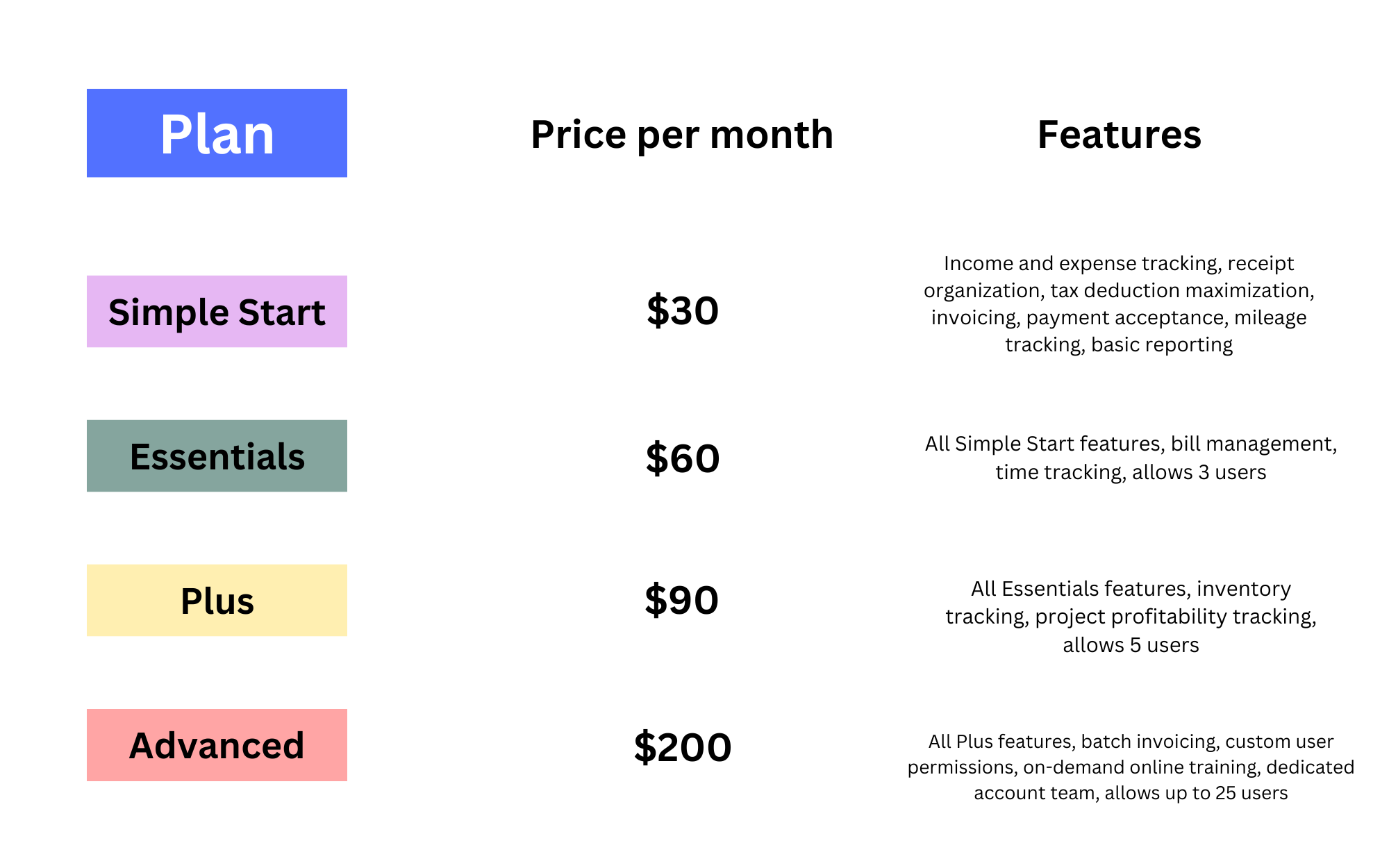
Intuit, the parent company of QuickBooks, has structured QBO into four primary pricing tiers. Each level is defined not just by its price tag, but by the complexity of the financial data it can manage. Understanding these distinctions is critical for optimizing your business finance stack without overpaying for unnecessary features.
Simple Start: The Foundation for Solopreneurs
The Simple Start plan is the entry point for most new businesses and independent contractors. Typically priced around $30 per month (subject to Intuit’s frequent promotional cycles), it provides the essential tools required to maintain a professional financial record.
At this level, the focus is on basic income and expense tracking. You can send custom invoices, track sales tax, and organize receipts for tax deductions. For a solopreneur, the financial value here lies in the automation of the Schedule C tax form. By categorizing transactions throughout the year, the “cost” of the software is often offset by the reduction in billable hours spent with a CPA during tax season.
Essentials: Managing Bills and Multiple Users
As a business grows to include a small team or begins dealing with accounts payable, the Essentials plan—usually priced around $60 per month—becomes a necessity. The primary financial advantage of this tier is the inclusion of up to three users and the “Manage Bills” feature.
From a business finance perspective, managing bills within your accounting software allows for better cash flow forecasting. By entering bills as they arrive and scheduling payments, a business owner can see future liabilities reflected in their reports. This prevents the “cash flow crunch” that often occurs when unexpected expenses hit the bank account simultaneously.
Plus: Scaling with Projects and Inventory
The Plus plan, priced at approximately $90 per month, is widely considered the “sweet spot” for established small businesses. This tier introduces two critical financial tools: project profitability tracking and inventory management.
If your business operates in construction, professional services, or manufacturing, understanding the specific ROI of a single project is vital. The Plus plan allows you to attribute labor and material costs to specific jobs, providing a clear picture of which services are driving profit and which are eroding your margins. Furthermore, the inventory tracking feature ensures that your balance sheet accurately reflects your current assets, preventing the overstatement of profits and ensuring you aren’t tying up too much capital in unsold goods.
Advanced: Enterprise-Level Insights and Automation
For high-growth companies with complex needs, the Advanced plan (roughly $200 per month) offers deep financial analytics and automation. This tier supports up to 25 users and includes features like batch invoicing and customized financial reporting.
The financial logic behind choosing the Advanced plan often rests on labor costs. If your administrative team spends 10 hours a week manually entering invoices or running disparate reports, the $200 monthly fee is significantly lower than the cost of that manual labor. The Advanced tier also includes “Smart Reporting” powered by Fathom, which provides high-level financial health insights that are typically only available to companies with a full-time CFO.
Beyond the Base Subscription: Hidden Costs and Add-ons
While the monthly subscription fee is the most visible cost, a holistic view of “how much is QBO” must include the various add-ons and transaction fees that are integral to the ecosystem. These costs are not merely expenses; they are components of a comprehensive financial management system.
QuickBooks Payroll: The Cost of Managing Your Team
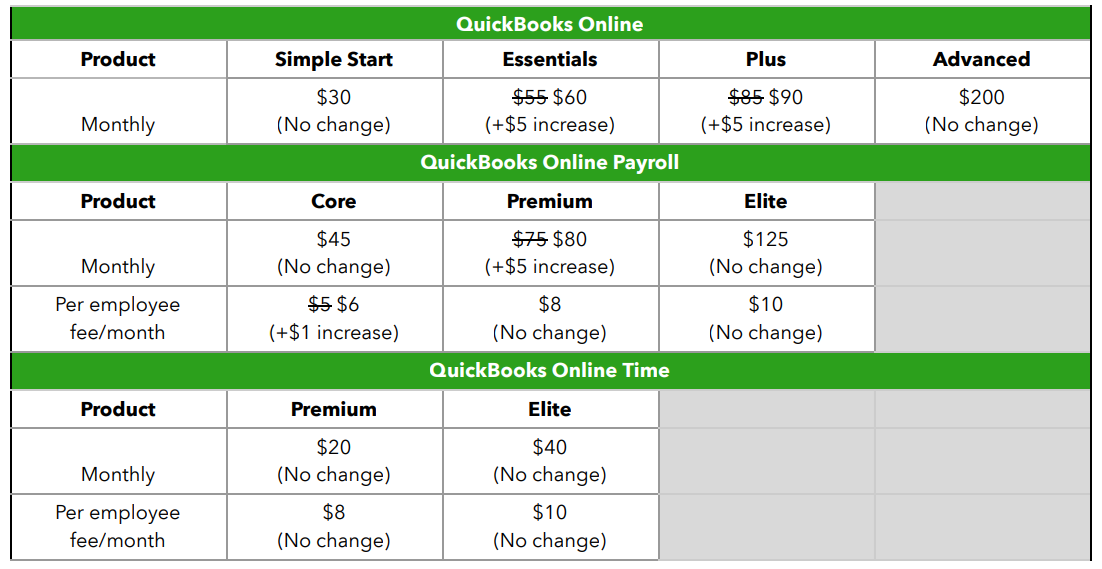
For businesses with employees, payroll is often the largest recurring expense. QuickBooks offers three payroll tiers (Core, Premium, and Elite) that integrate directly with QBO. These plans carry a base monthly fee (starting at $45 + $5 per employee) and scale upward.
The financial benefit of using integrated payroll is the reduction of manual data entry errors. When payroll is processed, the taxes, wages, and liabilities are automatically recorded in your general ledger. This real-time updates of your financial statements ensures that you always have an accurate view of your “burn rate” and total labor burden.
Payment Processing and Merchant Fees
To expedite cash flow, many businesses use QuickBooks Payments to accept credit cards and ACH transfers directly through sent invoices. While there is no monthly fee for this service, there are transaction-based costs. Typically, these range from 1% for ACH transfers to nearly 3.5% for “keyed-in” card transactions.
While these fees represent a “cost of doing business,” they must be weighed against the “DSO” (Days Sales Outstanding). If accepting a credit card payment via QBO results in an invoice being paid 15 days faster than a traditional check, the improved liquidity and reduced administrative follow-up often justify the 3% fee.
Third-Party Integrations and Expert Assistance
The QBO ecosystem thrives on integrations with tools like Bill.com, Expensify, or Shopify. Many of these apps carry their own subscription fees. Additionally, many businesses find that to maximize their investment in QBO, they need the help of a Certified QuickBooks ProAdvisor.
While paying an accountant for a monthly “clean-up” or “review” adds to the total cost, it serves as a form of financial insurance. Ensuring that your chart of accounts is structured correctly and that your bank reconciliations are accurate prevents costly errors that could lead to IRS audits or poor strategic decisions based on flawed data.
Evaluating ROI: Is the Cost of QBO Justified for Your Business?
When analyzing any business finance tool, the focus should shift from “price” to “value.” The cost of QuickBooks Online is an investment in financial clarity, which yields returns in several key areas.
Tax Savings and Compliance Accuracy
One of the most significant financial risks for any business is non-compliance with tax laws. QBO acts as a digital paper trail. By tracking every dollar in and out, the software ensures that you are claiming every legitimate tax deduction. For many businesses, the tax savings discovered through accurate categorization far exceed the annual cost of the software. Moreover, having a “clean” set of books reduces the legal and professional fees associated with responding to tax inquiries.
Time Efficiency and Labor Costs
In business, time is a literal financial asset. Manual bookkeeping is prone to human error and is incredibly time-consuming. By automating bank feeds and using “rules” to categorize recurring transactions, QBO can reduce the time spent on bookkeeping by upwards of 50-80%. If a business owner’s time is valued at $100 per hour, saving just one hour a month pays for the subscription.
Data-Driven Decision Making
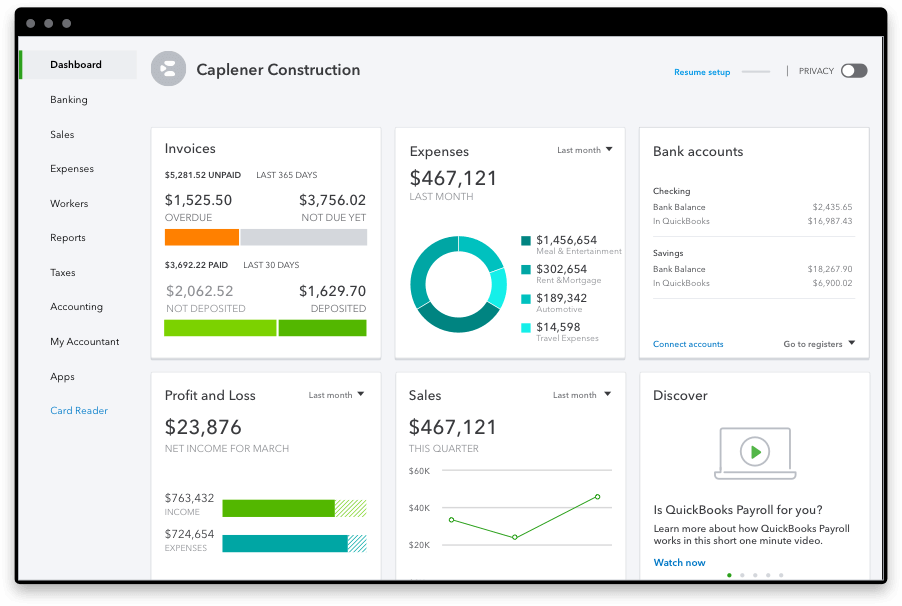
The ultimate financial value of QBO lies in the reports it generates. A Balance Sheet, Profit and Loss (P&L) statement, and Statement of Cash Flows are the “vitals” of a business. Without these, a business owner is flying blind. The ability to compare this month’s performance against the same period last year allows for proactive adjustments to spending and pricing strategies, which is the hallmark of a financially healthy organization.
Strategies to Optimize Your QBO Spend
To ensure you are getting the most out of your investment, it is important to employ specific strategies to manage the cost of the software itself.
Annual vs. Monthly Billing
Intuit frequently offers discounts for those who choose to pay for a full year upfront rather than month-to-month. For a business with stable cash flow, committing to an annual plan can result in significant savings over the long term.
Promotional Discounts and Accountant-Led Pricing
New users can often find “50% off for 3 months” promotions. However, an even more sustainable way to manage costs is through “Wholesale Billing” or “ProAdvisor Discount” programs. Many accounting firms purchase QBO subscriptions in bulk and can pass those savings on to their clients. This not only lowers the monthly cost but also ensures that your accountant has direct access to your books for real-time advisory.
Periodic Plan Audits
A common financial mistake is staying on a higher-tier plan than necessary. For example, if you initially needed the “Plus” plan for a specific project tracking feature but no longer manage those types of projects, downgrading to “Essentials” can save $360 annually. Conversely, upgrading at the right time—before manual processes become a bottleneck—is equally important for maintaining financial efficiency.
Conclusion
So, how much is QBO? The sticker price ranges from $30 to $200 per month, but the true cost is a reflection of your business’s financial complexity and goals. When viewed through the lens of business finance, QuickBooks Online is not just an expense—it is a central hub for financial intelligence.
By selecting the appropriate tier, leveraging integrations wisely, and focusing on the ROI of time and accuracy, businesses can transform their accounting software from a simple record-keeping tool into a powerful engine for financial growth. In the modern economy, the price of being “financially blind” is far higher than the monthly cost of a QBO subscription. Whether you are a solo freelancer or a scaling corporation, the investment in a robust financial tool like QBO is a prerequisite for long-term fiscal success and stability.
aViewFromTheCave is a participant in the Amazon Services LLC Associates Program, an affiliate advertising program designed to provide a means for sites to earn advertising fees by advertising and linking to Amazon.com. Amazon, the Amazon logo, AmazonSupply, and the AmazonSupply logo are trademarks of Amazon.com, Inc. or its affiliates. As an Amazon Associate we earn affiliate commissions from qualifying purchases.