
In the modern digital landscape, the “subscription economy” has transformed how consumers interact with software, services, and logistics. Amazon Prime stands as perhaps the most ubiquitous example of this shift, evolving from a simple expedited shipping service into a sprawling technological ecosystem. However, with the proliferation of digital accounts, family sharing plans, and various promotional trials, it is surprisingly common for users to lose track of their current membership status.
Verifying whether you have an active Amazon Prime subscription is more than a matter of curiosity; it is a fundamental aspect of digital account management and security. This guide provides a comprehensive technical walkthrough on how to identify your membership status across various platforms, understand the nuances of different subscription tiers, and ensure your digital security remains intact.
Navigating the Amazon Interface to Confirm Membership
The first step in managing any SaaS (Software as a Service) product is knowing where the administrative controls reside. Amazon’s user interface (UI) is designed to handle millions of data points, but for the average user, finding subscription details requires navigating through several layers of the account dashboard.
Verifying Status via Desktop Web Browser
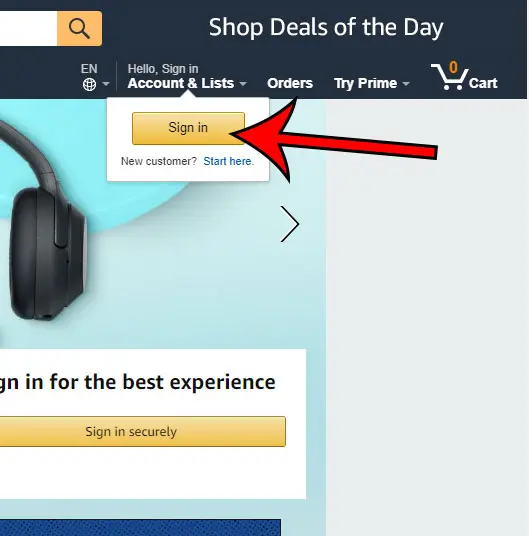
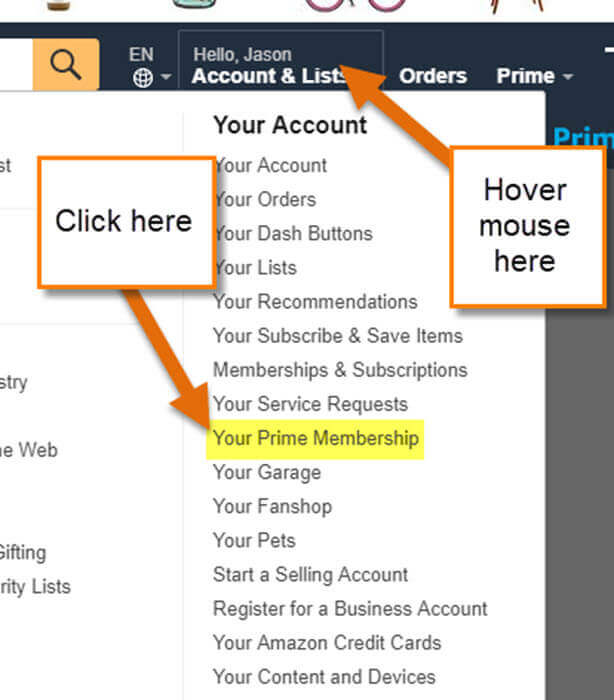
For the most detailed view of your account architecture, the desktop browser remains the gold standard. To check your status, log in to the Amazon homepage and hover over the “Account & Lists” dropdown menu located in the top-right corner. From here, select “Your Prime Membership.”
This dedicated landing page is the central hub for your subscription data. If you are an active member, the page will prominently display your membership type (e.g., Monthly, Annual, or Student), the renewal date, and the payment method currently linked to the service. If you do not have an active membership, the interface will typically present you with a marketing splash page inviting you to join or restart your trial. Technical users should also note that this page provides a “Manage Membership” toggle, allowing you to update your digital preferences or end the service.
Utilizing the Amazon Shopping App on Mobile Devices
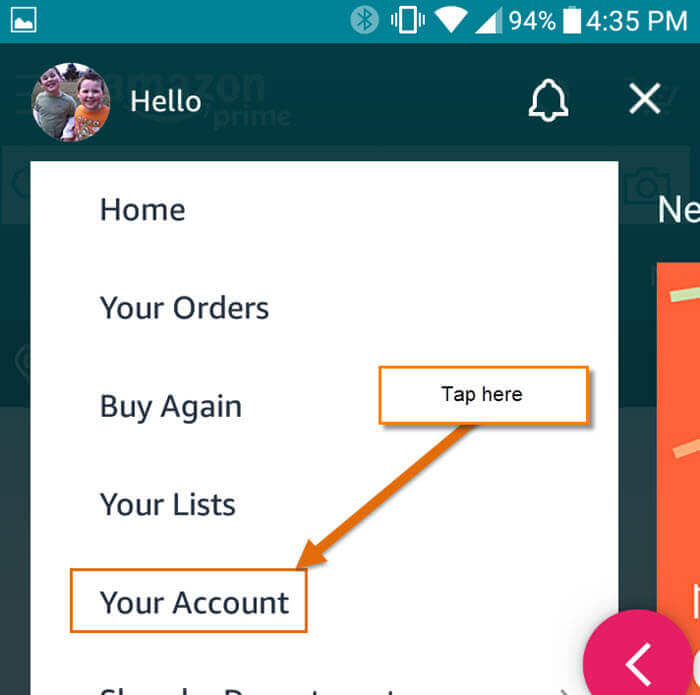
In an era of mobile-first computing, many users interact with the Amazon ecosystem exclusively through iOS or Android applications. The process here is slightly different due to the compressed UI. Open the app and tap the “User” icon (the person silhouette) at the bottom of the screen. Navigate to “Your Account” and scroll down to the “Account Settings” section to find “Manage Prime Membership.”
The mobile app interface is optimized for quick checks. It utilizes cloud-syncing to ensure that the status reflected on your phone matches your desktop settings in real-time. If you notice a discrepancy, it often indicates a synchronization error or that the app is logged into a different digital identity than the one used on your computer.
Decoding Subscription Tiers and Digital Access
Amazon Prime is not a monolithic service; it is a tiered software package that varies based on geography, price point, and user demographics. Understanding which version of the service you are paying for is crucial for maximizing the tech tools at your disposal.
Prime Video vs. Full Prime Membership
A common point of confusion in the tech space is the distinction between a “Prime Video” subscription and a full “Amazon Prime” membership. In certain regions, Amazon offers a standalone digital streaming subscription. This allows users to access the Prime Video library—including proprietary AI-enhanced features like “X-Ray,” which provides real-time actor data and trivia during playback—without the shipping benefits of the main platform.
If your account dashboard indicates you only have “Prime Video,” you will not receive “Prime” badges on product listings or access to other ecosystem features like Prime Music or Prime Gaming. Identifying this distinction is vital for users who believe they are paying for a comprehensive logistics service but are actually only subscribed to the streaming software.
Student and Discounted Technical Memberships
Amazon leverages specific algorithms to verify eligibility for discounted memberships, such as Prime Student or memberships linked to EBT or Medicaid cards. These accounts offer the same technical features as a standard membership but are billed at a different rate.
If you are a student, your account status will specifically reflect “Prime Student.” This version of the software often includes unique integrations, such as discounted access to third-party software like LinkedIn Learning or specialized Kindle Unlimited offers. Verifying this status ensures you are not being overcharged for a service that should be categorized under a legacy or promotional tier.
Technical Indicators of an Active Prime Status
Beyond the account settings menu, the Amazon platform provides several visual and functional cues that signal an active subscription. These indicators are embedded throughout the UI/UX to streamline the shopping and media consumption experience.
The Prime Logo and Search Results
The most immediate technical indicator is the “Prime” logo. When logged into an active account, the Amazon logo in the top-left corner of the website or app will often be accompanied by the word “Prime.” Furthermore, when performing a search for hardware or household goods, a blue “Prime” checkmark will appear next to the pricing information of eligible items.
This isn’t just a graphic; it’s a metadata tag that influences the search engine’s ranking algorithm. Users with Prime status can often filter search results to “Prime Only,” a feature that narrows down the database to show only items available within the Prime logistics network. If these filters are missing or if the logos do not appear next to common items, it is a clear technical signal that your membership is inactive or your session has timed out.
Examining Digital Content and Order History
Another way to verify your status is through your digital library. An active Prime membership grants access to a rotating selection of ebooks through Prime Reading and a catalog of millions of songs via Prime Music. If you attempt to access these services and are met with a “Buy” or “Subscribe” prompt, your Prime status has likely lapsed.
Furthermore, reviewing your “Order History” can provide historical data on your membership. Look for past invoices labeled “Amazon Prime.” These digital receipts will show the exact timestamp of your last payment, the transaction ID, and the duration of the billing cycle. This is particularly useful for auditing your digital expenses and identifying if a trial period has transitioned into a paid subscription without your realization.
Troubleshooting and Security: When Membership Status is Unclear
Digital security is a paramount concern when managing subscriptions. Occasionally, technical glitches or security breaches can obscure your membership status, leading to confusion or unauthorized charges.
Email Verification and Account Alerts
Every time a Prime membership is activated, renewed, or canceled, Amazon’s automated mail servers generate a confirmation. Searching your email archives for “Your Amazon Prime Membership” or “Amazon Prime Renewal” is a reliable offline method to verify your status.
However, users must remain vigilant against “Phishing” attacks. Scammers often send fraudulent emails claiming your Prime membership has expired to trick you into entering your login credentials on a fake site. Always verify your status by navigating directly to the official Amazon URL or app, rather than clicking links within an email. If your email history shows a renewal but your account dashboard shows “Inactive,” this indicates a technical synchronization issue that may require contacting Amazon’s cloud support team.
Managing Multiple Accounts and Device Links
In the age of smart homes, an Amazon Prime account is often linked to multiple pieces of hardware, including Fire TVs, Echo Show devices, and Kindle e-readers. If you have multiple email addresses, it is possible you are logged into an active account on one device and an inactive one on another.
Check the “Manage Your Content and Devices” section of your Amazon account. This technical dashboard lists every piece of hardware authorized to access your Prime benefits. If a device is missing from this list, it will not reflect your Prime status, even if the membership is active. Ensuring that your “Digital Identity” is consistent across all hardware is a key step in modern tech management.
Leveraging Your Subscription in the Modern Tech Landscape
Knowing you have Amazon Prime is the first step; the second is fully integrating its technical capabilities into your daily routine. Prime is increasingly becoming a hub for interconnected smart technology.
Integration with Echo, Alexa, and the Smart Home
An active Prime membership significantly enhances the utility of Alexa-enabled devices. From voice-activated shopping to streaming specialized Prime Music playlists, the software integration is seamless. If you have verified your Prime status, you can utilize “Amazon Day” delivery—a technical logistics feature that groups your orders together to reduce packaging and delivery frequency, managed entirely through the app or voice commands.
Prime Gaming and Digital Content Management
For the tech-savvy user, Prime Gaming (formerly Twitch Prime) is a significant benefit that is often overlooked. By linking your Amazon Prime account to your Twitch account, you receive a monthly “sub” to a creator of your choice and access to free digital games and in-game content.
This cross-platform integration represents the future of the Amazon brand—a unified digital experience where one subscription unlocks value across multiple separate software platforms. To ensure this is working, visit the Prime Gaming portal and click “Link Account.” If the system recognizes your Prime status, the integration will be instantaneous, confirming your membership through a successful API handshake between the two platforms.
In conclusion, verifying your Amazon Prime status is a multifaceted process that involves navigating sophisticated UIs, understanding digital tiers, and maintaining account security. By following these technical steps, you can ensure that you are not only aware of your subscription status but are also extracting the maximum technological value from the Amazon ecosystem.
aViewFromTheCave is a participant in the Amazon Services LLC Associates Program, an affiliate advertising program designed to provide a means for sites to earn advertising fees by advertising and linking to Amazon.com. Amazon, the Amazon logo, AmazonSupply, and the AmazonSupply logo are trademarks of Amazon.com, Inc. or its affiliates. As an Amazon Associate we earn affiliate commissions from qualifying purchases.