
In the modern business landscape, financial clarity is the bedrock of sustainability. For small business owners, freelancers, and growing enterprises, the question of “how much does QuickBooks cost” is rarely just about the monthly subscription fee. Instead, it is a question of financial strategy: What is the price of automated bookkeeping, and how does that investment translate into long-term fiscal health? QuickBooks has long been the industry standard for accounting software, but its pricing structure is multifaceted, designed to scale alongside a company’s revenue and complexity.
Navigating these costs requires more than a glance at a pricing table; it requires an understanding of how each tier aligns with your business finance goals, tax obligations, and cash flow management.

Understanding the QuickBooks Ecosystem: A Strategic Financial Investment
Before dissecting the specific dollar amounts, it is essential to categorize QuickBooks as a financial tool rather than a mere administrative expense. In business finance, we distinguish between “sunk costs” and “value-adding investments.” QuickBooks falls firmly into the latter. By automating ledger entries, bank reconciliations, and financial reporting, the software reduces the margin for human error—a factor that can save thousands in potential audit penalties or missed tax deductions.
QuickBooks Online vs. QuickBooks Desktop
The first major financial decision a business must make is choosing between the cloud-based “Online” version and the traditional “Desktop” version. Historically, QuickBooks Desktop was the go-to for complex inventory and high-volume data. However, Intuit (the parent company) has pivoted toward a subscription-based model for all its products.
QuickBooks Online (QBO) is now the primary focus for most modern businesses due to its accessibility and real-time data syncing. From a financial perspective, the cloud model offers a predictable monthly operational expense (OpEx), whereas the Desktop version often involves higher upfront costs and periodic “Plus” subscription renewals. For most businesses focusing on online income and digital efficiency, the Online version provides the best ROI.
Why Your Business Model Dictates Your Choice
A freelance graphic designer has vastly different financial reporting needs than a multi-state manufacturing firm. The cost of your accounting software should be proportionate to your revenue and the complexity of your transactions. If you are managing a side hustle, paying for a top-tier Enterprise plan is a leak in your cash flow. Conversely, if you are managing a $2 million-a-year operation with ten employees, the cheapest plan will likely cost you more in lost time and inadequate data than the subscription itself.
Navigating QuickBooks Online Pricing Tiers
QuickBooks Online is divided into several tiers, each designed for a specific stage of the business lifecycle. Understanding these tiers is crucial for maintaining a lean budget while ensuring you have the tools necessary for growth.
Simple Start: For Solopreneurs and New Ventures
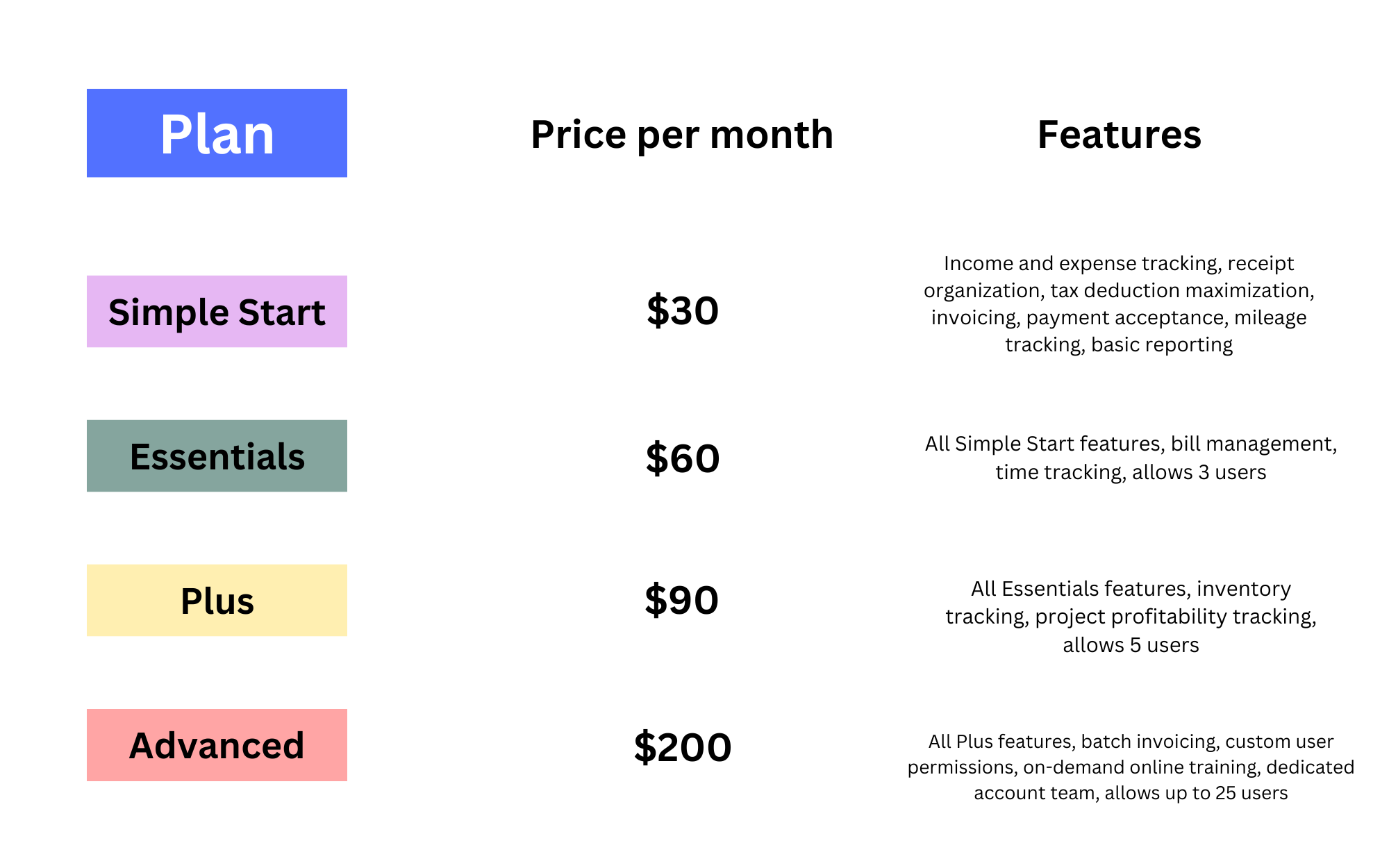
The “Simple Start” plan typically begins around $30 per month (though promotional rates often apply for the first few months). This tier is designed for the single-user business. From a money management perspective, this plan covers the basics: income and expense tracking, invoice creation, and basic tax categorization.
For a professional just starting their journey in personal finance management and business ownership, this tier is the most cost-effective way to separate personal and business expenses—a fundamental rule of corporate identity and legal protection.
Essentials: For Growing Businesses with Basic Teams
Moving up to the “Essentials” tier, the cost increases to approximately $60 per month. The primary financial benefit here is the ability to manage accounts payable (bills) and the inclusion of up to three users. For a business that is starting to scale, having an assistant or a bookkeeper access the books simultaneously is a strategic necessity. This tier also allows for time tracking, which is essential for service-based businesses that need to ensure their billable hours align with their revenue projections.
Plus: For Comprehensive Inventory and Project Tracking
The “Plus” plan, priced at roughly $90 per month, is where QuickBooks becomes a robust financial tool for product-based businesses. It includes inventory tracking and project profitability reporting. In the world of business finance, “Project Profitability” is a game-changer. It allows you to see exactly which clients or jobs are generating the highest margins and which are draining your resources. If your business involves physical goods or long-term contracts, the “Plus” plan is often the “sweet spot” for balancing cost and insight.
Advanced: Enterprise-Level Insights

For established companies with significant revenue, the “Advanced” plan costs approximately $200 per month. This tier is an investment in data analytics. It offers customized reporting, automated workflows, and supports up to 25 users. From a financial management standpoint, the Advanced tier is about “Big Data” for “Small Business.” It provides the granular detail needed for high-level forecasting and budgeting, which is essential for businesses looking to attract investors or secure large-scale financing.
Hidden Costs and Strategic Financial Add-ons
While the base subscription is the most visible expense, a true financial analysis must include the “hidden” or additional costs associated with the QuickBooks ecosystem. These add-ons are often where the real power of the software lies, but they must be budgeted for accordingly.
QuickBooks Payroll: Investing in Human Capital
For many businesses, payroll is the largest single expense. QuickBooks offers integrated payroll services that range from $45 to $125 per month, plus a per-employee fee (typically $6 to $10). While this adds to the monthly cost, the financial benefit of integration cannot be overstated. When payroll is integrated with your accounting software, tax filings are automated, and labor costs are instantly reflected in your profit and loss statements. This real-time visibility is vital for managing a company’s “burn rate.”
Payment Processing Fees: The Reality of Cash Flow
QuickBooks Payments allows you to accept credit cards and ACH transfers directly through your invoices. While there is no additional monthly fee for this service, there are transaction fees (typically ranging from 1% to 3.5% depending on the payment type).
In business finance, these are known as “costs of goods sold” (COGS) or merchant fees. While they represent a percentage of your revenue, the strategic benefit is improved cash flow. Businesses that accept digital payments through their accounting software generally get paid twice as fast as those that rely on paper checks.
Third-Party Integrations and Consultant Fees
As your financial needs grow, you may find that you need to connect QuickBooks to other tools—such as Shopify for e-commerce, or specialized CRM software. Some of these integrations carry their own monthly costs. Furthermore, many businesses choose to hire a Certified QuickBooks ProAdvisor. While an accountant or bookkeeper is an additional expense, their expertise often pays for itself through optimized tax strategies and the identification of financial waste.
Calculating the ROI of Your Accounting Software
To answer “how much does QuickBooks cost,” one must also ask “how much does it save?” The return on investment (ROI) of financial software is measured in two primary ways: time and accuracy.
Time Savings vs. Subscription Costs
If the QuickBooks “Plus” plan costs $1,080 per year, but saves a business owner five hours of manual data entry per week, the software is effectively “paying” the owner. If the owner’s time is valued at $50 per hour, that is $250 a week in saved labor, or $13,000 per year. From a financial perspective, spending $1,080 to save $13,000 is an exemplary use of capital.
Tax Compliance and Audit Protection
The financial cost of a tax audit or a filing error can be catastrophic for a small business. QuickBooks provides a digital paper trail that is essential for tax compliance. The software tracks sales tax, categorizes deductible expenses, and generates the reports your CPA needs at year-end. By reducing the billable hours your accountant spends “cleaning up” your books, the software often reduces your year-end professional fees, further offsetting its monthly cost.
Choosing the Right Plan for Your Financial Future
In conclusion, the cost of QuickBooks is a variable expense that scales with your business’s financial maturity. Whether you are a freelancer spending $30 a month or a corporation spending $200+, the goal remains the same: to gain total control over your money.
Scaling Your Plan with Business Growth
The beauty of the QuickBooks pricing model is its flexibility. A wise financial strategy is to start with the lowest tier that meets your current needs and upgrade only when your revenue or complexity demands it. This “lean” approach to financial tools ensures that you are never overpaying for features you don’t use, while maintaining the path toward comprehensive financial oversight.
Ultimately, the cost of QuickBooks is a small price to pay for the peace of mind that comes with accurate, real-time financial data. In the world of money and business finance, information is power, and QuickBooks remains one of the most cost-effective ways to harness that power for your company’s success.
aViewFromTheCave is a participant in the Amazon Services LLC Associates Program, an affiliate advertising program designed to provide a means for sites to earn advertising fees by advertising and linking to Amazon.com. Amazon, the Amazon logo, AmazonSupply, and the AmazonSupply logo are trademarks of Amazon.com, Inc. or its affiliates. As an Amazon Associate we earn affiliate commissions from qualifying purchases.