
In an increasingly complex digital entertainment landscape, simply wanting to watch a favorite show can sometimes feel like navigating a maze. For users of AT&T’s U-verse service, a common query revolves around locating specific channels, especially popular ones like TNT, known for its compelling dramas, blockbuster movies, and live sports. This article delves deep into the technological underpinnings of AT&T U-verse, providing a comprehensive guide to not only finding TNT but also understanding the advanced features that enhance your overall viewing experience within this sophisticated Internet Protocol Television (IPTV) ecosystem. We’ll explore U-verse from a purely technological perspective, examining its architecture, user interface, and the functionalities that make it a distinct player in the realm of digital content delivery.

Understanding AT&T U-verse: A Technological Overview
AT&T U-verse, at its core, represents a significant technological leap in television broadcasting. Unlike traditional cable or satellite systems that transmit signals over coaxial cables or from geosynchronous orbit, U-verse leverages AT&T’s advanced fiber optic network infrastructure to deliver television, internet, and voice services directly to your home. This converged service model, known as IPTV, offers a range of technical advantages that redefine how content is accessed and consumed.
The IPTV Advantage: How U-verse Delivers Content
IPTV is fundamentally different from older television delivery methods because it transmits television content using the Internet Protocol (IP) suite over a managed broadband network. This is not merely “TV over the internet” in the general sense of streaming platforms; rather, it’s a dedicated, quality-controlled network specifically designed for broadcast television. This technical distinction is crucial:
- Guaranteed Bandwidth and Quality of Service (QoS): Unlike public internet streaming which can suffer from congestion, U-verse’s managed network allocates specific bandwidth for TV services, ensuring consistent picture quality (including HD and 4K capabilities) and minimal buffering, even during peak usage times. This is achieved through sophisticated traffic management protocols.
- Two-Way Communication: The IP-based nature of U-verse enables bidirectional communication between the set-top box (STB) and the service provider. This allows for interactive features that are not possible with traditional broadcast, such as true video-on-demand (VOD), personalized programming guides, and seamless integration with other IP services.
- Efficient Content Delivery: U-verse utilizes multicasting technology, where a single stream of data is sent from the server to multiple receivers simultaneously, rather than individual streams for each viewer. This optimizes network resources, making it highly efficient for delivering live broadcast channels to a large subscriber base.
- Scalability and Flexibility: The IP architecture allows AT&T to easily scale its services, add new channels, introduce new features, and deliver personalized content much more flexibly than legacy systems. New content can be injected into the IP stream with relative ease, and new functionalities can be deployed via software updates to the STBs.
Navigating the U-verse Interface: Design and Usability
The user interface (UI) of the U-verse platform, accessed via your set-top box and remote control, is a critical component of its technological design, focusing on intuitive navigation and comprehensive feature access. AT&T invested significantly in creating an interface that, while feature-rich, remains accessible to users of varying technical proficiency.
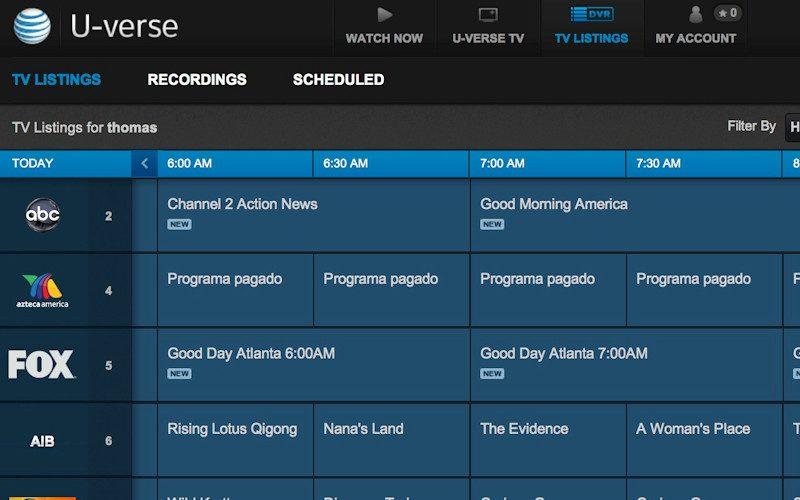
- The On-Screen Guide (EPG): The Electronic Program Guide (EPG) is the central hub for discovering content. Designed for efficiency, it displays channel numbers, program titles, airtimes, and often brief descriptions. Its grid-based layout allows for quick scanning of upcoming programs, and its real-time updates ensure accuracy. From a technical standpoint, the EPG data is dynamically fetched from AT&T’s servers, ensuring that program information is always current.
- Remote Control Functionality: The U-verse remote control is engineered to be more than just a channel changer. It integrates controls for the STB, television, and often other audio/video equipment, reducing remote clutter. Dedicated buttons for the guide, menu, VOD, and DVR facilitate quick access to key features, leveraging infrared (IR) or sometimes radio frequency (RF) signals for communication with the STB.
- Menu System Logic: The main menu typically organizes services into logical categories like Live TV, On Demand, My Recorded TV, Settings, and Apps. This hierarchical structure is a fundamental aspect of UI/UX design, intended to reduce cognitive load and guide users through complex options efficiently. The underlying software architecture processes user inputs, retrieves relevant data from AT&T’s servers, and renders the information on the television screen.
Locating TNT on Your U-verse System
Finding a specific channel like TNT on U-verse primarily involves understanding the system’s channel lineup logic and utilizing its integrated navigation tools. While the process is generally straightforward, regional variations and package specifics can influence exact channel assignments.
The Dynamic Nature of Channel Lineups
One of the most important technical considerations for U-verse users is the variability of channel lineups. Unlike a universal standard, channel numbers for networks like TNT can differ based on several factors:
- Geographic Location: AT&T operates across various regions, and licensing agreements or local broadcasting regulations may necessitate different channel assignments. The U-verse system’s backend infrastructure is designed to serve region-specific channel maps to individual STBs.
- Service Package: U-verse offers multiple programming tiers (e.g., U-Family, U200, U300, U450). TNT is typically included in most mid-to-high-tier packages, but its exact numeric placement might shift depending on the tier, as premium or specialized channels often occupy different ranges. The STB software, upon activation, receives configuration data detailing the subscribed package’s channel list.
- Network Restructuring: Periodically, AT&T may reorganize its channel lineup for various operational or commercial reasons. When these changes occur, the U-verse system pushes software updates or EPG data refreshes to subscribers’ devices to reflect the new assignments.
To ascertain the precise channel number for TNT in your specific location and package, it’s always recommended to consult the official AT&T U-verse channel lineup specific to your area. These are often available on the AT&T website and are dynamically updated.
Step-by-Step Guide: Finding TNT via the On-Screen Guide
The most direct and reliable method to find TNT on your U-verse system is through the Electronic Program Guide (EPG). This process is designed to be intuitive:
- Access the Guide: Press the “Guide” button on your U-verse remote control. This action sends a command to the STB, which then loads the EPG interface, retrieving current programming data from AT&T’s network.
- Navigate Channels: Use the “Channel Up/Down” buttons or the arrow keys on your remote to scroll through the channel list. As you scroll, the EPG dynamically updates, displaying program information for the selected channel.
- Locate TNT: Look for the TNT logo or channel name. Given its popularity, TNT is often placed within a common range of entertainment channels. In many U-verse configurations, TNT can typically be found in the 100s or 1100s range for SD and HD versions respectively, but this is a generalization.
- Confirm and Select: Once you’ve identified TNT, press “Select” (or “OK”) on your remote to tune into the channel. The STB then switches the IP stream to deliver TNT’s content to your television.
Leveraging Search and Favorites Features
Beyond manual scrolling, U-verse’s advanced features leverage its IP architecture to offer more efficient ways to access content:
- Search Functionality: Most U-verse STBs include a search feature. By pressing a “Menu” or dedicated “Search” button, you can access an on-screen keyboard. Typing “TNT” (or part of it) will prompt the system to search its comprehensive database of live channels, on-demand content, and recorded programs. This search is powered by a robust indexing system on AT&T’s backend servers, quickly returning relevant results.
- Favorites List: To streamline access to frequently watched channels like TNT, U-verse allows users to create a “Favorites” list. This feature, configurable in the settings menu, enables the user to select preferred channels. Once a Favorites list is active, using the “Channel Up/Down” buttons will only cycle through the channels you’ve designated, significantly reducing navigation time. From a technical standpoint, this feature customizes the channel mapping presented to the user, filtering the main lineup based on stored user preferences within the STB’s memory.
Beyond Live TV: TNT’s Presence Across U-verse Features
The power of an IPTV platform like U-verse extends far beyond simple linear TV viewing. Its integrated technical ecosystem allows for various methods of accessing TNT’s programming, whether live, on-demand, or on the go.
On-Demand Content and DVR Capabilities
U-verse’s advanced technical architecture facilitates robust on-demand and DVR services:
- Video On Demand (VOD): Many of TNT’s popular shows and movies are available through U-verse’s On Demand library. This service functions much like a digital media store, where content is streamed directly to your STB upon request. Technologically, VOD relies on specialized servers that store vast libraries of content and stream individual programs using adaptive bitrate streaming, optimizing quality based on your network conditions and device capabilities. Accessing TNT via VOD allows you to watch programs at your convenience, bypassing the live broadcast schedule.
- Digital Video Recorder (DVR): The U-verse DVR is a sophisticated recording device integrated into specific STB models. It allows users to record live TNT broadcasts, pause, rewind, and fast-forward through content. The DVR functions by writing the incoming IP stream of a selected channel to a local hard drive within the STB. Features like series recording (recording every episode of a TNT show) and conflict resolution (managing simultaneous recordings) demonstrate complex scheduling algorithms and database management within the STB’s firmware. The ability to pause live TV involves buffering a portion of the incoming stream to the hard drive, providing a seamless “time-shifting” experience.
U-verse App Integration: Mobile Access to TNT
In response to the growing demand for multi-device content consumption, AT&T extended the U-verse experience to mobile platforms through dedicated applications.
- The U-verse App (or Successor Apps): While U-verse itself has evolved into DIRECTV STREAM for new subscribers, legacy U-verse users often had access to a dedicated U-verse mobile app. This application served as a powerful technological extension of the home STB. It utilized authentication protocols to verify user subscriptions and then facilitated streaming of live TV channels, including TNT, and on-demand content to smartphones and tablets.
- Streaming Technology: The app employs adaptive bitrate streaming technologies (like HLS or DASH) to deliver video content efficiently over various internet connections (Wi-Fi, cellular data). This means the app dynamically adjusts the video quality to match the available bandwidth, ensuring a smooth playback experience even on mobile networks.
- Remote Control Functionality: Beyond content streaming, some iterations of the U-verse app allowed mobile devices to function as a remote control for the home STB, leveraging IP communication within the local network to send commands to the set-top box. This exemplifies the interconnected nature of the U-verse ecosystem.
Troubleshooting and Optimization for Your U-verse Experience
Even with a robust IPTV system like U-verse, technical issues can occasionally arise. Understanding common problems and optimization techniques can significantly enhance your viewing experience and ensure uninterrupted access to channels like TNT.
Common Technical Issues and Quick Fixes
Most U-verse issues stem from network connectivity or STB firmware glitches. Simple troubleshooting steps often resolve these:
- No Signal/Black Screen: This often indicates a loss of signal to the STB or an issue with the HDMI connection. First, check all physical cable connections (HDMI from STB to TV, coaxial/Ethernet from wall to STB). If connections are secure, a power cycle of the STB is the next step. Unplug the STB from power for 10-15 seconds, then plug it back in. This forces the device to reboot its operating system and re-establish a connection with the AT&T network and television.
- Guide Not Loading/Incorrect Information: The EPG data is dynamically pulled from AT&T’s servers. If the guide is blank or outdated, it usually signifies a temporary communication issue between your STB and the network. A STB reboot (power cycle) often resolves this by prompting a fresh data download. Ensuring your internet connection (which U-verse shares) is stable is also crucial.
- Pixelation/Choppy Video: This is typically a symptom of signal degradation or insufficient bandwidth. While U-verse’s managed network is designed to prevent this, external factors like Wi-Fi interference (if your STB uses wireless adapters) or broader network issues could be culprits. Try connecting your STB directly via Ethernet if possible. If the problem persists, it may indicate an issue with the AT&T network infrastructure itself, warranting a call to technical support.
- Remote Control Unresponsive: Check the batteries first. If batteries are good, try resetting the remote or re-pairing it with the STB if it’s an RF remote. IR remotes require a clear line of sight to the STB’s IR receiver. Dust or obstructions can interfere with the signal.
Enhancing Your Viewing with U-verse Settings
The U-verse system provides various settings to customize and optimize your viewing experience, leveraging its technical capabilities:
- Parental Controls: U-verse allows users to set parental controls based on ratings, specific channels (including blocking TNT if desired), or time of day. This feature relies on the STB’s firmware interpreting user-defined rules and blocking access to content that doesn’t meet those criteria, often requiring a PIN for override.
- Picture and Audio Settings: Within the STB’s settings menu, you can often adjust resolution output (e.g., 720p, 1080i, 1080p), aspect ratio, and audio settings (e.g., stereo, surround sound via Dolby Digital). These settings control how the STB processes and outputs the digital video and audio streams to your television or audio receiver, ensuring compatibility and optimal quality for your home theater setup.
- Network Diagnostics: Advanced users can sometimes access network diagnostic tools within the U-verse STB settings. These tools provide technical information about signal strength, connection speed, and network status, which can be invaluable for pinpointing connectivity issues.
The Evolving Landscape of TV Technology and U-verse’s Future
The digital television industry is in constant flux, driven by rapid technological advancements and changing consumer behaviors. While AT&T U-verse represented a pioneering effort in IPTV, the landscape continues to evolve, impacting how services like it are positioned and developed.
From IPTV to Streaming: U-verse’s Place in a Hybrid Ecosystem
The television technology journey has seen a gradual shift from traditional broadcast to digital cable, then to IPTV, and now increasingly towards pure internet-based streaming services. While U-verse embraced IP delivery, it still retained some characteristics of traditional pay-TV, such as fixed channel lineups and dedicated set-top boxes.
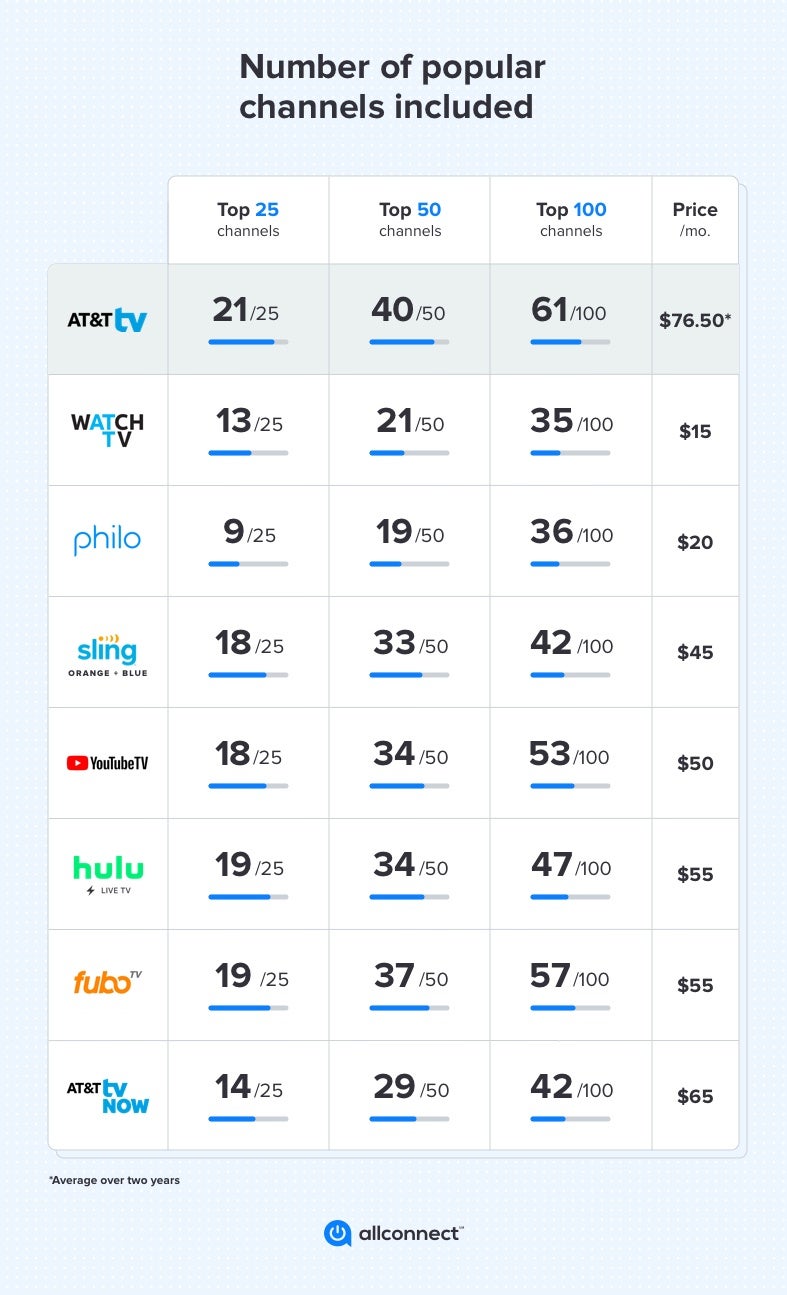
- The Rise of OTT: Over-the-top (OTT) streaming services (like Netflix, Hulu, YouTube TV, and even Warner Bros. Discovery Max, which carries TNT content) have gained prominence by delivering content directly over the open internet, bypassing traditional service providers’ managed networks. This shift offers greater flexibility and often lower costs for consumers.
- AT&T’s Evolution: Recognizing this trend, AT&T has strategically pivoted its video offerings. While legacy U-verse customers may still retain their service, new subscribers are often directed towards DIRECTV STREAM (formerly AT&T TV), which is a modern streaming-first platform delivered over the open internet, designed to compete directly with OTT services. This represents a technological evolution from a closed, managed IPTV network to a more open, application-based streaming model.
- Hybrid Models: The future likely involves a hybrid ecosystem where traditional pay-TV (including IPTV) coexists with OTT, with many platforms integrating features from both worlds. This means that while U-verse’s core technology remains robust, its operational model has been adapted to a new digital reality.
Innovations in Content Delivery and User Experience
The drive for innovation in TV technology continues, focusing on higher fidelity, greater personalization, and seamless multi-device experiences:
- 4K UHD and HDR: As display technologies advance, the demand for 4K Ultra High Definition (UHD) and High Dynamic Range (HDR) content is growing. Future content delivery systems, whether managed IPTV or OTT, must support these formats, requiring higher bandwidth capabilities and advanced video codecs (like HEVC) for efficient transmission.
- Personalization and AI: Leveraging artificial intelligence and machine learning, TV platforms are moving towards hyper-personalized content recommendations, tailored advertising, and intuitive voice control. These technologies analyze viewing habits and preferences to create a more engaging and user-specific experience.
- Cloud-Based DVR: Instead of local storage on a set-top box, cloud DVR solutions store recordings on remote servers. This offers greater storage flexibility, allows access to recordings from multiple devices, and simplifies hardware management. Many modern streaming services, including AT&T’s successor platforms, have adopted this technology.
In conclusion, understanding “what channel is TNT on U-verse” extends beyond a simple channel number. It involves appreciating the sophisticated IPTV technology that underpins AT&T U-verse, from its fiber-optic delivery system and interactive guide to its advanced DVR and mobile app integrations. While the television landscape continues to evolve towards streaming, the foundational technological principles demonstrated by U-verse remain relevant in shaping how we access and enjoy digital entertainment. By leveraging the platform’s features and understanding its technical nuances, U-verse users can optimize their viewing experience and effortlessly connect with their favorite content.
aViewFromTheCave is a participant in the Amazon Services LLC Associates Program, an affiliate advertising program designed to provide a means for sites to earn advertising fees by advertising and linking to Amazon.com. Amazon, the Amazon logo, AmazonSupply, and the AmazonSupply logo are trademarks of Amazon.com, Inc. or its affiliates. As an Amazon Associate we earn affiliate commissions from qualifying purchases.