
In the vast and ever-evolving landscape of digital technology, data storage stands as a fundamental pillar, underpinning virtually every digital interaction, from opening an application to streaming a high-definition movie. Among the myriad storage solutions available today, the Hard Disk Drive (HDD) has a long and storied history, and its interface, Serial ATA (SATA), has become a ubiquitous standard. Understanding “what is a SATA HDD drive” is essential for anyone looking to grasp the foundations of modern computing, appreciate the nuances of data storage, or make informed decisions about their hardware.
A SATA HDD drive, at its core, is a mass-storage device that employs magnetic storage to store and retrieve digital data using one or more rigid rapidly rotating platters coated with magnetic material. Data is stored on these platters using read/write heads that float on a cushion of air above the surface. The “SATA” part refers specifically to the interface—Serial Advanced Technology Attachment—which is the standard connection used to link the HDD to a computer’s motherboard, enabling data transfer. While solid-state drives (SSDs) have gained prominence, SATA HDDs continue to play a crucial role, particularly in applications requiring vast storage capacities at an economical price point. This article will delve into the intricacies of SATA HDDs, exploring their history, technology, advantages, and their enduring relevance in today’s tech ecosystem.
The Evolution of Data Storage and the Advent of SATA
The journey of data storage has been a remarkable one, marked by continuous innovation driven by the relentless demand for higher capacities, faster access, and greater reliability. Before SATA, there was a different paradigm, one that had its own strengths but eventually became a bottleneck for progress.
From Parallel ATA to Serial ATA
For many years, the primary interface for connecting hard drives and optical drives to motherboards was Parallel Advanced Technology Attachment (PATA), often referred to as IDE (Integrated Drive Electronics). PATA drives were characterized by wide, flat ribbon cables, typically 40 or 80 wires wide. While revolutionary in its time, PATA suffered from several limitations. The bulky cables were difficult to manage within a computer case, impeded airflow, and had strict length limitations, capping design flexibility. More critically, PATA’s parallel signaling method meant that all data bits were sent simultaneously across multiple wires. This architecture was prone to signal timing issues at higher frequencies, making it difficult to increase data transfer speeds beyond a certain point. Each drive also required its own jumper settings for ‘master’ or ‘slave’ configurations when two devices shared a single ribbon cable, adding complexity to system setup.
The limitations of PATA became increasingly apparent as processors grew faster and software became more data-intensive. The computing world needed a new standard—one that was faster, more efficient, and easier to manage. This necessity gave birth to Serial ATA. Introduced in 2000, SATA represented a paradigm shift. Instead of parallel data transmission, SATA sends data serially, one bit at a time, over a single pair of wires. While this might sound slower, serial transmission, counter-intuitively, allows for much higher clock rates and thus significantly faster data transfer speeds. SATA cables are much thinner and more flexible, improving airflow, simplifying cable management, and extending cable length capabilities. Furthermore, each SATA device connects directly to a port on the motherboard, eliminating the need for master/slave jumpers and simplifying configuration. This move from parallel to serial was a foundational leap, paving the way for the storage speeds we often take for granted today.
Understanding the SATA Interface
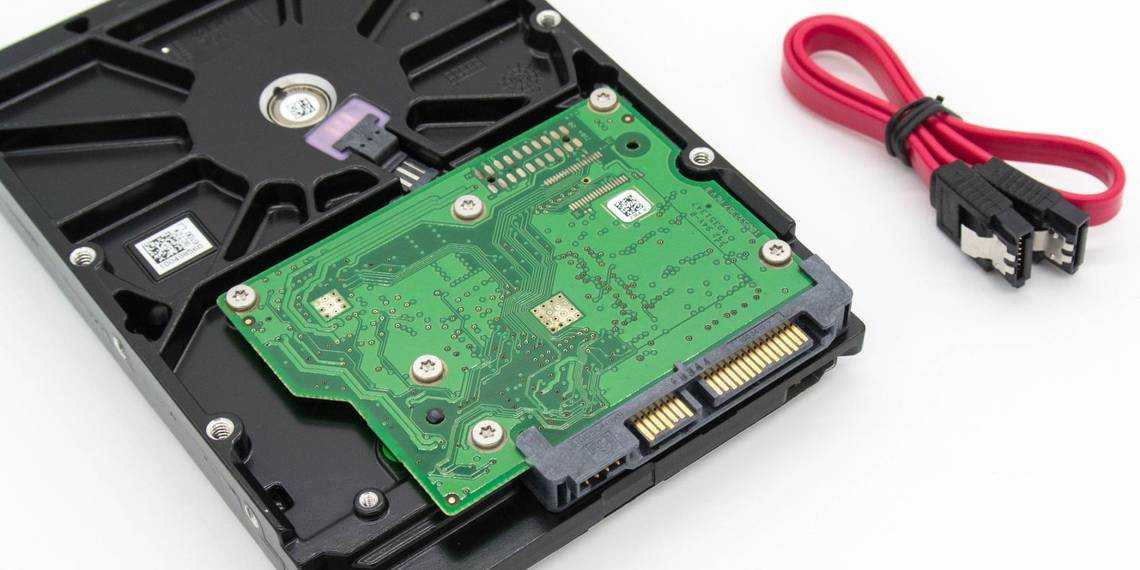
The SATA interface isn’t just a physical connection; it’s a complete communication protocol designed for efficiency and speed. Physically, a SATA connection consists of two cables: a data cable and a power cable. The data cable is typically a thin, seven-pin cable that connects the drive to a SATA port on the motherboard. The power cable is a larger 15-pin connector that draws power directly from the power supply unit (PSU). This separate power connection contrasts with PATA, where power was supplied via a 4-pin Molex connector, and data via the wide ribbon.
Over the years, the SATA standard has seen several revisions, each bringing incremental improvements in speed:
- SATA I (SATA 1.5 Gbit/s): The original specification, offering a maximum theoretical transfer rate of 150 MB/s.
- SATA II (SATA 3 Gbit/s): Doubled the transfer rate to 300 MB/s, also introducing features like Native Command Queuing (NCQ), which optimizes the order of commands to improve performance.
- SATA III (SATA 6 Gbit/s): The most common and current iteration, providing a theoretical maximum transfer rate of 600 MB/s. This is the standard found in most modern motherboards and HDDs.
- SATA Express: An attempt to leverage PCIe lanes for even faster speeds, but largely superseded by M.2 and NVMe for high-performance storage.
While HDDs rarely saturate the full bandwidth of SATA III due to their mechanical limitations, the interface provides ample headroom for even the fastest traditional hard drives. The SATA interface also supports hot-swapping (connecting or disconnecting drives while the system is running), which is highly beneficial for servers and external drive enclosures.
Deconstructing the Hard Disk Drive (HDD) Technology
To truly understand a SATA HDD, one must look beyond the interface and into the intricate mechanical and electronic marvel that is the hard disk drive itself. It’s a testament to precision engineering, where microscopic components work in concert to store and retrieve vast amounts of data.
How HDDs Store Data
The core of an HDD’s operation lies in its platters and read/write heads. Inside the sealed, dust-free enclosure of an HDD are one or more circular disks, known as platters, made from a rigid material like aluminum or glass, and coated with a thin layer of magnetic material. Data is stored on these platters as magnetic patterns, representing binary 0s and 1s.
When the drive is active, these platters spin at incredibly high speeds—typically 5,400 RPM, 7,200 RPM, or even 10,000 RPM for enterprise drives. Above and below each platter surface, delicate read/write heads are mounted on actuator arms. These heads don’t physically touch the platter; instead, they “float” on a cushion of air generated by the spinning platters, separated by a microscopic gap (often just a few nanometers). When writing data, the head magnetizes tiny regions on the platter’s surface. When reading, it detects the magnetic orientation of these regions and translates them back into electrical signals. The actuator arm moves the heads rapidly across the platter’s surface, allowing them to access different tracks and sectors where data is stored. The precision required for this operation, especially at high rotational speeds, is astounding.
Key Components of an HDD
Beyond the platters and heads, several other critical components contribute to the HDD’s functionality:
- Spindle Motor: This motor is responsible for spinning the platters at a consistent and high RPM. Its precision is vital for stable read/write operations.
- Actuator Arm and Voice Coil Motor: The actuator arm, which holds the read/write heads, is moved by a voice coil motor (similar to how a speaker works). This motor allows for rapid and precise positioning of the heads over the platters.
- Logic Board (Controller Board): Mounted on the exterior of the sealed enclosure, this printed circuit board contains the drive’s firmware, a controller chip, and often a cache memory. It acts as the brain of the drive, translating commands from the computer’s operating system into specific actions for the mechanical components, managing data flow, error correction, and overall drive operation.
- Cache Memory (Buffer): Modern HDDs include a small amount of RAM (typically 8MB to 256MB) that acts as a buffer. This cache temporarily stores frequently accessed data or data waiting to be written, significantly improving performance by reducing the need for the slower mechanical components to constantly seek data.
- Sealed Enclosure: The platters and read/write heads are housed within a hermetically sealed enclosure to protect them from dust, moisture, and other contaminants that could easily damage the delicate components and corrupt data.
The entire process, from receiving a request to delivering data, involves a complex interplay of these components, all managed by the logic board to ensure efficient and reliable storage and retrieval.
Different Form Factors and Capacities
SATA HDDs come in a couple of primary physical sizes, known as form factors, which dictate where they can be used:
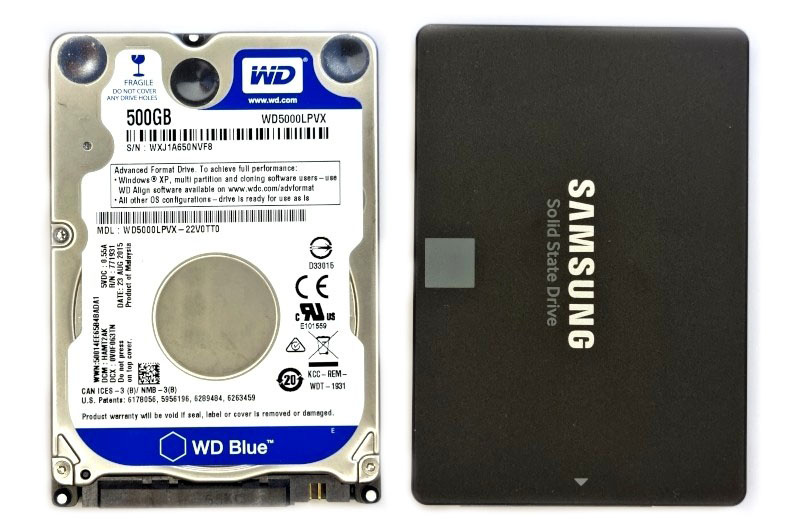
- 3.5-inch Drives: These are the larger form factor, primarily used in desktop computers, servers, and Network Attached Storage (NAS) devices. They generally offer the highest storage capacities (up to 20TB and beyond) and often prioritize cost-effectiveness per gigabyte.
- 2.5-inch Drives: Smaller and thinner, these drives are typically found in laptops, external hard drives, and compact desktop systems. While they usually have lower capacities than their 3.5-inch counterparts, they consume less power and are more resistant to physical shock due to their smaller size and lighter platters.
Capacities for SATA HDDs range from a few hundred gigabytes to many terabytes, making them ideal for storing large media libraries, extensive document archives, and comprehensive backups.
Advantages and Disadvantages of SATA HDDs
While the technological landscape has introduced newer storage paradigms, SATA HDDs maintain a strong foothold in various applications due to their inherent characteristics. However, they also come with certain limitations that are important to consider.
The Enduring Strengths
Despite the rise of solid-state technology, SATA HDDs continue to offer compelling advantages, primarily rooted in their cost-efficiency and capacity:
- Cost-Effectiveness: This is arguably the most significant advantage. Per gigabyte, HDDs are significantly cheaper than SSDs. This makes them the go-to choice for users or organizations needing massive amounts of storage without breaking the bank, such as for large media servers, archival systems, or budget-conscious gaming PCs.
- High Storage Capacity: HDDs still lead the market in terms of raw storage volume in a single drive. Drives with capacities of 8TB, 12TB, 16TB, and even 20TB or more are readily available, making them indispensable for storing vast digital libraries, video surveillance footage, and enterprise data centers.
- Reliability for Archival Data: For long-term cold storage or archival purposes, HDDs can be very reliable. While mechanical parts can fail, the data itself, once written magnetically, can remain stable for many years, provided the drive is kept in suitable environmental conditions and not subjected to physical shocks. Their data retention capabilities are generally very robust for static data.
- Mature and Established Technology: HDDs have been around for decades, meaning the technology is incredibly mature, stable, and well-understood. Manufacturing processes are highly optimized, contributing to their lower cost.
The Performance and Durability Trade-offs
However, the mechanical nature of HDDs introduces several disadvantages, especially when compared to their solid-state counterparts:
- Slower Speeds: This is the most noticeable drawback. Because HDDs rely on spinning platters and moving read/write heads, access times are measured in milliseconds, and sequential read/write speeds are typically in the range of 100-200 MB/s. This is significantly slower than SSDs, which offer near-instant access times and speeds often exceeding 500 MB/s for SATA SSDs and thousands of MB/s for NVMe SSDs. This speed difference impacts boot times, application loading, and file transfer operations.
- Mechanical Fragility: The moving parts within an HDD make it vulnerable to physical shock. A drop or a hard bump, especially while the drive is operating, can cause the read/write heads to crash onto the platters, leading to permanent data loss. This makes HDDs less ideal for mobile devices or environments where physical resilience is paramount.
- Power Consumption and Heat: HDDs, with their spinning motors and moving arms, generally consume more power than SSDs, which translates to more heat generation. This can be a concern for laptops (affecting battery life) and systems requiring efficient cooling.
- Noise and Vibration: The mechanical operation of an HDD can produce audible noise, particularly when the heads are actively seeking data. The spinning platters can also generate minor vibrations, which, while usually not problematic in a single drive, can become a consideration in large server racks with many drives.
These trade-offs mean that while HDDs excel in mass storage, they are rarely the best choice for primary operating system drives or applications demanding high-speed I/O.
SATA HDDs in the Modern Computing Landscape
Despite the continuous advancements in storage technology, particularly with the proliferation of SSDs, SATA HDDs have not become obsolete. Instead, they have found specialized niches where their strengths are best utilized, often working in conjunction with newer technologies.
Primary Use Cases
SATA HDDs continue to be the workhorses for a variety of critical applications:
- Mass Storage and Archival: For storing vast libraries of photos, videos, music, and documents, HDDs remain the most economical solution. They are perfect for users who need terabytes of space for media consumption or professional content creation where raw storage volume is key.
- Network Attached Storage (NAS) Devices: NAS systems, popular for home and small business users, rely heavily on 3.5-inch SATA HDDs. Their high capacity, relatively low cost, and suitability for continuous operation make them ideal for centralized data storage, backups, and media streaming over a network.
- Secondary Drives in Desktop PCs: Many desktop users adopt a hybrid storage strategy: an SSD for the operating system and frequently used applications (for speed) and one or more large SATA HDDs for mass data storage. This setup offers the best of both worlds—fast performance where it matters most and vast capacity for everything else.
- Backup Solutions: External SATA HDDs, enclosed in a protective case, are a common and cost-effective solution for local data backups. Their large capacities ensure that entire systems or significant data sets can be easily replicated.
- Surveillance Systems (DVR/NVR): Security camera systems that continuously record video footage require immense storage capacity, making high-capacity, often specialized, SATA HDDs the primary choice for Digital Video Recorders (DVRs) and Network Video Recorders (NVRs).
Coexistence with Solid State Drives (SSDs)
The rivalry between HDDs and SSDs is often oversimplified. In reality, they are often complementary rather than mutually exclusive. The significant performance gap means that SSDs have become the default for primary boot drives, transforming user experience with faster boot times and snappier application launches. However, when it comes to storing large files that don’t require constant, high-speed access—such as movies, archival backups, or game libraries—HDDs still offer unbeatable value.
Many modern PCs employ a “two-drive” strategy. A smaller, faster NVMe or SATA SSD houses the operating system and core applications, delivering a premium user experience. Alongside this, a larger, more affordable SATA HDD provides ample space for less performance-critical data. This hybrid approach allows users to balance performance, capacity, and budget effectively, leveraging the unique strengths of each storage type.
Future Outlook for SATA HDDs
While NVMe SSDs continue to push the boundaries of performance and their prices steadily decrease, the death of the SATA HDD has been greatly exaggerated. The demand for massive, affordable storage continues to grow exponentially, driven by data-intensive applications like AI, big data analytics, cloud storage, and high-resolution media. As such, HDDs are likely to remain relevant for the foreseeable future, particularly in enterprise data centers, cloud infrastructure, and archival solutions where sheer capacity and cost-per-gigabyte are paramount.
Innovations in HDD technology, such as Helium-filled drives for increased platter density and energy efficiency, and technologies like Heat-Assisted Magnetic Recording (HAMR) and Microwave-Assisted Magnetic Recording (MAMR) to push capacities even further, demonstrate that manufacturers are still investing heavily in the technology. While they may not be the star performers for speed, SATA HDDs will continue to be the silent giants of the storage world, underpinning the vast digital infrastructure that defines our age.

Conclusion
The SATA HDD drive is more than just a component; it’s a cornerstone of digital storage history and a persistent workhorse in modern computing. From its origins as an evolution of PATA to its current role in hybrid storage solutions, the SATA HDD has consistently adapted to the demands of an increasingly data-centric world. Understanding its mechanical intricacies, the efficiency of the SATA interface, and its inherent advantages in cost and capacity—alongside its performance limitations—provides valuable insight into how our digital lives are stored and accessed.
While solid-state drives undoubtedly lead the charge in speed and responsiveness, the SATA HDD continues to offer unparalleled value for mass storage, archival purposes, and in applications where sheer volume outweighs the need for blazing fast speeds. As we continue to generate unprecedented amounts of data, the reliable, high-capacity, and cost-effective SATA HDD drive will undoubtedly retain its vital place within the intricate ecosystem of technology, powering everything from personal media centers to the sprawling data centers of the cloud.
aViewFromTheCave is a participant in the Amazon Services LLC Associates Program, an affiliate advertising program designed to provide a means for sites to earn advertising fees by advertising and linking to Amazon.com. Amazon, the Amazon logo, AmazonSupply, and the AmazonSupply logo are trademarks of Amazon.com, Inc. or its affiliates. As an Amazon Associate we earn affiliate commissions from qualifying purchases.