
The unassuming passport-size photo is far more than a mere headshot; it is a critical component of global identification systems, a gatekeeper to international travel, and an intricate exercise in adhering to precise technical specifications. In an increasingly digital world, understanding “what is the passport size photo” transcends simple dimensions. It involves grappling with digital imaging standards, biometric data capture, and the ever-evolving technological infrastructure that underpins secure identity verification. This article delves into the technological underpinnings of passport photos, exploring their definition, the tools used to create them, and their pivotal role in a world driven by digital security and biometrics.
The Technical Genesis of Passport Photos
At its core, a passport photo is a standardized photographic image of an individual’s face, designed to meet strict governmental and international guidelines. These guidelines are not arbitrary; they are meticulously crafted to ensure consistency, facilitate human visual identification, and, increasingly, enable automated biometric recognition systems. The journey from a casual snapshot to an official passport photo involves a complex interplay of optics, digital processing, and rigorous compliance.
Defining Dimensions and Compositional Standards
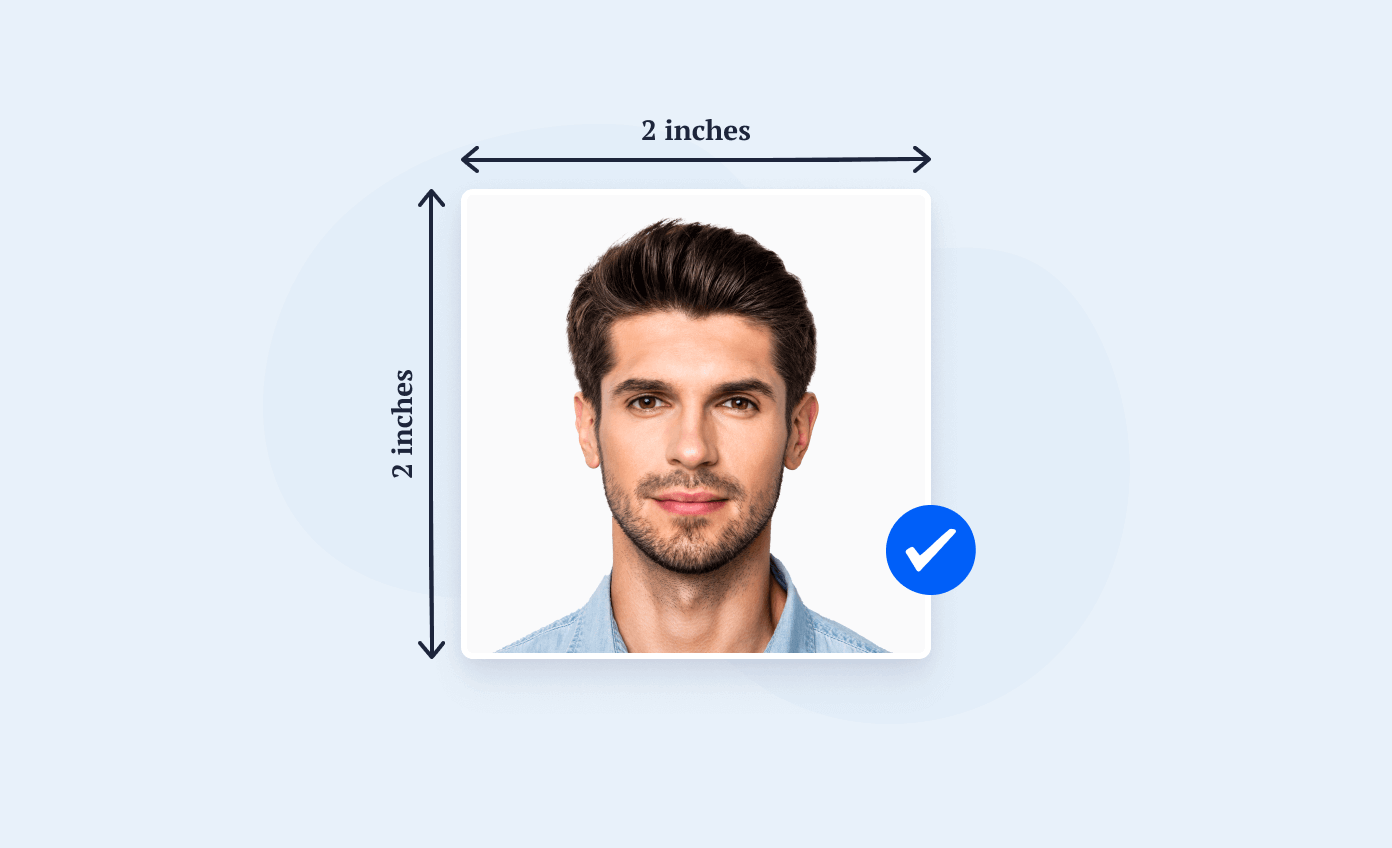
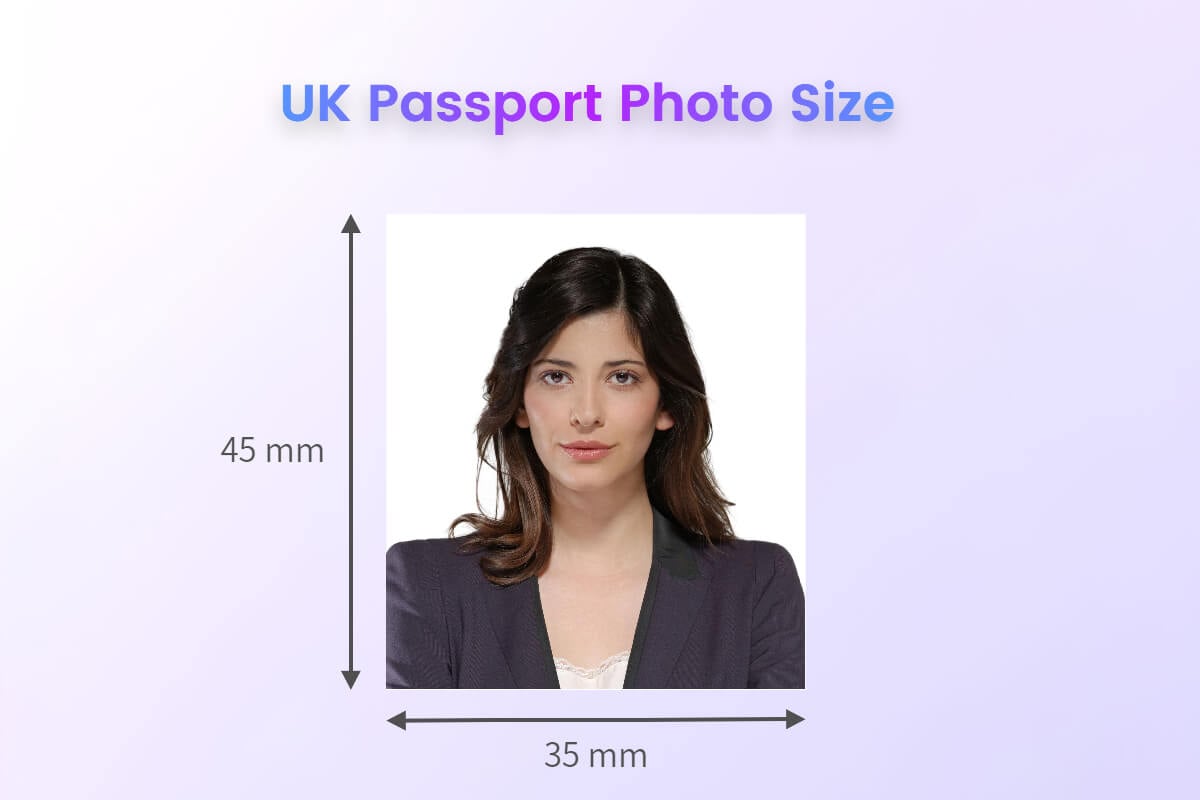
While specific dimensions can vary slightly by country (e.g., 2×2 inches in the US, 35×45 mm in the UK and Schengen area), the underlying technical principles remain universal. These standards dictate not only the overall size of the image but also critical compositional elements:
- Head Size and Position: The head must occupy a specific percentage of the photo frame, often between 70-80%, centered, with the full face visible. This ensures that the primary biometric features are prominently displayed.
- Background: A plain, light-colored background (usually white or off-white) is universally required. This minimizes distractions and provides a clean canvas for facial recognition algorithms to operate effectively, ensuring no shadows or patterns interfere with feature extraction.
- Lighting and Exposure: Even and neutral lighting is paramount. Harsh shadows, glare, or over/under-exposure can obscure facial features, making the photo unacceptable. Digital cameras with advanced metering and flash systems are crucial for achieving this uniformity.
- Expression and Pose: A neutral facial expression, with both eyes open and visible, directly facing the camera, is standard. This “template” pose is vital for consistent biometric data capture, as deviations can lead to inaccurate matches or system failures. Subtle nuances in expression can significantly alter biometric templates, necessitating this strict adherence.
- Eyewear and Headwear: Generally, eyeglasses are discouraged or restricted (no thick frames, glare, or tinted lenses), and headwear is only permitted for religious reasons, provided the full face remains visible. These rules prevent obscuration of critical facial landmarks used in biometric analysis.
The Shift from Analog to Digital Capture
The evolution from traditional film photography to digital imaging has fundamentally transformed how passport photos are created and processed. Analog photos, with their inherent variability in development and printing, presented challenges for consistent output. Digital photography, conversely, offers unparalleled precision and control:
- High-Resolution Sensors: Modern digital cameras, from professional DSLRs to advanced smartphone cameras, feature high-resolution sensors capable of capturing minute facial details essential for biometric analysis. This fidelity ensures that a wealth of data points is available for algorithms.
- Precise White Balance and Color Fidelity: Digital cameras allow for exact white balance calibration, ensuring true-to-life skin tones and background colors, which is crucial for maintaining standardization across different lighting conditions and equipment.
- Instant Feedback and Review: The immediate preview capabilities of digital cameras allow photographers and applicants to verify compliance with standards on the spot, significantly reducing the likelihood of rejected applications due to technical flaws. Issues like shadows, incorrect expression, or poor lighting can be identified and corrected instantly.
- Metadata Integration: Digital image files (like JPEG) carry extensive metadata (EXIF data) that can include capture settings, timestamps, and even GPS coordinates. While not always directly used for passport photo validation, this underlying data confirms the digital provenance and can be a layer of authenticity.
Biometric Integration and Digital Validation
The true essence of the modern passport photo lies in its role as a source of biometric data. Beyond human visual inspection, these images are processed by sophisticated software designed to extract unique facial features, creating a digital template for identification and verification. This integration of biometrics represents a significant technological leap in secure identity management.
Facial Recognition and AI-Driven Compliance
The advent of advanced facial recognition technology and artificial intelligence (AI) has revolutionized passport photo processing:
- Feature Extraction: AI algorithms analyze digital passport photos to identify and map dozens, if not hundreds, of unique facial landmarks – the distance between eyes, nose bridge width, jawline shape, and more. These measurements are converted into a numerical template.
- Liveness Detection: Some advanced systems incorporate liveness detection to ensure the photo is of a real person and not a manipulated image or a photo of a photo. This can involve subtle analysis of texture, depth, and even micro-expressions, though for static passport photos, it primarily relates to preventing the use of existing photographs or deepfakes.
- Automated Compliance Checks: AI-powered software can instantaneously scan a submitted photo against all stipulated governmental requirements – correct head size, neutral expression, unobstructed face, proper background color, and lighting. These systems flag non-compliant images with high accuracy, often providing specific reasons for rejection. This automation dramatically speeds up processing and enhances consistency, reducing human error.
- Biometric Template Generation: The extracted facial features form a unique biometric template, which is stored in secure databases and linked to the individual’s passport or visa application. This template is then used at borders for rapid, automated verification against the live individual, streamlining entry and exit processes.
Digital Submission and Security Protocols
The shift to digital submission has introduced new layers of convenience and, critically, robust security protocols:
- Online Application Portals: Many governments now offer online portals for passport and visa applications, allowing applicants to upload their digital photos directly. These platforms often integrate real-time photo validation tools that check for compliance even before submission.
- Secure Data Transmission: When photos are submitted digitally, they are transmitted over secure, encrypted channels (e.g., HTTPS/SSL) to protect sensitive biometric data from interception or tampering.
- Image Tampering Detection: Advanced algorithms can detect signs of digital manipulation, such as Photoshopped backgrounds, altered facial features, or composite images. This forensic analysis helps maintain the integrity of the identification document.
- Digital Signatures and Hashing: In some systems, digital signatures or cryptographic hashes are applied to the photo file to ensure its authenticity and that it has not been altered since its initial upload or processing. Any modification would break the hash, indicating tampering.
Technology’s Role in Achieving Compliance
Meeting the stringent requirements for passport photos often necessitates the use of specialized technology, benefiting both professional photographers and individuals opting for DIY solutions. The tools available range from sophisticated studio setups to accessible mobile applications, all designed to guide users toward compliant images.
Software Tools for Image Editing and Verification

While manual manipulation of passport photos is largely discouraged and often results in rejection due to tampering, specialized software plays a crucial role in initial setup and verification:
- Automated Cropping and Resizing: Dedicated passport photo software or modules within popular image editors (like Adobe Photoshop with specific plug-ins) can automatically crop and resize an image to the exact dimensions required, ensuring the head occupies the correct percentage of the frame.
- Background Removal/Refinement: Some tools offer advanced background removal features that can precisely isolate the subject and replace the background with a uniform, compliant color, especially useful when an ideal physical background isn’t available. However, extreme digital manipulation of the background is usually detectable and discouraged.
- Compliance Checkers: Many software solutions incorporate built-in validation algorithms that simulate governmental checks. They analyze lighting, shadow, expression, eye position, and even potential glare on glasses, providing instant feedback and flagging common errors. These tools guide users to correct issues before final printing or submission.
- Biometric Grid Overlays: Some professional software offers visual overlays that show the ideal placement of eyes, mouth, and top of the head according to biometric standards, helping photographers position their subjects perfectly.
Mobile Applications and DIY Solutions
The proliferation of high-quality smartphone cameras has opened the door for do-it-yourself (DIY) passport photo solutions, supported by a wealth of mobile applications:
- Guided Photography: Many passport photo apps provide on-screen guides, outlines, and real-time feedback to help users correctly position themselves, ensure proper lighting, and maintain a neutral expression. They leverage the phone’s camera technology to capture the image.
- Automated Background Processing: Some apps use AI to automatically detect and replace backgrounds with a plain white or off-white backdrop, simplifying the process for users without studio-quality setups.
- Instant Compliance Checks: Similar to professional software, these apps often integrate AI-driven algorithms to check for common compliance issues before saving or printing, providing a high degree of confidence that the photo will be accepted.
- Digital File Export and Printing Services: Apps typically offer options to save the photo in the correct digital format (e.g., JPEG with specific resolution and file size requirements) and often integrate with online printing services or local photo kiosks.
Professional Photography Studios and Digital Workflows
Despite the rise of DIY options, professional photography studios remain a popular choice, primarily due to their specialized equipment and expertise:
- Optimized Lighting Setups: Professionals use studio-grade lighting systems (softboxes, strobes) to achieve perfectly even, shadow-free illumination, which is notoriously difficult to replicate in home environments.
- High-End Digital Cameras and Lenses: Dedicated cameras with superior sensors and prime lenses capture images with exceptional clarity, detail, and color accuracy, essential for precise biometric analysis.
- Calibrated Printing Systems: Professional studios use calibrated printers and archival-quality paper to ensure that the printed photo meets color, contrast, and durability standards, resisting fading and deterioration.
- Expert Knowledge of Regulations: Professional photographers are typically well-versed in the latest regulations for various countries, ensuring that they can produce photos that meet specific, sometimes nuanced, requirements. Their digital workflow incorporates these standards from capture to final output.
Future Trends: Beyond the Static Image
The technological trajectory of identity verification suggests that passport photos, while still foundational, are part of a broader evolution toward more dynamic and secure biometric systems.
Dynamic Biometrics and Enhanced Security
The future may see passport photos integrated with more advanced, real-time biometric capabilities:
- 3D Facial Scans: Instead of a 2D image, future identity documents might incorporate 3D facial scans, providing a richer, more robust biometric template that is harder to spoof and more accurate for identification. Technologies like structured light or time-of-flight sensors could enable this.
- Iris and Retina Scans: While already used in some high-security contexts, these unique patterns could become more broadly integrated into travel documents, offering an additional layer of almost foolproof biometric authentication.
- Continuous Authentication: At borders, passive biometric gates using advanced cameras could continuously verify identity as travelers walk through, comparing their live biometric data against their digital passport profile without requiring a static pose or document presentation.
User Experience and Accessibility Innovations
Technology will also likely focus on making the process more seamless and accessible for applicants:
- AI-Driven Feedback Loops: Even more sophisticated AI systems could offer hyper-personalized feedback, coaching users in real-time on how to adjust their pose or lighting, making compliant photos achievable with minimal effort.
- Blockchain for Identity Management: Distributed ledger technology (blockchain) could be used to secure biometric data and identity credentials, ensuring immutability, transparency, and enhanced protection against fraud and tampering.
- Integration with Digital Wallets: Digital versions of passports, incorporating the photo and biometric data, could be securely stored in smartphone digital wallets, streamlining online identity verification and potentially even physical border crossings.
Best Practices for Digital Passport Photo Success
Navigating the technical landscape of passport photos requires a methodical approach, whether utilizing professional services or attempting a DIY solution. Adhering to best practices ensures a smooth application process and avoids delays.
Pre-flight Checks: Lighting, Background, and Expression
Before even snapping the picture, a few critical “pre-flight checks” are essential, especially for DIY photographers:
- Optimal Lighting: Position yourself directly facing a soft, even light source, such as a large window during daylight hours, or use diffused artificial lights. Avoid direct overhead lights that create shadows under the eyes and chin. Eliminate strong side lighting.
- Immaculate Background: Ensure the background is truly plain white or off-white, free of shadows, textures, or objects. A freshly ironed white sheet or a smooth white wall works best.
- Neutral Expression: Practice a neutral expression in a mirror. Avoid smiling, frowning, or raising eyebrows. Eyes should be open and looking directly into the camera, not up, down, or to the side.
- Proper Attire: Avoid uniforms or camouflage. Stick to everyday clothing that contrasts with the background. For glasses, remove them to prevent glare and ensure full eye visibility, or ensure they are thin-rimmed, clear, and don’t obscure your eyes.
Leveraging Technology for Accuracy and Convenience
Once the physical setup is correct, technology becomes your ally:
- Use High-Quality Cameras: While smartphone cameras are often sufficient, ensure yours has good resolution and is held steady. Tripods or stable surfaces are recommended to prevent blur.
- Utilize Passport Photo Apps/Software: Employing a dedicated app or software for guidance, cropping, and preliminary compliance checks significantly boosts the chances of acceptance. These tools are designed to catch common errors before you submit.
- Double-Check Requirements: Always refer to the official government website for the most current and specific photo requirements for your country and destination. Requirements can change, and a common mistake is relying on outdated information.
- Professional Review: If unsure, consider a final review by a professional photo service. Many offer digital photo services where they can check your DIY photo for compliance before you print or submit.
The passport-size photo, far from being a simple image, is a sophisticated technical document at the intersection of photography, digital imaging, and advanced biometrics. Understanding its definition and the stringent technological standards it must meet is crucial in our interconnected world, ensuring secure identity verification and seamless international travel. As technology continues to advance, so too will the methods by which these essential personal identifiers are captured, validated, and secured.
aViewFromTheCave is a participant in the Amazon Services LLC Associates Program, an affiliate advertising program designed to provide a means for sites to earn advertising fees by advertising and linking to Amazon.com. Amazon, the Amazon logo, AmazonSupply, and the AmazonSupply logo are trademarks of Amazon.com, Inc. or its affiliates. As an Amazon Associate we earn affiliate commissions from qualifying purchases.