
Microsoft Excel is a powerhouse for data management and analysis, a tool that has become indispensable in countless professional environments. From tracking budgets to forecasting sales, its ubiquity is undeniable. However, for those grappling with complex decision-making scenarios, Excel’s standard functionalities might feel limiting. This is where Solver for Excel steps in. It’s not just another feature; it’s a potent add-in designed to tackle intricate problems by finding optimal solutions based on your defined constraints.
Think of it this way: you have a goal, say, maximizing profit from your product line. You also have limitations, such as production capacity, material availability, and market demand. Manually sifting through every possible combination to pinpoint the absolute best outcome can be an insurmountable task, prone to human error and often impractical. Solver automates this process, employing sophisticated algorithms to explore a vast landscape of possibilities and deliver the most efficient or desirable result.
This article will delve into the world of Excel Solver, explaining what it is, how it works, and its profound implications across various domains. We’ll explore its core functionalities, the types of problems it’s designed to solve, and how it aligns with the broader technological and business trends shaping our world today.
Understanding the Core of Excel Solver: Optimization and Decision Making
At its heart, Solver for Excel is an optimization tool. It’s built to answer the “what if” questions that go beyond simple calculations. Instead of just presenting data, Solver helps you act on data by finding the best possible outcome given a set of conditions. This capability is crucial for informed decision-making in both personal and professional spheres.
The Pillars of Optimization: Objective, Variables, and Constraints
To understand how Solver operates, it’s essential to grasp its fundamental components:
-
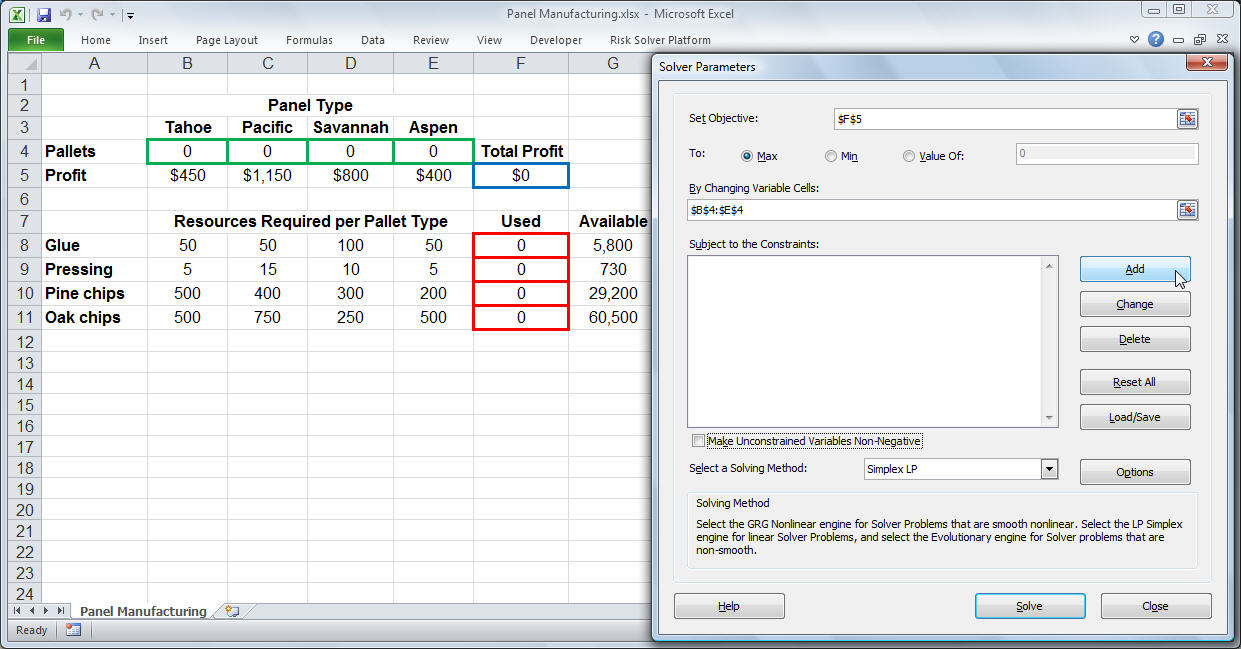
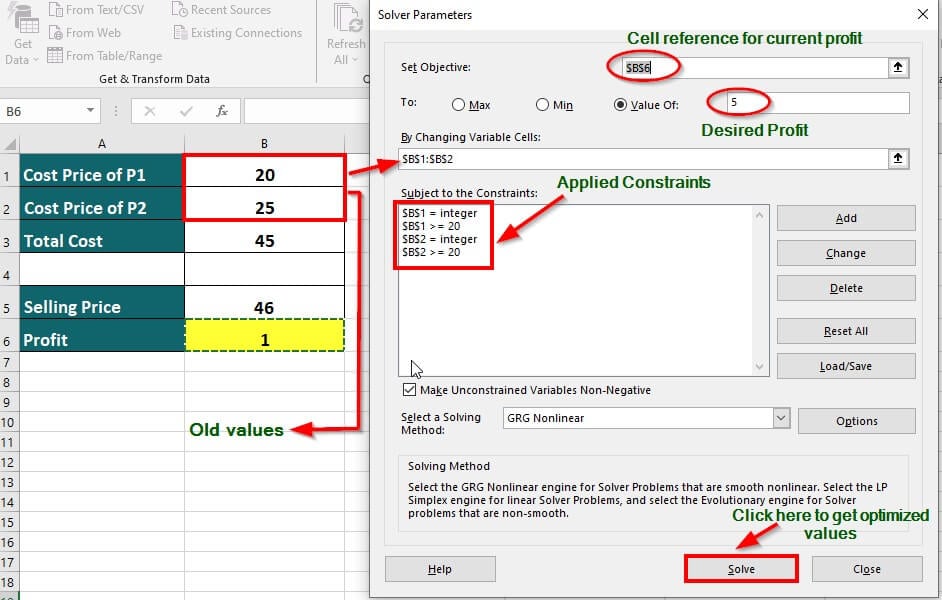
The Objective: This is the specific goal you want to achieve. It’s always a single cell in your Excel worksheet that Solver will try to either maximize (e.g., profit, revenue), minimize (e.g., cost, waste), or achieve a specific target value for. For example, if you’re trying to reduce operational expenses, your objective would be to minimize the cell containing the total cost.
-
Decision Variables: These are the “knobs” or “levers” that Solver can adjust to reach the objective. They are typically represented by cells in your worksheet that contain numerical values that can be changed. For instance, if you’re deciding how many units of each product to manufacture, the number of units for each product would be your decision variables. Solver will iterate through different values for these variables to find the optimal solution.
-
Constraints: These are the rules or limitations that your solution must adhere to. They represent the boundaries of your problem. Constraints can be in the form of inequalities (e.g., “production capacity must be less than or equal to 1000 units”) or equalities (e.g., “total budget must equal $50,000”). Without constraints, Solver would have an unbounded problem and wouldn’t be able to find a practical solution. For example, if you have limited raw materials, a constraint might be that the total amount of material used cannot exceed the available stock.
Solver uses mathematical algorithms to systematically adjust the decision variables, testing them against the defined constraints, and observing the effect on the objective function. It continues this iterative process until it finds the combination of variable values that yields the best possible result for your objective, all while respecting the established limitations.
Beyond Simple Calculations: The Power of Scenario Analysis
While Excel’s formulas and functions are excellent for direct calculations and basic scenario modeling, they typically require you to manually change input values to see different outcomes. Solver, on the other hand, automates this exploration. It doesn’t just show you what happens if you change one variable; it intelligently searches for the best combination of variables to achieve your desired outcome.
This is particularly valuable in situations with multiple interacting variables and complex interdependencies. For instance, if you’re trying to optimize a marketing campaign, you might have variables like advertising spend on different platforms, pricing strategies, and promotional discounts. Solver can help you determine the optimal allocation of your advertising budget across various channels to maximize customer acquisition or revenue, taking into account the potential impact of pricing changes and promotions on sales volume.
Applications of Solver Across Industries and Personal Endeavors
The versatility of Excel Solver makes it a powerful tool for a wide range of applications, extending far beyond the realm of traditional finance and business. Its ability to find optimal solutions under constraints makes it invaluable in fields as diverse as technology, marketing, and personal finance.
Optimizing Business Operations and Strategy (Brand & Money)
In the corporate world, Solver is a game-changer for strategic planning and operational efficiency.
-
Marketing Mix Optimization: Marketers can use Solver to determine the optimal allocation of their advertising budget across various channels (digital ads, TV, print, social media) to maximize reach, engagement, or conversion rates, given budget constraints and audience demographics. It can also help in setting optimal pricing strategies for products to maximize profit or market share.
-
Production Planning and Scheduling: Manufacturers can leverage Solver to determine the optimal production quantities for different products to meet demand, minimize production costs, and utilize resources (machinery, labor) efficiently. This is crucial for supply chain management and inventory control.
-
Resource Allocation: Businesses of all sizes can use Solver to optimize the allocation of limited resources, such as budget, personnel, or equipment, to various projects or departments to achieve the greatest overall return.
-
Financial Planning and Forecasting: Beyond simple forecasting, Solver can be used to find optimal investment portfolios that balance risk and return, or to determine the most efficient ways to manage debt and equity to minimize financing costs. For small businesses, it can help in optimizing cash flow management and ensuring profitability.
Enhancing Personal Finance and Investment Decisions (Money)
While often associated with large corporations, Solver can also empower individuals to make smarter financial choices.
-
Retirement Planning: Individuals can use Solver to determine the optimal savings rate and investment allocation required to meet their retirement goals, considering factors like expected investment returns, inflation, and desired lifestyle in retirement.
-
Debt Management: Solver can help in identifying the most efficient strategy for paying off multiple debts, minimizing the total interest paid over time while adhering to budget constraints.
-
Budget Optimization: For individuals with complex spending patterns and multiple financial goals, Solver can assist in optimizing their budget to allocate funds effectively towards savings, investments, and discretionary spending.
Driving Technological Innovation and Efficiency (Tech)
The principles of optimization are fundamental to technology, and Solver can mirror these processes within Excel.
-
Algorithm Design and Tuning: While not directly designing code, understanding how to formulate problems for Solver can provide insights into the logic and parameters that drive optimization algorithms used in software development. For example, optimizing the allocation of computing resources in a cloud environment could be conceptually modeled.
-
Logistics and Supply Chain Management in Tech: Companies in the tech sector can use Solver to optimize the delivery routes for their products, manage inventory levels for electronic components, or even plan the deployment of network infrastructure to minimize latency and maximize performance.
-
AI Model Parameter Optimization (Conceptual): While advanced AI model training uses specialized software, the underlying concept of adjusting parameters to achieve an optimal outcome is akin to what Solver does. For example, you could conceptually model optimizing the weights in a simple machine learning model by adjusting input parameters to achieve a desired output.
Getting Started with Solver for Excel: A Practical Guide
Enabling and using Excel Solver is straightforward, though mastering its full potential requires understanding the problem formulation.
Enabling the Solver Add-in
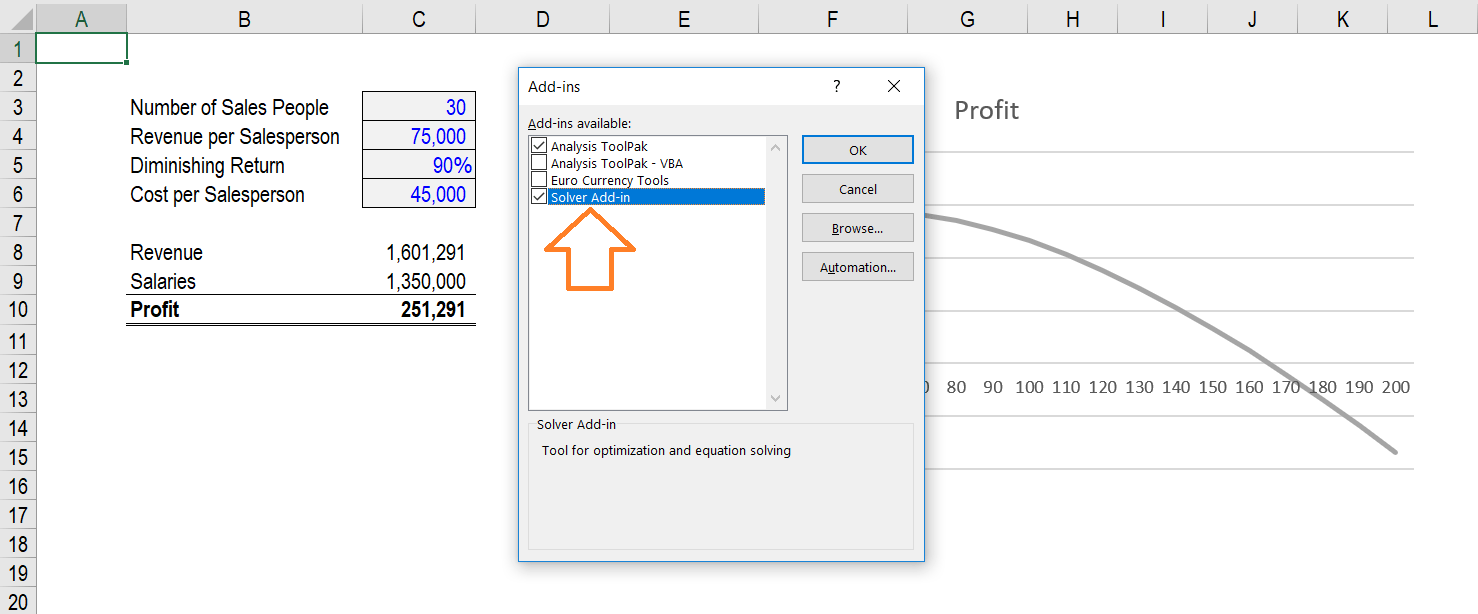
Solver is not enabled by default in Excel. You need to activate it through the Add-ins menu.
- Open Excel and go to the File tab.
- Click on Options.
- In the Excel Options dialog box, select Add-ins from the left-hand pane.
- At the bottom of the Add-ins screen, you’ll see a “Manage” dropdown. Select Excel Add-ins and click Go.
- In the Add-Ins dialog box, check the box next to Solver Add-in and click OK.
Once enabled, the Solver add-in will appear in the Data tab, in the Analysis group.
Setting Up Your First Solver Problem
To illustrate, let’s consider a simple production scenario: a bakery producing two types of cakes, vanilla and chocolate.
- Objective: Maximize total profit.
- Decision Variables: The number of vanilla cakes to bake and the number of chocolate cakes to bake.
- Constraints:
- Limited oven time.
- Limited amount of flour available.
- Minimum demand for chocolate cakes.
You would set up your Excel sheet with:
- Cells for the number of vanilla and chocolate cakes (your decision variables).
- Cells for the profit per vanilla cake and per chocolate cake.
- A cell that calculates the total profit (your objective function).
- Cells to calculate the total oven time used and total flour used, based on the number of cakes baked.
- Cells representing the maximum available oven time and flour.
- A cell for the minimum demand for chocolate cakes.
Then, you would open the Solver add-in from the Data tab and input:
- Set Objective: Select the cell containing the total profit.
- To: Choose “Max” (for maximum profit).
- By Changing Variable Cells: Select the cells representing the number of vanilla and chocolate cakes.
- Subject to the Constraints: Add the constraints for oven time, flour, and minimum chocolate cake demand.
Clicking Solve will then prompt Solver to find the optimal number of each cake type to bake to achieve the highest possible profit while staying within the limits of oven time and flour.
The Future of Optimization with Excel Solver
As businesses and individuals continue to navigate increasingly complex environments, the demand for sophisticated analytical tools will only grow. Excel Solver, while a mature technology, remains a cornerstone for practical optimization. Its integration within the familiar Excel interface makes advanced problem-solving accessible to a broader audience.
The principles of optimization that Solver embodies are at the core of many modern technological advancements, from AI algorithms that learn and adapt to sophisticated logistical networks that power global commerce. Understanding how to effectively use Solver not only enhances your immediate analytical capabilities but also provides a foundational understanding of these larger, more complex systems.
In conclusion, “What is Solver for Excel?” is a question that unlocks a world of powerful decision-making. It’s an essential tool for anyone looking to move beyond basic data analysis and harness the full potential of their data to achieve optimal outcomes in a world driven by efficiency and smart choices. Whether you’re a business analyst optimizing marketing spend, a finance manager managing investments, or an individual planning your financial future, Excel Solver offers a robust and accessible pathway to better, more informed decisions.
aViewFromTheCave is a participant in the Amazon Services LLC Associates Program, an affiliate advertising program designed to provide a means for sites to earn advertising fees by advertising and linking to Amazon.com. Amazon, the Amazon logo, AmazonSupply, and the AmazonSupply logo are trademarks of Amazon.com, Inc. or its affiliates. As an Amazon Associate we earn affiliate commissions from qualifying purchases.