
In the rapidly evolving landscape of financial technology, the ability to communicate effectively with a platform is paramount. For Robinhood users, “speaking directly” to the platform encompasses two distinct but equally important actions: accessing immediate human support for account issues and navigating the technical interface to execute precise financial strategies. Historically, fintech platforms were criticized for their lack of accessible human interaction, often hiding behind automated bots and complex FAQ pages. However, in response to user demand and regulatory scrutiny, Robinhood has significantly overhauled its communication infrastructure. This guide explores the technical nuances of how to initiate direct contact with Robinhood’s support team and how to use the app’s internal communication tools to streamline your digital trading experience.
Navigating the In-App Support Ecosystem
The most common interpretation of speaking directly in Robinhood is the quest for live customer service. Robinhood has transitioned from an email-centric support model to a more robust, 24/7 live communication system. This change was a technical necessity driven by the high-stakes nature of stock and crypto trading, where minutes can translate into significant financial shifts.
Accessing 24/7 Live Phone Support
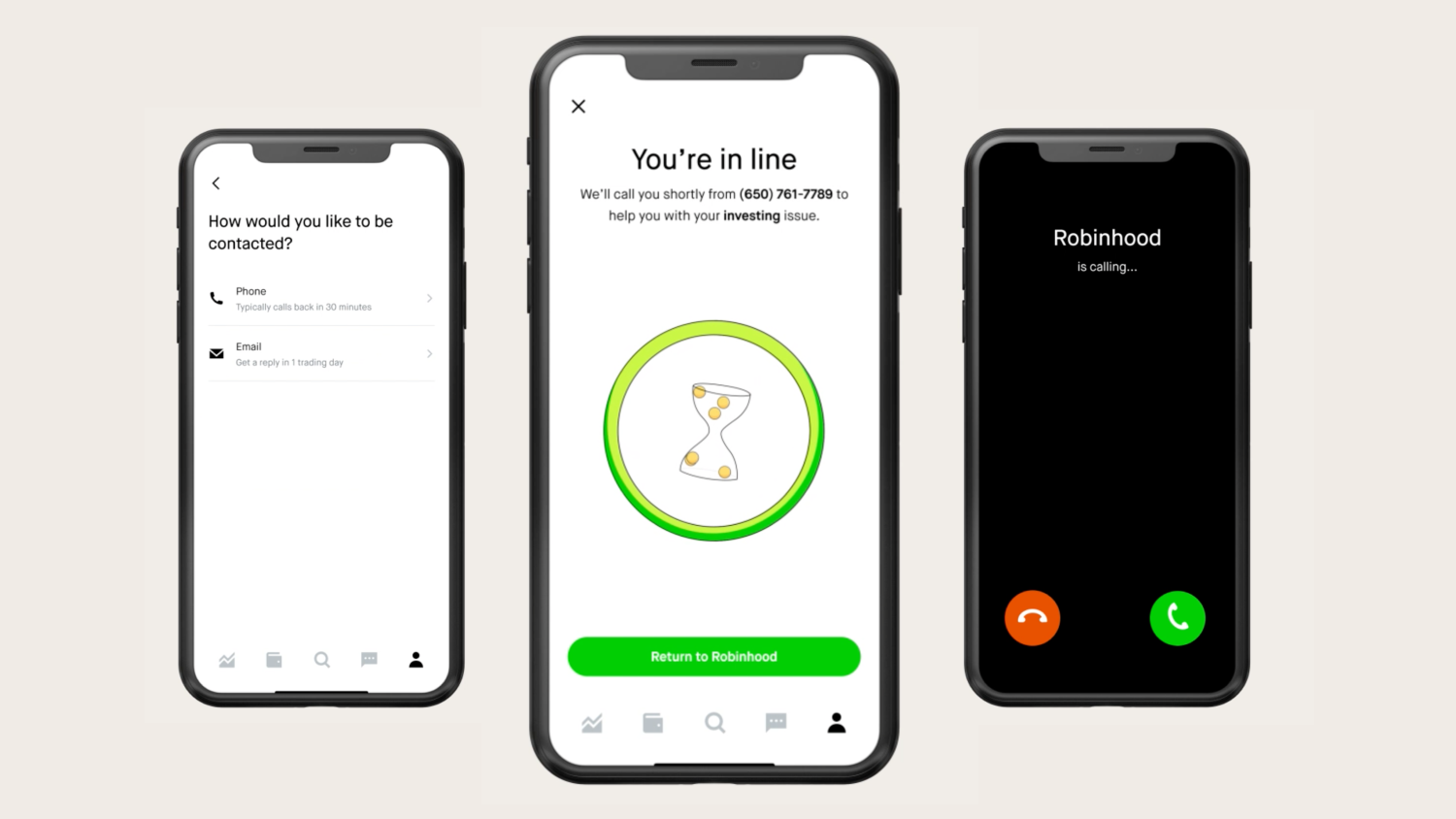
Robinhood’s primary method for direct verbal communication is its “Request a Call” feature. Unlike traditional banks with a static phone number that often leads to hours of hold music, Robinhood utilizes a callback system integrated directly into the app.
To speak to a representative, users must navigate to the “Account” icon (the person silhouette) in the bottom right corner of the app. From there, selecting the “Menu” (three horizontal lines) leads to the “Help” section. Within the Help menu, users select “Contact Us.” The app then prompts the user to select the topic of their inquiry—ranging from account security and transfers to specific trade questions. After narrowing down the issue, the option for “Phone” appears.
The technical advantage of this system is context. When you request a call through the app, the representative receives a packet of data regarding your account status and the specific issue you flagged before they even pick up the phone. This reduces the time spent on basic identification and allows the conversation to get straight to the resolution. It is important to note that Robinhood will never call you without a request initiated through the app, a key security feature designed to prevent “vishing” (voice phishing) attacks.
Utilizing the In-App Chat Interface
For those who prefer text-based direct communication, the in-app chat provides a similar level of immediacy. The chat interface is powered by a hybrid of AI-driven sorting and human intervention. Initial queries are often handled by a sophisticated natural language processing (NLP) bot that can solve common issues like password resets or dividend schedule inquiries.
If the bot cannot resolve the issue, users can request to speak to a live agent. This transition is seamless, maintaining the transcript of the conversation so the human representative has full context. This “direct” text communication is often faster than a phone call for uploading documents or sharing screenshots of technical glitches within the app.
Preparing for Direct Interaction
To make the most of your direct communication, users should have specific data points ready. Because Robinhood is a secure financial environment, the representative will often ask for verification that goes beyond the initial app login. Having your transaction IDs, the exact timestamp of a trade, or the specific ticker symbol in question ready can significantly decrease the duration of the support session.
Technical Communication Features and Market Insights
Speaking “directly” in Robinhood also refers to how a user interacts with the flow of information. The app is not just a portal for buying and selling; it is a communication hub where market data, news, and corporate actions are translated into a digestible format.
Robinhood Learn and the Help Center
While not a two-way conversation in the traditional sense, the Robinhood Learn platform is the primary way the company speaks to its users regarding financial literacy. From a technical standpoint, this is an integrated Content Management System (CMS) that delivers real-time updates on market volatility, regulatory changes (like the shift to T+1 settlement), and platform updates.
The Help Center serves as a massive repository of technical documentation. For users looking to understand “direct” technical functions—such as how to move an account via ACATS (Automated Customer Account Transfer Service) or how to enable options trading—the Help Center provides the direct protocols required. Navigating this via the search function is often the fastest way to get an “answer” without waiting for a human agent.
The Role of Push Notifications and Alerts
Direct communication from the app to the user is managed through a sophisticated notification engine. Users can speak back to the app by customizing these alerts. By navigating to Settings > Notifications, users can toggle specific triggers for price movements, earnings reports, and volatility alerts.
This creates a direct feedback loop. When the app “speaks” by sending a notification that a stock has hit a specific price point, the user “speaks back” by executing a limit order or a stop-loss. Mastering these settings is essential for any user who wants to maintain a proactive rather than reactive relationship with their portfolio.

Security Protocols When Communicating with Support
In the digital age, direct communication is a double-edged sword. While users want easy access to support, that very accessibility can be exploited by bad actors. Understanding the technical security boundaries of Robinhood’s communication is vital for protecting financial assets.
Recognizing Official Communication
Robinhood’s technical team has repeatedly emphasized that they do not communicate through social media DMs or third-party messaging apps like WhatsApp or Telegram. If you receive a message on these platforms claiming to be Robinhood support, it is a fraudulent attempt to gain access to your credentials.
Direct communication from Robinhood will always come through two channels: the in-app notification center or an official email ending in “@robinhood.com.” Even when receiving an official email, the safest protocol is to acknowledge the message and then navigate directly to the app to take action, rather than clicking links within the email itself.
Avoiding Social Engineering
Social engineering is a tactic where hackers attempt to “speak” their way into your account by manipulating emotions or creating a sense of urgency. When you are on a direct call with a Robinhood representative, they will never ask for your password, your two-factor authentication (2FA) code, or your Social Security number in full.
If a caller asks for this information, they are not from Robinhood. The technical structure of the “Request a Call” feature ensures that the representative already has your authenticated profile on their screen. The only verification they may require is a confirmation of the request through a push notification sent to your device while you are on the phone.
Two-Factor Authentication (2FA) as a Communication Shield
The most important technical tool in your communication arsenal is 2FA. Whether you use SMS-based codes or an authenticator app like Duo or Google Authenticator, this adds a layer of “direct verification.” It ensures that even if someone manages to mimic the “speaking” style of a user or the platform, they cannot bridge the technical gap to the account itself.
Optimizing the User Interface for Faster Navigation
To speak directly to the platform’s functions, one must master the User Interface (UI). The UI is the language of the app. For power users, navigating this efficiently is equivalent to speaking a shorthand that allows for rapid execution of complex tasks.
Customizing the Home Screen and Watchlists
One way to “speak” your preferences to the app is through the customization of watchlists. By organizing assets into specific tiers—such as “High Volatility,” “Long Term Hold,” or “Crypto”—you are telling the app’s algorithm what information to prioritize for you. This affects the news feed you see and the “People Also Owned” suggestions, creating a more personalized technical environment.
Accessing Direct Statements and Tax Documents
During tax season, the most direct communication you need is with the app’s data servers. Instead of requesting these documents from a person, users should navigate to the “Reports and Statements” section under the Account menu. Here, you can directly download 1099s, monthly statements, and trade confirmations. From a tech perspective, these are generated as secure PDF or CSV files directly from Robinhood’s clearinghouse database, ensuring that the data is an untouched reflection of your annual activity.
Advanced Order Types as Direct Instructions
Executing a market order is a simple command, but using advanced order types—like trailing stop orders or limit orders—is how a user speaks with nuance to the market through Robinhood. These technical instructions stay “live” on the exchange’s order book, communicating your intent to buy or sell only when specific technical conditions are met. This removes the emotional component of trading and allows the user’s strategy to speak for itself.
The Future of Direct Communication in Fintech
As Robinhood continues to integrate artificial intelligence and machine learning, the concept of “speaking directly” will likely evolve. We are moving toward a future where “Generative AI” may allow users to ask complex questions in plain English—such as “How would a 10% drop in tech stocks affect my specific portfolio?”—and receive an immediate, data-driven response.
For now, the most effective way to speak directly in Robinhood remains a combination of utilizing the structured “Request a Call” system for human support and mastering the app’s internal settings for technical efficiency. By understanding the infrastructure of the help center, the security of the callback system, and the precision of the UI, users can ensure their voice is heard and their financial goals are communicated clearly within the digital ecosystem.
aViewFromTheCave is a participant in the Amazon Services LLC Associates Program, an affiliate advertising program designed to provide a means for sites to earn advertising fees by advertising and linking to Amazon.com. Amazon, the Amazon logo, AmazonSupply, and the AmazonSupply logo are trademarks of Amazon.com, Inc. or its affiliates. As an Amazon Associate we earn affiliate commissions from qualifying purchases.