
For the modern freelancer, independent contractor, or “solopreneur,” the line between personal and business finances is often dangerously thin. As your side hustle evolves into a primary income stream, the complexity of managing tax liabilities, tracking deductible expenses, and ensuring timely quarterly payments grows exponentially. QuickBooks Self-Employed (QBSE) has emerged as one of the most prominent financial tools designed specifically to bridge this gap. However, the true cost of the software extends beyond the monthly subscription fee. To determine if it is the right investment for your business, you must evaluate the pricing tiers against the potential tax savings and administrative time recovered.

Understanding the Pricing Tiers of QuickBooks Self-Employed
Intuit offers QuickBooks Self-Employed in three distinct pricing tiers, each designed to meet varying levels of financial complexity and tax preparation needs. While the base subscription provides the essential tools for bookkeeping, the higher tiers integrate more deeply with TurboTax to streamline the annual filing process.
The Standard Self-Employed Plan
The entry-level tier typically starts at approximately $15 per month, though Intuit frequently offers introductory discounts (often 50% off for the first three to six months). This plan is designed for the professional who needs basic organizational tools. It allows users to separate business from personal transactions with a swipe, track mileage automatically via GPS, and calculate estimated quarterly taxes. For a freelancer earning a consistent income but with relatively simple tax needs, this is the foundational investment.
The Self-Employed Tax Bundle
The middle tier, usually priced around $25 per month, is a strategic choice for those who want to eliminate the “tax season scramble.” This bundle includes everything in the standard plan plus the ability to pay quarterly estimated taxes online directly from the platform. Most importantly, it includes one TurboTax Self-Employed Federal and State tax return filing per year. When you consider that a standalone TurboTax Self-Employed filing can cost upwards of $120, the bundle often pays for itself by distributing that cost across twelve months and ensuring your data flows seamlessly from your books to your tax return.
The Self-Employed Live Tax Bundle
The premium tier, often priced at $35 per month, adds a layer of professional oversight. This version includes all the features of the Tax Bundle plus unlimited, on-demand access to a QuickBooks certified CPA or Enrolled Agent throughout the year. For professionals navigating complex deductions, such as home office complexities or equipment depreciation, having a human expert to verify “Can I deduct this?” provides a level of financial security that software alone cannot offer. It also includes a final review of your tax return by a professional before you file.
Evaluating the Core Features: What Are You Paying For?
The cost of QuickBooks Self-Employed is justified by its ability to automate the most tedious aspects of business finance. Unlike the more robust QuickBooks Online versions designed for small businesses with employees, QBSE is a streamlined “cash-basis” accounting tool.
Automated Expense Categorization
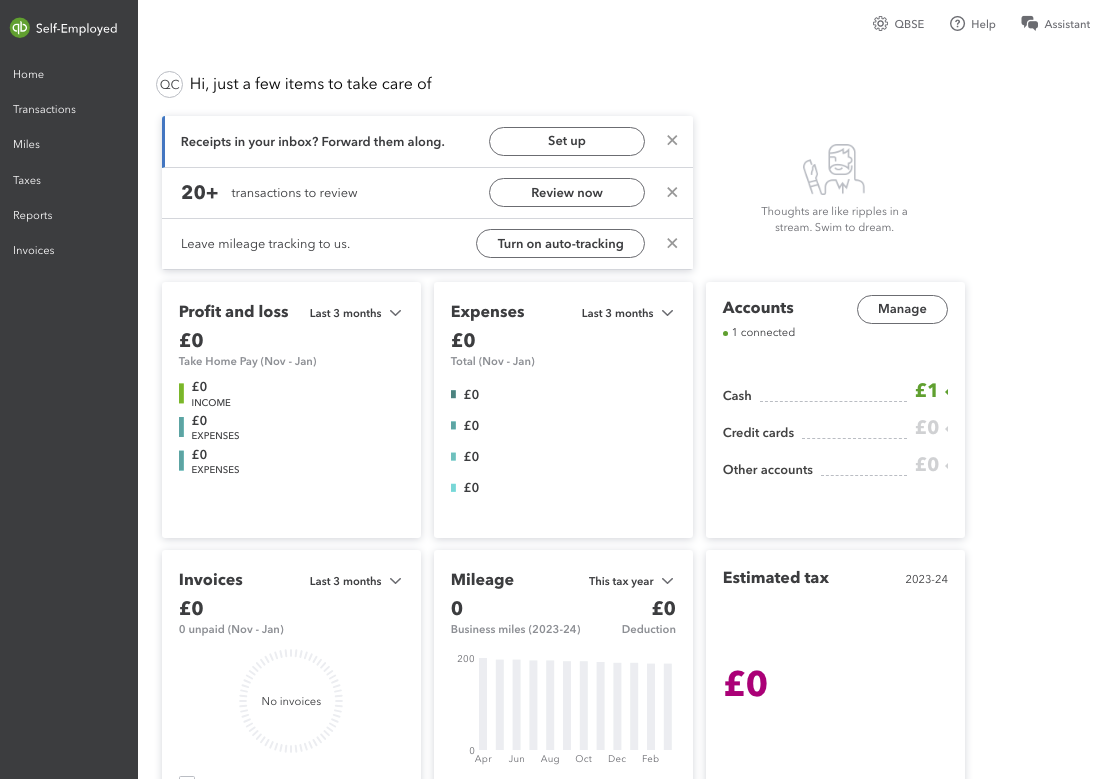
The primary value proposition is the bank feed integration. By linking your business bank accounts and credit cards, the software pulls in every transaction. The user interface allows you to categorize these as “Business” or “Personal.” This distinction is critical for the “Money” niche because it ensures that come April, your business overhead is clearly defined, preventing you from overpaying on your self-employment tax.
Intelligent Mileage Tracking
For many contractors—from real estate agents to delivery drivers—mileage is the largest single tax deduction. QBSE uses your phone’s GPS to track trips automatically. You can then categorize them as business or personal with a simple swipe. Given that the IRS standard mileage rate is significant, failing to track even 1,000 miles could mean losing over $600 in deductions. The software effectively pays for its annual subscription by capturing these easily forgotten “micro-deductions.”
Quarterly Tax Estimations
One of the most stressful aspects of being self-employed is the “sticker shock” of quarterly tax payments. QBSE tracks your income and expenses in real-time to provide a rolling estimate of what you owe the IRS every three months. This prevents the common financial pitfall of spending money that actually belongs to the government, helping solopreneurs maintain a healthy cash flow and avoid underpayment penalties.
Invoicing and Payment Processing
While not as advanced as the invoicing suites found in “Simple Start” or “Essentials,” QBSE allows you to send professional invoices and accept payments via credit card or ACH transfer. This speeds up the “accounts receivable” cycle, ensuring that cash enters your business account faster, which is the lifeblood of any independent operation.
The Tax Efficiency Factor: Calculating Your Return on Investment
When analyzing the cost of a financial tool, one must look at the Return on Investment (ROI). For a freelancer, the ROI of QuickBooks Self-Employed is found in the optimization of the Schedule C (Form 1040).
Maximizing Deductions
Many self-employed individuals miss out on deductions because they lose receipts or forget small expenses. QBSE allows for digital receipt capture; you simply take a photo of a receipt, and the software attaches it to the corresponding bank transaction. By ensuring every legitimate business expense—from web hosting fees to office supplies—is accounted for, the software often reduces a user’s taxable income by thousands of dollars.
Reducing Professional Accounting Fees
If you hand a “shoebox” of receipts to a CPA at the end of the year, they will charge you an hourly rate to organize that data. By using a tool like QBSE, you present your accountant with a clean, reconciled Profit and Loss statement. This reduces the billable hours your accountant spends on data entry, allowing them to focus on high-level tax strategy instead. If the software saves you two hours of an accountant’s time, it has effectively paid for a full year of its own subscription.
Avoiding Penalties and Interest
The IRS requires those who expect to owe $1,000 or more in taxes to pay in quarterly installments. Missing these deadlines or underpaying results in interest charges and penalties. The “Money” benefit of QBSE is the peace of mind that your calculations are based on actual year-to-date earnings, keeping you compliant and avoiding unnecessary “leakage” of your capital to government fines.
QuickBooks Self-Employed vs. QuickBooks Online Simple Start
A common point of confusion for those looking at the cost of QuickBooks is whether to choose the “Self-Employed” version or “Simple Start.” While “Self-Employed” is cheaper, it is built on a different architecture.
The Limitations of the Self-Employed Version
QuickBooks Self-Employed is not “double-entry” accounting software. You cannot track accounts payable (bills you owe), and you cannot easily manage inventory. It is strictly a tool for tracking the flow of cash in and out to calculate taxes. If your business involves selling physical products or if you plan to hire employees in the near future, the $15–$30 you save per month by staying on the Self-Employed plan might actually cost you more in the long run.
When to Upgrade to Simple Start
QuickBooks Online Simple Start (usually starting around $30 per month) allows for more robust reporting, such as Balance Sheets, which are often required if you apply for a business loan or a line of credit. If your financial goals include scaling a brand beyond a single person, the investment in a higher-tier QuickBooks product is necessary for the long-term structural integrity of your business finances. However, for the “pure” freelancer, the Self-Employed version remains the most cost-effective way to manage a 1099 income stream.
Is It Worth the Monthly Subscription?
The final determination of value depends on your annual revenue and the volume of your transactions. If you are a casual freelancer making $5,000 a year with only five or six expenses a month, a simple spreadsheet might suffice, and the $180 annual cost of QBSE might be an unnecessary overhead.
However, once your business reaches a level where you have multiple clients, recurring software subscriptions, travel expenses, and a significant tax liability, the software becomes an essential financial asset. The “cost” of the software is eclipsed by the “value” of time saved and taxes avoided. In the world of business finance, the most expensive tool is often the one that is free but fails to capture your deductions or leaves you vulnerable to an audit.
QuickBooks Self-Employed is priced to be an accessible entry point into professional financial management. By automating the tracking of your “Money”—how you earn it, how you spend it, and how much you give to the IRS—it functions as a digital CFO for the solopreneur. Whether you choose the basic plan or the Live Tax Bundle, the goal is the same: to move away from reactive bookkeeping and toward a proactive, tax-efficient financial strategy that protects your bottom line.
aViewFromTheCave is a participant in the Amazon Services LLC Associates Program, an affiliate advertising program designed to provide a means for sites to earn advertising fees by advertising and linking to Amazon.com. Amazon, the Amazon logo, AmazonSupply, and the AmazonSupply logo are trademarks of Amazon.com, Inc. or its affiliates. As an Amazon Associate we earn affiliate commissions from qualifying purchases.