
In the modern landscape of business management, fiscal transparency and streamlined accounting are no longer luxuries—they are requirements for survival. QuickBooks Online (QBO) has long stood as the gold standard for cloud-based accounting, providing a suite of tools designed to handle everything from basic bookkeeping to complex financial forecasting. However, for many business owners and financial managers, the primary question remains: what is the actual monthly cost, and how does that investment translate into long-term financial health?
Understanding the pricing structure of QuickBooks Online requires looking beyond the sticker price. It involves an analysis of features, scalability, and the peripheral costs associated with payroll, payment processing, and third-party integrations. This guide breaks down the current monthly costs and the financial strategic value of each tier.

Navigating the QuickBooks Online Subscription Tiers
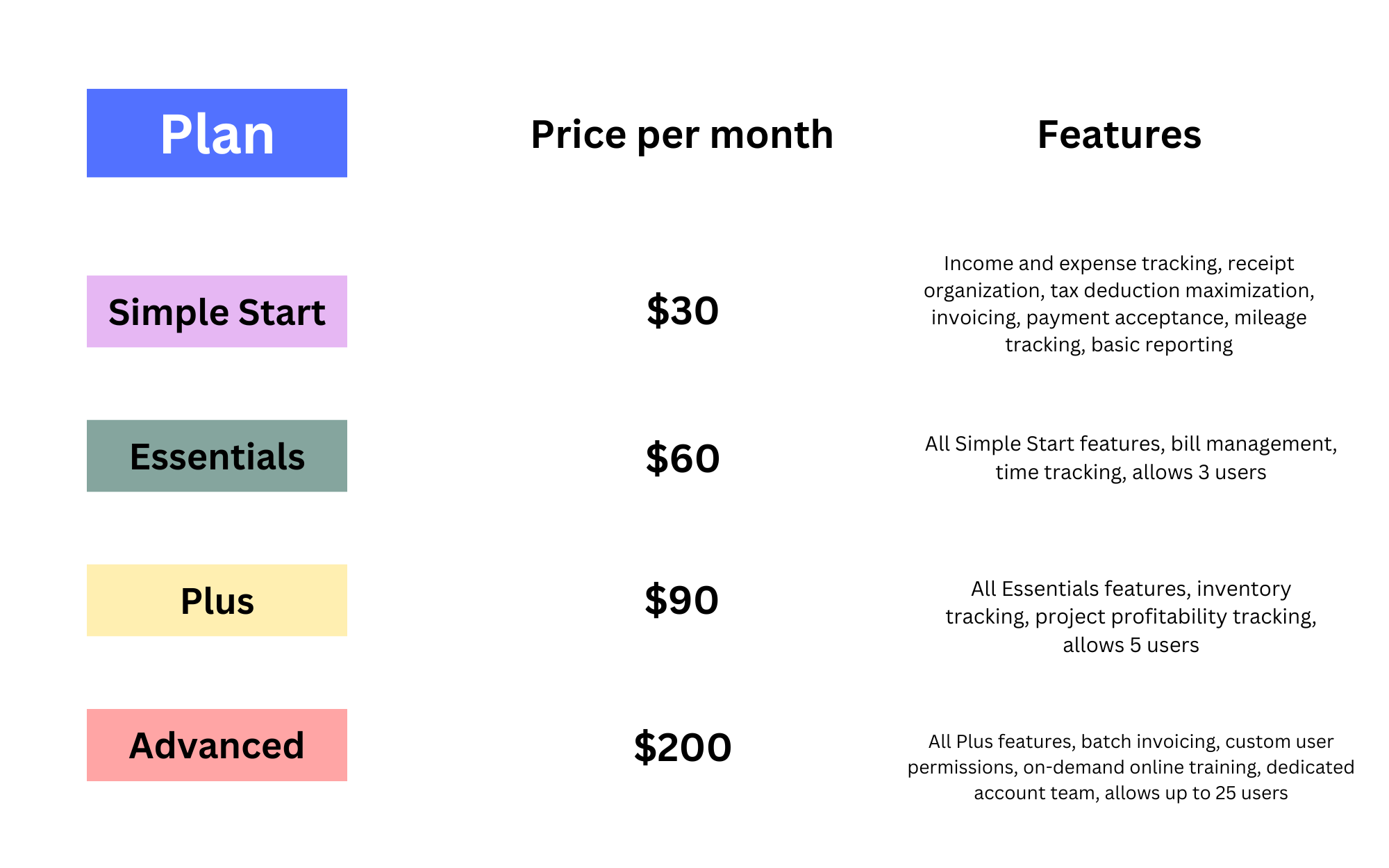
Intuit offers four primary subscription levels for QuickBooks Online, each tailored to a specific stage of the business lifecycle. While prices are subject to frequent promotional discounts for new users—often 50% off for the first three months—it is essential to budget based on the standard monthly rates to ensure long-term cash flow stability.
QuickBooks Online Simple Start
At approximately $30 per month, Simple Start is designed for solopreneurs and new startups. From a financial management perspective, this tier provides the fundamental building blocks of accounting. It allows users to track income and expenses, capture and organize receipts, and run basic financial reports like Profit and Loss statements.
The primary limitation of this tier is that it supports only one user. For a micro-business focused on tax compliance and basic organization, this is the most cost-effective entry point. It simplifies the transition from manual spreadsheets to automated digital ledgers, reducing the risk of human error during tax season.
QuickBooks Online Essentials
Priced at roughly $60 per month, the Essentials tier is where many service-based small businesses find their footing. This plan supports up to three users and introduces critical financial management tools such as bill management and time tracking.
The ability to manage and pay bills directly through the platform allows for better accounts payable (AP) oversight. For businesses that operate on a lean budget, the time-tracking feature ensures that billable hours are captured accurately, directly impacting the top line. This tier offers a significant step up in reporting capabilities, allowing for more nuanced insights into business performance.
QuickBooks Online Plus
At a standard rate of approximately $90 per month, QuickBooks Online Plus is the most popular choice for established small-to-medium enterprises (SMEs). This tier supports up to five users and introduces inventory tracking and project profitability tools.
For businesses that sell physical goods, the inventory management feature is vital for calculating the Cost of Goods Sold (COGS) and maintaining an accurate balance sheet. Furthermore, the project profitability tool allows financial officers to track income and expenses against specific projects, providing a granular view of which operations are driving revenue and which are draining resources.
QuickBooks Online Advanced
Designed for rapidly scaling companies, the Advanced tier costs roughly $200 per month. Supporting up to 25 users, this plan is a powerhouse for data-driven organizations. It includes customized access levels, batch invoicing, and premium apps like HubSpot and DocuSign integration.
The most significant financial advantage of the Advanced plan is the inclusion of Fathom-powered data restoration and enhanced custom reporting. For companies managing complex budgets and multiple departments, the ability to generate deep-dive financial analytics justifies the higher monthly expenditure.
Understanding Integrated Costs: Payroll and Transaction Fees
While the base subscription fee covers the accounting software, most businesses require additional financial services that incur separate monthly costs. To accurately forecast your monthly “QuickBooks expense,” you must account for these integrated variables.
QuickBooks Payroll Solutions
Payroll is often the largest expense for any business, and integrating it with your accounting software provides seamless ledger updates. QuickBooks offers three payroll tiers:
-
Core Payroll: Approximately $45 per month plus $6 per employee.
-
Premium Payroll: Approximately $80 per month plus $8 per employee.
-
Elite Payroll: Approximately $125 per month plus $10 per employee.
Choosing a payroll plan depends on your need for features like same-day direct deposit, workers’ compensation administration, and tax penalty protection. From a business finance standpoint, the automation of payroll taxes alone can save dozens of hours in administrative labor, potentially offsetting the monthly fee.
Payment Processing and Merchant Fees
To accelerate cash flow, many businesses utilize QuickBooks Payments to accept credit cards and ACH transfers directly through invoices. While there is no additional monthly subscription fee for this service, there are transaction-based costs. Typically, these hover around 2.4% to 3.4% plus a per-transaction fee for credit cards, and 1% (capped at $10) for ACH transfers.
Integrating payments reduces “Days Sales Outstanding” (DSO), which is a critical metric for maintaining healthy liquidity. While the transaction fees represent a cost of doing business, the speed at which capital is returned to the company often outweighs the small percentage lost to processing.
Maximizing ROI: Why QuickBooks Online is a Financial Strategic Asset
When evaluating whether the monthly cost of QuickBooks Online is “worth it,” it is helpful to shift the perspective from a simple expense to a Return on Investment (ROI) calculation. The software functions as a digital ecosystem that protects and optimizes a company’s financial interests.
Automation and Labor Savings
The most immediate ROI comes from the reduction of manual data entry. By linking bank feeds and credit card accounts, QuickBooks Online automatically categorizes transactions. This automation can save a business owner or an in-house bookkeeper 10 to 20 hours per month. If you value your time (or your staff’s time) at $50 per hour, the software pays for itself several times over before you even consider its other features.
Tax Readiness and Compliance
For many businesses, the true value of QuickBooks is realized at the end of the fiscal year. Because the software maintains a continuous record of deductible expenses and categorized income, the cost of tax preparation is significantly reduced. Accountants typically charge less for clients who provide clean, reconciled QuickBooks files compared to those who arrive with a box of paper receipts. Furthermore, the accuracy provided by QBO minimizes the risk of audits and expensive tax penalties.
Real-Time Financial Decision Making
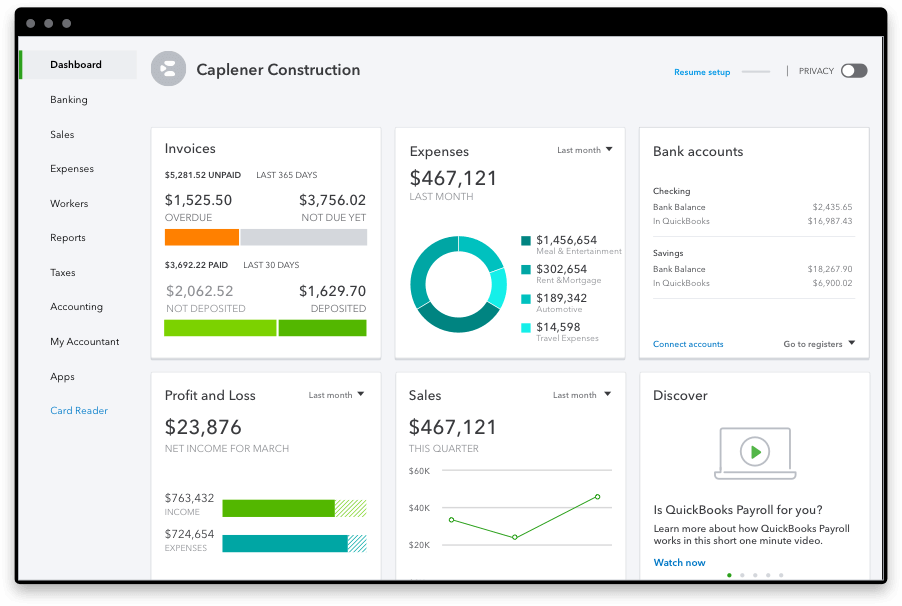
In a volatile economy, waiting until the end of the quarter to see your financial standing is a recipe for disaster. QuickBooks Online provides a real-time snapshot of your cash position. The H2-level reporting allows management to monitor “Burn Rate,” “Current Ratio,” and “Net Profit Margin” on a daily basis. Having this data at your fingertips enables agile decision-making—allowing you to cut costs or invest in growth opportunities with confidence.
Strategic Implementation: Choosing the Tier That Fits Your Financial Roadmap
Selecting the right QuickBooks Online plan is not just about current needs; it is about future financial goals. Over-subscribing can lead to unnecessary overhead, while under-subscribing can result in “feature debt” where manual workarounds hinder growth.
The Lean Startup Strategy
Startups should generally begin with Simple Start or Essentials. The focus here is on establishing a clean audit trail and understanding basic cash flow. In the early stages, it is more important to have a consistent record-keeping habit than it is to have high-level project tracking.
The Scaling SME Strategy
As a company grows, the complexity of its finances grows exponentially. The move to the Plus tier is usually triggered by the need for inventory management or the hire of more team members who need access to the books. At this stage, the $90 monthly fee is a negligible cost compared to the risk of losing track of inventory assets or project budgets.
The Enterprise-Lite Strategy
For businesses approaching $1 million or more in annual revenue, the Advanced tier becomes a strategic necessity. The custom roles and permissions ensure that internal controls are met, preventing fraud and unauthorized access to sensitive financial data. The batch invoicing feature also becomes a significant time-saver for businesses with a high volume of transactions.
Final Considerations for the Business Budget
When calculating the monthly cost of QuickBooks Online, remember to factor in the potential for annual billing. Intuit occasionally offers discounts for users who pay for a full year upfront, which can reduce the effective monthly rate. Additionally, keep an eye on “ProAdvisor” discounts; many certified accountants can offer their clients exclusive pricing that isn’t available to the general public.
In conclusion, QuickBooks Online ranges from $30 to $200 per month for the base software, with additional costs for payroll and transaction processing. However, from a professional financial perspective, these costs are foundational investments in infrastructure. By automating the mundane tasks of bookkeeping and providing deep insights into fiscal performance, QuickBooks Online enables business owners to focus on what truly matters: generating revenue and building long-term value. In the world of business finance, clarity is the most valuable asset you can buy, and QuickBooks Online remains one of the most efficient ways to achieve it.
aViewFromTheCave is a participant in the Amazon Services LLC Associates Program, an affiliate advertising program designed to provide a means for sites to earn advertising fees by advertising and linking to Amazon.com. Amazon, the Amazon logo, AmazonSupply, and the AmazonSupply logo are trademarks of Amazon.com, Inc. or its affiliates. As an Amazon Associate we earn affiliate commissions from qualifying purchases.