
In an increasingly interconnected world, the ability to communicate and share data wirelessly has become not just a convenience, but a fundamental necessity. At the heart of much of this seamless connectivity lies the Wireless Local Area Network, or WLAN. Far more than just a buzzword, a WLAN represents a pivotal technological advancement that has fundamentally reshaped how individuals and organizations interact with information, access resources, and foster productivity. From bustling corporate offices and expansive university campuses to your own living room, WLANs provide the invisible highways upon which digital life now thrives. This article delves deep into the architecture, benefits, security considerations, and future trajectory of WLANs, offering a comprehensive understanding of this indispensable technology.

Unpacking the Essentials of WLAN Technology
At its core, a WLAN is precisely what its name suggests: a network that allows devices to connect and communicate without physical cables, operating within a localized area. This section dissects the fundamental components and standards that underpin every functional WLAN.
Defining WLAN: Wireless Local Area Network
A WLAN, or Wireless Local Area Network, is a type of local area network (LAN) that uses high-frequency radio waves rather than cables to connect devices. This wireless connection enables users to move around within the local coverage area while maintaining network access. Unlike traditional wired LANs that rely on Ethernet cables for physical connections, WLANs facilitate connectivity through the air, offering unparalleled flexibility. The concept emerged from the desire to overcome the limitations of wired infrastructure, such as the expense and inconvenience of running cables, and to provide mobility for users. While a wired LAN might connect computers in a single office via Ethernet ports, a WLAN extends this connectivity to laptops, smartphones, tablets, and IoT devices across an entire building or campus, all without a tangle of wires.
Key Components and How They Connect
For a WLAN to function effectively, several key components work in concert:
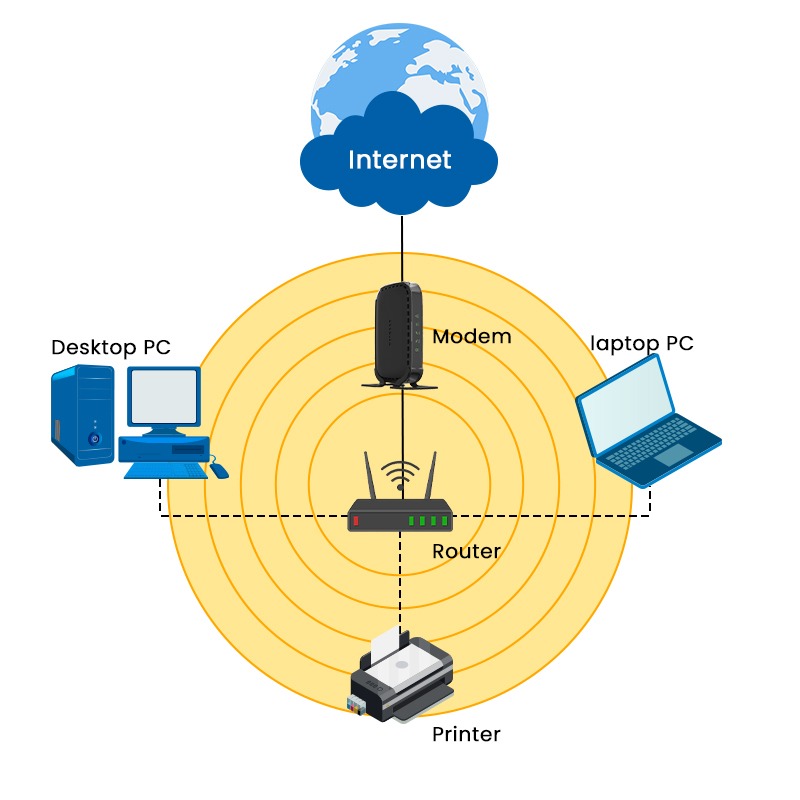
- Wireless Access Points (APs): These are the central transmitters and receivers of WLAN radio signals. An AP acts as a bridge between the wireless devices and the wired network, converting wireless signals into wired Ethernet signals and vice versa. Think of an AP as a wireless hub, broadcasting a network signal (SSID) to which devices can connect. More sophisticated APs can also manage user authentication and encryption.
- Wireless Routers: Often mistaken for just an AP, a wireless router combines the functions of an AP, an Ethernet switch, and a router into a single device. It not only broadcasts a Wi-Fi signal but also directs network traffic between connected devices, manages internet access, and often includes a firewall for security. For most home and small office setups, a wireless router is the primary piece of equipment.
- Wireless Adapters/Network Interface Cards (NICs): These are integrated into or attached to client devices (laptops, smartphones, smart TVs) to enable them to connect to a WLAN. They translate data between the device’s internal format and the radio waves required for wireless transmission. Most modern devices come with built-in Wi-Fi adapters.
- Antennas: Integrated within APs, routers, and client devices, antennas are crucial for sending and receiving radio signals. Their design and placement significantly impact signal strength, range, and network performance.
The connection process typically involves a client device’s wireless adapter scanning for available networks broadcast by an AP or router, authenticating with the network using a password, and then establishing a wireless link.
The Foundation of Wi-Fi Standards (IEEE 802.11)
The interoperability and widespread adoption of WLANs are largely due to the IEEE 802.11 family of standards, commonly known as Wi-Fi. The Institute of Electrical and Electronics Engineers (IEEE) developed these standards to ensure that wireless devices from different manufacturers could communicate seamlessly. Each iteration of the 802.11 standard brings improvements in speed, range, and efficiency:
- 802.11b (1999): The first widely adopted standard, offering speeds up to 11 Mbps in the 2.4 GHz band.
- 802.11a (1999): Operated in the 5 GHz band, offering faster speeds up to 54 Mbps but with a shorter range.
- 802.11g (2003): Combined the best of both, offering 54 Mbps in the 2.4 GHz band.
- 802.11n (Wi-Fi 4, 2009): Introduced MIMO (Multiple-Input, Multiple-Output) technology, significantly boosting speeds (up to 600 Mbps) and range, operating in both 2.4 GHz and 5 GHz bands.
- 802.11ac (Wi-Fi 5, 2013): Focused on the 5 GHz band, dramatically increasing speeds (gigabit Wi-Fi) with wider channels and more spatial streams.
- 802.11ax (Wi-Fi 6, 2019): Designed for high-density environments, improving efficiency and performance in crowded networks through OFDMA and other technologies, operating in both 2.4 GHz and 5 GHz.
- 802.11axe (Wi-Fi 6E, 2020): Extends Wi-Fi 6 into the 6 GHz band, providing more bandwidth and less interference.
- 802.11be (Wi-Fi 7, Expected): The upcoming standard, promising even greater speeds and lower latency, utilizing all three bands (2.4, 5, and 6 GHz).
These standards ensure that your smartphone can connect to your home router, a public hotspot, or your office network, regardless of the brand, as long as they adhere to compatible 802.11 protocols.
How WLANs Power Modern Connectivity
The advent and continuous evolution of WLANs have revolutionized how we live, work, and learn. Their inherent advantages have made them the default choice for flexible and efficient network access across diverse environments.
The Mechanics of Wireless Communication
WLANs rely on radio frequency (RF) technology to transmit data. When a device sends data wirelessly, its adapter converts digital data into radio waves. These radio waves are then broadcast by an antenna. The access point or router picks up these waves, converts them back into digital data, and forwards them to the wired network or another wireless device. This process happens in reverse when data is sent to the wireless device.
Key to this communication are frequency bands (2.4 GHz and 5 GHz, now 6 GHz with Wi-Fi 6E) and various modulation techniques. The 2.4 GHz band offers wider coverage but is more susceptible to interference from other devices (microwaves, Bluetooth). The 5 GHz band offers higher speeds and less interference but typically has a shorter range and is more affected by obstacles. Wi-Fi 6 and 6E leverage advanced technologies like Orthogonal Frequency-Division Multiple Access (OFDMA) and Multi-User Multiple-Input Multiple-Output (MU-MIMO) to simultaneously serve multiple devices more efficiently, reducing latency and increasing overall network capacity, especially in dense environments.
Advantages: Mobility, Flexibility, and Scalability
The benefits of WLANs are numerous and far-reaching:
- Mobility: Users can move freely within the network’s coverage area while maintaining continuous connectivity. This is invaluable in offices, campuses, and homes, allowing seamless work or leisure without being tethered to a physical port.
- Flexibility: Setting up a WLAN is significantly less intrusive and quicker than installing a wired network. There’s no need to drill holes, run extensive cabling, or disrupt existing infrastructure. This makes reconfiguring offices or expanding networks much simpler.
- Scalability: WLANs can be easily expanded by adding more access points to cover larger areas or accommodate a greater number of users. This flexibility allows businesses to grow their network infrastructure as their needs evolve without major overhauls.
- Cost-Effectiveness: While initial hardware costs might be comparable, the long-term savings from reduced cabling, installation labor, and easier maintenance often make WLANs more cost-effective, particularly in dynamic environments.
- Ease of Deployment: For homes and small businesses, setting up a wireless network is often a plug-and-play affair, making advanced network functionality accessible to everyone.
Diverse Applications Across Sectors
WLANs are ubiquitous, serving a vast array of applications across almost every sector:
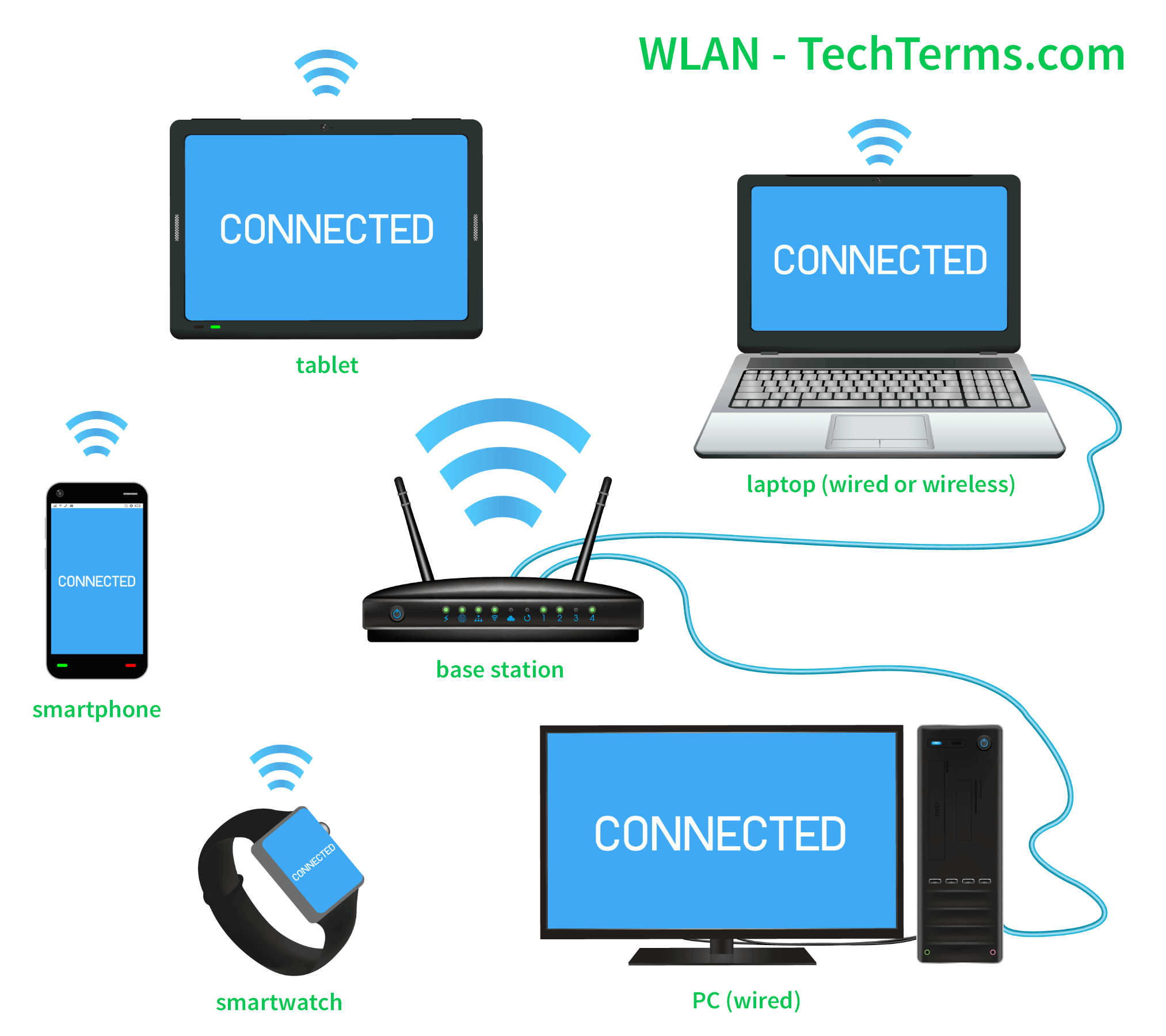
- Homes: Providing internet access to smartphones, laptops, smart TVs, IoT devices (smart thermostats, security cameras, smart lighting), and gaming consoles, forming the backbone of smart home ecosystems.
- Enterprises: Enabling employees to work from anywhere in the office, supporting collaborative tools, voice-over-IP (VoIP) phones, and mobile point-of-sale (POS) systems. Many businesses use separate guest networks to offer internet access to visitors securely.
- Education: Connecting students and faculty in classrooms, libraries, and dormitories, facilitating e-learning, online research, and interactive teaching methods.
- Healthcare: Supporting mobile medical devices, patient monitoring systems, and electronic health record (EHR) access for doctors and nurses on the go, enhancing efficiency and patient care.
- Public Spaces: Providing Wi-Fi hotspots in airports, cafes, hotels, shopping malls, and public transportation, offering convenience and connectivity to the general public.
- Industrial/IoT: Connecting sensors, actuators, and autonomous robots in smart factories or warehouses, facilitating real-time data collection, process automation, and predictive maintenance.
Navigating the Security Landscape of WLANs
While the convenience of WLANs is undeniable, their wireless nature introduces unique security challenges. Unlike wired networks where physical access often equates to network access, WLAN signals broadcast through the air, making them potentially accessible to anyone within range.
Common Vulnerabilities and Threats
The open medium of wireless transmission presents several common vulnerabilities:
- Eavesdropping/Sniffing: Without proper encryption, malicious actors can easily intercept wireless transmissions and capture sensitive data such as usernames, passwords, and private communications.
- Unauthorized Access: Weak passwords or misconfigured security settings can allow unauthorized individuals to connect to the network, potentially gaining access to internal resources, consuming bandwidth, or launching further attacks.
- Rogue Access Points: Attackers might set up their own unauthorized APs that mimic legitimate networks (e.g., “FreeAirportWi-Fi”), tricking users into connecting and then intercepting their traffic or injecting malware.
- Denial of Service (DoS) Attacks: By flooding the network with traffic or disrupting the wireless signal, attackers can prevent legitimate users from accessing the WLAN, leading to significant operational disruptions.
- Man-in-the-Middle Attacks: An attacker positions themselves between a user and the legitimate access point, intercepting and potentially altering communications without either party realizing.
Essential Security Protocols: From WPA2 to WPA3
To mitigate these risks, robust security protocols are paramount. The evolution of Wi-Fi security reflects an ongoing arms race against increasingly sophisticated threats:
- WEP (Wired Equivalent Privacy): An early, flawed protocol easily cracked due to weak encryption algorithms. Largely obsolete and highly insecure.
- WPA (Wi-Fi Protected Access): An interim solution developed to address WEP’s weaknesses. While better, it still had vulnerabilities, particularly with its Temporal Key Integrity Protocol (TKIP).
- WPA2 (Wi-Fi Protected Access II): For many years, WPA2 (using the Advanced Encryption Standard, AES, and the Counter Mode with Cipher Block Chaining Message Authentication Code Protocol, CCMP) was the industry standard for strong Wi-Fi security. It provided robust encryption and authentication for both personal (PSK – Pre-Shared Key) and enterprise (802.1X) networks. While still effective when properly implemented, it has faced some theoretical vulnerabilities, notably the KRACK attack.
- WPA3 (Wi-Fi Protected Access 3): The latest and most secure standard, designed to address the shortcomings of WPA2 and enhance overall wireless security. Key improvements include:
- Simultaneous Authentication of Equals (SAE): Replaces the WPA2 PSK handshake, making it much harder for attackers to guess passwords through offline dictionary attacks.
- Enhanced Open (Opportunistic Wireless Encryption – OWE): Provides individual data encryption in open, unauthenticated Wi-Fi networks (like public hotspots), protecting users even without a password.
- Stronger Encryption: Mandates 192-bit encryption in enterprise mode for classified or highly sensitive data.
- Forward Secrecy: Protects past communications even if the network key is compromised in the future.
Implementing Best Practices for Robust Wireless Security
Beyond adopting the latest protocols, several best practices are essential for securing a WLAN:
- Use Strong, Unique Passwords: For WPA2/WPA3 PSK networks, choose long, complex passphrases that are difficult to guess.
- Change Default Credentials: Always change the default username and password for your router/AP administrative interface.
- Enable WPA3 (or WPA2-AES): Ensure your router and all connected devices support and are configured to use the strongest available security protocol. Avoid WEP or WPA-TKIP.
- Keep Firmware Updated: Regularly update your router’s firmware to patch security vulnerabilities and access new features.
- Use a Separate Guest Network: Most modern routers allow you to create a separate network for guests, isolating them from your primary network and sensitive devices.
- Disable WPS (Wi-Fi Protected Setup): While convenient, WPS can be vulnerable to brute-force attacks.
- Consider a VPN: For sensitive activities, especially on public Wi-Fi, using a Virtual Private Network (VPN) encrypts your data end-to-end, adding an extra layer of security.
- Monitor Network Activity: Periodically check your router’s connected devices list for any unfamiliar connections.
The Evolution and Future Trajectory of WLANs
WLAN technology is not static; it’s a rapidly evolving field driven by increasing demand for bandwidth, lower latency, and seamless connectivity. While current WLANs offer impressive performance, they also face inherent challenges that new standards and approaches aim to overcome.
Current Challenges: Interference, Range, and Performance
Despite their advantages, WLANs are susceptible to several limitations:
- Interference: The 2.4 GHz band, especially, is crowded with other wireless devices (Bluetooth, microwaves, cordless phones), which can cause signal degradation and slower speeds. Even in the 5 GHz band, other Wi-Fi networks can cause interference.
- Range Limitations: Radio signals degrade with distance and are attenuated by physical obstacles like walls, floors, and furniture. This results in “dead spots” and inconsistent performance across a large area.
- Limited Bandwidth per User in Dense Environments: As more devices connect to a single access point, the available bandwidth is shared, leading to slower speeds for individual users, particularly in public hotspots or crowded offices.
- Congestion: Traditional Wi-Fi struggles when many devices transmit simultaneously, leading to “airtime contention” and reduced efficiency.
Advancements in Wi-Fi: Wi-Fi 6, 6E, and Beyond
The latest Wi-Fi standards are directly addressing these challenges:
- Wi-Fi 6 (802.11ax): Focuses on improving efficiency and performance in dense environments rather than just peak speed. Key technologies include:
- OFDMA (Orthogonal Frequency-Division Multiple Access): Allows an AP to communicate with multiple devices simultaneously using different sub-channels, improving efficiency and reducing latency.
- MU-MIMO (Multi-User Multiple-Input Multiple-Output): Extended to both upload and download, enabling more devices to send and receive data at the same time.
- Target Wake Time (TWT): Improves battery life for client devices by scheduling when they need to wake up to send or receive data.
- 1024-QAM: A more efficient modulation scheme that packs more data into each signal.
- Wi-Fi 6E (802.11axe): Expands Wi-Fi 6 into the largely uncongested 6 GHz band, providing significantly more spectrum, wider channels, and even lower latency. This “greenfield” spectrum is free from legacy Wi-Fi 4/5 devices, allowing Wi-Fi 6E devices to operate at peak performance without interference.
- Wi-Fi 7 (802.11be – Extremely High Throughput): The next generation, poised to deliver even greater speeds (potentially over 30 Gbps), lower latency, and enhanced reliability. It will leverage all three bands (2.4, 5, and 6 GHz) simultaneously with features like Multi-Link Operation (MLO) to aggregate bandwidth and dynamic spectrum sharing.
The Role of Mesh Networks and Seamless Connectivity
To combat range limitations and ensure consistent coverage, mesh Wi-Fi systems have gained significant popularity. Instead of a single router, a mesh system uses multiple access points (nodes) that communicate with each other to create a single, unified network that blankets an entire home or large office. This approach:
- Eliminates Dead Zones: Spreading APs throughout the space ensures robust coverage.
- Provides Seamless Roaming: Devices automatically switch to the nearest and strongest mesh node without dropping the connection.
- Simplifies Management: The entire mesh acts as one network, often managed through a single app.
Looking ahead, WLANs will continue to integrate more deeply with other wireless technologies like 5G, creating a hybrid connectivity landscape. The focus will be on even lower latency for applications like augmented reality (AR) and virtual reality (VR), greater capacity for the ever-growing number of IoT devices, and enhanced security to protect the burgeoning amount of data transmitted wirelessly.
In conclusion, the WLAN network is a cornerstone of modern digital infrastructure, offering the invaluable gift of wireless freedom. From its foundational IEEE 802.11 standards to the cutting-edge advancements of Wi-Fi 6E and Wi-Fi 7, its evolution is a testament to the relentless pursuit of faster, more reliable, and more secure connectivity. As we continue to demand ubiquitous access and empower an increasingly diverse array of smart devices, the WLAN will remain at the forefront, invisibly yet powerfully connecting our world.
aViewFromTheCave is a participant in the Amazon Services LLC Associates Program, an affiliate advertising program designed to provide a means for sites to earn advertising fees by advertising and linking to Amazon.com. Amazon, the Amazon logo, AmazonSupply, and the AmazonSupply logo are trademarks of Amazon.com, Inc. or its affiliates. As an Amazon Associate we earn affiliate commissions from qualifying purchases.