
The digital landscape of entertainment has undergone a radical transformation, moving from physical media and linear broadcasting to sophisticated, cloud-based Video on Demand (VOD) services. Paramount Plus (Paramount+) stands at the forefront of this evolution, offering a robust software platform that aggregates content from CBS, MTV, Nickelodeon, Comedy Central, and the Smithsonian Channel, alongside premium cinematic releases. Accessing this service requires more than just a subscription; it involves navigating a specific technological ecosystem comprising compatible hardware, optimized network configurations, and software installation protocols.
Cross-Platform Compatibility and Device Integration
The versatility of Paramount Plus lies in its broad compatibility with modern operating systems and hardware architectures. To integrate the service into your digital environment, you must first identify the hardware tier you are utilizing. The software is designed to run efficiently across several distinct categories of devices, each requiring a specific installation path.

Smart TV Ecosystems and OS Environments
Most modern Smart TVs operate on proprietary or licensed operating systems that host a dedicated application store. For users on Roku devices, the process involves navigating to the “Streaming Channels” menu and utilizing the search function to locate the Paramount Plus “Channel.” On Amazon Fire TV devices, which utilize a fork of the Android Open Source Project (AOSP), the app is found within the Amazon Appstore.
For those utilizing television sets from manufacturers like Samsung (Tizen OS) or LG (webOS), the integration is handled through the Samsung Smart Hub or the LG Content Store, respectively. It is critical to ensure your television’s firmware is updated to the latest version before installation. Outdated firmware can lead to application instability, memory leaks, or failure to support High Dynamic Range (HDR) metadata.
Mobile and Tablet Integration
The Paramount Plus mobile application is optimized for both iOS and Android environments. For Apple users, the app requires a device running a recent version of iOS or iPadOS to ensure compatibility with modern security protocols and video codecs. Android users can download the application from the Google Play Store, where the software is optimized for a wide range of screen resolutions and aspect ratios. The mobile application is particularly notable for its “Download and Watch” feature, which utilizes local storage encryption to allow for offline viewing—a technical necessity for users with limited data plans or those in transit.
Gaming Consoles and Set-Top Boxes
High-performance gaming consoles, including the PlayStation 5 and Xbox Series X|S, serve as powerful media hubs. The Paramount Plus application on these platforms often leverages the console’s superior processing power to deliver a snappier user interface and faster buffer times. Similarly, dedicated set-top boxes like the Apple TV 4K or Nvidia Shield (running Android TV) offer some of the most stable environments for the app, providing dedicated hardware acceleration for 4K playback and advanced audio passthrough for Dolby Atmos.
Step-By-Step Installation and Software Configuration
Once you have identified your hardware, the process of provisioning the service involves several technical stages, from account creation to the final handshake between the application and the server.
Initial Account Provisioning
The gateway to the service is the creation of a Paramount Plus identity. This is typically done through a web browser to ensure ease of data entry. Users are required to select a subscription tier—currently divided into the “Essential” plan and the “Paramount+ with SHOWTIME” plan. From a technical standpoint, the choice between these tiers dictates the metadata and stream quality available to the user. The premium tier unlocks 4K UHD, HDR10, and Dolby Vision capabilities, which are essential for users with high-end display hardware.
Authenticating the Device
After the account is established and the application is installed on your chosen device, a synchronization process must occur. Most TV-based apps utilize a “Device Link” system to bypass the cumbersome process of entering passwords via a remote control. The app will display a five-digit alphanumeric code; the user then visits a specific URL (paramountplus.com/activate) on a secondary device, such as a smartphone or laptop, and enters the code. This creates a secure token-based link between the device and the user’s account without exposing sensitive login credentials over the local interface.
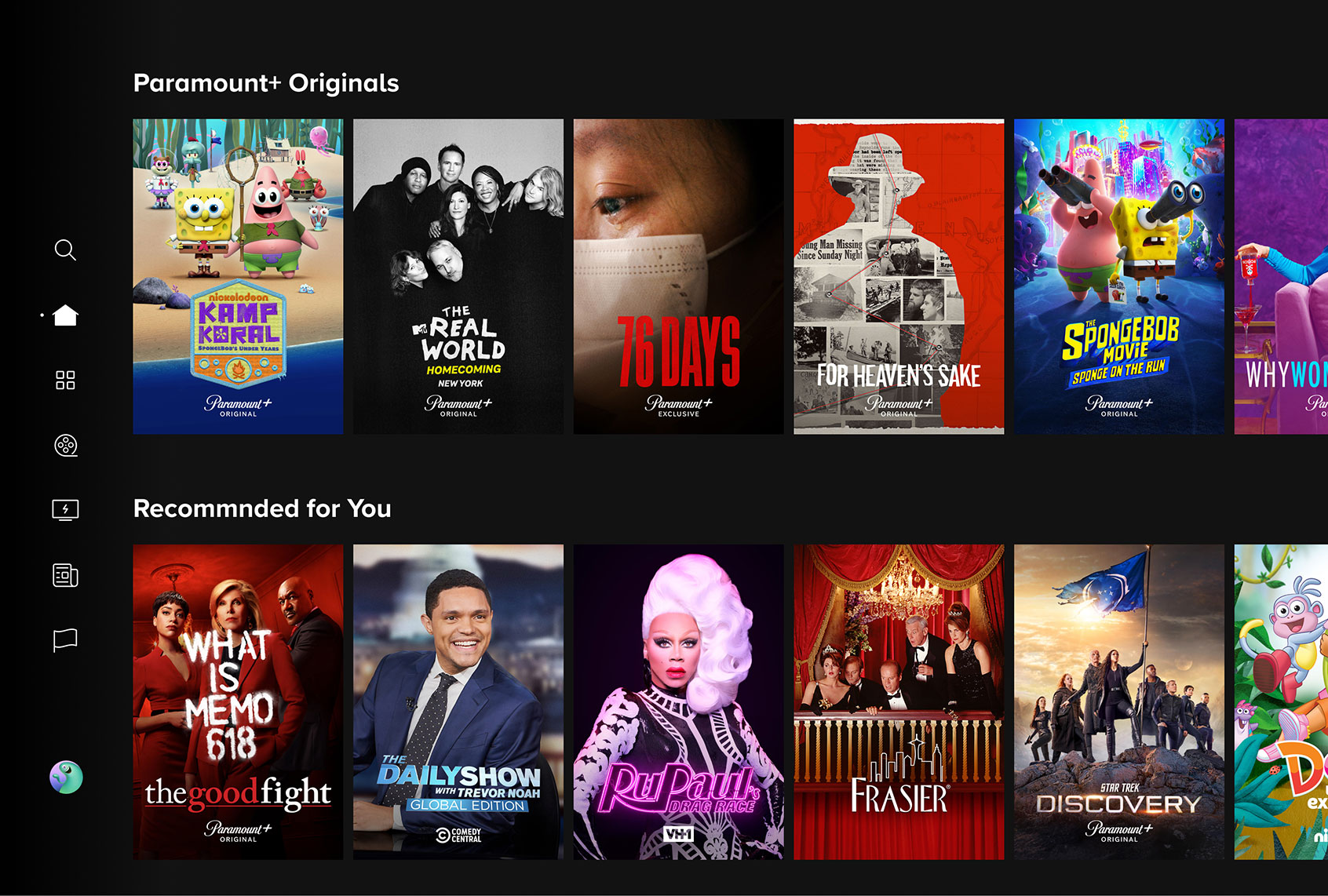
Navigating the User Interface (UI) and Experience (UX)
The Paramount Plus UI is built on a responsive design framework that categorizes content into “Hubs.” Technically, the app uses machine learning algorithms to populate the “Keep Watching” and “Recommended for You” rows. As a user interacts with the software, data packets representing viewing habits are sent back to the cloud, refining the metadata and improving the personalization engine. Understanding this interface is key to maximizing the utility of the software.
Optimizing the Digital Experience: Connectivity and Hardware Requirements
A successful installation is only the first step. To ensure high-fidelity playback without the interruptions of buffering or resolution downscaling, the underlying network infrastructure must be optimized.
Bandwidth and Network Optimization
Paramount Plus utilizes adaptive bitrate streaming (ABR). This technology detects the user’s bandwidth in real-time and adjusts the video quality accordingly. For a standard High Definition (1080p) stream, a stable download speed of at least 5 Mbps is required. However, for 4K Ultra HD content, the requirement jumps to a minimum of 25 Mbps.
To minimize latency and packet loss, it is recommended to use a wired Ethernet connection for stationary devices like Smart TVs or gaming consoles. If Wi-Fi is the only option, utilizing the 5GHz band on a Wi-Fi 6 (802.11ax) router is preferable to the crowded 2.4GHz band. Configuring Quality of Service (QoS) settings on your router to prioritize streaming traffic can also prevent interruptions caused by other bandwidth-heavy activities on the network, such as large file downloads or online gaming.
Hardware Performance: 4K, HDR, and Audio
To fully realize the potential of Paramount Plus content, the hardware must support specific codecs and standards. For 4K playback, the display must be HDCP 2.2 compliant. Furthermore, if the content features Dolby Vision or HDR10, the software must communicate with the display’s “handshake” protocol to enable the expanded color gamut and increased brightness levels. On the audio side, users with home theater systems should ensure their hardware supports the Dolby Digital Plus codec, which Paramount Plus uses to deliver 5.1 surround sound and Atmos metadata.
Advanced Integration and Troubleshooting Common Software Issues
Even with a perfect setup, users may encounter technical hurdles. Understanding the software’s architecture allows for more effective troubleshooting.
Third-Party Aggregators and Channel Integration
One alternative method for “getting” Paramount Plus is through third-party digital marketplaces like Amazon Prime Video Channels or Apple TV Channels. In this scenario, the Paramount Plus content is integrated directly into the host’s interface. This is often preferred by users who wish to consolidate their billing and search functions into a single UI. However, it is important to note that the standalone Paramount Plus app may offer features—such as live local CBS stations—that are occasionally restricted or handled differently within third-party aggregators.
Software Updates and Cache Management
Streaming applications can occasionally experience “cache bloat” or localized data corruption, leading to crashes or “stuck” loading screens. On Android-based systems, users can navigate to the system settings to “Clear Cache” for the Paramount Plus app, effectively resetting the temporary files without requiring a full re-login. Ensuring that the app is always updated to the latest version is vital, as updates often include patches for security vulnerabilities and optimizations for the latest OS kernels.

VPN Usage and Geo-Location Protocols
For users traveling internationally, accessing their Paramount Plus account can become complicated due to geo-fencing. The software utilizes IP-based geolocation to verify that the user is within a supported region. While Virtual Private Networks (VPNs) are often used to route traffic through different geographic nodes, many streaming services employ sophisticated detection scripts to block known VPN exit nodes. If a user finds they cannot access the service while away from home, ensuring their VPN uses “obfuscated servers” or a dedicated IP may be a technical necessity, though adherence to the service’s terms of use is paramount.
By approaching Paramount Plus as a software integration task rather than a simple television channel, users can ensure a high-performance, secure, and immersive viewing experience. From the initial hardware handshake to the fine-tuning of network protocols, the transition into the Paramount Plus ecosystem is a testament to the sophistication of modern streaming technology.
aViewFromTheCave is a participant in the Amazon Services LLC Associates Program, an affiliate advertising program designed to provide a means for sites to earn advertising fees by advertising and linking to Amazon.com. Amazon, the Amazon logo, AmazonSupply, and the AmazonSupply logo are trademarks of Amazon.com, Inc. or its affiliates. As an Amazon Associate we earn affiliate commissions from qualifying purchases.