
Navigating the complexities of the internal revenue system is a fundamental aspect of personal and business finance management. For many taxpayers, the moment of clicking “submit” on an electronic payment or dropping a check in the mail is followed by a period of uncertainty. Ensuring that your tax payment has reached the Internal Revenue Service (IRS) is not just about checking a box; it is about protecting your financial health, avoiding unnecessary penalties, and maintaining an accurate record of your cash flow. In an era where digital financial tools provide near-instant feedback, understanding the specific mechanisms for verifying government transactions is essential for any disciplined financial strategy.

Confirming a payment prevents the “cascading error” effect in personal finance, where a missed or unrecorded payment leads to automated delinquency notices, accrued interest, and potential impacts on your creditworthiness should a lien be filed. This guide explores the diverse methods available to verify that your funds have reached their destination, the timelines you should expect, and the professional steps to take if your payment appears to be missing in transit.
Utilizing Digital Financial Tools for Real-Time Verification
The most efficient way to manage your tax liability and verify transactions is through the IRS’s suite of digital tools. In the modern financial landscape, these platforms serve as the primary “command center” for your tax-related cash outflows.
The IRS Online Account
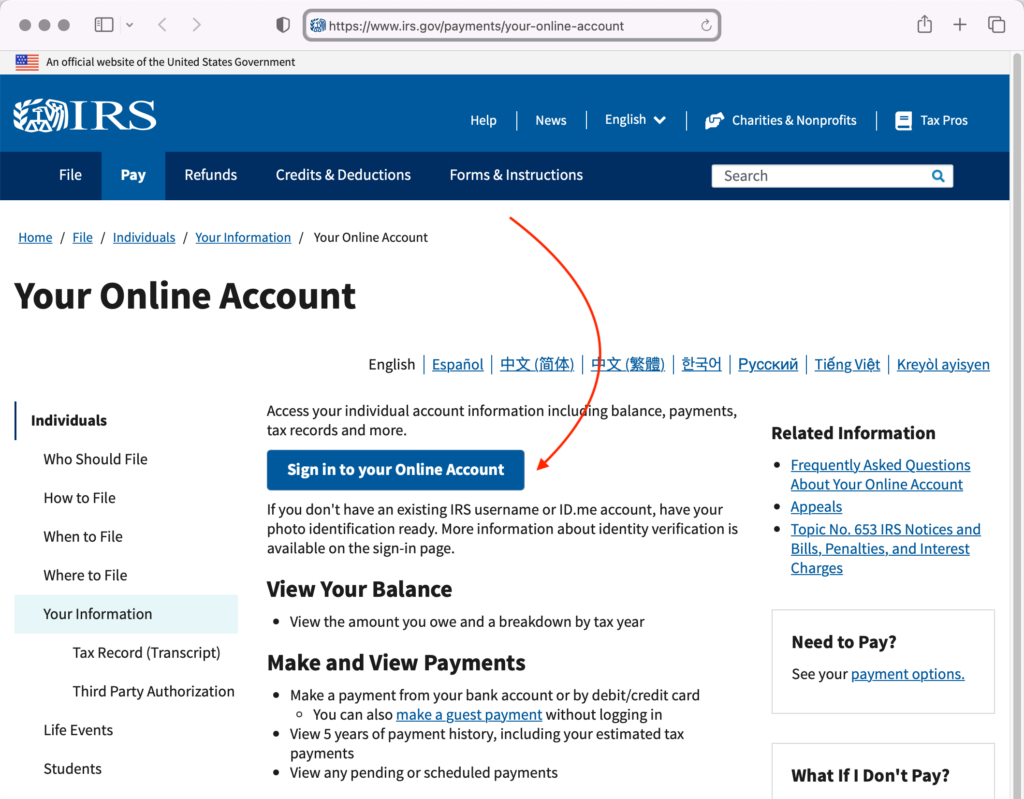
For individual taxpayers, the IRS Online Account is the gold standard for financial transparency. This portal allows you to view the total amount you owe, your payment history for the last 24 months, and key details from your most recent tax return. When you make a payment via Direct Pay or a debit/credit card, the transaction should typically appear in your account history within one to three business days.
Monitoring this account is a proactive financial habit. By logging in periodically, you can ensure that the “Amount Owed” reflects your recent payments. If you see a “processed” status next to your transaction, you have definitive proof for your financial records. This digital ledger is often more reliable than physical mail, as it updates directly from the IRS’s internal databases.
Direct Pay Confirmation and Lookup
If you utilized the IRS Direct Pay service—a popular choice for its lack of fees and direct integration with checking or savings accounts—you should have received a confirmation number at the end of your session. However, a confirmation number is only the first step. To verify the actual movement of funds, you can use the “Look Up a Payment” feature on the Direct Pay website. By entering your confirmation number and the last four digits of your Social Security Number, you can check the real-time status of that specific transaction. This is particularly useful for those managing tight monthly budgets who need to know exactly when a large liability has cleared.
EFTPS for Business and High-Volume Taxpayers
For business owners and individuals who make frequent estimated tax payments, the Electronic Federal Tax Payment System (EFTPS) is the preferred financial tool. Unlike the general consumer portals, EFTPS is a high-security site designed for professional financial management. It allows you to track your payment history for up to 16 months. Because EFTPS is often used for significant corporate tax liabilities or payroll taxes, the verification process here is more rigorous. Checking the “Payment History” tab within EFTPS provides a detailed audit trail, which is crucial for business accounting and year-end reconciliation.
Monitoring Bank-Side Transactions and Paper Trails
While the IRS’s internal systems are the ultimate authority, your own bank or credit card statements serve as the first line of defense in financial verification. For many, the movement of money out of a private account is the most immediate indicator of a successful transaction.
Canceled Checks and Bank Statements
If you belong to the segment of taxpayers who still prefer physical checks, verification requires a bit more patience. A check is not considered “received” in a legal or financial sense until it has been processed and the funds have been withdrawn from your account.
To verify a check payment, you must monitor your bank’s mobile app or monthly statement. Once the IRS processes the check, a digital image of the “canceled” check should become available in your banking portal. It is a best practice in personal finance to download and save these images. On the back of the canceled check, the IRS will have printed a series of numbers—this is their internal tracking code. This code is your absolute proof of payment should any discrepancy arise in the future.
Credit and Debit Card Processing
Payments made via third-party processors (such as PayUSAtax or ACI Payments, Inc.) are often processed faster than checks but involve different verification paths. When you use these services, you are technically paying a vendor who then remits the funds to the IRS. Your credit card statement will show the name of the processor, not “IRS” directly. To verify these, you should check the confirmation email sent by the processor and cross-reference it with your IRS Online Account. From a financial planning perspective, remember that these processors charge a convenience fee, which should be factored into your total tax expenditure.
The Importance of Certified Mail
For those sending high-value checks or sensitive documents through the mail, the use of USPS Certified Mail with a Return Receipt is a critical risk-management strategy. This provides a legal date-stamp of when the IRS received your envelope. While this doesn’t prove that the check has been deposited, it protects you from “failure to pay” penalties by proving the payment was delivered on time. In financial disputes, this receipt is often the only evidence a taxpayer has to overturn an automated late fee.
Understanding Processing Timelines and Financial Delays
One of the greatest stressors in financial management is the “latency period”—the time between when you send money and when it is officially acknowledged. Understanding these timelines is essential to prevent unnecessary calls to the IRS or premature stop-payment orders on checks.
Electronic vs. Paper Latency
Electronic payments via Direct Pay or EFTPS generally have a processing window of 24 to 48 hours. If you make a payment on a Friday, it may not reflect in your IRS Online Account until Tuesday or Wednesday. In contrast, paper checks sent via mail can take significantly longer. During peak tax seasons (March through May), it may take the IRS three to six weeks to open, process, and deposit a physical check.
During this interval, the funds remain in your bank account. A common financial mistake is forgetting about this “floating” liability and spending the funds elsewhere. To maintain financial integrity, you should treat the money as “gone” the moment the check is mailed, perhaps by moving the equivalent amount into a dedicated “Tax Reserve” savings account to avoid accidental overdrafts.
Peak Season and Backlog Considerations
It is important to recognize that the IRS often experiences processing backlogs. If your bank account hasn’t been debited within three weeks of mailing a check, it is not yet time to panic, but it is time to start investigating. Factors such as regional processing center volume and federal holidays can extend these timelines. Insightful financial managers keep a calendar alert for 30 days post-mailing to check their bank balance; if the check hasn’t cleared by then, an inquiry is warranted.
Troubleshooting Missing Payments and Rectifying Errors
Despite best efforts, payments sometimes go astray due to clerical errors, mail issues, or systemic glitches. Taking swift, professional action is the key to minimizing financial damage.
What to Do If the Money Hasn’t Left Your Account
If you have submitted an electronic payment but see no activity in your bank account after five business days, the transaction may have failed due to an incorrect routing or account number. In this scenario, do not simply send another payment immediately, as this could result in a double-debit. Instead, check your email for a rejection notice from the IRS or the payment processor. If no notice is found, contact your financial institution to see if a “rejected” or “returned” ACH transaction is on record.
Dealing with IRS Notices After Payment
One of the most frustrating experiences in personal finance is receiving a “Balance Due” notice (such as a CP14) for a tax bill you have already paid. This usually happens when the notice was generated by an automated system before your payment was fully processed.
If this occurs, do not ignore the notice. Compare the date on the notice with the date your payment cleared your bank. If you paid before the notice was issued, the IRS system likely just hasn’t “caught up.” However, you should still contact the IRS at the number provided on the notice to provide your payment confirmation number or the details of your canceled check. This ensures that a human agent notes your account and prevents the system from escalating to the next level of collection.
Using Form 3911 for Lost Payments
If your bank records show that a check was cashed, but the IRS claims they haven’t received it, you must file Form 3911, “Taxpayer Statement Regarding Refund.” While typically used for refunds, this form also initiates a “tracer” for payments. This is a formal financial inquiry that requires the IRS to locate where the funds were credited. Providing a copy of both sides of the canceled check along with this form is usually sufficient to resolve the issue.
Long-Term Financial Management and Documentation
The habit of verifying IRS payments should be part of a broader strategy of financial documentation. Tax records are not just for the current year; they are vital for future loan applications, property purchases, and potential audits.
Maintaining a Digital Tax Archive
Successful financial management relies on organization. Create a dedicated folder—either physical or encrypted digital cloud storage—specifically for payment confirmations. Every time you make a tax payment, save a PDF of the confirmation screen, the confirmation email, and eventually, the bank statement showing the cleared transaction. Having these documents readily available can save hours of stress during a mortgage application or an inquiry from a state tax authority.

Integrating Tax Payments into Cash Flow Analysis
Tax payments are often the largest single expenditures a household or small business makes in a year. By tracking exactly when these payments hit your account, you can better understand your “true” liquidity. Using financial tools like spreadsheets or accounting software to categorize these as “Tax Expense” rather than general withdrawals allows for a more accurate picture of your net income and savings rate.
Ultimately, checking if the IRS received your payment is about more than just verifying a single transaction; it is about exercising control over your financial life. By utilizing the available digital tools, understanding the necessary timelines, and maintaining rigorous records, you ensure that your relationship with the tax authorities remains transparent and trouble-free. This level of diligence is what separates passive money management from active, professional financial stewardship.
aViewFromTheCave is a participant in the Amazon Services LLC Associates Program, an affiliate advertising program designed to provide a means for sites to earn advertising fees by advertising and linking to Amazon.com. Amazon, the Amazon logo, AmazonSupply, and the AmazonSupply logo are trademarks of Amazon.com, Inc. or its affiliates. As an Amazon Associate we earn affiliate commissions from qualifying purchases.