
In the landscape of modern personal finance, the digital wallet has transitioned from a niche convenience to a primary financial hub. PayPal, as one of the world’s most recognized financial tools, sits at the center of this transition, facilitating everything from global commerce to peer-to-peer lending. However, the efficacy of any financial tool is fundamentally tied to the accuracy of the data it holds. Maintaining an up-to-date physical address on your PayPal account is not merely a matter of logistical convenience for shipping; it is a critical component of your digital financial identity, security posture, and compliance with global banking regulations.
The Critical Role of Address Accuracy in Digital Financial Management
The physical address associated with your PayPal account serves as a cornerstone for several financial layers. At the most basic level, it dictates the destination of physical goods purchased through the platform. However, the implications run much deeper into the realms of fraud prevention and merchant protection. When you initiate a transaction, PayPal’s risk-modeling algorithms cross-reference your account details, IP address, and billing information. A discrepancy between these data points can trigger security flags, resulting in declined transactions or temporary account holds.
From a personal finance perspective, an outdated address can lead to significant financial loss. If a high-value item is shipped to an old residence because the “one-click” checkout pulled stale data from your PayPal profile, recovering those funds or the merchandise becomes a complex legal and logistical challenge. Most merchant protection programs are contingent upon the item being shipped to the verified address on the transaction record. If your address is incorrect, you effectively forfeit many of the consumer protections that make digital wallets attractive in the first place.
Furthermore, for those utilizing PayPal for business finance or as a primary tool for side hustles, address accuracy is tied to tax compliance. Financial institutions are required to report certain thresholds of income to tax authorities, such as the IRS in the United States. These reports are generated based on the residency information on file. An incorrect address can lead to misfiled tax documents, potentially resulting in audits or penalties that could have been avoided with a simple profile update.
How to Update Your PayPal Address: A Comprehensive Walkthrough
Updating your information on PayPal is a straightforward process, but it requires precision to ensure the new data propagates correctly across your linked payment methods. The platform allows for multiple addresses to be stored, but only one can be designated as the “Primary” address, which serves as the default for billing and official correspondence.
Updating via Desktop Browser
For most users, the web interface provides the most granular control over account settings.
-
Access Settings: Log into your account and locate the gear icon (Settings) in the top right corner of the dashboard.
-
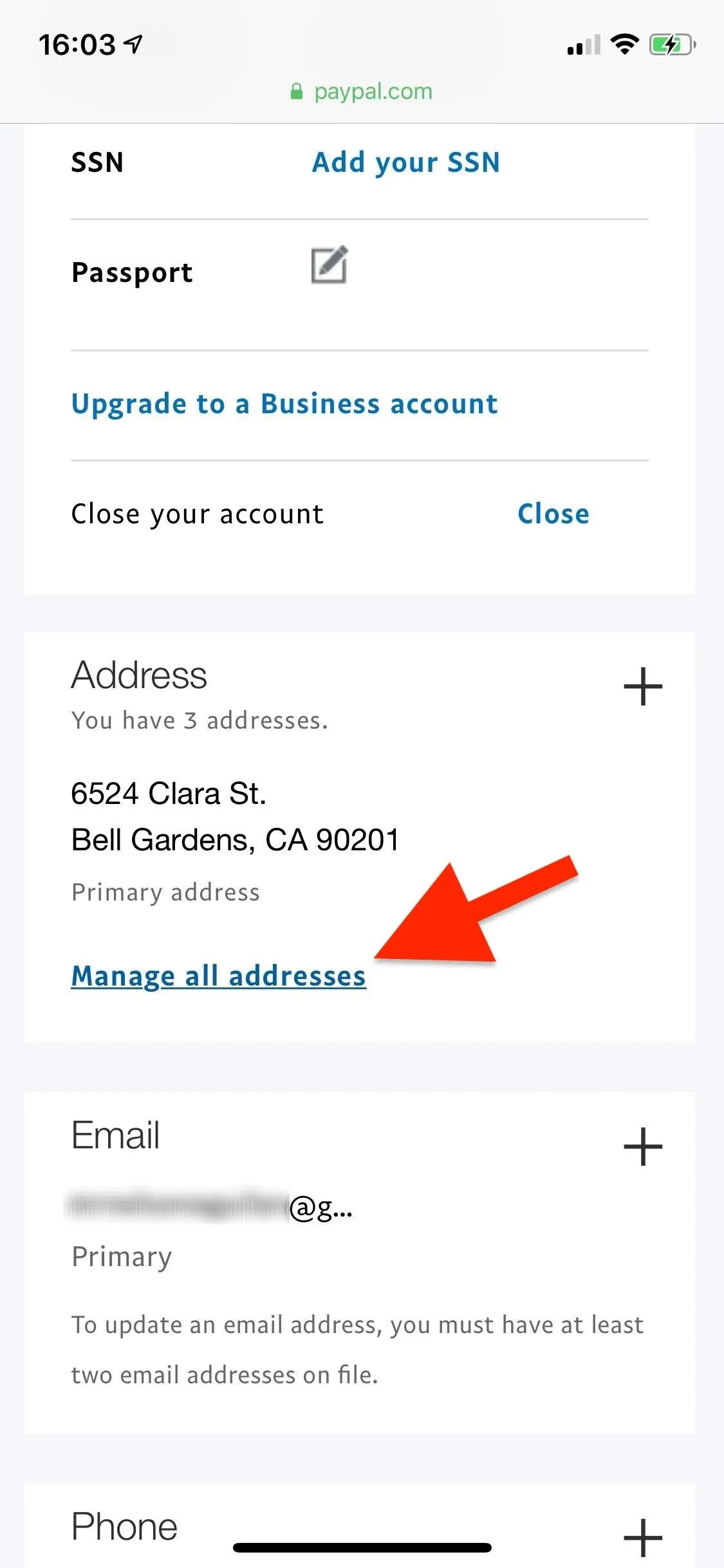
Account Profile: Under the “Account” tab, you will find the “Address” section. This area displays your current primary address and any secondary shipping locations you have saved.
-
Edit or Add: To update an existing address, click “Manage all addresses.” From here, you can click “Edit” on your primary address. If you have moved permanently, it is often safer to click “Add New” to input the fresh data first.
-
Verification: Once the new address is entered, you can set it as the “Primary.” PayPal may send a notification to your registered email or phone to verify that this change was authorized by you, acting as a secondary layer of security.
Updating via the PayPal Mobile App
As personal finance increasingly moves to mobile-first environments, the PayPal app offers a streamlined way to manage your profile on the go.
-
Profile Icon: Open the app and tap the profile icon or the “Wallet” section.
-
Personal Info: Navigate to “Personal Info” and then select “Addresses.”
-
Update: Tap on the address you wish to change. The app will allow you to edit the fields or delete the old address entirely.
-
Syncing: Ensure that you save the changes. The mobile app syncs instantly with the web version, so any changes made on your phone will reflect across all platforms where you use PayPal.
Updating Linked Cards and Bank Accounts
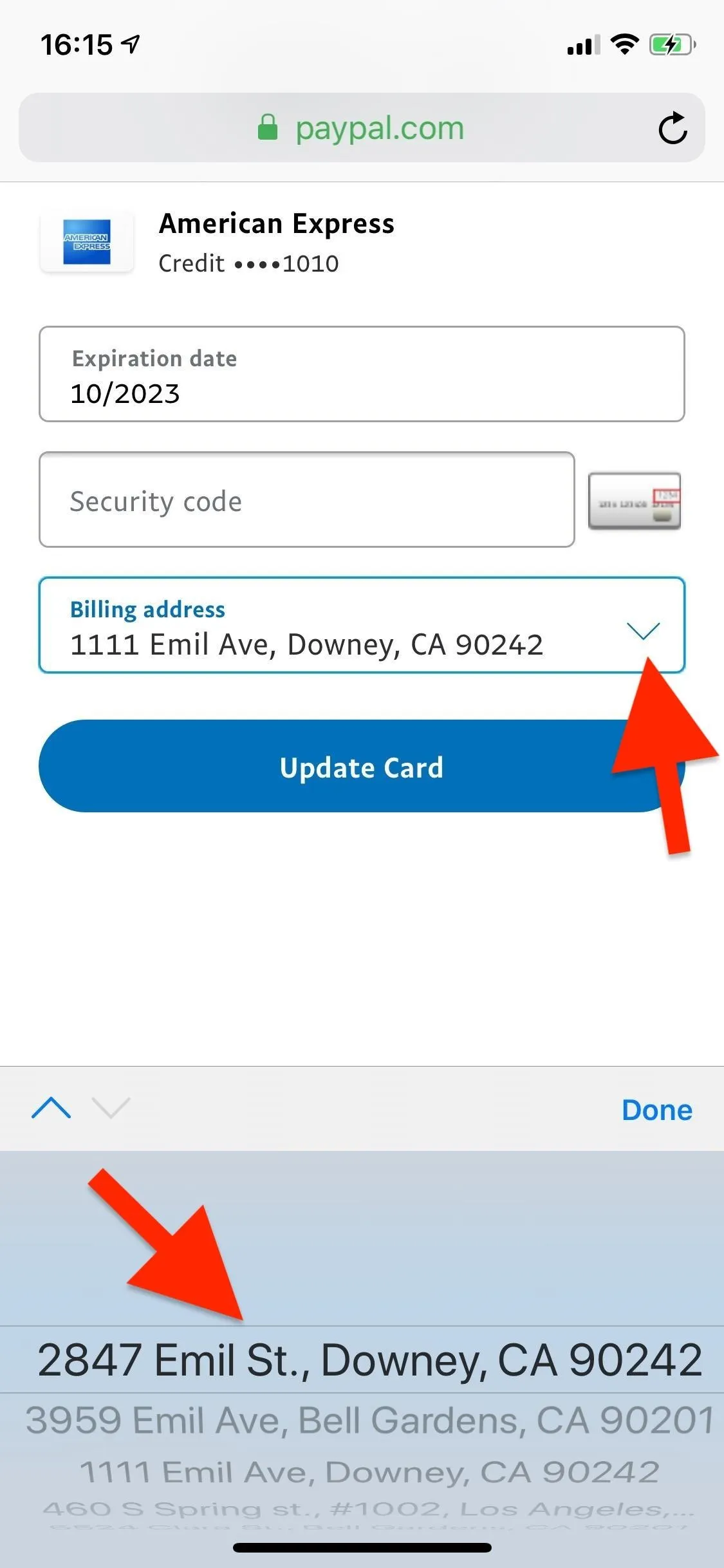
A common oversight in personal finance management is updating the PayPal profile address but forgetting to update the billing addresses for the linked credit cards and bank accounts. PayPal requires that the billing address for your payment methods matches the information held by the card issuer. If you move, you must update your address with your bank first, then return to the “Wallet” section of PayPal to update the billing address for each specific card. Failure to do this can lead to “AVS (Address Verification System) Mismatches,” which are a leading cause of declined online payments.
Navigating the Difference Between Billing, Shipping, and Primary Addresses
Understanding the taxonomy of addresses within a financial tool is essential for smooth transacting. PayPal distinguishes between three specific types of addresses, each serving a different function in your financial ecosystem.
The Primary Address is your legal residence. This is the address PayPal uses for identity verification and official communication. It is also the default address used for tax documentation and “Know Your Customer” (KYC) compliance. From a financial health standpoint, this address should always match the residency reported on your government-issued ID and tax filings.
The Billing Address is specifically tied to your funding sources—your credit cards, debit cards, or bank accounts. While often the same as your primary address, it can differ. For instance, if you use a business credit card that is registered to a corporate office but your PayPal account is personal, the billing address for that specific card must reflect the office location to ensure the transaction is cleared by the bank’s security protocols.
Shipping Addresses are the most flexible. PayPal allows you to store multiple shipping addresses to facilitate sending gifts to family or receiving packages at an office location. When checking out at a merchant site, you can select any of these stored addresses. However, it is a best practice to periodically audit these. Removing old workplace addresses or previous residences reduces the risk of an accidental “autofill” error during a high-speed checkout, which could lead to lost goods and complicated refund requests.
International Relocation: Why You Cannot Simply Change Your Country
One of the most complex scenarios in digital finance is moving across international borders. Unlike changing a street address within the same country, changing your country of residence on a PayPal account is generally not permitted due to the strict regulatory environments of global banking.
Each country has specific financial laws, anti-money laundering (AML) regulations, and tax reporting requirements. A PayPal account created in the United Kingdom is governed by different terms of service and legal frameworks than one created in the United States or Singapore. Consequently, if you relocate to a new country, you cannot simply update your address in the settings.
In this situation, the recommended financial procedure is to:
-
Zero Out the Balance: Transfer any remaining funds in your current PayPal account to your linked bank account.
-
Close the Account: Once the balance is clear and all pending transactions are finalized, you should close the existing account.
-
Open a New Account: Create a new PayPal account using your new country of residence and a local bank account or credit card issued in that region.
While this may seem like a hurdle, it is a necessary step to ensure your financial activities remain compliant with local laws. Attempting to use a PayPal account registered in one country while living and banking in another can lead to your account being flagged for suspicious activity and a permanent freeze on your funds.

Security Implications and Verification Procedures Following an Address Update
In the era of digital asset management and online banking, an address change is viewed by financial institutions as a high-risk event. It is a common tactic for bad actors who gain unauthorized access to an account to change the address before making large purchases to ensure the goods are diverted to them.
Because of this, you should expect—and welcome—additional security hurdles when you update your address. PayPal may employ several verification methods:
-
Two-Factor Authentication (2FA): You may be asked to provide a code sent via SMS or an authenticator app.
-
Email Confirmation: A link may be sent to your registered email to confirm that the change was intentional.
-
Card Verification: In some cases, adding a new primary address may require you to re-verify a linked credit card by entering the CVV or going through a 3D Secure check.
From a personal finance strategy perspective, it is wise to update your address during a period when you do not have urgent, time-sensitive payments to make. This allows a “cooling-off” period where the system can recognize the new data without interrupting your cash flow. Additionally, always ensure you are making these changes over a secure, private internet connection. Using public Wi-Fi to update sensitive financial information like your home address invites unnecessary risk from “man-in-the-middle” cyberattacks.
Maintaining your PayPal account is a vital part of managing your broader financial health. By ensuring your address is accurate, you protect your purchases, satisfy legal requirements, and maintain the integrity of your digital financial identity. Regular audits of your profile settings, including your primary and billing addresses, should be a standard part of your quarterly financial check-up. This proactive approach ensures that your tools work for you, providing the seamless and secure experience that modern digital finance promises.
aViewFromTheCave is a participant in the Amazon Services LLC Associates Program, an affiliate advertising program designed to provide a means for sites to earn advertising fees by advertising and linking to Amazon.com. Amazon, the Amazon logo, AmazonSupply, and the AmazonSupply logo are trademarks of Amazon.com, Inc. or its affiliates. As an Amazon Associate we earn affiliate commissions from qualifying purchases.