
In the rapidly evolving landscape of financial technology, the transition from physical wallets to digital ones has been nothing short of revolutionary. Among the leaders of this shift is Google Pay, a platform that has integrated itself into the daily lives of millions. However, as with any technology that handles sensitive financial information, the primary question for users remains: how secure is it? To understand the security posture of Google Pay, one must look beyond the user interface and examine the complex layers of encryption, hardware-level security, and artificial intelligence that safeguard every transaction.
Google Pay is not merely a digital version of a plastic card; it is a sophisticated security intermediary. By leveraging modern cryptographic standards and mobile hardware capabilities, it aims to provide a payment environment that is, in many ways, significantly more secure than carrying a physical credit or debit card.
The Foundation of Digital Safety: Understanding Tokenization
The most critical technical feature of Google Pay is a process known as tokenization. This is the bedrock of mobile payment security and the primary reason why digital wallets are often safer than their physical counterparts.
Replacing Real Data with Virtual Accounts
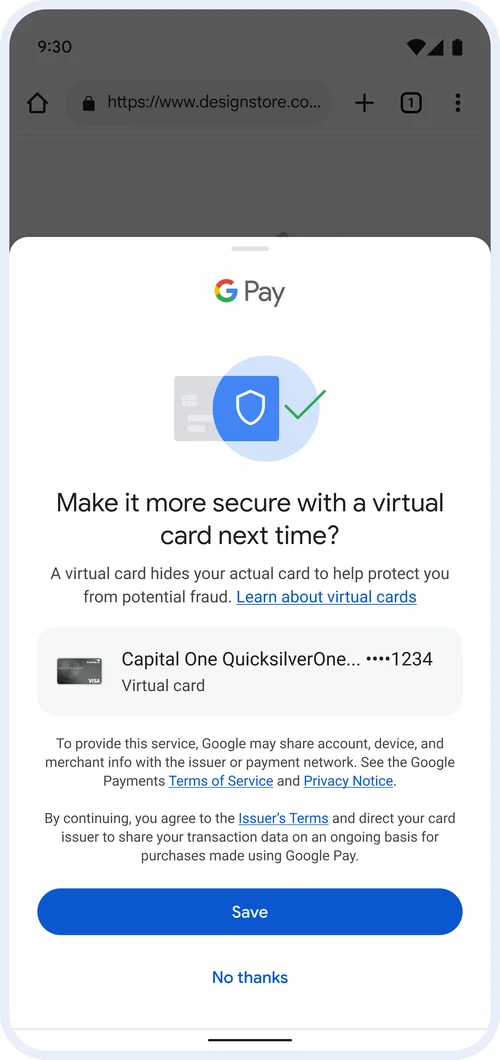
When you add a credit or debit card to Google Pay, the app does not store your actual card number (the 16-digit Permanent Account Number or PAN) on your device. Instead, Google Pay communicates with your bank to request a “token”—a unique, digital alias for your card. This token is referred to as a Virtual Account Number (VAN).
When you make a payment at a terminal using Near Field Communication (NFC), Google Pay transmits this VAN and a one-time dynamic security code instead of your real card details. Because the merchant never receives your actual card number, your financial data remains insulated. Even if a merchant’s database is compromised in a future data breach, the information stolen would be a useless token that cannot be used to recreate your physical card or initiate unauthorized transactions outside of the specific digital wallet environment.
The Transaction Lifecycle
Every time a transaction is initiated, the system generates a dynamic cryptogram. This is a unique piece of data that validates the transaction for that specific moment and amount. Unlike the CVV code on the back of a physical card, which remains static and can be copied by a malicious actor, the dynamic cryptogram used by Google Pay expires almost immediately after use. This multi-layered approach ensures that even if a signal were intercepted mid-air during an NFC broadcast, the data would be worthless for any subsequent fraudulent attempts.
Hardware-Level Security: The Role of the Secure Element and Biometrics
While software encryption handles the data in transit, the physical device in your hand serves as the first line of defense. Google Pay utilizes the hardware architecture of modern smartphones to ensure that the payment environment is isolated from the rest of the operating system.
Biometric Gatekeeping
One of the most significant security advantages of Google Pay is the requirement for user authentication. Unlike a physical card, which can be swiped by anyone who finds it, Google Pay requires a “handshake” from the user. This is typically achieved through biometrics—fingerprint scanners, facial recognition, or iris scanning—or a secure PIN/pattern.
This biometric data is not stored on Google’s servers; rather, it is handled by the device’s Trusted Execution Environment (TEE) or a dedicated Secure Element (SE) chip. These are hardware-isolated areas of the phone’s processor that are shielded from the main Android operating system. Even if a device is infected with malware, the malware generally cannot access the biometric templates or the keys required to authorize a Google Pay transaction.
The Importance of the Screen Lock
Google Pay enforces a strict policy regarding device security: it will not function unless a screen lock is active. If a user disables their PIN or biometric lock, Google Pay immediately removes the digital payment tokens from the device as a proactive measure. This ensures that a lost or stolen phone cannot be used as a “blank check” by a thief. Furthermore, the short-range nature of NFC technology (typically requiring the device to be within 4 centimeters of the reader) prevents “long-distance” digital pickpocketing, a common myth that has been debunked by the technical limitations of the hardware.
Google’s Defensive Infrastructure: AI and Fraud Detection

Beyond the device and the tokenization process lies Google’s massive backend infrastructure. As one of the world’s leading technology companies, Google employs some of the most advanced machine learning and artificial intelligence models to monitor for suspicious activity.
Real-Time Risk Analysis
Every time a transaction is processed through Google Pay, it is subjected to an instantaneous risk assessment. Google’s AI models analyze thousands of data points—such as the location of the transaction, the type of merchant, and the user’s historical spending patterns—to identify anomalies. If a transaction appears fraudulent (for example, a high-value purchase made in a geographic location far from the user’s current position), Google Pay can flag or block the transaction instantly.
This level of active monitoring is far more sophisticated than the reactive measures often associated with traditional banking. While banks also have fraud detection, Google’s ability to integrate device-level telemetry (like GPS and device health) allows for a much more granular and accurate risk profile.
Encrypted Data Transmission
All communication between the Google Pay app and Google’s servers is protected using Transport Layer Security (TLS). This ensures that no “man-in-the-middle” attacks can intercept the communication between the user’s phone and the payment processing infrastructure. Google also utilizes specialized encryption keys that are rotated frequently, further narrowing the window of opportunity for any potential cryptographic exploit.
Comparing Google Pay to Traditional Payment Methods
To truly appreciate the security of Google Pay, it is helpful to compare it against the vulnerabilities of traditional magnetic stripe or EMV chip cards.
Why Digital Beats Magnetic Stripes
Physical cards with magnetic stripes are inherently insecure. The data on the stripe is static and can be easily copied using a “skimmer” installed on an ATM or gas pump. Once a thief has the data from the stripe, they can clone the card and use it anywhere. Google Pay completely eliminates this risk because there is no static data to skim. Every “tap” uses a different digital signature.
Even compared to EMV chip cards, Google Pay offers an edge. While the chip is secure, the card itself still displays the PAN and CVV, making it vulnerable to “shoulder surfing” or dishonest employees who might record the card details during a transaction. With Google Pay, the physical card stays in your pocket or at home, removing it from the physical line of sight of potential bad actors.
Remote Management and Theft Recovery
If you lose a physical wallet, you must call every individual bank to cancel your cards, a process that can take hours and leaves a window open for fraud. If you lose a phone equipped with Google Pay, you can use Google’s “Find My Device” service to remotely lock the phone, sign out of your Google account, or wipe the device entirely. This capability provides a level of control that physical currency and cards simply cannot match.
Mitigating the Human Element: Best Practices for Maximum Security
Despite the robust technical safeguards, the “human element” remains the most common entry point for security breaches. Digital security is a partnership between the technology provider and the end-user.
Phishing and Social Engineering
Google Pay users are often targeted not through technical hacks of the app itself, but through social engineering. Scammers may send fraudulent emails or text messages (smishing) pretending to be Google Support, asking for account credentials or one-time passcodes (OTPs). It is vital to remember that Google will never ask for your password or OTP over the phone or via email. Protecting your Google Account with Two-Factor Authentication (2FA), specifically using hardware security keys or Google Prompt, is perhaps the single most effective way to secure the “keys to the kingdom.”

Public Wi-Fi and App Integrity
While Google Pay’s encryption protects data even on public Wi-Fi, it is a best practice to avoid conducting sensitive financial management—such as adding new cards or changing security settings—on unencrypted public networks. Additionally, users should only download the Google Pay app from the official Google Play Store or Apple App Store. “Sideloading” apps from third-party sources can introduce modified versions of software that contain “keyloggers” designed to capture sensitive input.
The security of Google Pay is a testament to the power of modern computer science and hardware engineering. By combining the anonymity of tokenization, the rigors of biometric authentication, and the proactive intelligence of AI-driven fraud detection, Google has created a payment ecosystem that is remarkably resilient against contemporary threats. While no system is 100% infallible, the technical architecture of Google Pay makes it one of the most secure ways to transact in the digital age, effectively turning the smartphone from a potential liability into a highly fortified financial vault.
aViewFromTheCave is a participant in the Amazon Services LLC Associates Program, an affiliate advertising program designed to provide a means for sites to earn advertising fees by advertising and linking to Amazon.com. Amazon, the Amazon logo, AmazonSupply, and the AmazonSupply logo are trademarks of Amazon.com, Inc. or its affiliates. As an Amazon Associate we earn affiliate commissions from qualifying purchases.