
In the modern era of air travel, the flight number serves as the primary data key for a passenger’s entire journey. It is the alphanumeric code that connects a traveler to the global aviation network, enabling real-time tracking, gate updates, and seamless digital check-ins. For American Airlines (AA) passengers, finding this number is no longer a matter of shuffling through paper tickets; instead, it involves navigating a sophisticated ecosystem of mobile applications, web portals, and automated notification systems. Understanding the technological infrastructure behind these tools is essential for any digitally-savvy traveler looking to streamline their experience.
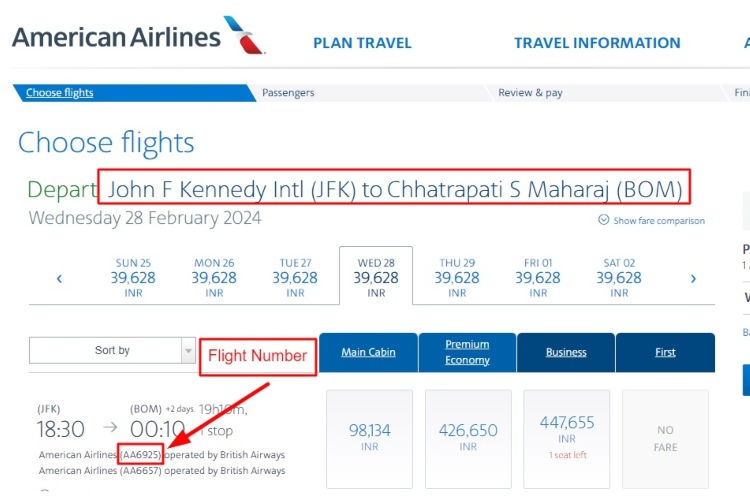
Leveraging the American Airlines Mobile App for Real-Time Data
The American Airlines mobile application is the cornerstone of the carrier’s digital transformation. Available on both iOS and Android, the app functions as a personalized travel concierge, aggregating complex data from Global Distribution Systems (GDS) into a user-friendly interface. Finding your flight number within this software is designed to be intuitive, provided you understand the app’s architecture.
Navigating the “My Trips” Module
Once you log into the application using your AAdvantage credentials or your record locator, the “My Trips” section becomes the primary hub for all flight-specific information. The flight number is prominently displayed at the top of the itinerary card. From a technical standpoint, the app pulls this data via an API (Application Programming Interface) that communicates directly with American Airlines’ central reservation system. This ensures that even if there is a last-minute equipment change or a flight re-numbering due to operational shifts, the app reflects the most current data stored in the cloud.
Utilizing Push Notifications and Haptic Alerts
Beyond static viewing, the AA app employs proactive technology to keep the flight number at the forefront of the user’s mobile experience. By enabling push notifications, the software pushes “Flight Status” updates directly to the lock screen. These automated alerts contain the flight number, departure time, and gate information. This is particularly useful for travelers using wearable tech, such as an Apple Watch, where the flight number is synced via the companion app, allowing for a “glanceable” data experience without needing to unlock a phone.
Digital Confirmation and Wallet Integration
The transition from physical documentation to digital identity has changed how we store and retrieve travel identifiers. The flight number is embedded in several layers of digital communication, from the initial transaction to the day of departure.
Advanced Search Strategies for Email Retrieval
For many, the search for a flight number begins in the inbox. When a booking is confirmed, American Airlines generates a high-priority email containing the itinerary. To find this efficiently, users should utilize advanced search operators within their email clients. Searching for “from:americanairlines.com” combined with “Confirmation” or “Itinerary” will typically surface the correct document.
Technologically, these emails are formatted using schema.org markup, which allows search engines like Google to “read” the flight number and automatically inject it into other services. For example, if you use Gmail, Google’s AI often extracts the flight number and creates a summary box at the top of the email or automatically adds the event to Google Calendar, making the flight number accessible via calendar metadata.
Seamless Syncing with Mobile Wallets
One of the most efficient ways to keep a flight number accessible is through mobile wallet integration. Once checked in via the app or website, users can “Add to Apple Wallet” or “Save to Google Pay.” This process creates a digital pass (a .pkpass file) that resides locally on the device. The flight number is displayed in a high-contrast font on the digital boarding pass.
The advantage of this method is its offline availability. Because the pass is stored in the device’s secure element, the flight number remains accessible even if the user loses cellular connectivity or Wi-Fi while navigating the airport. Furthermore, these digital passes are geofenced; when the device’s GPS detects that the user has arrived at the airport, the pass (containing the flight number) automatically appears on the lock screen for immediate access.
Using Web-Based Tools and Third-Party Flight Trackers
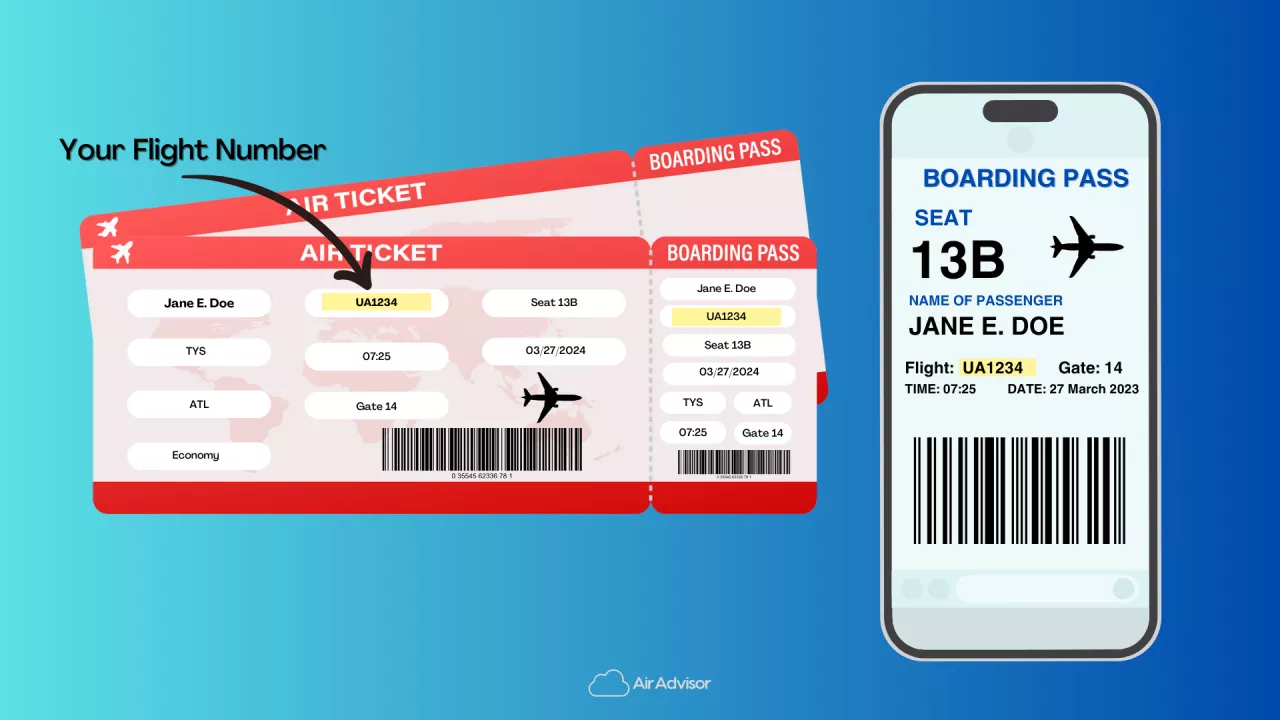
While mobile apps offer convenience, the broader web ecosystem provides powerful tools for flight identification, especially when dealing with complex multi-leg itineraries or codeshare agreements.
The American Airlines Desktop Portal
The desktop version of the American Airlines website offers a robust “Flight Status” tool that does not require a login. By entering the departure and arrival cities, users can view a list of all scheduled flights for that day. This is a “public-facing” database query that returns all active flight numbers within the AA network. This is particularly helpful if a traveler has lost their confirmation details but knows their route and approximate departure time. The desktop site provides a more granular view of the data, often including the aircraft type and historical on-time performance associated with that specific flight number.
Integration with Global Flight Tracking Software
In some cases, the most reliable way to find or verify a flight number is through third-party SaaS (Software as a Service) platforms like FlightAware, FlightRadar24, or FlightStats. These platforms aggregate data from ADS-B (Automatic Dependent Surveillance-Broadcast) transponders and government radar feeds.
By searching for a specific route (e.g., “DFW to LHR”), these tools display all active and scheduled flight numbers. This is a professional-grade solution for travelers who want to verify that their flight number matches the actual physical aircraft assigned to the route. These trackers provide a secondary layer of data validation, ensuring that the flight number provided by the airline matches the live telemetry data being broadcast by the aviation infrastructure.
Managing Your Digital Identity and AAdvantage Account
The flight number is intrinsically linked to a passenger’s digital identity within the airline’s CRM (Customer Relationship Management) system. Managing this data through a loyalty account provides a centralized repository for all historical and future flight numbers.
The Role of the AAdvantage Profile
For frequent flyers, the AAdvantage profile acts as a digital ledger. By logging into the AA.com portal, users can access a comprehensive dashboard of “Upcoming Trips.” This database view is significantly more detailed than a simple email confirmation. It links the flight number to seat assignments, upgrade status, and meal preferences. From a data management perspective, using the loyalty account ensures that the flight number is never “lost,” as it is permanently associated with the user’s unique member ID until the journey is completed.
Leveraging AI Chatbots and Virtual Assistants
American Airlines has integrated AI-driven virtual assistants into their digital platforms to assist with data retrieval. If a user cannot find their flight number, they can interact with the chatbot via the AA app or website. By providing secondary identifiers—such as a credit card number used for purchase or a phone number—the AI can query the backend database to retrieve the flight number and record locator. This natural language processing (NLP) interface simplifies the recovery of information that might otherwise require a lengthy phone call to customer service.
Troubleshooting and Technical Best Practices
In the digital world, data synchronization issues can occasionally lead to confusion. Understanding how to troubleshoot these technical hurdles is vital for maintaining access to your travel information.
Resolving Data Sync and Cache Issues
Sometimes, the mobile app may display outdated information or fail to show a new booking. This is often a result of local caching on the device. To resolve this, users should “pull to refresh” within the app to trigger a new API call to the AA servers. If the flight number still does not appear, clearing the app’s cache or logging out and back in can force a complete re-sync of the user’s profile data. It is a fundamental troubleshooting step that ensures the local device is aligned with the airline’s central database.

Ensuring Data Security and Privacy
The flight number, while public in a general sense, is a key component of your PNR (Passenger Name Record). Travelers should be cautious about sharing screenshots of their digital boarding passes or confirmation screens on social media. Modern image recognition software can easily scrape flight numbers and record locators from these images, potentially giving bad actors access to personal data or the ability to modify bookings.
When accessing flight numbers on public Wi-Fi networks in airports, it is highly recommended to use a VPN (Virtual Private Network). This encrypts the data transfer between your device and American Airlines’ servers, ensuring that your flight details and personal identity remain secure from packet sniffing or “man-in-the-middle” attacks.
By mastering these digital tools and understanding the underlying technology, American Airlines passengers can ensure they always have their flight number at their fingertips. Whether through a geofenced mobile wallet pass, an AI-powered chatbot, or a global flight tracking database, the information is always available to those who know where to look.
aViewFromTheCave is a participant in the Amazon Services LLC Associates Program, an affiliate advertising program designed to provide a means for sites to earn advertising fees by advertising and linking to Amazon.com. Amazon, the Amazon logo, AmazonSupply, and the AmazonSupply logo are trademarks of Amazon.com, Inc. or its affiliates. As an Amazon Associate we earn affiliate commissions from qualifying purchases.