
JavaScript, the engine that drives interactivity on the web, thrives on its ability to handle operations that don’t immediately complete. From fetching data from a server to responding to user clicks, many tasks take time. This is where the concept of a “callback” becomes not just useful, but fundamental. If you’ve ever dabbled in JavaScript development, especially when dealing with asynchronous operations, you’ve undoubtedly encountered callbacks. They are the unsung heroes that allow our applications to remain responsive and efficient, preventing them from freezing while waiting for long-running processes.
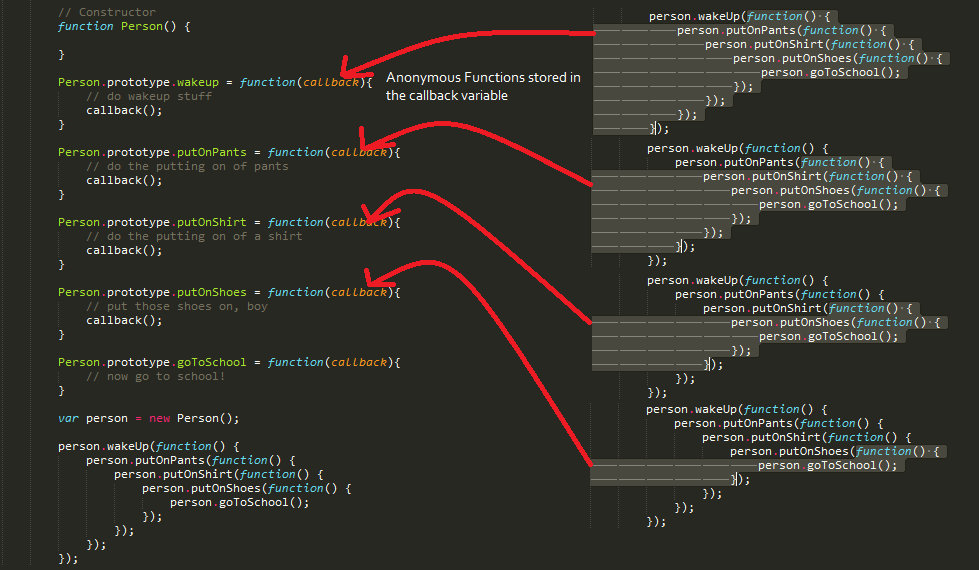
But what exactly is a callback in the context of JavaScript? At its core, a callback is simply a function that is passed as an argument to another function, with the expectation that it will be executed at a later time. This might sound straightforward, but its implications are profound, particularly in the realm of asynchronous programming, which is a cornerstone of modern web applications and software development. Understanding callbacks is a crucial step towards mastering JavaScript and building sophisticated, dynamic digital experiences.
The Foundation: Functions as First-Class Citizens
Before diving deeper into callbacks, it’s essential to grasp a core JavaScript principle: functions are first-class citizens. This means that functions in JavaScript can be treated like any other variable. They can be:
- Assigned to variables.
- Passed as arguments to other functions.
- Returned as values from other functions.
This flexibility is what makes callbacks possible. If functions couldn’t be passed around like data, the entire callback pattern would be impossible. Think of it like this: if you need to tell someone to do something after another task is finished, you need to be able to give them the instructions (the callback function) to execute later.
Why Callbacks? The Need for Asynchronous Operations
The modern digital landscape is characterized by constant interaction and data exchange. Websites fetch information from servers, users interact with interfaces, and devices communicate with each other. Many of these operations are inherently asynchronous, meaning they don’t complete instantly.
Consider these common scenarios:
- Fetching data from an API: When your web application needs to retrieve data from a remote server (e.g., weather information, user profiles, product details), this process can take anywhere from milliseconds to several seconds, depending on network speed and server load.
- User interactions: Responding to a button click, a mouse hover, or keyboard input are all events that happen at unpredictable times.
- Timers and intervals: Scheduling a function to run after a specific delay or at regular intervals (e.g.,
setTimeout,setInterval). - File operations: Reading from or writing to files in environments like Node.js.
If JavaScript were purely synchronous, the entire program would halt and wait for each of these operations to finish. This would lead to a frozen, unresponsive user interface – a terrible user experience. This is where asynchronous programming and, consequently, callbacks, come into play.
Synchronous vs. Asynchronous Execution
To truly appreciate callbacks, let’s quickly contrast synchronous and asynchronous execution in JavaScript:
-
Synchronous: Operations are executed one after another, in the order they appear. If one operation takes a long time, everything else has to wait.
console.log("First task");
// Imagine a time-consuming operation here
console.log("Second task");
console.log("Third task");
In this example, “First task” will print, then the (hypothetical) long operation will complete, and then “Second task” and “Third task” will print.
-
Asynchronous: Operations are initiated, and the program continues to execute other tasks while waiting for the asynchronous operation to complete in the background. When the asynchronous operation is done, a specific piece of code (the callback) is executed.
console.log("First task");

setTimeout(function() {
  console.log("This runs after a delay");
}, 2000); // Wait for 2000 milliseconds (2 seconds)

console.log("Second task");
In this asynchronous example, “First task” prints immediately. Then,
setTimeoutstarts a timer but doesn’t block the execution. “Second task” prints almost immediately after “First task”. Only after 2 seconds have passed will the message “This runs after a delay” be printed. Notice how “Second task” executes before the delayed message, demonstrating non-blocking behavior.
This non-blocking nature is the primary benefit of asynchronous programming, and callbacks are a key mechanism for managing it.
Understanding the Callback Pattern
A callback function is essentially a way to say: “Hey, do this task, and when you’re done, please execute this other function for me.”
Let’s break down a classic example using setTimeout:
function greet(name, callback) {
  console.log('Hello, ' + name);
  callback(); // Execute the callback function
}

function sayGoodbye() {
  console.log('Goodbye!');
}

// Calling greet and passing sayGoodbye as the callback
greet('Alice', sayGoodbye);
In this snippet:
greetis a function that takes two arguments:name(a string) andcallback(a function).- Inside
greet, it logs “Hello, Alice”. - Then, it calls
callback(). SincesayGoodbyewas passed as the callback,sayGoodbye()is executed. sayGoodbyelogs “Goodbye!”.
The output will be:
Hello, Alice
Goodbye!
Here, sayGoodbye is the callback function. It’s passed to greet and executed after greet has performed its primary task.
Callbacks with Asynchronous Operations
The power of callbacks truly shines when dealing with operations that take time. Imagine fetching data from a server:
function fetchData(url, callback) {
  console.log(`Fetching data from ${url}...`);
  // Simulate a network request that takes some time
  setTimeout(() => {
    const data = { message: "Data successfully fetched!" };
    console.log("Data received.");
    callback(data); // Pass the fetched data to the callback
  }, 3000); // Simulate a 3-second delay
}

function processData(receivedData) {
  console.log("Processing data...");
  console.log("Received:", receivedData.message);
}


<p style="text-align:center;"><img class="center-image" src="https://scaler.com/topics/images/callback-function-in-javascript-Image_1.webp" alt=""></p>


fetchData('https://api.example.com/data', processData);
console.log("Request initiated. Continuing with other tasks.");
Let’s trace the execution:
console.log("Request initiated. Continuing with other tasks.");prints first.fetchData('https://api.example.com/data', processData)is called.console.log(Fetching data from ${url}…);prints.setTimeoutis set up, but the code doesn’t wait for it.- The program continues to
console.log("Request initiated. Continuing with other tasks.");and prints it. - After approximately 3 seconds, the
setTimeoutcallback executes:const data = { message: "Data successfully fetched!" };is created.console.log("Data received.");prints.callback(data);is called. SinceprocessDatawas passed as the callback,processData(data)is executed.
- Inside
processData:console.log("Processing data...");prints.console.log("Received:", receivedData.message);prints the message from the fetched data.
The output order is crucial here:
Request initiated. Continuing with other tasks.
Fetching data from https://api.example.com/data...
Data received.
Processing data...
Received: Data successfully fetched!
This demonstrates how the main thread remains unblocked. The “Request initiated…” message appears long before the data is actually fetched and processed. The processData function (our callback) is designed to handle the result of the asynchronous fetchData operation.
Common Scenarios and Use Cases for Callbacks
Callbacks are ubiquitous in JavaScript, especially in scenarios that involve interaction with the outside world or operations that might take time.
1. Event Handling
Web browsers generate events when users interact with a page (e.g., clicking a button, submitting a form, typing in an input field). We attach functions to these events to respond to them. These attached functions are callbacks.
const myButton = document.getElementById('myButton');

myButton.addEventListener('click', function() {
  console.log('Button was clicked!');
  // Perform actions when the button is clicked
});
Here, the anonymous function function() { ... } is a callback that addEventListener will execute whenever the click event occurs on myButton.
2. Timers (setTimeout and setInterval)
As shown previously, setTimeout and setInterval are prime examples of functions that accept callbacks to schedule code execution.
// Run a function once after 5 seconds
setTimeout(() => {
  console.log("This message appears after 5 seconds.");
}, 5000);

// Run a function every 2 seconds
let counter = 0;
const intervalId = setInterval(() => {
  counter++;
  console.log(`Interval count: ${counter}`);
  if (counter >= 5) {
    clearInterval(intervalId); // Stop the interval
  }
}, 2000);
3. Asynchronous I/O (Node.js)
In server-side JavaScript with Node.js, file system operations, network requests, and database queries are often asynchronous and rely heavily on callbacks.
const fs = require('fs');

fs.readFile('myFile.txt', 'utf8', (err, data) => {
  if (err) {
    console.error("Error reading file:", err);
    return;
  }
  console.log("File content:", data);
});
console.log("Attempting to read file...");
In this Node.js example, the function (err, data) => { ... } is a callback. It will be executed once fs.readFile has attempted to read myFile.txt. It receives two arguments: err (if an error occurred) and data (the file content).
4. Array Methods (forEach, map, filter, reduce)
Many built-in JavaScript array methods are higher-order functions that accept callback functions to define how each element should be processed.
const numbers = [1, 2, 3, 4, 5];

// Using forEach with a callback
numbers.forEach(function(number) {
  console.log(number * 2);
});

// Using map with a callback to create a new array
const doubledNumbers = numbers.map(number => number * 2);
console.log(doubledNumbers); // [2, 4, 6, 8, 10]
Here, the functions passed to forEach and map are callbacks that operate on each number in the numbers array.
The Evolution: From Callbacks to Promises and Async/Await
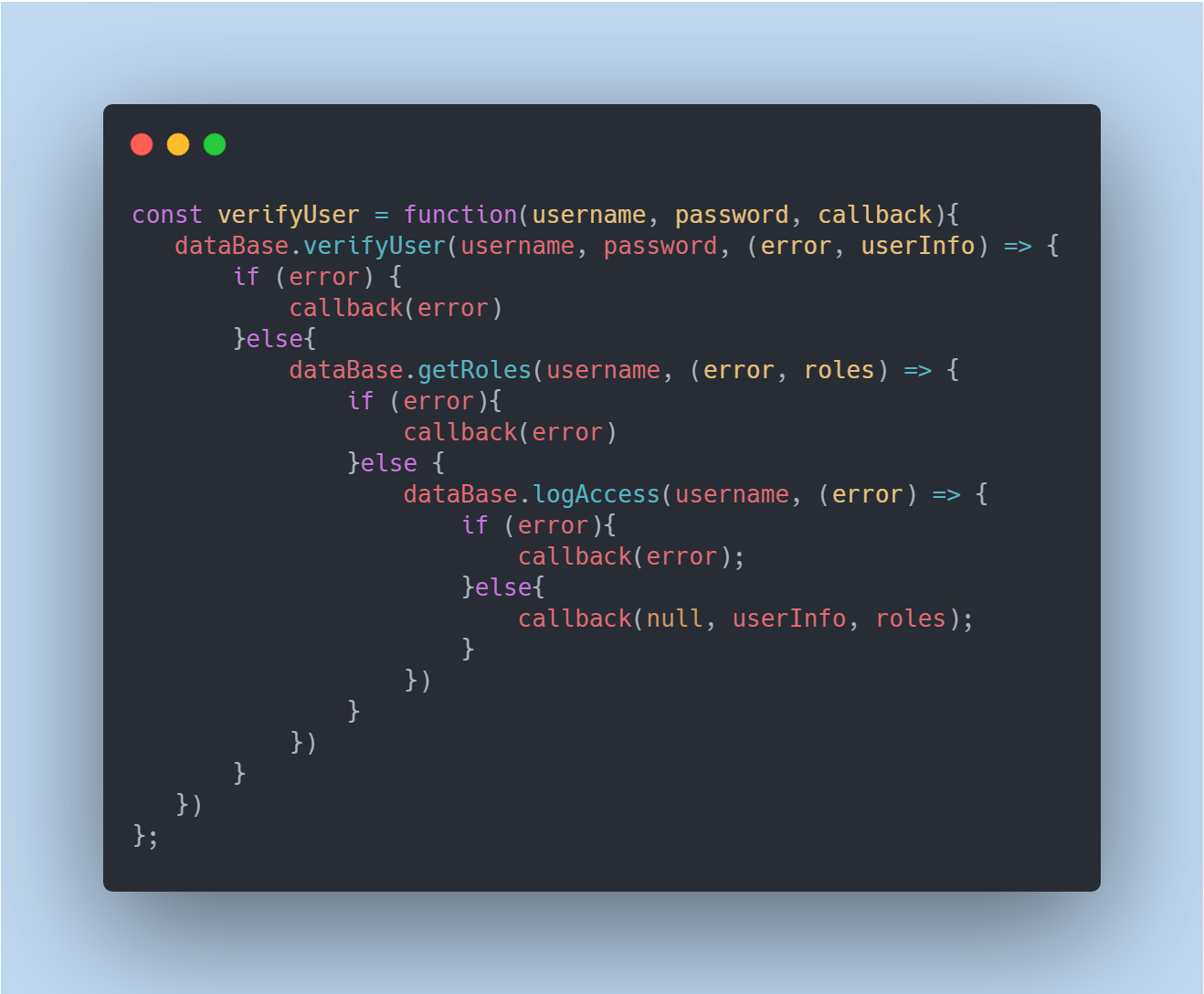
While callbacks are fundamental and still widely used, they can lead to a problem known as “callback hell” or the “pyramid of doom” when dealing with multiple nested asynchronous operations. This occurs when you have many callbacks, each waiting for the previous one to complete, leading to deeply indented, hard-to-read code.
Consider this hypothetical scenario:
getData(function(data1) {
  processData1(data1, function(data2) {
    fetchMoreData(data2, function(data3) {
      // ... and so on, creating a deep indentation
    });
  });
});
To address this complexity, JavaScript introduced Promises and, more recently, the async/await syntax.
- Promises: A Promise is an object that represents the eventual completion (or failure) of an asynchronous operation and its resulting value. It provides a cleaner way to handle asynchronous operations, chaining them together without deep nesting.
- Async/Await: This syntax is built on top of Promises and provides a more synchronous-looking way to write asynchronous code. It allows you to write asynchronous code that reads almost like synchronous code, making it significantly more readable and maintainable.
However, even with these advancements, understanding callbacks remains essential. Promises and async/await often still utilize callbacks under the hood, and many older codebases or libraries rely on the callback pattern. Mastering callbacks provides a solid foundation for understanding these more modern asynchronous patterns.
Conclusion: The Enduring Power of Callbacks
In the dynamic world of JavaScript, callbacks are more than just a programming concept; they are a cornerstone of asynchronous programming. They empower us to build responsive, efficient, and engaging web applications and software by allowing operations to run in the background without blocking the main execution flow.
Whether you’re handling user interactions, fetching data from external services, or scheduling tasks, understanding how to effectively use and manage callbacks is a crucial skill for any JavaScript developer. While newer patterns like Promises and async/await have emerged to simplify complex asynchronous workflows, the fundamental principles of callbacks remain deeply embedded in the JavaScript ecosystem. By grasping this foundational concept, you unlock a deeper understanding of how modern JavaScript applications are built and pave the way for mastering more advanced asynchronous techniques. So, the next time you encounter a function that accepts another function as an argument, remember: you’re looking at the powerful and versatile callback pattern in action.