
The streaming landscape has undergone a radical transformation over the last decade, shifting from a few monolithic platforms to a highly fragmented ecosystem of niche services. Among these, AMC Plus (AMC+) has carved out a significant space by aggregating premium content from Shudder, Sundance Now, and IFC Films. For tech-savvy consumers looking to evaluate whether this specific software stack deserves a place in their digital repertoire, the most pressing question is often: “How long is the AMC Plus free trial?”
As of current market standards, the AMC Plus free trial typically lasts for 7 days. However, navigating this trial is not merely a matter of clicking a button; it involves understanding the underlying digital distribution channels, platform-specific integrations, and the technical nuances of subscription management. This guide explores the technical architecture of the AMC Plus trial, the hardware requirements for an optimal experience, and the best practices for managing your digital footprint within the streaming economy.

The Architecture of the AMC Plus Trial System
In the realm of software-as-a-service (SaaS) for entertainment, the free trial is the primary user acquisition tool. AMC Plus utilizes a standard 7-day window, a duration designed to provide users with enough time to stress-test the interface and sample the library without allowing for “binge-and-bolt” behavior that might occur with a 30-day window.
Standard Trial Duration and Variances
While the 7-day trial is the baseline when signing up directly through the AMC+ website, the duration can fluctuate based on the digital storefront you use. For instance, during major hardware promotional cycles (such as the launch of new Roku or Amazon Fire TV devices), tech companies often partner with content providers to extend these trials to 14 or even 30 days. These extended trials are often baked into the device’s firmware setup process, requiring the user to “claim” the offer during the initial hardware configuration.
Integration via Third-Party “Channels”
One of the most complex technical aspects of AMC Plus is its existence as both a standalone app and a “Channel” within other ecosystems. If you subscribe via Amazon Prime Video Channels, Apple TV Channels, or The Roku Channel, the trial period remains 7 days, but the technical delivery of the content changes.
In these scenarios, you are not using the AMC+ native application code. Instead, the metadata and video streams are served through the host platform’s infrastructure. This is often a preferred route for users with older hardware, as the host apps (like Amazon or Apple) frequently receive more consistent optimization and security updates than smaller, niche applications.
Optimizing the Streaming Tech Stack for AMC Plus
To truly evaluate a streaming service during its trial period, one must ensure that the hardware and network environment are configured for peak performance. AMC Plus offers a range of high-definition content, and its performance is heavily dependent on the client-side hardware and the local network’s Quality of Service (QoS).
Network Requirements and Data Throughput
AMC Plus content generally streams in 1080p Full HD, with select titles moving toward 4K as the platform’s back-end infrastructure matures. For a seamless 1080p experience, a stable downstream bandwidth of at least 5 Mbps is required. However, for a buffer-free experience—especially if other IoT devices are active on the network—a 25 Mbps connection is recommended.
From a technical troubleshooting perspective, if users experience “micro-stuttering” during the trial, the issue often lies in the Wi-Fi frequency. Moving the streaming device to the 5GHz band rather than the congested 2.4GHz band can significantly reduce interference from other household gadgets. Furthermore, utilizing a hardwired Ethernet connection for stationary devices like Smart TVs or gaming consoles remains the gold standard for avoiding packet loss.
Device Compatibility and UI/UX Performance
The AMC Plus app is available across a wide spectrum of operating systems, including:
-
iOS/iPadOS and Android: High levels of optimization for mobile touch interfaces.
-
tvOS (Apple TV) and Android TV: Robust performance with support for system-level search integration.
-
Roku OS and Fire OS: Targeted optimization for low-power streaming sticks.
-
Web Browsers: HTML5-based players that require modern versions of Chrome, Firefox, or Safari for DRM (Digital Rights Management) compliance.
During the 7-day trial, tech-oriented users should pay close attention to the app’s User Interface (UI) latency. A well-designed app should allow for rapid metadata loading and quick transitions between the “Home” screen and the “Live” feed. If the app feels sluggish on a specific piece of hardware, it may be due to the device’s limited RAM or an unoptimized build of the software for that specific OS version.
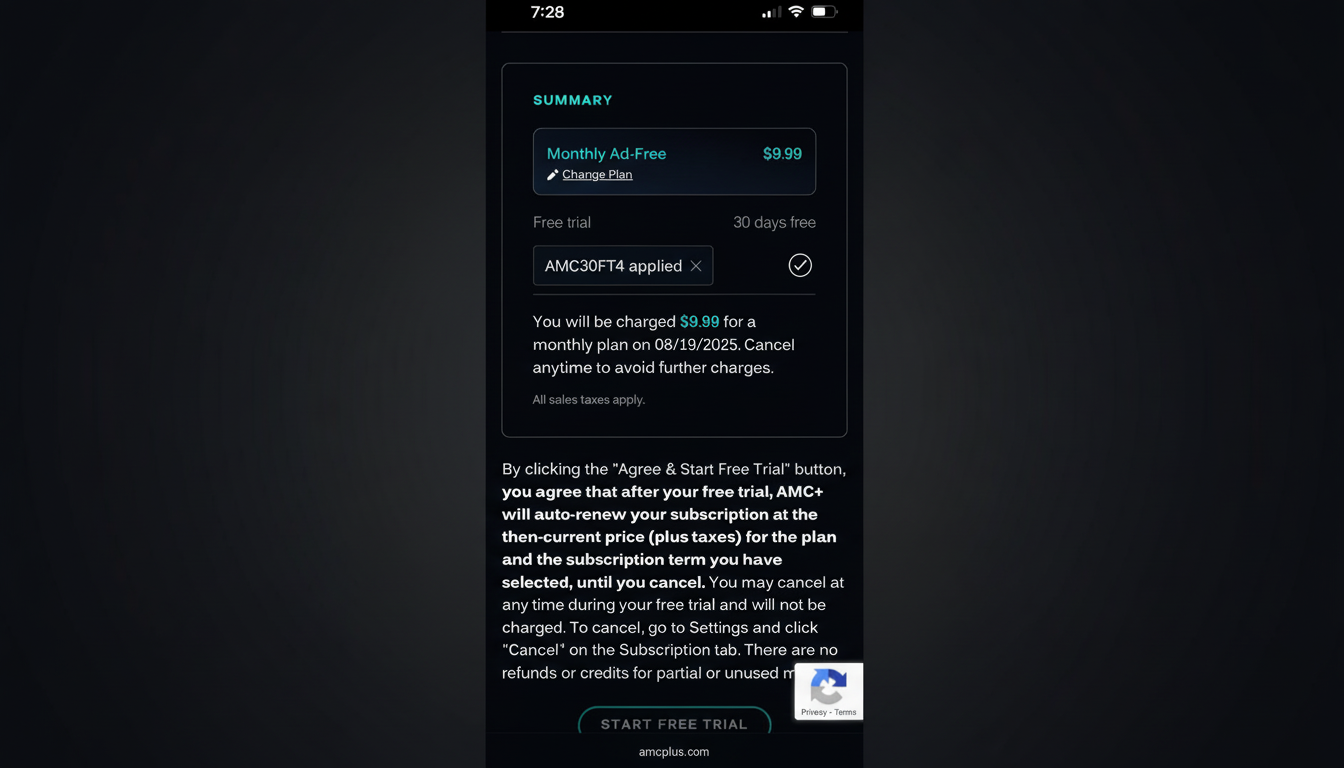
Managing the Digital Subscription Lifecycle
A free trial is not just an opportunity to watch content; it is a technical agreement that involves data sharing and automated billing triggers. Managing this lifecycle is a critical skill in the modern digital economy.
The Auto-Renewal Mechanism
The AMC Plus trial requires a valid payment method (Credit Card, PayPal, or App Store Link) at the point of registration. This is handled through a “pre-authorization” check, where the system verifies the account’s validity without actually processing a charge. The moment the 168th hour (the end of the 7th day) passes, the system’s automated billing engine triggers a subscription charge.
To manage this effectively, users should utilize the notification systems built into their mobile OS. Both iOS and Android allow users to view “Active Subscriptions” in their system settings. A professional tip for trial management is to cancel the subscription immediately after signing up. On most platforms, the technical logic allows the trial to continue until the end of the 7-day period even if “Auto-Renew” is toggled off.
Security and Data Privacy
When signing up for a trial, you are integrating your personal data into a new database. For those concerned with digital security, using “Hide My Email” features (available on Apple devices) or burner email services can help manage the influx of marketing telemetry. Additionally, using virtual credit cards with a $0 limit can act as a technical fail-safe against unwanted “zombie” subscriptions that occur if a cancellation request fails to propagate through the server clusters correctly.
Troubleshooting Common Technical Hurdles
Even during a short trial, technical glitches can occur. Understanding how to resolve these ensures that the evaluation of the service is based on the content and interface rather than avoidable bugs.
Cache Management and App Refreshes
If the AMC Plus app fails to load content or displays an error code (such as the common “Service Unavailable” or DRM-related errors), the first technical step is to clear the application cache. On Android and Fire OS, this can be done via the “Applications” menu in settings. On iOS and tvOS, where manual cache clearing is not supported, a full “Delete and Reinstall” is often necessary to clear the local storage of corrupted temporary files.
DRM and Browser Compatibility
For those using a PC or Mac, AMC Plus utilizes Widevine or FairPlay DRM to prevent unauthorized copying of streams. If you encounter a black screen with audio, it is likely a DRM handshake failure. This often happens if you have screen-recording software active or if you are using an outdated browser that does not support the latest encryption protocols. Ensuring that your browser is updated to the latest stable build is essential for maintaining the security handshake required for premium streaming.
Geographic Restrictions and VPN Protocols
AMC Plus is currently localized to specific regions (primarily the United States, Canada, and Australia). The platform uses IP-based geofencing to restrict access. While many tech enthusiasts use VPNs to navigate these fences, streaming services have become increasingly sophisticated at identifying and blacklisting known VPN server IP ranges. During a trial, if you encounter “Regional Unavailability” errors while using a VPN, it is usually because the platform’s security layer has flagged the tunnel protocol as a proxy.

The Future of Niche Streaming Technology
The existence of trials like the one offered by AMC Plus points toward a larger trend in the tech world: the “Platform-as-a-Service” model for media. As we look forward, the technical barriers between these services are likely to dissolve through deeper OS integration.
AMC Plus’s strategy of bundling IFC, Sundance, and Shudder into a single technical endpoint is a response to “subscription fatigue.” By centralizing the API calls and the user database, they reduce the friction of managing multiple apps. For the user, the 7-day trial is the gateway into this consolidated environment.
In conclusion, while the answer to “how long is the AMC Plus free trial” is a simple 7 days, the execution of that trial is a sophisticated dance of software compatibility, network optimization, and digital management. By understanding the underlying technology—from DRM protocols to subscription logic—users can make an informed decision about whether AMC Plus fits into their long-term digital ecosystem. Whether you are accessing it through a native app or a third-party channel, the goal remains the same: a high-fidelity, secure, and uninterrupted viewing experience.
aViewFromTheCave is a participant in the Amazon Services LLC Associates Program, an affiliate advertising program designed to provide a means for sites to earn advertising fees by advertising and linking to Amazon.com. Amazon, the Amazon logo, AmazonSupply, and the AmazonSupply logo are trademarks of Amazon.com, Inc. or its affiliates. As an Amazon Associate we earn affiliate commissions from qualifying purchases.