
Navigating the complexities of the tax code is one of the most significant annual financial challenges for individuals and business owners alike. In the modern financial landscape, the choice of tax preparation software is not merely a matter of convenience; it is a strategic decision that impacts your bottom line. Among the heavyweights in the industry, TaxAct has carved out a reputation as a value-driven alternative to higher-priced competitors. However, determining exactly how much TaxAct costs requires a nuanced look at their tiered pricing structure, additional filing fees, and the specific financial needs of the taxpayer.

For those focused on personal finance and wealth management, understanding the cost-benefit ratio of tax software is essential. Paying for features you don’t need is a waste of capital, while under-investing in software that fails to identify eligible deductions can result in a much larger financial loss. This guide breaks down the TaxAct pricing model to help you determine which investment aligns with your financial profile.
Understanding TaxAct’s Tiered Pricing Structure
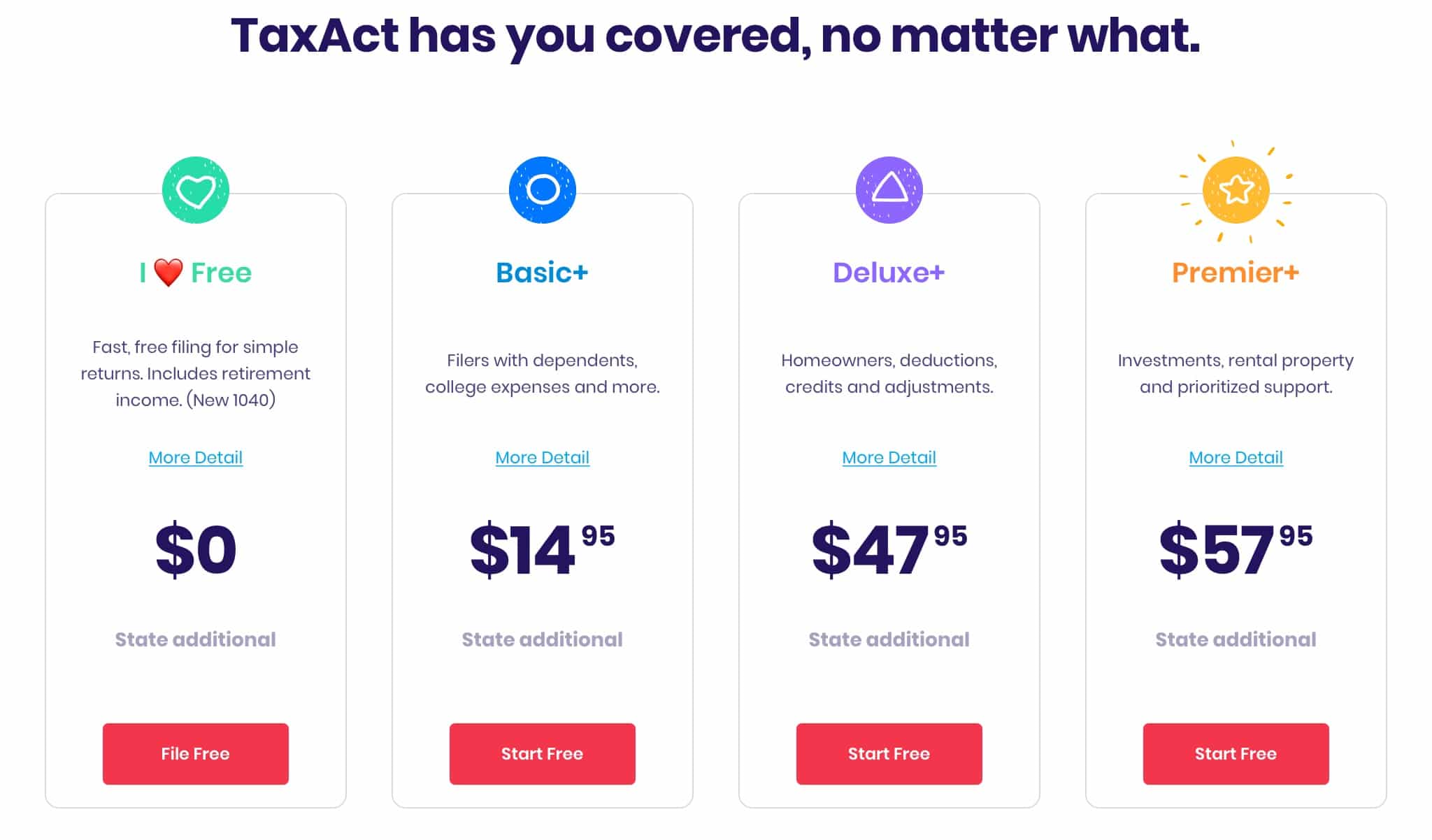
TaxAct operates on a “freemium” to premium model, where the complexity of your financial life dictates the tier you must purchase. Unlike some competitors that gate-keep specific forms behind high-priced paywalls, TaxAct generally offers a transparent progression through four primary tiers.
The Free Confidential Tier
The entry-level offering is designed for taxpayers with the simplest financial situations. This typically includes individuals whose income is derived solely from W-2 wages, unemployment compensation, and standard interest income. While the federal filing is often marketed at $0, it is crucial for users to recognize that “free” usually applies only to the federal return.
In the world of personal finance, the “Free” tier is a tool for building credit and establishing a filing history for young professionals or students. However, if you have any complexity—such as student loan interest deductions or health savings account (HSA) contributions—you may quickly find yourself pushed into the next tier.
The Deluxe Plan
The Deluxe Plan is the most popular option for the average American household. It is designed for those who own a home, have children, or carry student debt. This tier unlocks the ability to itemize deductions, which is a critical strategy for reducing taxable income.
From a financial planning perspective, the Deluxe Plan is where taxpayers begin to see a return on their software investment. By allowing for the deduction of mortgage interest, real estate taxes, and significant medical expenses, the software helps shield more of your hard-earned income from the IRS. The cost for this tier generally fluctuates based on the time of year, with early-bird discounts often available in January.
The Premier Plan
As your investment portfolio grows, so does the complexity of your tax return. The Premier Plan is specifically tailored for investors. If you have sold stocks, bonds, or cryptocurrency during the fiscal year, you will likely need this tier to report capital gains and losses accurately.
This plan also covers rental property income (Schedule E) and foreign bank account reporting. For those focused on long-term wealth building through diversified assets, the Premier Plan provides the necessary forms to ensure that investment expenses are properly accounted for, potentially offsetting the higher cost of the software through smarter tax positioning.
The Self-Employed Plan
The most robust and expensive tier is reserved for freelancers, contractors, and small business owners filing a Schedule C. In the gig economy, where side hustles and independent consulting are common, this plan is a vital business expense.
The Self-Employed Plan includes tools for calculating depreciation on business equipment, home office deductions, and industry-specific tax credits. While it carries the highest price tag, the ability to accurately track and deduct business expenses is a fundamental component of maintaining healthy business cash flow and minimizing self-employment tax liabilities.
Hidden Costs and Add-On Fees to Watch For
The “sticker price” of tax software rarely tells the whole story. In personal finance, the devil is always in the details. When budgeting for TaxAct, you must account for several additional costs that can significantly increase your total expenditure.
State Filing Fees
The most common “hidden” cost in tax preparation is the state filing fee. While the federal price might seem competitive, TaxAct—like most of its peers—charges a separate fee for each state return filed. For individuals who live in one state but work in another, or for digital nomads with income sourced from multiple jurisdictions, these fees can quickly stack up. It is not uncommon for the state filing fee to nearly equal the cost of the federal software itself.
Professional Support and Xpert Assist
One of TaxAct’s premium value-adds is “Xpert Assist.” This service allows users to connect with CPAs or Enrolled Agents for personalized advice and a final review of their return. While this feature provides a safety net for those concerned about audits or complex tax laws, it typically comes with an additional fee or is bundled into a higher-priced version of the software.
For many, this is a worthwhile investment. The cost of a one-hour consultation with an independent CPA can far exceed the add-on fee for Xpert Assist. If you are making a significant financial transition—such as selling a business or managing a large inheritance—the professional oversight can prevent costly errors.
Refund Transfer and Payment Fees
How you choose to pay for the software also affects the total cost. If you opt to have the software fees deducted from your tax refund rather than paying upfront with a credit card, you will likely incur a “Refund Transfer” fee. This is essentially a convenience charge assessed by a third-party bank. From a strictly financial standpoint, it is almost always more cost-effective to pay for the software upfront to avoid these auxiliary processing fees.
Comparing TaxAct to Major Competitors
In the competitive landscape of financial tools, TaxAct positions itself as a high-value, lower-cost alternative to industry giants like TurboTax and H&R Block. Understanding where TaxAct sits in the market helps you make an informed choice for your personal budget.
Price Point Comparison
Generally, TaxAct maintains a price point that is 20% to 30% lower than TurboTax for comparable tiers. For a self-employed individual, this savings might represent $50 to $100. Over a decade of filing, choosing a more affordable software provider can lead to significant cumulative savings, which could be better utilized in a high-yield savings account or an IRA.
User Experience and Feature Sets
While TaxAct is more affordable, the “cost” is sometimes paid in the user interface. TurboTax is often cited for its highly polished, interview-style UI, which some users find more intuitive. TaxAct, conversely, is slightly more utilitarian. It provides all the necessary calculations and forms but may require the user to have a slightly firmer grasp of their financial documents. For the financially literate user who is comfortable navigating forms, the lower price of TaxAct represents an excellent ROI (Return on Investment).
Is TaxAct Worth the Investment? Evaluating ROI for Different Taxpayers
The question of “how much it costs” should always be followed by “what is the value?” In personal finance, we look for the intersection of low cost and high utility.
Best Value for Simple and Mid-Level Filers
For W-2 employees with a mortgage and a few investments, TaxAct offers perhaps the best balance in the industry. You receive a robust platform that ensures compliance and maximizes standard deductions without the “brand name” markup of larger competitors. The ROI here is clear: you save on software costs while still securing your full legal refund.
Value for Small Business Owners
For the self-employed, the software is more than just a filing tool; it is a defensive measure. The Self-Employed tier’s ability to categorize expenses and calculate the Qualified Business Income (QBI) deduction can save a taxpayer thousands of dollars. In this context, the $60–$100 spent on software is a negligible expense compared to the potential tax savings.
Strategies to Save Money on Your Tax Preparation
If you have decided that TaxAct is the right financial tool for your needs, there are several ways to drive the cost down even further.
Early Bird Discounts
Tax software pricing is dynamic. In December and January, companies offer “early bird” pricing to entice users to commit before the rush. As April 15th approaches, prices typically increase. By organizing your financial documents early and locking in a price in January, you can often save 15% to 25% on the base software cost.
Professional and Association Bundles
Many banks, credit unions, and professional organizations offer discounts on tax software to their members. Before paying full price, check your credit card rewards portal or your business association benefits. These partnerships often provide a link that applies a discount code automatically, further enhancing the value proposition of the software.

Use the Right Tier
One of the biggest mistakes in personal finance is over-purchasing. Many taxpayers assume they need the “Premier” or “Self-Employed” version because they have a small amount of dividend income or a tiny side hustle. TaxAct’s interface will often prompt you to upgrade. However, if your side income is minimal and doesn’t require a Schedule C, or if your investments are simple, you may be able to stay in a lower tier. Reviewing the form requirements before starting can prevent you from paying for features that don’t apply to your specific financial situation.
Ultimately, the cost of TaxAct is a variable expense that depends on your proactive planning and your financial complexity. By understanding the tiers, anticipating the add-on fees, and timing your purchase, you can turn tax season from a financial drain into a streamlined, cost-effective component of your overall wealth management strategy.
aViewFromTheCave is a participant in the Amazon Services LLC Associates Program, an affiliate advertising program designed to provide a means for sites to earn advertising fees by advertising and linking to Amazon.com. Amazon, the Amazon logo, AmazonSupply, and the AmazonSupply logo are trademarks of Amazon.com, Inc. or its affiliates. As an Amazon Associate we earn affiliate commissions from qualifying purchases.