
In an increasingly digitized world, managing our finances has transcended the traditional brick-and-mortar bank branch. The ability to deposit a check online, particularly with a major financial institution like Chase, represents a significant leap forward in personal finance convenience and efficiency. No longer are you beholden to bank operating hours or geographical proximity; your smartphone or scanner transforms into a personal teller, accessible 24/7. This comprehensive guide will walk you through the process of depositing a check online with Chase, delve into the financial nuances involved, and equip you with best practices for a seamless and secure digital banking experience.
The Evolution of Check Deposits: Embracing Digital Convenience
The landscape of personal finance has undergone a dramatic transformation over the past two decades. What was once a routine trip to the bank teller or ATM has evolved into a few taps on a smartphone screen. This shift towards digital convenience is not merely a luxury; it’s a fundamental change in how we interact with our money, offering unparalleled flexibility and control.
From Branch Visits to Mobile Banking
For generations, depositing a check meant a physical journey. You’d either fill out a deposit slip and hand it to a teller, or navigate the sometimes-finicky interface of an ATM. While these methods remain viable, they come with inherent limitations:
-
Time Constraints: Bank branches operate within set hours, and ATMs, while more accessible, can be out of the way or prone to queues.
-
Geographic Limitations: Moving or traveling often meant finding a new branch or an ATM of your specific bank.
-
Logistical Hurdles: Inclement weather, transportation issues, or simply a busy schedule could make a simple deposit a time-consuming chore.
Mobile banking, spearheaded by institutions like Chase, shattered these barriers. The advent of smartphone cameras and sophisticated banking apps made it possible to literally “snap” a picture of a check and transmit it securely to your bank. This innovation, often referred to as “remote deposit capture” or “mobile check deposit,” has become a cornerstone of modern personal finance management. It empowers individuals to manage their cash flow from virtually anywhere, at any time, fitting seamlessly into the rhythm of contemporary life.
The Security and Efficiency of Digital Deposits
Beyond convenience, online check deposits offer distinct advantages in terms of security and efficiency. Chase, like other leading financial institutions, employs robust security measures to protect your financial data during online transactions.
-
Encryption: All data transmitted between your device and Chase’s servers is heavily encrypted, safeguarding sensitive information like account numbers and check details from interception.
-
Secure Authentication: Access to the mobile banking app requires strong authentication, typically involving a username, password, and often two-factor authentication (like a fingerprint, face ID, or a one-time code sent to your phone), ensuring only authorized users can initiate transactions.
-
Fraud Detection Systems: Banks utilize sophisticated algorithms and fraud detection systems that monitor transactions for unusual activity, adding another layer of protection.
In terms of efficiency, digital deposits significantly reduce processing times in many cases. While there might still be hold periods (which we’ll discuss later), the immediate digital submission of the check often kickstarts the processing sooner than a physical deposit might, especially if made outside of traditional banking hours. This speed and security instill confidence, making online check deposits not just an easy option, but often the preferred one for many Chase customers.
Step-by-Step Guide to Mobile Check Deposit with Chase
Depositing a check using the Chase Mobile app is designed to be intuitive and user-friendly. By following a few simple steps, you can quickly and securely credit funds to your account.
Prerequisites for a Smooth Deposit
Before you begin, ensure you have the following in place to guarantee a hassle-free experience:
-
An Active Chase Account: You must be a Chase customer with an eligible checking, savings, or money market account.
-
Chase Mobile App: Download and install the latest version of the Chase Mobile app on your smartphone or tablet (available for iOS and Android).
-
Reliable Internet Connection: A stable Wi-Fi or cellular data connection is crucial for secure data transmission.
-
Well-Lit Environment: Good lighting is essential for taking clear images of your check. Avoid shadows or glare.
-
Endorsed Check: The check must be properly endorsed on the back.
Navigating the Chase Mobile App
Once you’ve met the prerequisites, follow these steps to initiate your deposit:
-
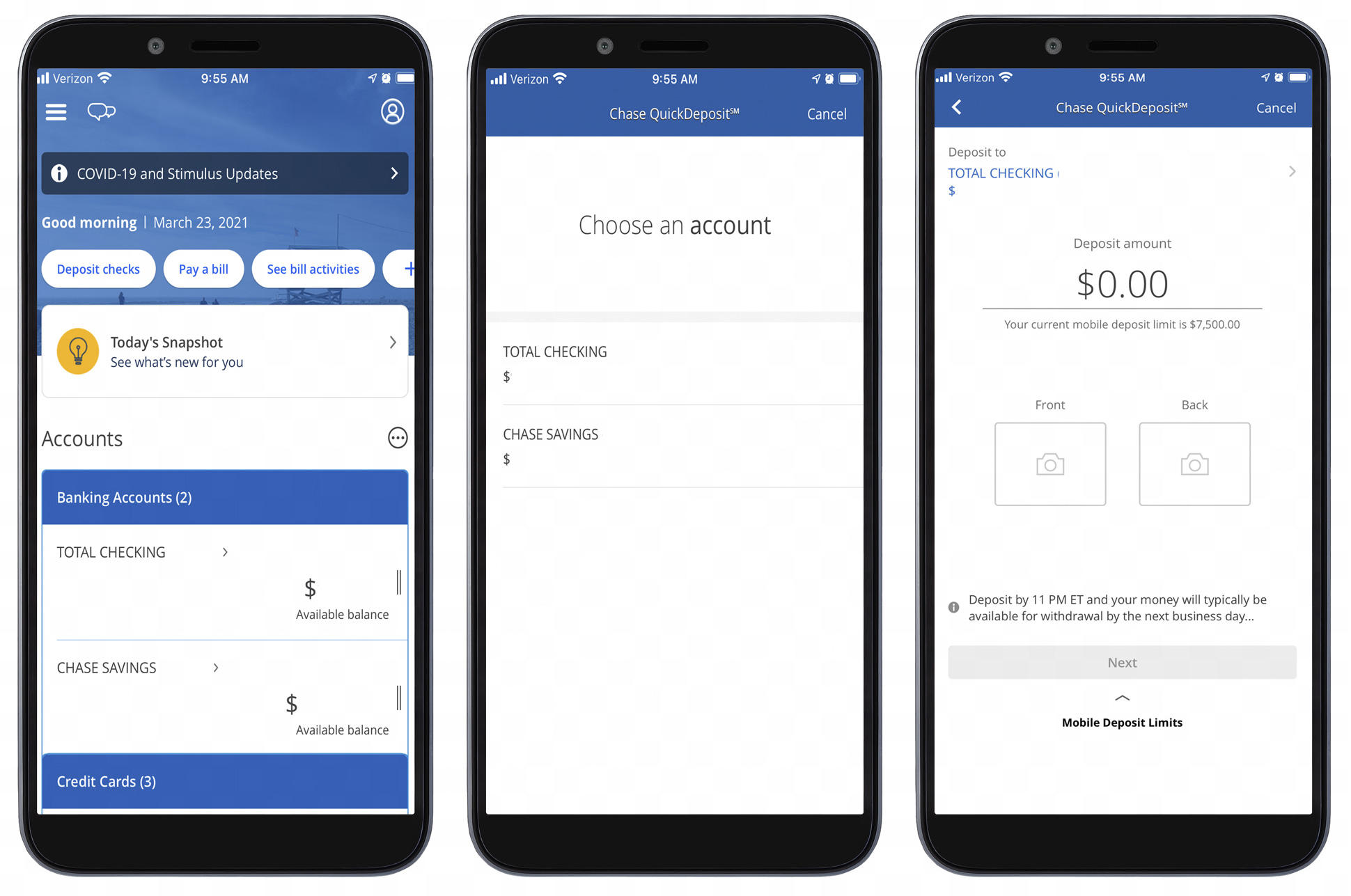
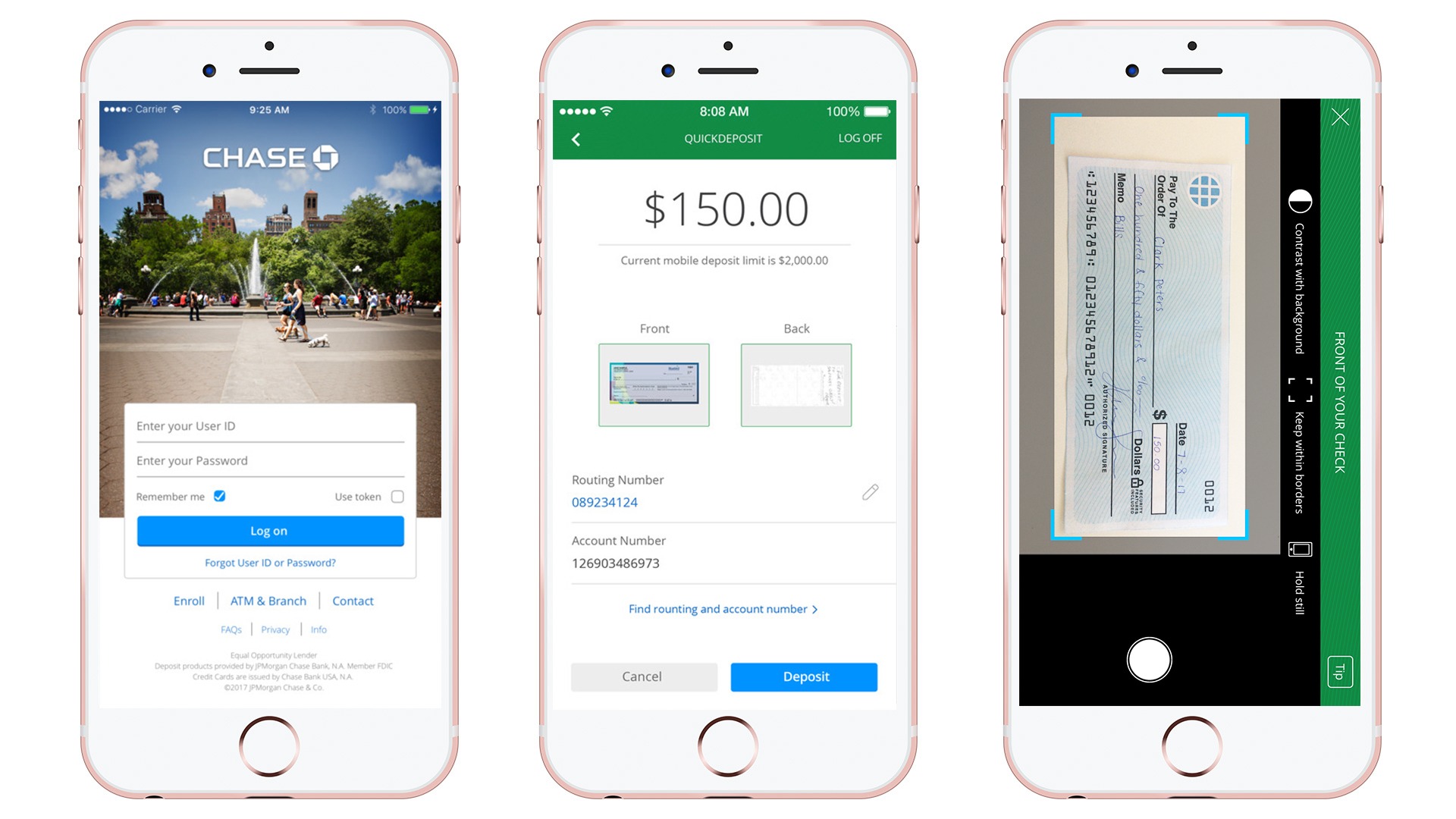
Log In: Open the Chase Mobile app and log in using your username and password. You may also use biometric authentication (fingerprint or face ID) if enabled.
-
Select “Deposit”: On the main dashboard, you’ll typically find a prominent “Deposit” or “Deposit Checks” option. Tap on it.
-
Choose Account: Select the Chase account (checking or savings) into which you wish to deposit the funds.
-
Enter Amount: Carefully enter the exact dollar amount of the check. Double-check this to avoid errors.
Endorsing Your Check Correctly
Correct endorsement is a critical step for mobile check deposits. Failure to endorse properly can lead to deposit rejection or delays.
-
Sign the Back: Turn the check over to the back. There will typically be an “Endorse Here” line. Sign your name exactly as it appears on the “Pay to the Order Of” line on the front of the check.
-
“For Mobile Deposit Only” (or similar): Below your signature, it’s highly recommended, and often required by Chase, to write “For Mobile Deposit Only” or “For Deposit Only at Chase.” This specific endorsement helps prevent the check from being accidentally deposited again physically and indicates its intended use. Some banks even have a pre-printed box on the back for this purpose; if so, check that box.
Capturing Clear Images
This is perhaps the most crucial technical step. The app uses your device’s camera to capture images of the front and back of the check.
-
Front of the Check:
-
Place the check on a dark, flat, non-reflective surface.
-
Position your phone directly above the check, ensuring all four corners are visible within the app’s frame.
-
The app will often provide a guide box. Fit the check entirely within this box.
-
Tap the camera icon to take the picture. Ensure the numbers, date, payee, and amount are all clear and legible.
-
-
Back of the Check (Endorsed Side):
-
Flip the check over to the endorsed side.
-
Repeat the process, ensuring your signature and the “For Mobile Deposit Only” annotation are clearly visible.
-
Tap the camera icon.
-
The app will typically process the images and confirm their clarity. If the images are blurry or incomplete, the app will prompt you to retake them. Take your time to get clear, well-lit photos.
Confirming Your Deposit
After successfully capturing both images:
-
Review Details: The app will display a summary of your deposit, including the account, amount, and images. Review all details carefully to ensure accuracy.
-
Confirm: If everything looks correct, tap the “Deposit” or “Confirm” button to submit your check.
-
Confirmation: You will receive an immediate confirmation screen within the app, often with a confirmation number. Chase may also send an email confirmation to your registered email address. This confirmation is your proof of deposit.
Understanding Deposit Limits, Holds, and Funds Availability
While mobile check deposits offer immense convenience, it’s important to understand the financial mechanics behind them, specifically regarding limits, holds, and when your money will actually be available for use. These policies are in place for security and regulatory compliance.
Daily and Transaction Limits

Chase, like all financial institutions, implements limits on mobile check deposits. These limits are designed to mitigate risk and can vary based on several factors:
-
Customer Relationship: Long-standing customers with good standing might have higher limits than new customers.
-
Account Type: Certain account types might have different default limits.
-
Transaction History: Your past deposit behavior can influence your limits.
-
Check Amount: The amount of the individual check being deposited.
-
Daily and Monthly Limits: There are typically limits on the total dollar amount you can deposit via mobile in a single day, and often over a rolling 30-day period.
For example, a common daily limit might be $2,000 to $10,000, with monthly limits reaching $10,000 to $25,000 or more. These limits are not always prominently displayed upfront but can usually be found within the app’s help section or by contacting Chase customer service. If a check exceeds your mobile deposit limit, you would need to deposit it at an ATM or a Chase branch.
The Nature of Check Holds
A “check hold” is a temporary restriction placed on the funds from a deposited check, meaning you cannot access the full amount immediately. Banks place holds for several reasons:
-
Verification: To allow time for the check to clear the issuing bank and ensure the funds are legitimate and available.
-
Fraud Prevention: To detect and prevent fraudulent checks from being withdrawn.
-
Regulatory Compliance: Banks are subject to regulations (like Regulation CC) that govern how quickly funds must be made available.
Common reasons for extended holds can include:
-
Large Check Amounts: Checks over a certain threshold (e.g., $5,000) often trigger longer holds.
-
New Accounts: New accounts typically have longer hold periods until a banking relationship is established.
-
Repeated Overdrafts: Accounts with a history of overdrafts or negative balances might face extended holds.
-
Third-Party Checks: Checks that are not payable directly to you (e.g., endorsed over to you by someone else) can also be subject to holds.
While a portion of the deposit (often the first $225) might be available on the next business day, the remainder could be held for a few business days, or sometimes longer, depending on the circumstances.
When Will Your Funds Be Available?
Chase will provide you with an estimated availability date for your funds during the deposit confirmation process. Generally, funds from mobile deposits made before a certain cut-off time (e.g., 8 PM ET) on a business day are often processed that day. Funds deposited after the cut-off time or on weekends/holidays are typically processed on the next business day.
-
Next Business Day Availability: For most standard personal checks under a certain amount, a portion or even the full amount may be available on the next business day.
-
Extended Availability: If a hold is placed, the funds will be available after the hold period expires, which could be anywhere from 2 to 7 business days, or occasionally longer for specific cases.
It’s crucial to check the estimated availability date provided by the app for each deposit. This information helps you plan your spending and avoid potential overdrafts or late payment fees. You can also monitor your account activity within the Chase app or online portal to see when deposited funds clear and become available.
Best Practices for Secure and Successful Online Deposits
While the convenience of mobile check deposits is undeniable, adopting best practices ensures both the security of your financial information and the smooth processing of your transactions.
Protecting Your Mobile Device and Account
Your smartphone is your gateway to your financial life; protecting it is paramount.
-
Strong Passwords/Biometrics: Always use a strong, unique password for your device and for the Chase Mobile app. Enable biometric authentication (fingerprint, face ID) for an extra layer of security.
-
Keep Software Updated: Regularly update your phone’s operating system and the Chase Mobile app. Updates often include critical security patches.
-
Be Wary of Public Wi-Fi: Avoid conducting financial transactions over unsecured public Wi-Fi networks, as they can be vulnerable to eavesdropping. If you must, use a Virtual Private Network (VPN).
-
Monitor Account Activity: Regularly review your Chase account statements and transaction history for any unauthorized activity. Set up alerts for large transactions or unusual logins.
-
Never Share Login Credentials: Chase will never ask for your password via email or phone. Be suspicious of any communication requesting this information.
Keeping Records and What to Do with the Physical Check
After a successful mobile deposit, your responsibility doesn’t end immediately.
-
Retain the Physical Check: Do not destroy or discard the physical check immediately after depositing it. Banks generally recommend keeping the check for a certain period (e.g., 5-14 business days, or until the funds are fully available and cleared). This allows for easy retrieval if there’s any issue with the mobile deposit.
-
Mark the Check: Once the funds are fully available and you’re confident the deposit processed correctly, write “VOID” or “Electronically Deposited” across the front of the check before securely shredding it. This prevents anyone from attempting to deposit it again.
-
Digital Records: The Chase app and your online banking portal provide a digital record of your deposit. You can take a screenshot of the confirmation page or save the confirmation email for your personal records.
Troubleshooting Common Issues
While mobile deposits are generally smooth, issues can arise. Knowing how to address them can save time and frustration.
-
Deposit Rejected:
-
Blurry Images: Retake photos, ensuring they are clear, well-lit, and all four corners are visible.
-
Incorrect Endorsement: Ensure your signature is present and “For Mobile Deposit Only at Chase” is clearly written.
-
Incorrect Amount: Double-check that the entered amount matches the check.
-
Exceeding Limits: If you exceed daily or monthly limits, you’ll need to use an ATM or branch.
-
Check Already Deposited: Ensure the check hasn’t been deposited previously.
-
-
Funds Not Available as Expected:
-
Check Hold: Review the initial deposit confirmation for any stated hold periods.
-
Processing Time: Remember deposits made after the cut-off time or on non-business days are processed on the next business day.
-
Contact Chase: If you suspect an error or the delay is unusual, contact Chase customer service via phone or secure message within the app/online banking. Provide your confirmation number for faster assistance.
-
Maximizing Your Digital Banking Experience with Chase
Mobile check deposit is just one facet of the expansive digital banking ecosystem offered by Chase. By familiarizing yourself with these tools, you can unlock a greater degree of financial control and convenience.
Beyond Check Deposits: Other Mobile Banking Features
Chase’s mobile app is a comprehensive personal finance hub, offering a wide array of features designed to simplify money management:
-
Account Monitoring: View all your Chase accounts (checking, savings, credit cards, investments) at a glance, check balances, and review transactions.
-
Bill Pay: Schedule and pay bills directly from your checking account, set up recurring payments, and manage payees.
-
Transfers: Easily transfer funds between your Chase accounts or to external bank accounts.
-
Zelle®: Send and receive money instantly with friends, family, and others you trust, directly from the app.
-
Budgeting Tools: Many banking apps, including Chase, offer tools to categorize spending, set budgets, and track your financial habits.
-
Credit Score Access: Many Chase credit card customers can view their FICO® Score within the app.
-
Branch/ATM Locator: Find the nearest Chase branches or ATMs when you need in-person services.
-
Customer Support: Access secure messaging, FAQs, or contact customer service directly through the app.
-
Card Management: Lock/unlock your debit or credit card, report it lost/stolen, and manage travel notifications.
By leveraging these features, you transform your smartphone into a powerful financial management tool, capable of handling almost all your day-to-day banking needs without ever stepping into a branch.
The Financial Freedom of Digital Tools
The overarching benefit of mastering digital banking tools like Chase’s mobile check deposit and other features is the profound sense of financial freedom they confer.
-
Time Savings: Eliminate travel time, waiting in lines, and conforming to bank hours. This reclaimed time can be dedicated to work, family, or leisure.
-
Greater Control: Real-time access to your account balances and transaction history allows for better budgeting and immediate awareness of your financial standing.
-
Enhanced Accessibility: Manage your money even when traveling, relocating, or during emergencies.
-
Reduced Paperwork: Digital statements and transaction histories contribute to a greener, more organized financial life.
-
Proactive Management: Set up alerts for low balances, large transactions, or payment due dates to stay ahead of your finances.
In conclusion, depositing a check online with Chase is a straightforward, secure, and highly convenient process that exemplifies the best of modern personal finance. By understanding the steps, adhering to best practices, and leveraging the full suite of digital tools available, you can streamline your financial life, gain greater control over your money, and enjoy the true freedom that comes with digital banking.
aViewFromTheCave is a participant in the Amazon Services LLC Associates Program, an affiliate advertising program designed to provide a means for sites to earn advertising fees by advertising and linking to Amazon.com. Amazon, the Amazon logo, AmazonSupply, and the AmazonSupply logo are trademarks of Amazon.com, Inc. or its affiliates. As an Amazon Associate we earn affiliate commissions from qualifying purchases.