
In the rapidly evolving landscape of digital finance, applications like Cash App have become indispensable tools for managing personal funds. Offering unparalleled convenience for sending, receiving, and even investing money, Cash App simplifies many financial transactions. However, a common and critical question for many users revolves around accessing their funds: “Where can I take money off Cash App for free?” Understanding the various withdrawal mechanisms and, crucially, how to avoid associated fees, is vital for prudent financial management. This article delves into the strategies and options available to ensure your money remains accessible without incurring unnecessary costs, reinforcing smart personal finance practices.
Understanding Cash App’s Withdrawal Mechanisms and Fees
Cash App, like many financial service providers, offers a range of options for accessing your funds, each with its own set of rules regarding speed and cost. Differentiating between these options is the first step towards fee-free withdrawals.
Instant vs. Standard Withdrawals
The primary distinction in Cash App withdrawals lies between instant and standard transfers.
-
Standard Transfers: These transfers typically deposit funds into your linked bank account within 1 to 3 business days. The significant advantage of standard transfers is that they are entirely free of charge. For users who can plan their finances and don’t require immediate access to their money, this is the most cost-effective method. It leverages the traditional Automated Clearing House (ACH) network for bank-to-bank transfers, which, while slower, is universally free for consumers.
-
Instant Transfers: Designed for immediate access, instant transfers deposit funds to your linked debit card almost instantly. While incredibly convenient for urgent financial needs, Cash App imposes a fee for this service, typically 0.5% to 1.75% of the transferred amount, with a minimum fee of $0.25. For example, transferring $100 instantly might cost you between $0.50 and $1.75. While seemingly small, these fees can accumulate over time, eroding your overall financial standing.
Potential Fees to Avoid
Beyond instant transfer fees, users might encounter other charges if they are not careful.
-
ATM Fees (Without Direct Deposit or Eligible Boosts): If you use your Cash Card (Cash App’s free debit card) at an ATM that is not part of Cash App’s fee-free network or if you don’t meet the criteria for ATM fee reimbursement, you could face fees from both the ATM operator and potentially Cash App.
-
Expedited Card Orders: While the standard Cash Card is free to order, Cash App might charge a fee for expedited shipping if you need the card quickly.
-
Peer-to-Peer Transaction Fees (Rare): Generally, sending and receiving money between Cash App users is free. However, if a user initiates a payment using a credit card linked to their Cash App account, Cash App charges a 3% fee to the sender. While not a withdrawal fee, it’s a cost associated with moving money within the ecosystem that users should be aware of.
Avoiding these fees is paramount for maximizing the value of your funds and adhering to sound personal finance principles. Understanding when and why fees are applied empowers you to make informed decisions about how and when you access your money.
The Primary Free Withdrawal Method: Standard Bank Transfer
For most users, the most straightforward and consistently free way to withdraw money from Cash App is by transferring it directly to a linked bank account via a standard transfer. This method is reliable, secure, and crucially, incurs no charges from Cash App.
Step-by-Step Guide to Linking Your Bank Account
Before you can initiate a standard transfer, you must have a bank account linked to your Cash App profile.
-
Open Cash App: Launch the Cash App on your mobile device.
-
Navigate to the Banking Tab: Tap the “Banking” icon (usually represented by a house or building) on the bottom left of your screen.
-
Link Bank: Under the “Cash Out” option, you will see an option to “Link Bank.” Tap on it.
-
Enter Bank Credentials: Cash App uses Plaid, a secure third-party service, to connect to your bank. You will be prompted to select your bank from a list and then enter your online banking login credentials. This process securely verifies your account ownership without Cash App ever storing your bank login information.
-
Confirm Link: Follow the on-screen prompts to confirm the linking process. Once complete, your bank account will appear as a linked option for withdrawals.
It is critical to ensure the accuracy of your bank information. Any discrepancies could lead to delays or even rejection of your transfer. Linking a checking or savings account is ideal, as debit cards are primarily used for instant transfers and credit cards cannot be used for withdrawals.
Initiating a Standard Transfer
Once your bank account is linked, initiating a free standard transfer is simple:
-
Open Cash App: Tap the “Banking” icon.
-
Select “Cash Out”: Tap on the “Cash Out” button.
-
Enter Amount: Input the amount of money you wish to withdraw.
-
Choose “Standard”: When prompted to choose between “Standard” and “Instant,” select “Standard.”
-
Confirm Transfer: Review the details (amount, destination bank account) and confirm the transfer.
After confirmation, you will see an estimated arrival date, typically 1 to 3 business days. Weekends and holidays can extend this timeframe, so it’s always wise to initiate transfers with sufficient lead time. The funds will then appear directly in your designated bank account without any deductions for fees. This method is the backbone of free financial access within the Cash App ecosystem.
Verifying Your Bank Account
While usually integrated into the linking process, some banks might require additional verification. This often involves micro-deposits, where Cash App sends two small, random amounts (e.g., $0.15 and $0.23) to your bank account. You then confirm these amounts within the Cash App to prove ownership. This is a security measure to protect your funds and ensure transfers go to the correct account. While it adds a minor step, it’s a one-time process that safeguards your finances.
Utilizing the Cash Card for Free Access
Beyond direct bank transfers, the Cash Card offers another powerful avenue for accessing your funds without fees, particularly for everyday spending and specific ATM withdrawals.
What is the Cash Card?
The Cash Card is a free, customizable Visa debit card directly linked to your Cash App balance. It functions like any traditional debit card, allowing you to make purchases online, in stores, and withdraw cash from ATMs. It’s an excellent tool for spending the money in your Cash App balance without first having to transfer it to a separate bank account. You can order a physical card for free directly from the Cash App, and a virtual card is available immediately for online purchases.

Free ATM Withdrawals with Cash Card
While many ATMs charge fees, Cash App offers ways to mitigate these costs, especially for users who leverage its features fully.
-
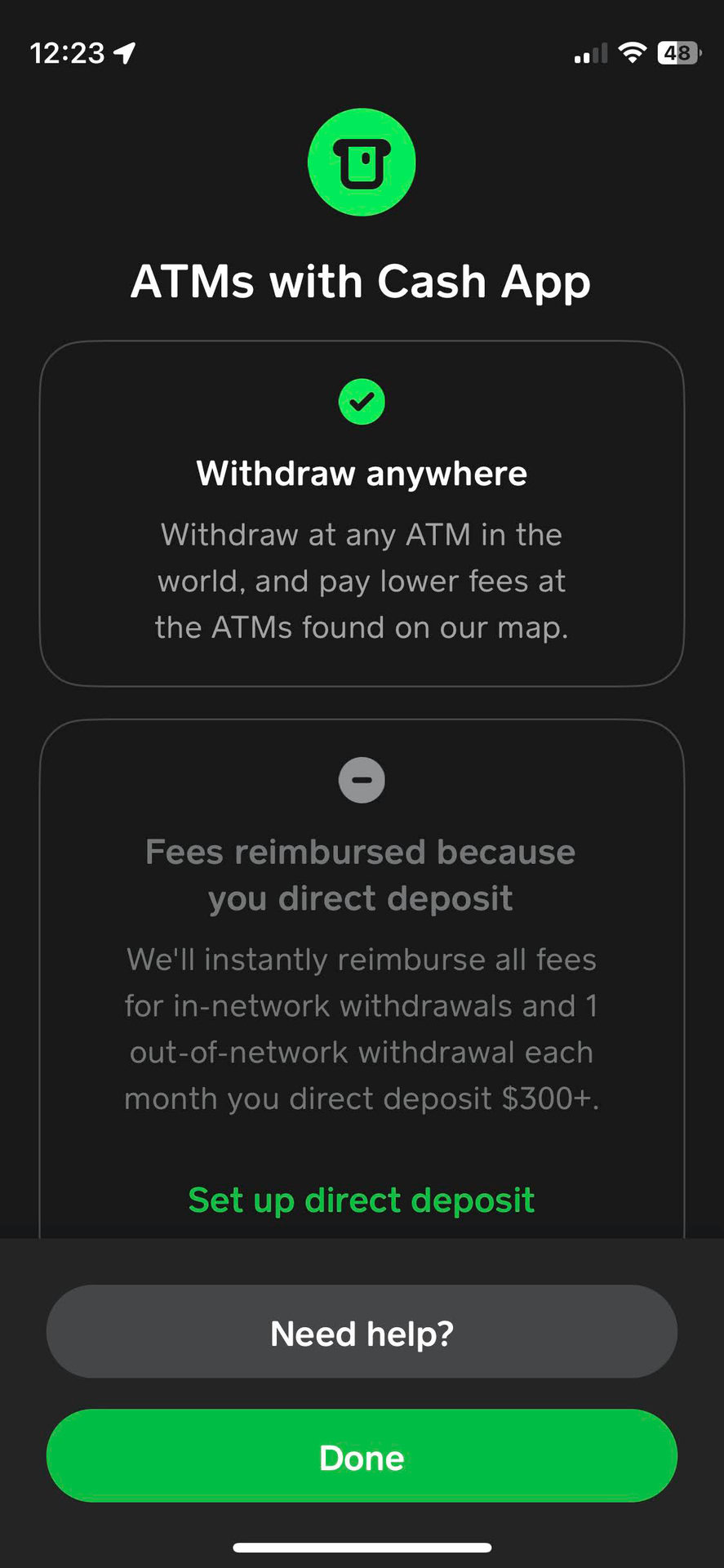
Finding Fee-Free ATMs: Cash App does not have its own network of fee-free ATMs in the traditional sense, but it can reimburse ATM fees under certain conditions. For users who set up direct deposit with Cash App (e.g., direct deposit of paychecks, government benefits), Cash App will reimburse fees from any ATM, up to a certain limit per 31-day period. Once you’ve received at least $300 in direct deposits into your Cash App balance within a 31-day rolling period, Cash App will refund up to three ATM withdrawal fees (and up to $7 in total fees) for each subsequent 31-day period. This essentially turns most ATMs into free-withdrawal points for eligible users.
-
Checking Eligibility: To check if you qualify for ATM fee reimbursement, navigate to the Cash Card section of your app and look for details regarding direct deposit benefits. This feature significantly enhances the utility of the Cash Card for free cash access.
-
Withdrawal Limits: Be aware that the Cash Card has daily, weekly, and monthly ATM withdrawal limits. Typically, users can withdraw up to $310 per transaction, $1,000 per day, and $1,000 per week. These limits are in place for security and regulatory compliance.
Point-of-Sale Cashback
An often-overlooked yet highly effective method for obtaining cash without ATM fees is through point-of-sale (POS) cashback. Many grocery stores, pharmacies, and large retailers offer the option to receive cash back when you make a purchase using a debit card.
-
How it Works: When paying for groceries or other items with your Cash Card, simply inform the cashier that you’d like cash back. They will add the requested cash amount to your total purchase, and you’ll receive the physical cash. For example, if your groceries cost $50 and you request $20 cash back, your Cash Card will be charged $70, and you’ll receive $20 in physical currency.
-
Benefits: This method is entirely free, as it’s processed as part of a regular debit card transaction, circumventing any ATM fees. It’s convenient and widely available, making it an excellent alternative to finding an ATM, especially for smaller amounts of cash. Always confirm with the retailer if they offer cash back and what their limits are.
Alternative and Less Common Free Withdrawal Strategies
While standard bank transfers and Cash Card usage are the primary methods, there are other strategies and considerations that contribute to effectively managing and utilizing funds from Cash App for free.
Leveraging Direct Deposit for ATM Fee Reimbursement
As highlighted earlier, setting up direct deposit into your Cash App account is a game-changer for free ATM access. Instead of just thinking of direct deposit as a way to get your paycheck, consider it an investment in your financial flexibility within the Cash App ecosystem.
-
Enabling Direct Deposit: You can easily find your Cash App account and routing numbers within the “Banking” tab. Provide these details to your employer, government agency, or any payer that offers direct deposit.
-
The Reimbursement Benefit: Once you consistently meet the direct deposit threshold ($300 within a 31-day period), Cash App automatically reimburses ATM fees. This transforms a potential cost into a free service, making your Cash Card a more powerful financial tool. This also underscores a broader principle in personal finance: understanding the full benefits of your financial tools.
Using Cash App for Direct Bill Payments and Purchases
While not a “withdrawal” in the traditional sense of taking out physical cash, utilizing your Cash App balance to pay bills or make direct purchases effectively “removes” money from the app without incurring transfer fees.
-
Online Purchases: Use your Cash Card (virtual or physical) for online shopping. This instantly depletes your Cash App balance without any transfer steps or fees.
-
In-Store Payments: Swipe your physical Cash Card or use it with mobile payment systems (like Apple Pay or Google Pay, if Cash App is integrated) for purchases at brick-and-mortar stores.
-
Bill Pay (Indirectly): Many online bill payment portals accept debit card payments. You can use your Cash Card to pay bills directly from your Cash App balance. This saves you the step of transferring money to your bank account first, then paying the bill, potentially saving you time and avoiding any inadvertent instant transfer fees.
-
Peer-to-Peer Payments: While not withdrawing your money for your use outside the app, sending money to another Cash App user is free. If you owe a friend money or need to split a bill, using Cash App for peer-to-peer transfers keeps the funds within the ecosystem and avoids any transfer fees. This is a free way to disburse funds.
These methods illustrate that “taking money off” Cash App doesn’t always mean converting it to physical cash or moving it to another bank account. It can also mean directly utilizing the funds within the app’s capabilities to meet your financial obligations and needs.
Best Practices for Fee-Free Cash App Management
To consistently enjoy free withdrawals and manage your money efficiently on Cash App, adopting a few best practices is highly recommended. These tips align with broader principles of sound personal finance.
Plan Ahead for Withdrawals
The single most effective strategy for avoiding fees is foresight.
-
Utilize Standard Transfers for Non-Urgent Needs: Whenever possible, opt for the standard 1-3 business day transfer to your linked bank account. This requires a bit of planning, but the savings from avoiding instant transfer fees are worthwhile, especially for larger amounts.
-
Avoid Instant Transfers Unless Absolutely Necessary: Reserve instant transfers for genuine emergencies or situations where the small fee is an acceptable trade-off for immediate access. Regularly paying instant transfer fees for routine transactions is a drain on your funds.
Understand Your Cash Card Benefits
Maximize the utility of your Cash Card to ensure free access to your funds.
-
Regularly Check Eligibility for ATM Fee Reimbursement: If you use direct deposit, make sure you understand the criteria for qualifying for ATM fee reimbursements and monitor your direct deposit activity to ensure you meet the threshold.
-
Leverage Point-of-Sale Cashback: Remember that most grocery stores and many retailers offer cash back with a debit card purchase. This is a free, convenient alternative to ATMs for smaller cash needs.
-
Know Your Limits: Be aware of the daily, weekly, and monthly spending and withdrawal limits associated with your Cash Card. Planning larger transactions accordingly can prevent inconvenience.
Security and Fraud Prevention
While not directly about fees, secure management of your Cash App account is crucial to ensure your funds remain yours and accessible for free.
-
Protect Your Account Details: Never share your Cash App PIN, login credentials, or personal verification codes with anyone. Cash App support will never ask for your PIN.
-
Enable Security Features: Utilize features like security locks and notifications within the app to monitor your account activity.
-
Be Wary of Scams: Be cautious of phishing attempts, unsolicited requests for money, or promises of “free money” if you send funds. Scammers often target Cash App users. Losing money to fraud is the ultimate “cost” that dwarfs any withdrawal fee. Regularly review your transaction history for unauthorized activity.
By integrating these best practices into your routine, you can confidently navigate Cash App’s features, ensuring your money is always accessible and, most importantly, free from avoidable charges.
Conclusion
Accessing your money from Cash App for free is not only possible but also straightforward when you understand and utilize the platform’s various features. The cornerstone of free withdrawals lies in the standard bank transfer, which reliably moves funds to your linked bank account within a few business days without any cost. Additionally, the Cash Card offers robust capabilities for free cash access, particularly through point-of-sale cashback at retailers and via ATM fee reimbursements for users who set up direct deposit.
By embracing strategies like planning your withdrawals, leveraging the full benefits of your Cash Card, and prioritizing account security, you can ensure that Cash App remains a convenient and cost-effective tool for your personal finance needs. Managing your digital funds wisely means making informed choices that protect your money from unnecessary fees, allowing you to retain more of your hard-earned cash.
aViewFromTheCave is a participant in the Amazon Services LLC Associates Program, an affiliate advertising program designed to provide a means for sites to earn advertising fees by advertising and linking to Amazon.com. Amazon, the Amazon logo, AmazonSupply, and the AmazonSupply logo are trademarks of Amazon.com, Inc. or its affiliates. As an Amazon Associate we earn affiliate commissions from qualifying purchases.