
In the rapidly evolving landscape of digital finance, peer-to-peer payment applications like Cash App have become indispensable tools for managing personal funds, making instant transfers, and even engaging with the burgeoning cryptocurrency market. While many users initially link a single debit card or bank account for their transactions, the versatility of Cash App truly shines when you explore its capacity to integrate multiple payment methods. Adding another card to your Cash App account isn’t merely a convenience; it’s a strategic move that enhances flexibility, improves financial management, and provides a crucial layer of transactional security.
This comprehensive guide will walk you through the precise steps to link an additional card to your Cash App, delving into the nuances of card compatibility, common troubleshooting scenarios, and advanced strategies for leveraging multiple payment sources. Whether you’re looking to separate personal and business expenses, ensure a backup payment method, or simply optimize your digital wallet, mastering Cash App’s card management system is a fundamental skill for any savvy user.
The Versatility of Cash App: Beyond a Single Card
Cash App, developed by Block, Inc. (formerly Square, Inc.), has transcended its initial role as a simple money transfer service to become a multifaceted financial platform. Its user-friendly interface belies a robust backend that supports a range of financial activities, from direct deposits to stock investing. At the heart of its utility is the ability to connect various funding sources, making it a flexible tool for diverse financial needs. Understanding the benefits of linking multiple cards is the first step towards unlocking Cash App’s full potential.
Why Multiple Cards Matter for Your Digital Wallet
The concept of a digital wallet is to centralize and streamline your financial instruments. Adding multiple cards to Cash App significantly amplifies this benefit by offering unparalleled flexibility. Imagine having distinct cards for different purposes: one for daily spending, another for online subscriptions, or perhaps a dedicated card for side hustle income. This segregation, easily managed within the app, simplifies expense tracking and budgeting, preventing the commingling of funds that can often complicate financial oversight.
Furthermore, linking a secondary card acts as a critical backup. Should your primary card expire, be lost, or encounter issues with a transaction, having an alternative immediately available within Cash App means uninterrupted service. This redundancy is not just about convenience; it’s a vital component of digital security and continuity, ensuring you’re never stranded without a way to send or receive funds when you need them most. From a practical standpoint, it allows users to choose the most advantageous card for a given transaction—perhaps one that offers better rewards or has a lower transaction fee for specific types of payments.
A Glimpse into Cash App’s Card Integration Capabilities
Cash App is designed to integrate seamlessly with a wide array of banking institutions and card providers. The application supports linking both debit and credit cards, though with some distinctions in their functionality and associated fees. Primarily, Cash App facilitates transactions via cards issued by major networks such as Visa, Mastercard, Discover, and American Express. This broad compatibility ensures that most users can easily connect their existing financial tools without needing to open new accounts or acquire specific card types.
The app’s design emphasizes ease of use, making the process of adding a new card intuitive. The underlying technology securely encrypts card details, adhering to industry-standard security protocols to protect sensitive financial information. By understanding these capabilities, users can confidently expand their Cash App wallet, knowing that their chosen cards will function effectively within the platform’s secure ecosystem.
A Seamless Process: Step-by-Step Guide to Adding Your Card
Adding another card to your Cash App account is a straightforward process, designed for user convenience and accessibility. The application guides you through each step, ensuring that your financial details are securely inputted and verified. Following these instructions will allow you to quickly expand your payment options.
Initial Access and Navigation
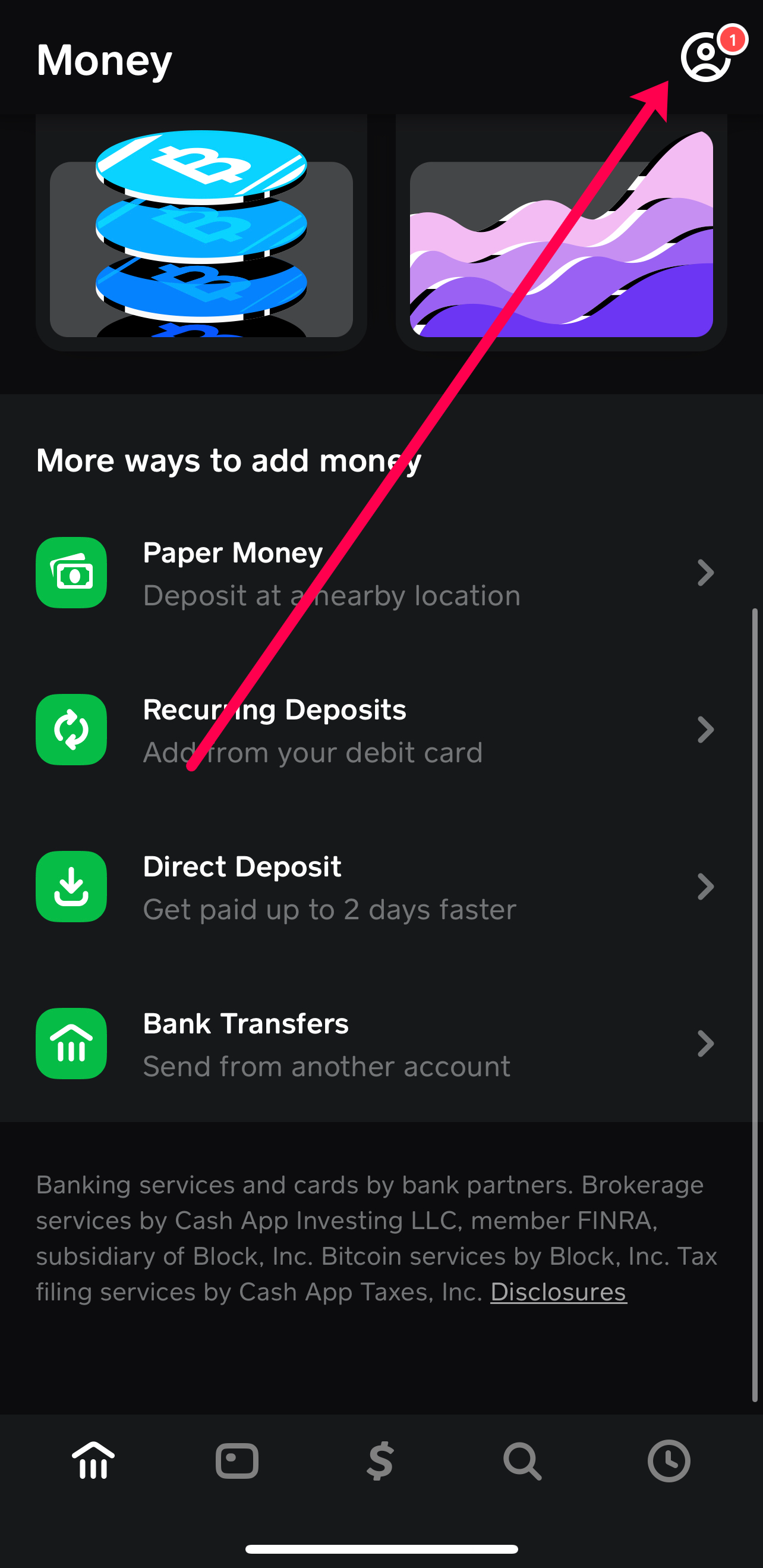
To begin, open the Cash App on your mobile device. Ensure you are logged into your account. The primary navigation is usually accessible via an icon on the home screen, often represented by a profile picture or a silhouette of a person. Tap this icon to access your account dashboard, which provides an overview of your linked banks, cards, and other personal settings. This is your central hub for managing all aspects of your Cash App profile.
Initiating the Card Addition
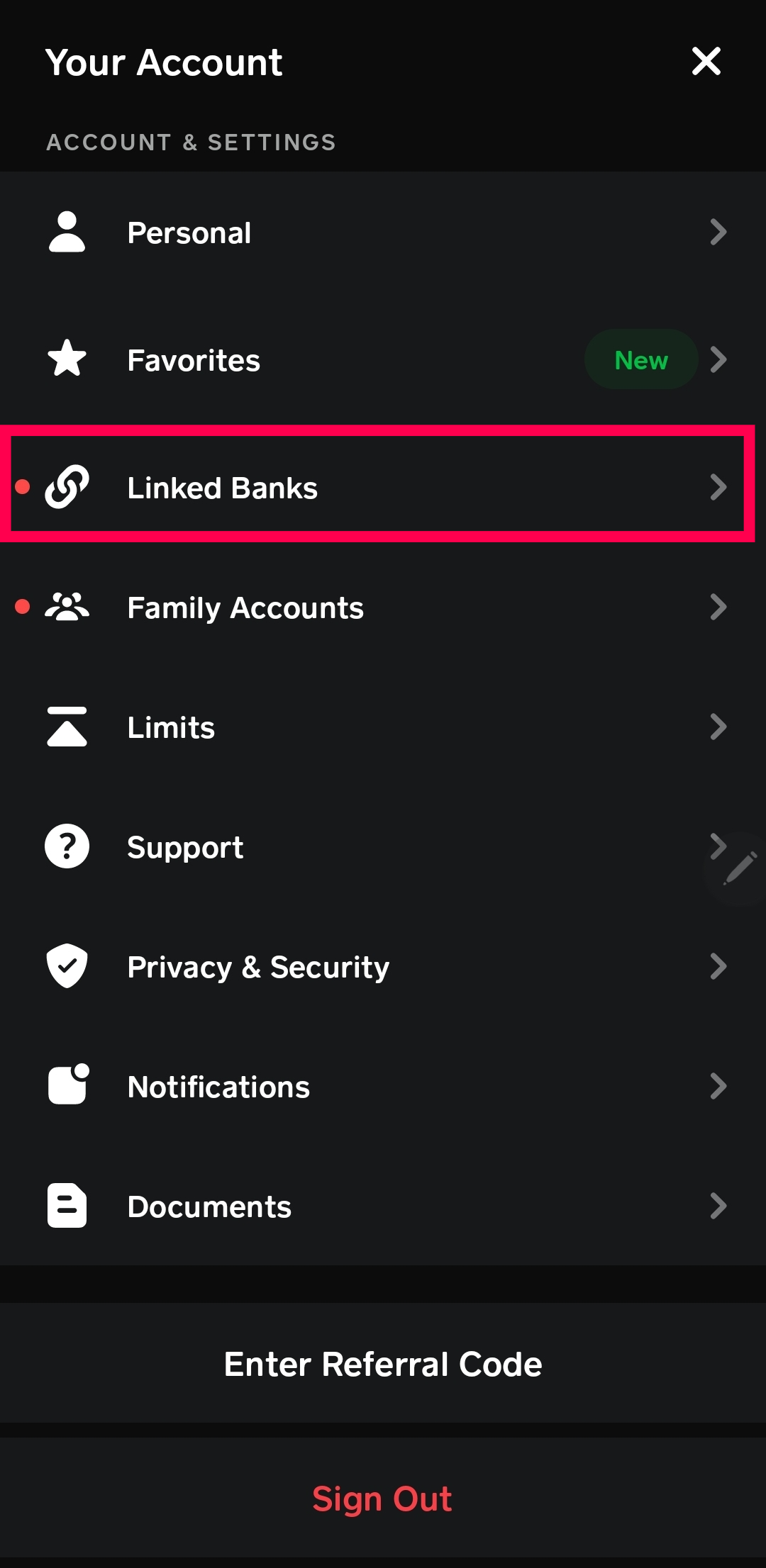
Once on your account dashboard, scroll down to find the “Linked Banks” section. This area lists all your currently connected financial institutions and cards. To add a new card, you will typically see an option labeled “Link Bank” or “Add Bank.” Despite the “bank” label, this is often the pathway to link either a bank account or a debit/credit card. Tap on this option.
If you already have a bank account linked, you might see an option like “Link a Debit Card” or “Link Credit Card” directly. Select the most appropriate option based on the type of card you intend to add. Cash App intelligently separates the two, as their functionalities and any potential fees may differ.
Inputting Card Details and Verification
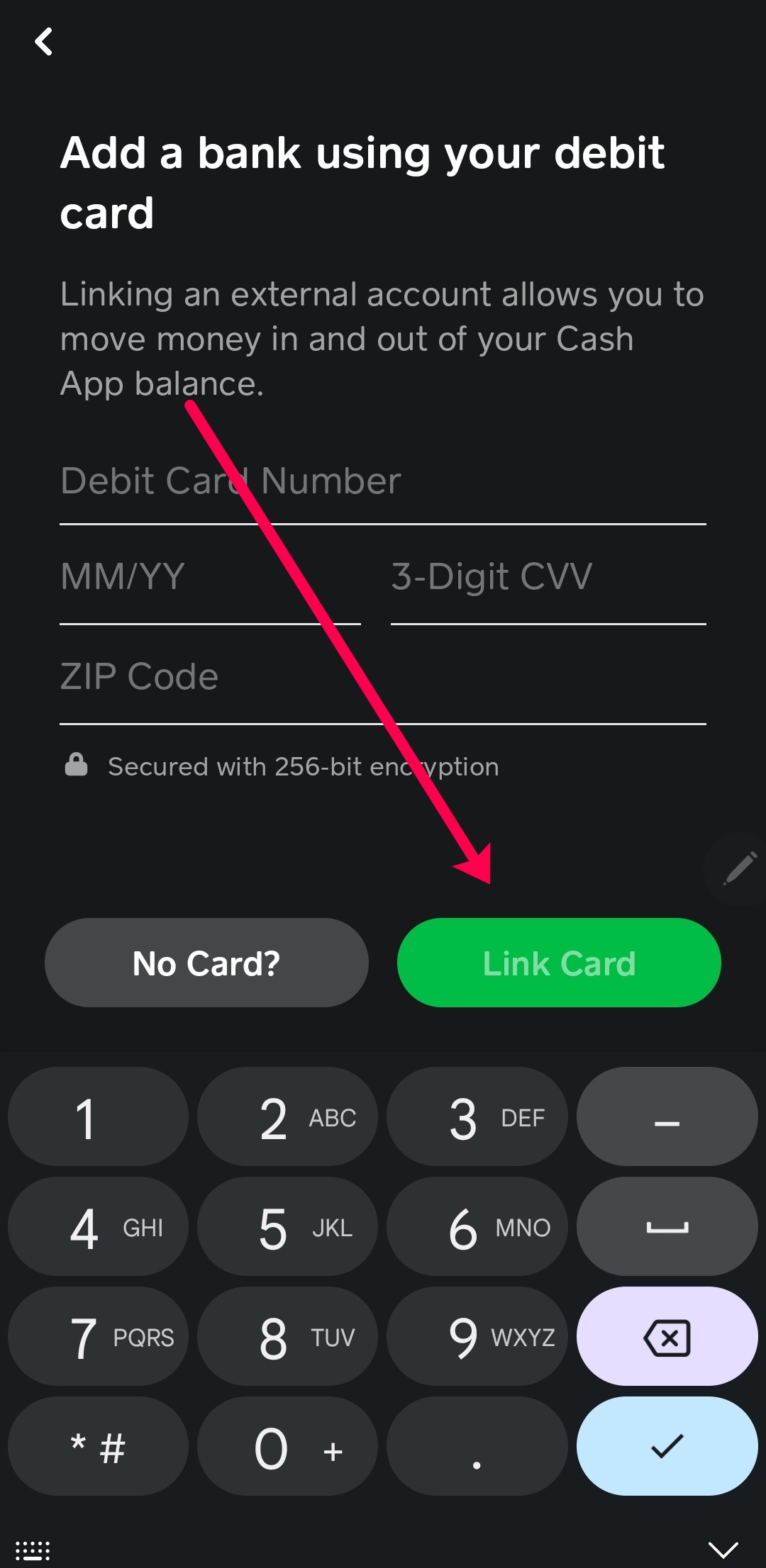
Upon selecting the option to add a card, you will be prompted to enter its details. This typically includes:
-
Card Number: The 16-digit number found on the front of your card.
-
Expiration Date: The month and year your card expires.
-
CVV (Card Verification Value): The 3 or 4-digit security code usually found on the back of your card (or front for Amex).
-
ZIP Code: The billing ZIP code associated with your card.
It is crucial to enter these details accurately. Any discrepancy can lead to the card being rejected. Cash App employs robust digital security measures during this step, encrypting your data as it’s transmitted and stored. This ensures that your sensitive card information is protected from unauthorized access. For some cards, Cash App might perform a micro-transaction (a very small, temporary charge that is immediately refunded) to verify the card’s validity and ownership with your bank.
Finalizing and Confirming Your New Card
After accurately entering all the required card details, you will typically tap a “Link Card” or “Add Card” button. Cash App will then attempt to verify the card with your financial institution. If successful, you will receive a confirmation message within the app, indicating that your new card has been successfully linked. The newly added card will then appear under the “Linked Banks” section of your account profile, ready for use. If there are any issues, an error message will usually provide guidance on what might have gone wrong, leading you to potential troubleshooting steps.
Navigating Card Compatibility and Specifics
While Cash App aims for broad compatibility, understanding the specific types of cards it supports, and any inherent limitations, is crucial for a smooth user experience. Not all cards are created equal in the eyes of digital payment platforms.
Debit vs. Credit: Understanding the Differences in Cash App
Cash App generally supports both debit and credit cards, but their functionality within the app can vary.
-
Debit Cards: These are the preferred method for many Cash App users for sending and receiving money. Linking a debit card allows direct transfers from your bank account (linked via debit card) to your Cash App balance, or directly to another user. Most standard transactions using a debit card are free.
-
Credit Cards: While you can link a credit card to Cash App, it’s typically used to send money. Be aware that Cash App usually charges a 3% fee for transactions funded by a linked credit card. This fee covers the processing costs associated with credit card transactions. Credit cards cannot be used to receive funds directly into your bank account via Cash App, nor can they be used to add funds to your Cash App balance without the fee. They are primarily for outbound payments when you need to leverage your credit line.
Accepted Networks: Visa, Mastercard, Discover, American Express
Cash App generally supports cards from the major payment networks.
-
Visa and Mastercard: These are the most widely accepted and seamlessly integrated networks. Most debit and credit cards from these providers will link without issue.
-
Discover and American Express: Cards from these networks are also generally accepted. However, in some rare instances, certain specific types of Discover or American Express cards (e.g., corporate cards, specific gift cards) might have limitations due to issuer policies, rather than Cash App’s intrinsic compatibility. It’s always best to try linking the card to confirm.
Prepaid and Gift Cards: What You Need to Know
Linking prepaid debit cards or gift cards to Cash App can be a bit more nuanced.
-
Prepaid Debit Cards: Many prepaid debit cards (especially those issued by Visa or Mastercard) can be linked to Cash App. However, they may sometimes encounter issues if they are not fully registered with a billing address and ZIP code. For successful linking, ensure the prepaid card is registered online with accurate personal information. These cards can typically be used to send money, but receiving funds might depend on the specific card issuer’s policies.
-
Gift Cards: Generic gift cards (e.g., a Visa gift card) that do not require registration with personal details often have trouble linking to Cash App because they lack a billing address and ZIP code for verification. While some users might find success, it’s not a guaranteed functionality, and Cash App’s primary intention is for cards linked to established bank accounts.
Linking Bank Accounts Directly: An Alternative or Complementary Approach
Beyond linking specific cards, Cash App also allows for direct linking of bank accounts using your bank’s login credentials. This method provides an alternative or complementary way to fund your Cash App activities. When you link a bank account directly, it often serves as the primary source for adding funds to your Cash App balance or for direct deposit features. While linking a debit card associated with a bank account often achieves a similar effect, direct bank linking can be useful if you prefer not to use your debit card details or if you manage multiple accounts within the same bank. It enhances the flexibility of fund transfers, enabling seamless movement between your external bank and your Cash App balance.
Overcoming Obstacles: Troubleshooting Common Card Addition Issues
Despite Cash App’s streamlined process, users may occasionally encounter issues when attempting to add a new card. These problems can stem from various sources, ranging from simple input errors to underlying technical glitches or bank-imposed restrictions. Understanding common error messages and troubleshooting steps is key to resolving these hurdles quickly.
“Unable to Link Card” and Error Messages
The most frequent challenge users face is receiving a generic “Unable to Link Card” or similar error message. This usually indicates that Cash App could not verify the card details with the issuing bank. Common reasons include:
-
Incorrect Card Details: Double-check the card number, expiration date, CVV, and especially the billing ZIP code. A single typo can prevent successful linking.
-
Expired Card: Ensure the card is still valid and has not expired.
-
Unsupported Card Type: As discussed, certain prepaid cards or gift cards might not be fully compatible.
-
Issuer Restrictions: Your bank or card issuer might have policies that prevent its card from being linked to third-party payment apps without prior authorization. Contact your bank to inquire if this is the case.
-
Network Issues: Temporary internet connectivity problems on your end or Cash App’s servers can disrupt the verification process.
Verification Challenges and Security Protocols
Sometimes, the issue isn’t about incorrect input but rather the card issuer’s security protocols.
-
Bank Holds: Your bank might place a temporary hold on the transaction attempt from Cash App if it detects unusual activity, especially for new links. This is a fraud prevention measure. Contact your bank to confirm if they are blocking the link attempt.
-
ZIP Code Mismatch: The billing ZIP code you enter must exactly match the one on file with your card issuer. Even if you’ve moved, the card might still be associated with an older address.
-
3D Secure (e.g., Verified by Visa, Mastercard SecureCode): Some banks might require an additional layer of verification (like a one-time password sent to your phone) during the linking process. Ensure you are ready to complete this step if prompted.
App Glitches and Connectivity Problems
Occasionally, the problem might reside with the Cash App itself or your device.
-
Outdated App Version: Ensure your Cash App is updated to the latest version. Developers frequently release updates to fix bugs and improve performance.
-
App Cache: A corrupted app cache can sometimes interfere with functionality. Clearing the Cash App cache (via your phone’s app settings) can resolve minor glitches.
-
Internet Connection: A weak or unstable internet connection can interrupt the communication between Cash App and your bank’s servers. Try linking the card using a strong Wi-Fi connection or stable mobile data.
-
Device Compatibility: While rare, ensure your device’s operating system (iOS or Android) is compatible with the latest Cash App version.
When to Contact Cash App Support
If you have exhausted all troubleshooting steps and are still unable to link your card, it’s time to contact Cash App support. Provide them with detailed information, including the exact error message you received, the type of card you are trying to link, and any steps you have already taken. They can access your account details and provide specific guidance or investigate potential backend issues. Cash App support can be accessed directly through the app (Profile Icon > Support > Start A Chat) or via their website.
Maximizing Your Cash App Experience with Multiple Cards
Once you’ve successfully linked multiple cards to your Cash App account, the real power of this feature begins to unfold. It’s not just about having options; it’s about strategically utilizing these options to optimize your financial activities within the app.
Strategic Card Selection for Transactions
One of the primary advantages of having multiple cards is the ability to choose the most appropriate funding source for each transaction.
-
Sending Money: When sending money to another user, you can easily select which linked card or your Cash App balance you wish to use. For example, you might use a debit card for personal transfers to avoid credit card fees, but use a specific credit card for business expenses that you can later deduct.
-
Direct Deposit: If you use Cash App for direct deposit of your paycheck, you might prefer to link a debit card directly associated with your primary bank account, allowing seamless transfers from your Cash App balance to your bank.
-
Cash Card Top-ups: If you have a Cash Card (Cash App’s debit card), you can use any linked debit card to instantly add funds to your Cash App balance to top up your Cash Card for purchases.
This granular control empowers you to manage cash flow more effectively, taking advantage of different card features or avoiding unnecessary fees.
Enhancing Security and Fraud Prevention
While Cash App itself employs robust security measures, having multiple cards can add an extra layer of personal security and aid in fraud prevention.
-
Separating Funds: By using one card for online purchases and another for in-app transfers, you can compartmentalize your exposure. If one card number is compromised, your other linked funds remain unaffected.
-
Monitoring Different Accounts: It becomes easier to spot unusual activity by linking cards from different banks or with different spending habits. You can quickly identify if a suspicious transaction originates from a card typically used for specific purposes.
-
Limiting Exposure: You might choose to keep a minimal balance on a less frequently used linked card, thereby limiting potential losses if that card’s details are ever breached.
Tips for Managing Your Linked Cards Effectively
Effective management of your linked cards ensures that your Cash App remains organized and secure.
-
Regularly Review Linked Accounts: Periodically check your “Linked Banks” section to ensure all listed cards are current and actively used. Remove any cards that have expired, been replaced, or are no longer needed. This declutters your digital wallet and reduces potential security risks.
-
Update Details Promptly: If a card’s expiration date or billing address changes, make sure to update these details within Cash App as soon as possible to avoid transaction failures.
-
Understand Card Limits: Be aware of any daily or weekly transaction limits imposed by Cash App or your card issuer, especially when planning larger transfers.
-
Use Strong Passcodes/Biometrics: Always protect your Cash App with a strong passcode, PIN, or biometric authentication (fingerprint/face ID) to prevent unauthorized access to your linked cards and funds.
In conclusion, adding another card to Cash App is a straightforward technical process that opens up a world of enhanced financial flexibility and security. By carefully following the steps, understanding compatibility nuances, and leveraging troubleshooting techniques, users can transform their Cash App into a more powerful and versatile digital finance tool. Strategic management of multiple linked cards not only streamlines your transactions but also provides a more resilient and secure financial ecosystem within the palm of your hand.
aViewFromTheCave is a participant in the Amazon Services LLC Associates Program, an affiliate advertising program designed to provide a means for sites to earn advertising fees by advertising and linking to Amazon.com. Amazon, the Amazon logo, AmazonSupply, and the AmazonSupply logo are trademarks of Amazon.com, Inc. or its affiliates. As an Amazon Associate we earn affiliate commissions from qualifying purchases.