
In the rapidly evolving landscape of digital finance, mobile payment applications like Cash App have become indispensable tools for managing transactions, sending money to friends, and even investing. At the heart of a user’s identity within Cash App lies the “$Cashtag” – a unique identifier that streamlines the process of sending and receiving funds. For many users, the need to update or personalize this tag arises, whether for privacy, professional branding, or simply a fresh start. This article delves into the technical intricacies and user-centric process of changing your Cash App tag, ensuring a smooth and secure transition within this popular financial technology platform.
Understanding Your Cash App Tag and Its Importance
The “$Cashtag” is more than just a username; it’s a critical component of your digital financial identity within the Cash App ecosystem. Grasping its fundamental nature and significance is the first step toward managing it effectively.
What is a Cash App Tag?
A Cash App tag, typically formatted as “$username” (e.g., $JaneDoe), is a unique identifier assigned to each Cash App account. It functions similarly to an email address or a phone number for direct messaging services, but specifically for financial transactions. When someone wants to send you money via Cash App, they simply type in your Cashtag, eliminating the need to share sensitive bank details or phone numbers. This public-facing handle makes transactions quick, secure, and user-friendly. Each Cashtag is unique to its owner, ensuring that funds are directed to the correct recipient.
Why Your Tag Matters
The importance of your Cashtag extends beyond mere convenience. It plays several vital roles:
-
Identification: It’s your primary public identifier on Cash App. Friends, family, clients, or customers use it to find and pay you. A clear, recognizable tag fosters trust and ease of use.
-
Transaction Simplicity: It simplifies the process of sending and receiving money. Instead of fumbling with bank account numbers or routing details, a simple Cashtag ensures funds reach their intended destination efficiently.
-
Security Layer: While seemingly public, the Cashtag acts as a secure intermediary. Senders don’t need your bank details, reducing the risk of data compromise. However, a well-chosen tag can also subtly enhance privacy by not overtly revealing personal information if you prefer.
-
Personal and Professional Branding: For many, the Cashtag can be a reflection of their personal brand or business identity. A professional or memorable tag can enhance credibility and make it easier for clients to transact with you.
Initial Tag Setup and Default Behavior
Upon registering for Cash App, users are prompted to create a unique Cashtag. If a user skips this step, Cash App might automatically assign a default tag, often a combination of letters and numbers, which might not be memorable or desired. This initial creation sets the foundation for your Cash App presence, making the ability to change it later a crucial flexibility offered by the application. The system ensures that no two active Cashtags are identical, a fundamental technical constraint to prevent misdirected payments.
Step-by-Step Guide to Changing Your Cash App Tag
The process of updating your Cash App tag is designed to be intuitive, yet it’s crucial to follow each step carefully to ensure your changes are applied correctly and securely. This technical walkthrough provides a clear path for users looking to modify their digital identity within the app.
Accessing Your Profile Settings
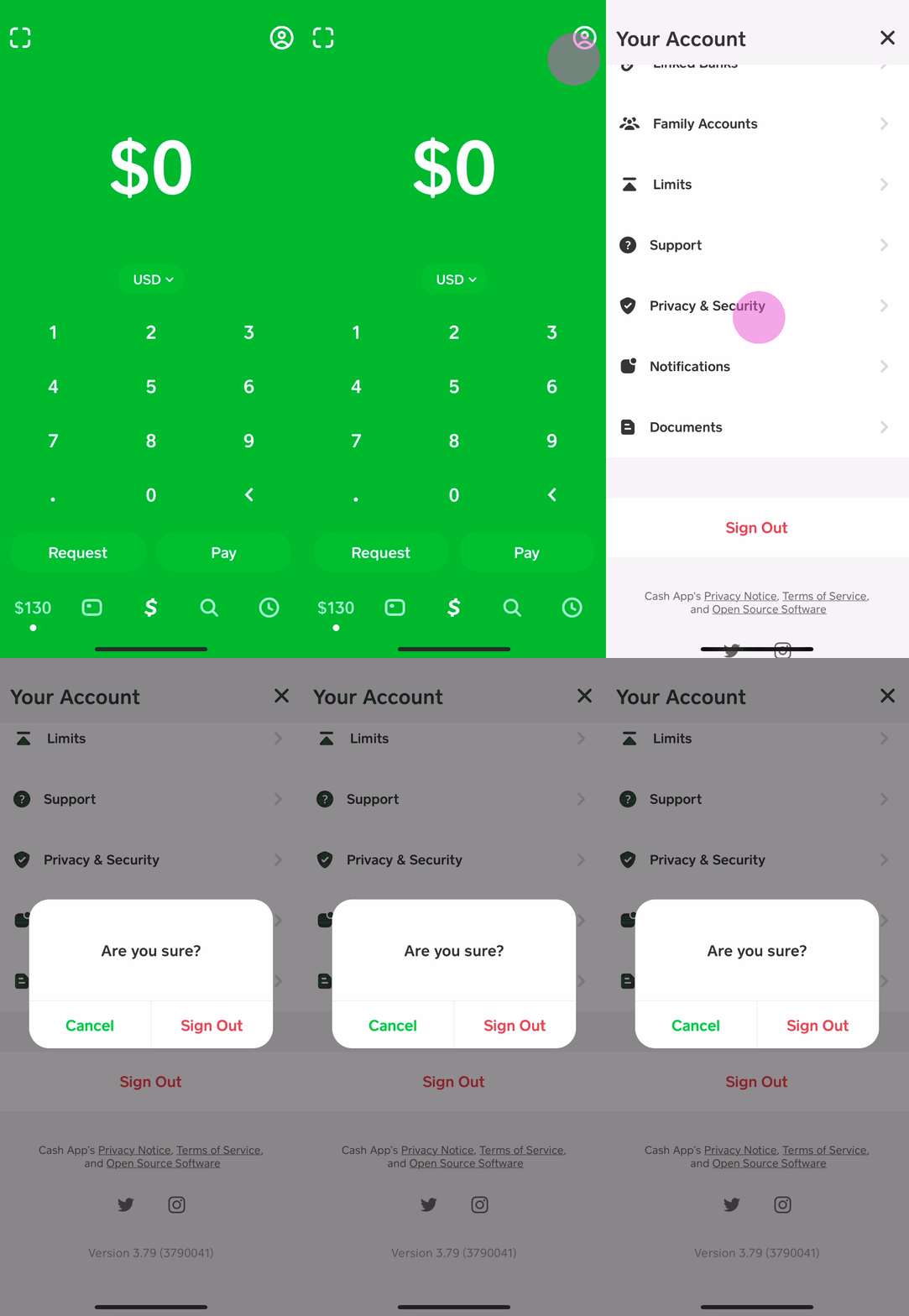
To begin, launch the Cash App on your mobile device. From the main screen, you will need to navigate to your profile. This is typically done by tapping on the profile icon, which is usually represented by a small circle with your avatar or a generic person icon, located in the top-right corner of the home screen. Tapping this icon will open a sidebar or a new screen displaying your account information and various settings options.
Locating the “$Cashtag” Option
Within your profile menu, scroll down until you find the section pertaining to your personal information. You should see your current name, phone number, email address, and most importantly, your current “$Cashtag.” This Cashtag will likely be displayed prominently, often accompanied by an edit icon (like a pencil) or simply an interactive field. Tap on your current “$Cashtag” to initiate the editing process.
Entering a New Tag
Once you tap on your Cashtag, you will be presented with an input field where you can type in your desired new tag. As you type, the Cash App system performs real-time checks to determine if the proposed tag is available. Cashtags must be unique, so if your desired tag is already in use by another Cash App user, the system will notify you immediately, prompting you to try another variation. Additionally, there are specific formatting rules: Cashtags must start with a letter and can contain letters, numbers, and underscores, with a minimum length of 1 character and a maximum length of 20 characters. Avoid using special characters or spaces. Choose a tag that is both memorable and reflective of your desired online identity.
Confirmation and Saving Changes
After successfully entering an available and valid new Cashtag, you will typically see a “Set” or “Save” button become active. Tap this button to confirm your choice. The app will usually prompt you one more time to ensure you are certain about the change, as this action has significant implications (discussed in the next section). Once confirmed, the system processes your request, and your new Cashtag will be updated across your account. This change is typically instant, and your new tag will immediately become active for all future transactions.
Troubleshooting Common Issues
While the process is generally smooth, users might encounter minor technical hiccups:
-
Tag Already Taken: This is the most common issue. Be prepared with several alternative tags. Consider adding numbers, initials, or minor variations to your preferred name.
-
Network Errors: Ensure you have a stable internet connection. Intermittent connectivity can prevent the app from communicating with its servers to verify and save your new tag.
-
App Glitches: If the app freezes or doesn’t respond, try closing and reopening it. If the issue persists, clear the app’s cache (via your phone’s settings) or reinstall the app. Always ensure your Cash App is updated to the latest version.
-
“Unable to Change Tag” Message: In rare instances, specific account restrictions or technical issues on Cash App’s side might temporarily prevent a change. If this occurs, waiting and trying again later, or contacting Cash App support, might be necessary.
Key Considerations Before Changing Your Cashtag
Changing your Cash App tag is not merely an aesthetic update; it has functional implications for your account and interactions. Understanding these nuances before committing to a new tag is crucial for a seamless experience.

The Uniqueness Rule: Why You Can Only Change It Once
A critical technical constraint within Cash App, and indeed many unique identifier systems, is that each Cashtag can only be changed once. After you successfully update your tag, your previous tag becomes immediately available for other users to claim, and you cannot revert to it or change your tag again. This is a security measure designed to prevent identity confusion and potential fraud, ensuring that a Cashtag remains uniquely tied to a specific account’s history, even if the account owner changes their active tag. This policy underscores the importance of thoughtful consideration when selecting your new Cashtag.
Impact on Existing Transactions and Contacts
When you change your Cashtag, your existing transaction history remains intact and linked to your account. Past transactions will still show your old Cashtag, but any new transactions will reflect your updated one.
The primary impact will be on your contacts:
-
Friends and Family: Individuals who have previously sent you money or have your old Cashtag saved will need to update their records. If they attempt to send money to your old tag after you’ve changed it, they might encounter an error if someone else has claimed it, or the payment might simply not go through if it remains unclaimed.
-
Businesses/Clients: If you use Cash App for business, inform your clients and customers immediately about your new Cashtag. Update any marketing materials, websites, or invoices where your Cashtag is displayed. Failure to do so could result in delayed or missed payments.
Communicating Your New Tag
Proactive communication is key to minimizing disruption. After changing your Cashtag:
-
Notify Your Network: Send out a group message, email, or social media post to your regular contacts, informing them of your new Cashtag.
-
Update Saved Information: Ask anyone who has your Cashtag saved in their contacts to update it.
-
Business Updates: For business users, prominently display your new Cashtag in all relevant places and consider a temporary notice about the change.
Security Implications and Best Practices for Tag Selection
While changing your tag can enhance personalization, it also has security considerations:
-
Avoiding PII (Personally Identifiable Information): While not strictly a security flaw, using your full name or easily discoverable personal information can make it easier for others to link your online activity. For enhanced privacy, consider a tag that isn’t directly traceable to your real identity, especially if you plan to use it publicly.
-
Predictability: Avoid tags that are too simple or predictable (e.g., $JohnSmith1). While uniqueness rules mitigate some risks, a less obvious tag is generally better.
-
Professionalism: If using Cash App for business, ensure your new tag reflects a professional image.
-
Memorable but Secure: Aim for a balance. A tag that’s easy for your contacts to remember but difficult for a malicious actor to guess or exploit.
Beyond the Change: Optimizing Your Cash App Experience
Changing your Cashtag is just one aspect of managing your digital financial identity. A holistic approach involves understanding the broader technological framework of Cash App and adopting best practices for security and efficiency.
Leveraging Your Cashtag for Business or Personal Use
Once your Cashtag is set, consider how to maximize its utility. For personal use, a simple, memorable tag facilitates easy peer-to-peer payments. For business owners, the Cashtag transforms into a versatile payment gateway. Display it prominently on your website, social media, or in physical stores to provide a quick, cashless payment option. Many small businesses use Cashtags for quick invoicing and payment collection, leveraging the app’s functionality to streamline their financial operations without requiring complex POS systems. This integration of a simple identifier into business processes highlights the power of well-designed fintech tools.
Understanding Cash App’s Security Features
Cash App employs a robust suite of security features to protect your funds and personal information. Beyond the unique Cashtag, these include:
-
Encryption: All data transmitted within the app is encrypted, safeguarding your financial information during transactions.
-
PIN/Touch ID/Face ID: The app requires a PIN, fingerprint, or facial recognition for accessing your account and authorizing transactions, adding a crucial layer of biometric security.
-
Fraud Protection: Cash App utilizes advanced fraud detection systems to monitor transactions for suspicious activity. If unusual patterns are detected, transactions may be flagged or temporarily held for verification.
-
Two-Factor Authentication (2FA): Enabling 2FA adds an extra layer of security, requiring a code sent to your phone or email in addition to your password for login attempts, making unauthorized access significantly harder.
Familiarizing yourself with and actively utilizing these features is paramount for any user, especially after making changes to your primary identifier.
Maintaining Account Integrity and Privacy
Regular maintenance of your Cash App account extends beyond just managing your Cashtag. Periodically review your transaction history for any unauthorized activity. Be wary of phishing attempts or scams that try to trick you into revealing your login credentials or personal information. Cash App will never ask for your PIN or full login details outside of the secure app interface. Additionally, keep your linked bank accounts and debit cards up to date, and regularly check your associated email and phone number for accuracy and security. Privacy settings within the app, though limited for transactions, should also be reviewed to understand what information is shared.
Future Trends in Digital Payment Identifiers
The evolution of digital payment identifiers like the Cashtag is a continuous process. We can anticipate further advancements aimed at enhancing security, interoperability, and user experience. Technologies like blockchain could introduce decentralized identifiers, offering even greater user control and privacy. The integration of AI for predictive fraud detection will become more sophisticated, and seamless cross-platform payment solutions might emerge, making unique tags like the Cashtag even more powerful across different financial applications and services. As Cash App continues to innovate, staying informed about these technological shifts will empower users to maximize the utility and security of their digital financial tools.

Conclusion
Changing your Cash App tag is a straightforward yet impactful process that allows users to personalize and secure their digital financial identity. By understanding the ‘why’ behind the Cashtag, following the precise ‘how-to’ steps, and carefully considering the implications of the ‘one-time change’ rule, users can navigate this feature with confidence. Beyond the immediate action of updating your tag, fostering an ongoing awareness of Cash App’s robust security features and adopting best practices for account management will ensure a continuously safe, efficient, and optimized experience within the realm of modern digital finance. Your Cashtag is more than just a name; it’s your digital fingerprint in the world of instant payments, and managing it wisely is key to a secure and effective financial technology journey.
aViewFromTheCave is a participant in the Amazon Services LLC Associates Program, an affiliate advertising program designed to provide a means for sites to earn advertising fees by advertising and linking to Amazon.com. Amazon, the Amazon logo, AmazonSupply, and the AmazonSupply logo are trademarks of Amazon.com, Inc. or its affiliates. As an Amazon Associate we earn affiliate commissions from qualifying purchases.