
In the rapidly evolving landscape of personal finance, the shift from physical currency to digital ecosystems has fundamentally altered how we manage our wealth, settle debts, and conduct daily commerce. Among the leaders of this revolution is Cash App, a versatile financial tool that has bridged the gap between traditional banking and mobile-first convenience. Understanding how to pay someone on Cash App is more than just a technical skill; it is an essential component of modern financial literacy. This guide explores the intricacies of the platform, ensuring your transactions are efficient, secure, and integrated into your broader financial strategy.
Mastering the Fundamentals of Cash App Transactions
Before initiating a payment, it is crucial to understand the infrastructure of the Cash App ecosystem. Unlike traditional wire transfers that can take days to clear, Cash App operates as a peer-to-peer (P2P) network designed for immediacy. To begin, a user must have a funded account, which can be achieved by linking a traditional bank account, a debit card, or a credit card.
Setting Up Your Financial Profile for Success
The first step in making a payment is ensuring your profile is correctly configured. Your $Cashtag—a unique username that acts as your digital financial identity—is the primary way others identify you. When setting up your account for the purpose of sending money, accuracy is paramount. A single character error in a $Cashtag can result in funds being sent to the wrong individual, and in the world of P2P payments, reclaiming those funds can be a complex challenge.
Linking and Verifying Funding Sources
Cash App allows you to pull funds from multiple sources. To pay someone, you must navigate to the “Banking” tab to link your primary financial institution. For those focused on personal finance optimization, using a linked debit card is often preferred over a credit card. While credit cards offer convenience, Cash App typically charges a 3% fee for payments funded by credit, which can erode your capital over time. Conversely, debit card and bank account transfers are generally free of charge for standard transactions.
The Step-by-Step Execution of a Payment
Once your account is funded and your identity is verified, the process of sending money is designed to be frictionless. However, professional financial management requires a disciplined approach even to simple tasks.
Initiating the Transfer
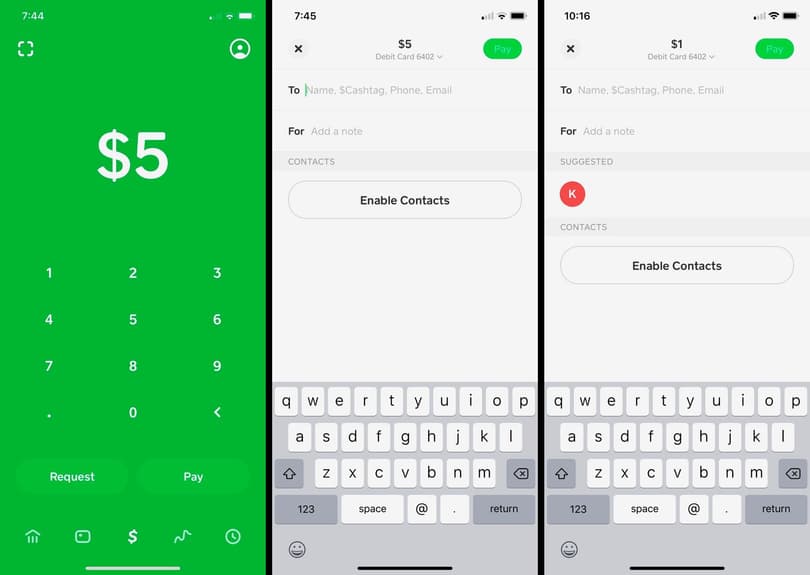
To pay someone, open the app to the main screen, which displays a numerical keypad. Enter the specific amount you wish to send. Precision is key here; double-check the decimal points to avoid overpayment. After entering the amount, tap the “Pay” button.
Identifying the Recipient
The next screen prompts you to enter the recipient’s information. You can search for a recipient using three primary identifiers:
-
$Cashtag: The most reliable method, as it is unique to the user.
-
Phone Number: Useful if the recipient is already in your contacts.
-
Email Address: A solid alternative if you do not have their $Cashtag.
As you type, Cash App will suggest contacts. It is a best practice to verify the recipient’s full name and profile picture, if available, to ensure the funds reach the intended party.
Adding Context with Notes
A frequently overlooked step in digital payments is the “For” field. From a personal finance and accounting perspective, adding a note (e.g., “Monthly Rent,” “Dinner Split,” or “Freelance Design Work”) is vital. This creates a clear paper trail for your financial records, which is especially important during tax season or when reconciling a monthly budget. After confirming the details, tap “Pay” in the top right corner. The funds are usually transferred instantly.
Advanced Financial Features for Strategic Users
Cash App is no longer just a tool for splitting a lunch bill; it has grown into a multi-faceted financial platform. To maximize the utility of the app, users should be aware of features that go beyond simple peer-to-peer transfers.
Navigating Instant vs. Standard Deposits
While sending money to someone else is usually instantaneous for the recipient, the way they move that money to their bank account varies. As a sender, you should be aware that if you are paying a contractor or a service provider, they may choose an “Instant Deposit,” which incurs a fee (typically 0.5% to 1.75%). Understanding these friction points helps in professional negotiations and ensures that the net amount received aligns with the agreed-upon price.
Automated and Recurring Payments
For those who use Cash App for regular financial obligations—such as paying a roommate for utilities or a landlord for rent—the platform allows for a degree of automation. While it does not have a native “recurring payment” button for P2P transfers in the same way a bank might, users can set up “Auto-Add” features to ensure their Cash App balance is always sufficient to cover expected monthly outgoing transfers.
The Role of the Cash Card in Budgeting
The Cash Card is a physical Visa debit card linked to your Cash App balance. For individuals practicing “envelope budgeting,” the Cash Card is an excellent tool. By transferring a specific “discretionary spending” budget to your Cash App account each week, you can use the card for daily purchases without dipping into your primary savings or checking accounts. This separation of funds is a hallmark of disciplined financial planning.
Prioritizing Security and Fraud Prevention
In the digital age, the speed of transactions is matched by the speed of potential risks. Protecting your capital is just as important as growing it. Because Cash App transactions are often instantaneous and irreversible, security must be a top priority.
Implementing Hardened Security Measures
Every user should enable the “Security Lock” feature within the app settings. This requires your Face ID, Touch ID, or a PIN before any payment can be authorized. This simple step adds a layer of protection against unauthorized access if your device is lost or stolen. Additionally, enabling “Notification” alerts for every transaction ensures you are aware of any movement of funds in real-time.
Recognizing and Avoiding Common Scams
The most common risk in P2P payments is the “accidental payment” or “prize” scam. Scammers may send you a small amount of money and then ask you to “send it back,” only to use a reversed fraudulent transaction to steal your original funds. As a rule of thumb, only pay people you know and trust. If you are paying for goods or services from a stranger, recognize that Cash App does not offer the same level of buyer protection as a traditional credit card or platforms like PayPal.
Dispute Resolution and the Limits of Recovery
It is a hard truth of digital finance that once a payment is sent and accepted, it is nearly impossible to cancel. If you realize you sent money to the wrong person, your only immediate recourse is to use the “Request” feature to ask for it back. Cash App support can mediate in some instances of unauthorized fraud, but they cannot force a user to return funds sent voluntarily in error. This underscores the necessity of the “measure twice, cut once” philosophy in digital banking.
Cash App for Business and Side Hustles
As the gig economy expands, many individuals are using Cash App to receive payments for professional services. However, there are significant financial and tax implications to using the app for business purposes.
Personal vs. Business Accounts
Cash App offers a specific account type for businesses. While personal accounts are free to use for most transactions, business accounts incur a 2.75% processing fee on all received payments. The benefit is the ability to accept larger volumes of payments and a more professional interface for your clients. From a financial management standpoint, keeping your business and personal expenses separate is essential for accurate bookkeeping.

Tax Obligations and Form 1099-K
Recent changes in tax regulations mean that P2P platforms are now required to report a user’s business income to the IRS if it exceeds certain thresholds. If you use Cash App to get paid for a side hustle, you must keep meticulous records. Cash App will issue a Form 1099-K for business accounts that meet the reporting requirements. Failure to account for this income can lead to significant issues during tax audits. Even if you use a personal account for business transactions (which is technically against the terms of service), the income remains taxable, and you are responsible for reporting it accurately to the authorities.
By mastering the nuances of paying someone on Cash App, you are doing more than just moving digits on a screen. You are engaging with a powerful financial tool that, when used with precision and caution, can streamline your personal economy, enhance your budgeting capabilities, and provide a seamless bridge to the future of digital finance.
aViewFromTheCave is a participant in the Amazon Services LLC Associates Program, an affiliate advertising program designed to provide a means for sites to earn advertising fees by advertising and linking to Amazon.com. Amazon, the Amazon logo, AmazonSupply, and the AmazonSupply logo are trademarks of Amazon.com, Inc. or its affiliates. As an Amazon Associate we earn affiliate commissions from qualifying purchases.