
In the vast landscape of scientific and graphing calculators, certain functions stand out as fundamental building blocks for mathematics, physics, engineering, and countless other STEM fields. Among these, the trigonometric functions—sine, cosine, and tangent—are universally recognized and usually have dedicated buttons. However, when it comes to their reciprocal counterparts, such as the secant function (often abbreviated as ‘sec’), users frequently encounter a puzzling absence. The query “how to put sec in calculator” is a common one, signaling a moment of confusion that, once resolved, unlocks a deeper understanding of both trigonometry and calculator functionality.

This guide aims to demystify the process of utilizing the secant function on various calculators. We’ll explore why a dedicated ‘sec’ button is rare, walk through the essential steps for accurate calculation, and address common pitfalls. Ultimately, understanding how to input secant isn’t just about performing a specific calculation; it’s about mastering your technological tool and gaining confidence in tackling complex mathematical challenges.
Demystifying the Secant Function (sec x)
Before diving into the mechanics of calculator input, it’s crucial to understand what the secant function represents. This foundational knowledge not only aids in correct usage but also enhances problem-solving intuition.
The Core Concept: What is Secant?
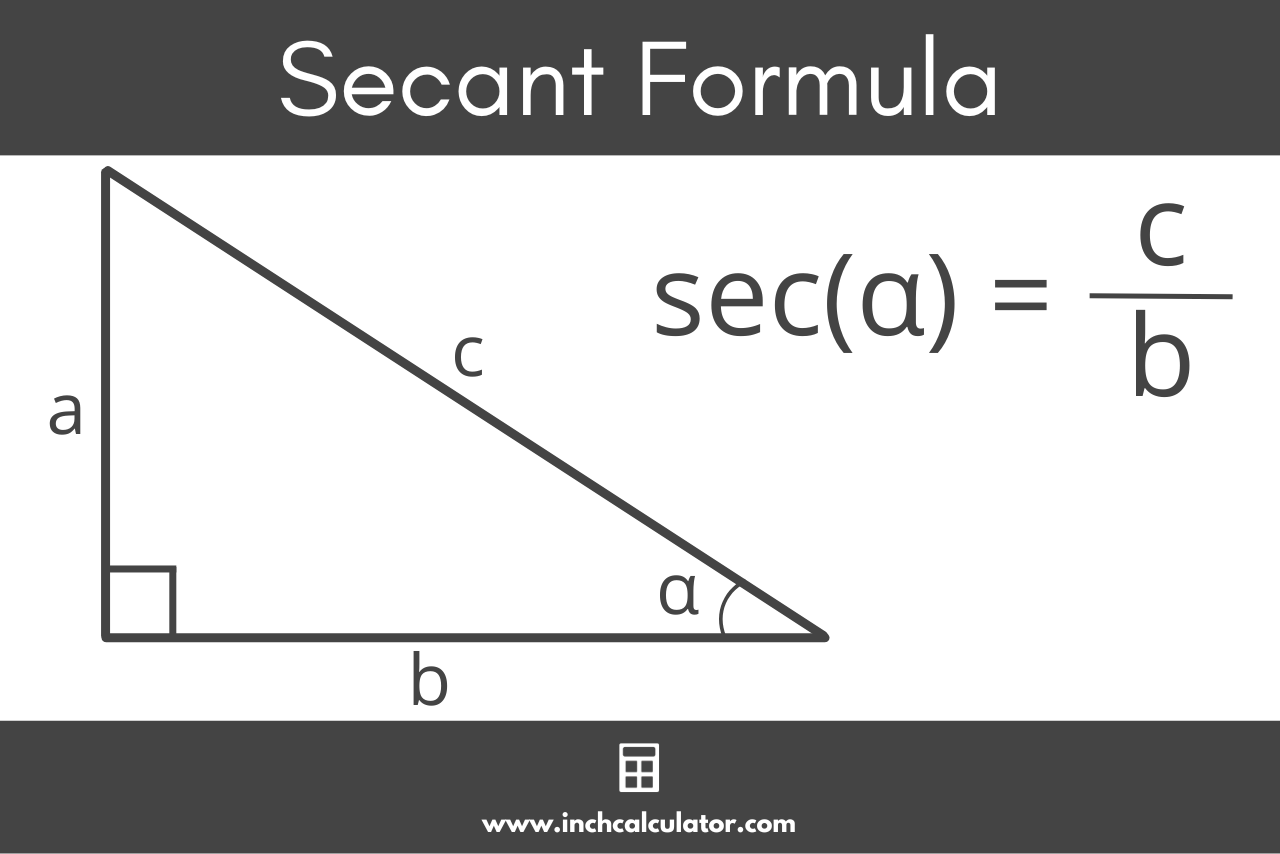
The secant of an angle, denoted as sec(x), is one of the six primary trigonometric functions. It is fundamentally defined as the reciprocal of the cosine function. Mathematically, this relationship is expressed as:
sec(x) = 1 / cos(x)
To visualize this, imagine a right-angled triangle. If x is one of the acute angles, cos(x) is defined as the ratio of the length of the adjacent side to the length of the hypotenuse. Consequently, sec(x) is the ratio of the hypotenuse to the adjacent side. In the context of the unit circle (a circle with radius 1 centered at the origin), if a point (a, b) lies on the circle and forms an angle x with the positive x-axis, then cos(x) = a, and sec(x) = 1/a.
The secant function plays a vital role in various branches of mathematics and applied sciences. Engineers use it in structural analysis and wave mechanics. Physicists employ it in optics and quantum mechanics. Its utility extends to areas like surveying, navigation, and computer graphics, making it an indispensable tool for technical professionals and students alike.
Why No Dedicated ‘Sec’ Button?
This is often the root of the “how to put sec in calculator” question. Unlike sine, cosine, and tangent, most standard scientific and graphing calculators do not feature a direct ‘sec’ button. There are several pragmatic reasons for this design choice:
-
Redundancy and Efficiency: Since
sec(x)is directly derivable fromcos(x), providing a separate button would be redundant. Calculator manufacturers prioritize space for fundamental operations and functions that cannot be easily derived from others. -
Historical Precedent: The primary trigonometric functions (sin, cos, tan) were historically the first to be tabulated and widely used. Their reciprocals gained prominence later, and the convention of calculating them via the primary functions became standard.
-
User Interface Simplicity: A cluttered interface can be overwhelming. By limiting the number of direct function buttons, calculators maintain a cleaner, more intuitive layout for core operations. Users are expected to understand the reciprocal relationships to access these secondary functions.
-
Hardware Limitations: Even with modern displays, physical calculators have finite button space. Manufacturers must make strategic decisions about which functions warrant a dedicated button and which can be accessed through a sequence of operations.
Understanding this design philosophy empowers users to not just find a workaround but to grasp the underlying mathematical relationships that govern these functions.
Step-by-Step: Inputting Secant on Common Calculators
Now that we understand the ‘why,’ let’s delve into the ‘how.’ The method for calculating sec(x) remains consistent across most scientific and graphing calculators, relying on the reciprocal relationship with cos(x).
The Reciprocal Method (Most Scientific Calculators)
This is the most common and universally applicable method. It involves two simple steps:
-
Calculate the Cosine: First, you need to find the cosine of your angle
x. -
Take the Reciprocal: Then, you take the reciprocal of the result obtained in step 1.
Let’s illustrate with an example: Calculate sec(60°).
Steps:
-
Check Angle Mode: Ensure your calculator is in the correct angle mode (degrees or radians). For
sec(60°), you’ll need “DEG” (degrees) mode. Look for a “DRG” or “MODE” button to adjust this. -
Input Cosine: Enter
cos(60). On most calculators, you’d pressCOS, then60, then)(if applicable), then=.- Result:
cos(60°) = 0.5
- Result:
-
Take the Reciprocal: Now, take the reciprocal of 0.5. Most calculators have a dedicated reciprocal button, often labeled
1/xorx^-1. Press this button immediately after obtaining the cosine result.-
Input:
[COS] 60 [=] [1/x](or[x^-1]) -
Result:
1 / 0.5 = 2
Therefore,
sec(60°) = 2. -
General Sequence: [COS] [Angle] [)] [=] [1/x] or [COS] [Angle] [=] [1/x]
Important Note: The order of operations can vary slightly between calculator models. Some calculators require ANGLE [COS] while others prefer [COS] ANGLE. Experiment with your specific model or consult its manual if unsure.
Graphing Calculators and Advanced Features (e.g., TI-83/84, Casio fx series)
Graphing calculators like the Texas Instruments TI-83/84 series or advanced Casio fx models follow the same reciprocal principle but offer slightly more sophisticated input methods.
-
Direct Input with Division: You can explicitly use the division operator:
1 / cos(angle).-
Example: To find
sec(pi/4)(in radians):-
Ensure calculator is in “RAD” (radians) mode.
-
Input:
1 / (COS ( [π] / 4 ) ) -
Press
ENTER. -
Result:
1 / (sqrt(2)/2) = 2/sqrt(2) = sqrt(2) ≈ 1.41421356
-
-
Using parentheses correctly is crucial, especially when the angle itself is an expression (like
pi/4).
-
-
Fraction Templates: Many graphing calculators have a fraction template function (often accessed via
ALPHA Y=on TI calculators orSHIFT+fraction buttonon Casio). This allows you to visually construct the fraction1 / cos(x), which can improve clarity and reduce input errors.- Example: Using a fraction template, you might see
1in the numerator andcos(angle)in the denominator, making the expression visually clear.
- Example: Using a fraction template, you might see
-
Custom Functions (Advanced Users): For repetitive calculations, some advanced graphing calculators allow users to define custom functions. You could, for instance, program a function
SEC(X)that internally computes1 / COS(X). This is a more advanced technique but highlights the flexibility of these devices.
Online Calculators and Software
In contrast to physical calculators, many online calculators and mathematical software packages (like Google’s built-in calculator, Wolfram Alpha, Desmos, or specialized scientific calculators available as apps) do feature a direct sec() function.
-
Google Search: Simply type “sec(60 degrees)” or “sec(pi/4 radians)” into Google’s search bar, and it will provide the answer.
-
Wolfram Alpha: Allows natural language input, e.g., “secant of 45 degrees.”
-
Online Scientific Calculators: Many web-based calculators emulate physical ones but often add direct buttons for
sec,csc, andcot.
While these tools offer convenience, understanding the manual method on physical calculators is still essential, especially in exam settings or situations where internet access is unavailable.

Common Pitfalls and Troubleshooting
Even with a clear understanding of the reciprocal method, users can encounter errors. Recognizing these common pitfalls is key to accurate and efficient calculation.
Angle Mode Errors (Degrees vs. Radians)
This is arguably the most frequent source of error when dealing with trigonometric functions. A calculator can operate in different angle modes:
-
Degrees (DEG): The full circle is 360 degrees.
-
Radians (RAD): The full circle is 2π radians.
-
Gradians (GRA): (Less common) The full circle is 400 gradians.
If you intend to calculate sec(60°) but your calculator is in radian mode, it will interpret 60 as 60 radians instead of 60 degrees, leading to a vastly different and incorrect result.
Troubleshooting:
-
Always Check: Before any trigonometric calculation, quickly glance at the calculator’s display for indicators like “DEG,” “RAD,” or “G.”
-
Change Mode: Locate your calculator’s “MODE” or “DRG” button. This button usually cycles through the available angle modes. Select the appropriate one. Some calculators have a dedicated “Shift” or “2nd Function” + “DRG” key.
-
Test: If unsure, test with a known value, e.g.,
cos(90)in degree mode should be0, andsin(pi/2)in radian mode should be1.
Order of Operations and Parentheses
When calculating secant within a more complex expression, the order of operations (PEMDAS/BODMAS) and the correct use of parentheses become critical.
-
Incorrect:
1 / COS 30 + 10- The calculator might interpret this as
(1 / COS 30) + 10(correct for secant of 30 plus 10) or1 / (COS (30 + 10))(incorrect).
- The calculator might interpret this as
-
Correct:
1 / (COS (30)) + 10(if you meansec(30) + 10) -
Correct:
1 / (COS (30 + 10))(if you meansec(40))
Troubleshooting:
-
Prioritize: Remember that functions (like
COS) take precedence, and division occurs before addition/subtraction. -
Use Parentheses Liberally: When in doubt, use parentheses to explicitly define the scope of operations. This eliminates ambiguity and ensures the calculator interprets your input as intended. For
1 / cos(x), it’s generally safest to input1 / (cos(x)).
Dealing with Undefined Values
Since sec(x) = 1 / cos(x), the secant function is undefined whenever cos(x) = 0. This occurs at x = 90°, 270°, and generally 90° + n * 180° (or π/2 + n * π radians), where n is an integer.
What to Expect:
-
If you attempt to calculate
sec(90°), your calculator will typically display an error message such as “ERROR,” “DIVIDE BY ZERO,” or “MATH ERROR.” -
This is not a calculator malfunction but a mathematical reality. The secant function has vertical asymptotes at these angles.
Troubleshooting:
-
Understand the Domain: Be aware of the angles for which
cos(x)is zero. -
Contextual Check: If you encounter an error message, review the angle you are inputting. If it corresponds to an undefined point, the error is expected.
Beyond Secant: Maximizing Your Calculator’s Potential
Learning how to put ‘sec’ in your calculator is just one small step in mastering your technological device. The principles learned here extend to other functions and highlight the power of understanding a calculator’s underlying logic.
Other Reciprocal Trigonometric Functions (Cosecant, Cotangent)
The same reciprocal method applies directly to the other two commonly used reciprocal trigonometric functions:
-
Cosecant (csc x):
csc(x) = 1 / sin(x)- To calculate
csc(x), findsin(x)first, then take its reciprocal(1/x or x^-1).
- To calculate
-
Cotangent (cot x):
cot(x) = 1 / tan(x)- To calculate
cot(x), findtan(x)first, then take its reciprocal. Alternatively, you can usecot(x) = cos(x) / sin(x).
- To calculate
By understanding the reciprocal relationship for secant, you’ve inherently learned how to use these other functions as well, broadening your trigonometric capabilities.
Exploring Advanced Features
Your calculator, especially a graphing one, is far more than a simple number cruncher. It’s a powerful tool for exploration and learning:
-
Graphing Functions: Visualize trigonometric functions, including secant (by graphing
1/cos(x)), to understand their periodicity, asymptotes, and behavior. -
Solving Equations: Utilize numerical solvers to find values of
xthat satisfysec(x) = k. -
Statistics and Probability: Many calculators have built-in functions for statistical analysis, regressions, and probability distributions.
-
Complex Numbers: Advanced calculators can perform operations with complex numbers, often involving trigonometric forms.
-
Calculus Features: Graphing calculators often include numerical differentiation and integration capabilities.
Encouraging Users to Read Their Calculator’s Manual: This is perhaps the most underrated piece of advice. A calculator’s manual is a treasure trove of information, detailing every function, obscure button, and troubleshooting tip specific to your model. Taking the time to explore it can unlock hidden functionalities and significantly enhance your mathematical workflow.
The calculator serves as a potent learning tool. By actively engaging with its features and understanding the mathematical principles it embodies, you transform it from a mere gadget into a powerful partner in your academic and professional journey.
Conclusion
The seemingly simple query “how to put sec in calculator” opens a gateway to fundamental trigonometric understanding and efficient calculator usage. While a direct ‘sec’ button may be absent on most devices, the straightforward reciprocal method—calculating 1 / cos(x)—provides a universal solution. Mastering this technique not only enables accurate calculations but also reinforces the interconnectedness of trigonometric functions.
Beyond the immediate task, this exploration underscores the importance of understanding your technological tools. Paying attention to angle modes, meticulously using parentheses, and recognizing mathematical constraints (like undefined values) are crucial skills that prevent errors and build confidence. As you delve deeper into mathematics and science, your calculator will remain an invaluable companion. Embrace its capabilities, consult its manual, and continuously strive to understand the ‘why’ behind its ‘how’ – for that is the true path to technological and mathematical mastery.
aViewFromTheCave is a participant in the Amazon Services LLC Associates Program, an affiliate advertising program designed to provide a means for sites to earn advertising fees by advertising and linking to Amazon.com. Amazon, the Amazon logo, AmazonSupply, and the AmazonSupply logo are trademarks of Amazon.com, Inc. or its affiliates. As an Amazon Associate we earn affiliate commissions from qualifying purchases.