
In the landscape of modern digital tools, the conversion of decimals to fractions represents more than just a simple mathematical operation; it is a fundamental requirement for high-precision engineering, software development, and digital design. While a human can manually perform these calculations using long division or simplification techniques, the “Decimal to Fraction Calculator” has become an essential piece of software for professionals who require instantaneous and error-free results. In this guide, we will explore the technological architecture behind these conversion tools, the algorithmic logic that drives them, and how to leverage the best software solutions for maximum productivity.

Understanding the Digital Architecture of Conversion Tools
At the core of any digital calculator lies a series of algorithms designed to interpret floating-point numbers—the way computers store decimals—and translate them into a rational format consisting of a numerator and a denominator. This process is more complex than it appears on the surface, primarily because of how hardware processes numerical data.
The Algorithmic Foundation: From Floating Point to Rational Numbers
Computers do not think in base-10 decimals the way humans do; they operate in binary. This often leads to “floating-point errors,” where a simple decimal like 0.1 cannot be perfectly represented in binary. A high-quality decimal to fraction calculator must implement sophisticated error-correction algorithms to ensure that the user receives an accurate fraction.
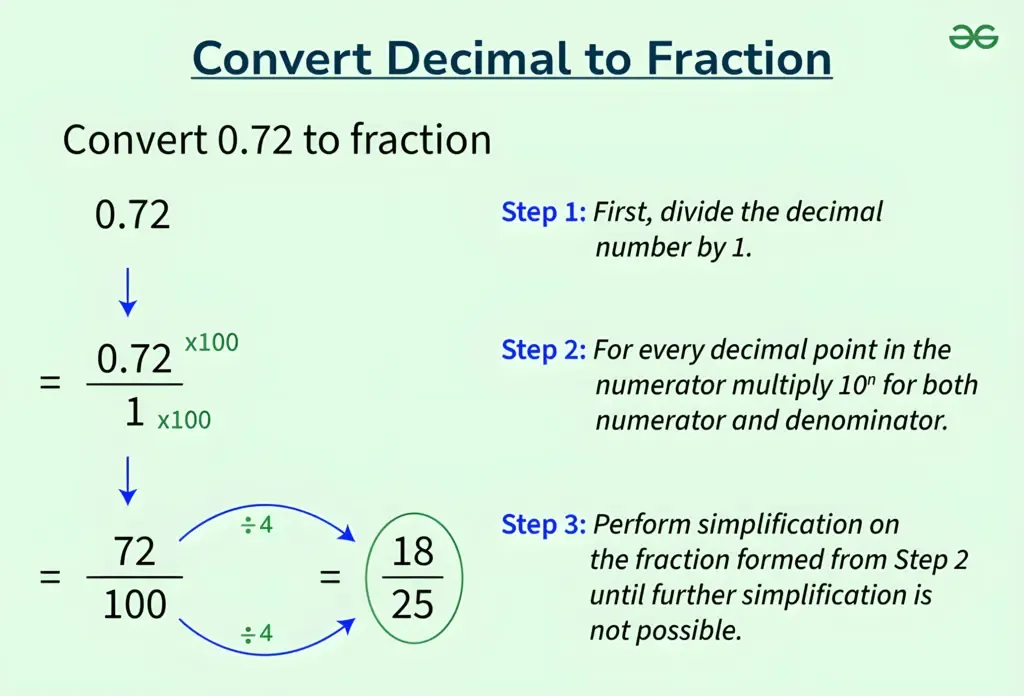
The most common method used by these software tools involves the “Greatest Common Divisor” (GCD) algorithm. When a user inputs a terminating decimal, such as 0.75, the software treats it as 75/100. It then runs an Euclidean algorithm to find the GCD of the two numbers—in this case, 25—and divides both the numerator and denominator to produce the simplified fraction: 3/4. This happens in milliseconds, but the backend logic involves several layers of verification to ensure the most reduced form is presented.
Why Developers Prioritize Fraction Conversion in Computing
In the realm of software engineering and CAD (Computer-Aided Design) software, fractions provide a level of absolute precision that decimals sometimes lack. For example, in 3D modeling, representing a measurement as 1/3 is far more accurate than using 0.333333, as the latter will always carry a minute margin of error. Developers build specialized conversion libraries into their applications to handle these transformations, ensuring that when a designer inputs a decimal measurement, the software can interpret it within a fractional grid system for physical manufacturing.
Top-Tier Software Solutions for Decimal-to-Fraction Conversion
The market is saturated with various tools ranging from simple browser-based widgets to complex scientific software suites. Choosing the right “Decimal to Fraction Calculator” depends largely on the user’s specific tech requirements and the complexity of the data being processed.
Specialized Scientific Apps vs. General Use Calculators
For everyday tasks, general-use calculators like those found on iOS, Android, or Windows are sufficient. However, for tech-heavy industries, professionals often turn to specialized apps like WolframAlpha or Desmos. These platforms do not just simplify 0.5 to 1/2; they can handle repeating decimals (like 0.142857…) and convert them into complex rational expressions.
WolframAlpha, for instance, uses a massive computational knowledge engine to provide not just the fraction, but also its continued fraction expansion and its representation in different bases. This is particularly useful for computer scientists working on encryption or data compression, where fractional representation of ratios is critical.
Integration in Spreadsheet Software (Excel and Google Sheets)
For many tech professionals, the “calculator” isn’t a standalone app but a function within a spreadsheet. Microsoft Excel and Google Sheets offer robust “Format as Fraction” options. By navigating to the cell formatting menu, a user can instruct the software to display any decimal input as a fraction (e.g., halves, quarters, or up to three digits).
The tech behind this involves a “tolerance” setting. Since some decimals don’t have a clean fractional equivalent within a certain number of digits, the software calculates the closest possible rational number within the user’s specified precision limit. This is a vital feature for financial tech (FinTech) developers who must reconcile decimal-based currency transactions with fractional interest rates.
API-Based Solutions for Developers

Modern web development has seen a rise in “Calculator-as-a-Service.” Developers no longer need to write their own conversion logic from scratch. Instead, they can integrate APIs (Application Programming Interfaces) that handle complex mathematical conversions. By sending a JSON request containing a decimal string, the API returns a structured object containing the numerator, denominator, and the mixed number equivalent. This modular approach allows for faster app development and ensures that the heavy lifting of mathematical precision is handled by optimized, server-side algorithms.
A Step-By-Step Guide to Using and Building a Conversion Tool
Understanding how to use these tools effectively—and how to build a basic version of one—is a hallmark of digital literacy in the tech age. Whether you are using a web-based interface or writing a script in Python, the logic remains consistent.
Navigating the Interface of Modern Conversion Apps
Most high-end decimal to fraction calculators feature a clean, minimalist UI (User Interface). To get the most out of these tools, users should look for the following features:
-
Repeating Decimal Toggle: This allows the user to specify if a digit repeats infinitely, which drastically changes the resulting fraction (e.g., 0.3 vs 0.3 repeating).
-
Simplification Level: Some tools allow you to choose between the simplest form and a specific denominator (like 16ths or 32nds for construction tech).
-
History Log: A crucial feature for developers who need to track a series of conversions throughout a project.
Building a Simple Conversion Script
For those interested in the “how-to” from a coding perspective, creating a decimal-to-fraction converter in a language like Python is a great way to understand software logic. Using the built-in fractions module, a developer can write:
from fractions import Fraction


decimal_val = 0.875


fraction_val = Fraction(decimal_val).limit_denominator()


print(fraction_val) # Output: 7/8
This simple script utilizes the limit_denominator() function, which is a perfect example of tech-driven precision. It finds the closest rational number to the given float, effectively acting as a digital bridge between the world of continuous decimals and discrete fractions.
Practical Applications in Engineering and Tech Design
In hardware engineering, particularly in CNC (Computer Numerical Control) machining, decimal to fraction calculators are indispensable. When a digital blueprint uses metric decimals but the available tooling is in imperial fractions, software must perform these conversions with zero margin for error. A calculator that converts 3.175mm to 1/8 inch is not just a convenience; it is a technical necessity that prevents hardware failure and material waste.
The Future of Precision Calculation: AI and Machine Learning in Mathematical Tools
As we move further into the era of Artificial Intelligence, the traditional “calculator” is evolving. We are seeing a shift from static algorithmic tools to dynamic, AI-enhanced mathematical assistants.
Moving Beyond Basic Algorithms
Future iterations of decimal to fraction software will likely utilize machine learning to predict user intent. For example, if a software developer is working within a specific codebase that uses a 64-bit architecture, the AI-driven calculator might automatically suggest fractions that are optimized for that specific memory alignment. It could recognize patterns in data sets and suggest the most efficient fractional representation to minimize computational overhead.
Improving UX in Educational Tech
The “EdTech” sector is also seeing a transformation. Interactive calculators are being developed that do not just provide the answer, but visually demonstrate the conversion process using dynamic graphs and animations. This “white-box” approach to software design helps users understand the “why” behind the conversion, which is essential for training the next generation of engineers and data scientists.
Furthermore, voice-activated conversion tools and AR (Augmented Reality) overlays are becoming more prevalent. Imagine a technician wearing AR glasses who can look at a digital display showing a decimal and see a real-time fractional overlay for physical adjustment. This integration of optical character recognition (OCR) and conversion software represents the cutting edge of modern utility tools.
In conclusion, the “how to convert a decimal to a fraction calculator” is a gateway into the broader world of digital precision and software efficiency. By understanding the algorithms that power these tools—from GCD logic to floating-point management—and knowing how to select the right software for the task, tech professionals can ensure their work remains accurate, scalable, and optimized for the digital age. Whether integrated into a spreadsheet, accessed via an API, or run as a standalone script, these conversion tools are silent workhorses in the modern technological ecosystem.
aViewFromTheCave is a participant in the Amazon Services LLC Associates Program, an affiliate advertising program designed to provide a means for sites to earn advertising fees by advertising and linking to Amazon.com. Amazon, the Amazon logo, AmazonSupply, and the AmazonSupply logo are trademarks of Amazon.com, Inc. or its affiliates. As an Amazon Associate we earn affiliate commissions from qualifying purchases.